



On a busy Tuesday morning, the office printer jammed, causing a backlog of tasks and frustration across departments. The IT team scrambled to resolve the issue, and it took hours to get the machine back online.
That got me thinking—how do field service teams, equipment managers, and businesses that rely on constant machine uptime manage maintenance and service issues more effectively? That’s when I began exploring the best field service management software.
I dove into G2 reviews, researched several platforms, and tested different software solutions to understand how they streamline field service operations. What I discovered was more than just scheduling, it’s about improving customer satisfaction, optimizing workforce efficiency, and ensuring timely responses to service requests.
If you’re searching for the best field service management software, keep reading. I’ll share insights to help you make the right choice for your business.
9 best field service management software: My picks for 2025
-
Salesforce Field Service is known for its seamless integration with Salesforce CRM for managing field operations (free trial available, starting at $25/user/mo)
-
Connecteam is known for its comprehensive workforce management and communication tools (free trial available, starting at $29/user/mo)
-
Field Nation is known for connecting businesses with a large network of skilled, on-demand technicians (pricing available on request)
-
Jobber is known for simplifying scheduling, invoicing, and client management for service businesses (free trial available, starting at $150/mo)
-
Housecall Pro is known for its easy-to-use platform for scheduling, dispatching, and billing in the home service industry (free trial available, $59/user/mo)
-
FieldPulse is known for its user-friendly interface for job management, invoicing, and customer communication (pricing available on request)
-
ServiceTitan is known for its robust software suite tailored for home service businesses and contractors (pricing available on request)
-
ServiceMax is known for its advanced asset-centric field service management and maintenance capabilities (pricing available on request)
-
Zuper is known for its automation features and real-time tracking for efficient field service operations (pricing available on request)
* These field service management tools are top-rated in their category, according to G2 Grid Reports. I’ve also added their monthly pricing to make comparisons easier for you.
My top 9 best field service management software recommendations for 2025
The best field service management software simplifies job scheduling, technician dispatch, and customer communication. While evaluating G2 reviews for these tools, I saw how they boost efficiency, reduce delays, and turn reactive service into a proactive, streamlined operation.
How did I find and evaluate the best field service management software?
By analyzing G2 reviews and Grid Reports, I gained a clear understanding of what sets each field service management tool apart, from ease of use to overall impact on operations. I focused on feedback from real users in industries like HVAC, plumbing, and utilities who rely on these tools daily.
I also used AI to identify patterns in user feedback, highlighting how these platforms help teams schedule jobs faster, communicate better with customers, and reduce time spent on manual tasks. Visuals in this article may include G2 review snapshots and images shared by software vendors.
Backed by user insights and expert analysis, this guide features the top field service management tools to help you find the right fit for your business.
What makes field service management software worth it: my opinion
When evaluating field service management (FSM) tools, I look beyond flashy interfaces and focus on what truly supports field teams in delivering faster, more reliable service:
- Smart job scheduling and dispatch: Great FSM software takes the guesswork out of job allocation. I assess how intelligently the tool matches technicians to jobs based on location, availability, certifications, and past job history. Features like drag-and-drop calendars, automated dispatching, GPS tracking, and dynamic rescheduling reduce idle time and prevent double bookings. Tools that provide real-time technician status (en route, on-site, completed) give dispatchers complete visibility and control.
- Mobile-first technician experience: Field techs shouldn’t be slowed down by paperwork or poor connectivity. The best FSM tools offer robust mobile apps that work offline and sync automatically once connected. I check for features like digital checklists, barcode scanning, photo uploads, and electronic signature capture. When technicians can complete jobs, update statuses, and access customer history in the field, it improves both efficiency and customer satisfaction.
- Work order management: A strong FSM system makes it easy to create, assign, and close work orders, whether manually or through automated workflows. I evaluate whether the tool allows real-time collaboration between field teams and office staff, supports adding notes or images, and provides a clear activity log. Systems with customizable job templates, priority tags, and recurring task scheduling help standardize service delivery.
- Customer communication and experience: Communication is everything in field service. I prioritize tools that offer automated appointment reminders, technician tracking links (like food delivery apps), and post-service feedback forms. Bonus if customers can self-schedule appointments or pay invoices through a branded portal. These features reduce no-shows, improve transparency, and create a smoother customer journey.
- Inventory and parts management: Many service delays are caused by missing or incorrect parts. That’s why I test FSM tools for features like real-time inventory tracking, warehouse and van stock management, and automatic reorder alerts. Ideally, techs should be able to request or reserve parts in the field, check availability, and view supplier details. Integration with procurement or ERP systems streamlines ordering and avoids downtime.
- Reporting and performance analytics: Data drives smarter decisions. I look for dashboards that show KPIs like first-time fix rate, job completion time, technician utilization, and revenue per job. The best FSM tools offer customizable reports and visualizations, and some even use AI to forecast demand or highlight underperforming areas. Exportable reports (CSV, PDF, or via API) are a plus for cross-department use.
- Scalability and integrations: FSM tools should grow with your business. I assess whether they support multi-location operations, different job types (e.g., installations vs. inspections), and user roles. Native integrations with CRMs, accounting software, GPS systems, and communication tools reduce manual data entry and keep everything in sync.
- Manage various types of assets and equipment across multiple locations
- Track inventory for spare parts and materials needed for maintenance
- Schedule maintenance activities such as inspections, repairs, and upgrades
- Manage resources (human and equipment) and allocate them to maintenance operations
- Deliver reports on asset utilization, maintenance costs, and technician productivity
- Ensure asset compliance with safety and environmental regulations
- Provide a mobile-friendly interface or mobile apps for field service technicians
This data was pulled from G2 in 2025. Some reviews have been edited for clarity.
1. Salesforce Field Service
Salesforce Field Service is a comprehensive solution designed to streamline field operations, especially for teams managing high volumes of service appointments.
Based on my review of G2 user feedback, this tool stands out for its ability to intelligently schedule and assign tasks based on technician availability, skills, and location. I frequently see G2 reviewers highlight how this feature helps reduce delays and makes daily service coordination more efficient.
Another commonly appreciated element is the native integration with Sales Cloud and Service Cloud. From what I’ve gathered in user reviews, this unified setup enables teams to access customer history, case details, and work orders in one place. G2 users often praise this for helping reduce miscommunication and making client interactions more informed and responsive.
Across multiple reviews, I’ve noticed users mention that the interface is intuitive and well-suited for various roles, from dispatchers to service managers. While some initial orientation is necessary, once users get accustomed, many find the system easy to navigate. A number of G2 reviewers also call out the responsiveness of Salesforce’s support team, especially during implementation and early workflow configurations.

That said, I’ve come across noticeable dissatisfaction around the platform’s learning curve. Smaller businesses or teams with limited technical resources seem to struggle the most. Many users on G2 point out that it takes time and considerable training to master the more advanced features, which can slow down the onboarding process.
Another recurring theme in reviews involves connectivity challenges in low-signal areas. I’ve read multiple reviewers mention struggles with app performance when offline or in remote locations. This slows down work in the field and creates frustration among technicians who rely on real-time access to job details.
There’s also feedback around support delays for heavily customized instances. According to feedback I gathered from G2 users, when organizations modify workflows extensively, getting timely assistance can become tricky. In several cases, users noted needing multiple follow-ups to resolve issues. Still, once the right support personnel were involved, response times did improve.
What I like about Salesforce Field Service:
- I’ve seen many G2 users highlight the intelligent scheduling and task assignment based on technician availability, skills, and location, which helps reduce delays and improve coordination.
- From my user feedback review, the native integration with Sales Cloud and Service Cloud is frequently praised for providing a unified view of customer history, case details, and work orders.
What G2 users like about Salesforce Field Service:
“The functionality within Field Service is impressive but vast. There are many ways to approach the same task, so without the right implementation partner and time investment from internal SMEs, it’s easy to build yourself into a corner that’s costly to fix. It took us working with three different partners to learn this. Now that we’re further along, the tool has proven to be excellent. We’re in construction—not Field Service’s typical target market—so adapting the out-of-the-box functionality to fit our needs took effort. But now, the future roadmap with Field Service looks very exciting.”
– Salesforce Field Service Review, Jaclynn M.
What I dislike about Salesforce Field Service:
- I’ve come across repeated mentions of a steep learning curve, particularly for small businesses or teams with limited technical resources.
- Many G2 users express frustration with the app’s performance in areas with poor connectivity, which affects field operations.
What G2 users dislike about Salesforce Field Service:
“The Field Service app would benefit from having its settings separated more clearly from the main Salesforce app to avoid confusion. Additionally, the ‘Guided Setup’ experience—with its service-specific menus—can be disorienting for users who are already accustomed to manually navigating setup options in other Salesforce projects.”
– Salesforce Field Service Review, Dominik M.
2. Connecteam
Connecteam is often described as a flexible, user-friendly workforce management platform that adapts well to different scheduling and operational needs.
From what I’ve seen in G2 reviews, users frequently highlight how easy it is to build and manage shift schedules, even for teams with varying roles and complex shift patterns. A commonly appreciated element is that the platform feels intuitive to both managers and employees, with minimal onboarding required.
One feature that I see getting a lot of praise is the customizability of workflows and settings. According to feedback I gathered from G2 users, teams can easily tailor permissions, communication tools, and scheduling options to suit specific departments. This flexibility supports smoother rollouts and faster adoption, particularly for organizations managing multiple teams or locations. Many reviewers note that they could configure the system without needing deep technical support.
There’s a lot of love for how this tool handles customer support and in-app assistance. I’ve noticed that G2 reviewers often mention positive experiences with Connecteam’s responsive support team. One standout capability, according to users, is the AI chat assistant, which doesn’t just provide canned responses—it actually interprets user intent and offers context-aware guidance, reducing reliance on live agents.
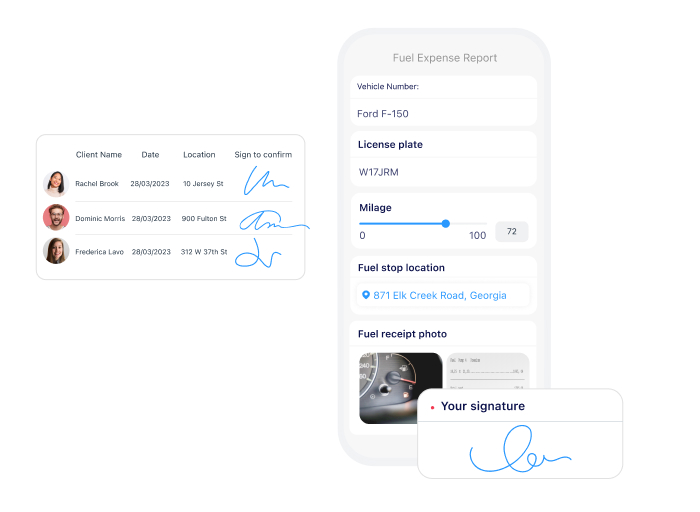
That said, negative feedback tends to focus on quirks within the scheduling functionality. I’ve read multiple reviewers mention that shift updates can behave unpredictably, such as auto-adjusting shifts or lagging when changes are made. While not a deal-breaker, these inconsistencies seem to cause momentary confusion, especially during peak scheduling times.
A consistent theme in G2 reviews that I’ve noticed is frustration with notification overload. By default, Connecteam sends out frequent alerts, which can become overwhelming if not adjusted. I’ve come across several users who felt the need to manually tweak notification settings just to prevent spamming their teams—something they felt should be easier or more intuitive to control from the start.
Finally, there’s noticeable dissatisfaction around Time Off policy customization. Many users on G2 point out the lack of granularity when setting individual policies. I’ve seen some users express frustration with creating multiple workaround policies just to account for different employee needs. This not only adds clutter but also introduces complexity to what could be a streamlined process.
What I like about Connecteam:
- I’ve seen G2 reviewers highlight how easy it is for teams to create and manage shift schedules, even with complex patterns.
- I’ve read feedback from users who love the flexibility to customize workflows, permissions, and communication tools without needing tech help.
What G2 users like about Connecteam:
“Connecteam has been instrumental in keeping my team organized and accountable. It offers several excellent features that can benefit any small business. As an office manager, I’ve found its HR capabilities especially valuable—helping me efficiently track PTO, sick days, time clock entries, and more.”
– Connecteam Review, Kristen R.
What I dislike about Connecteam:
- I’ve come across complaints about unpredictable behavior in the scheduling tool, like shifts auto-adjusting or lagging.
- I’ve noticed several users express frustration with the lack of detailed control when customizing Time Off policies.
What G2 users dislike about Connecteam:
“I would like the ability to customize notifications in Connecteam, especially for important items like help desk chats—adjusting the sound type and duration would help a lot. Since many of us juggle multiple tasks and screens, it’s easy to miss alerts even with our phones nearby. I don’t want to turn my phone volume up for everything, but I’d appreciate the option to increase it just for Connecteam notifications. Additionally, adding clearer lines or grid separators between employees on the job schedule would make it easier on the eyes and help visually organize the layout.”
– Connecteam Review, Sheila M.
3. Field Nation
Based on my review of G2 user feedback, Field Nation is widely recognized as a dependable platform for managing field service operations.
A consistent theme I’ve noticed in user reviews is how essential it becomes for daily operations, especially when it comes to sourcing and coordinating service providers. One feature that I see getting frequent praise is the responsiveness of Field Nation’s support team. Across multiple reviews, users highlight that support is not only quick to respond but genuinely helpful when it comes to job postings, communication challenges, or platform navigation.
Another standout capability, according to users, is the advanced filtering and sorting options within the service provider portal. G2 reviewers often mention that it’s easy to search for technicians based on criteria like skillset, location, rating, and availability. This functionality helps streamline the provider selection process and ensures more accurate job matches across different service types and regions.
Something G2 reviewers seem to really appreciate is the real-time photo upload feature for service providers. Whether it’s progress updates or proof of completion, users mention that these images are key for maintaining transparency and ensuring quality, especially when managing remote teams or escalating support issues.
A commonly appreciated element is Field Nation’s historical job tracking and documentation. From what I’ve seen, users rely on the platform’s organized job history, notes, and images to address repeat issues or handle warranty claims. This access to detailed past records is a consistent benefit highlighted in reviews.

That said, I’ve come across noticeable dissatisfaction around the variability of technician performance due to their independent contractor status. G2 users frequently note that while many providers are reliable, enforcing quality standards can be challenging, especially under time-sensitive conditions or when onboarding new technicians.
Many users on G2 also point out the inability to assign internal ratings to subcontracted technicians. Negative feedback tends to focus on the fact that, while a provider may complete work under a third-party arrangement, there’s no way to retain performance history within the platform. This creates gaps in long-term oversight and makes it harder to track or avoid underperforming providers in the future.
What I like about Field Nation:
- I’ve seen G2 users consistently highlight how easy it is to find and filter service providers by skills, ratings, and availability.
- I’ve read positive feedback about the real-time photo upload feature, which helps teams stay updated and maintain service quality remotely.
What G2 users like about Field Nation:
“I like that you can search for specific requirements from a wide range of technicians nationwide. I also find it useful to view individual tech profiles, see how many jobs they’ve completed, and determine which types of jobs they’re best suited for based on our company’s needs.”
– Field Nation Review, Verified User in Retail
What I dislike about Field Nation:
- I’ve noticed recurring frustration with inconsistent technician quality, primarily since most providers work as independent contractors.
- I’ve come across reviews mentioning the lack of internal rating tools, which makes it harder to track subcontractor performance over the long term.
What G2 users dislike about Field Nation:
“The only downside is that, occasionally, a technician may not meet quality standards, and the only way to identify this is after sending them. However, this is rare, and the ratings system helps avoid such mistakes.”
– Field Nation Review, Giuseppe A.
4. Jobber
Based on my review of G2 user feedback, Jobber’s intuitive design is often praised for its ease of use. Multiple reviewers mention how the platform requires minimal training and support, allowing businesses to get up and running quickly without unnecessary headaches.
One feature that stands out in user feedback is client and property management. From what I’ve seen, users frequently highlight how simple it is to add new customers and properties, both in the office and on the go. The ability to quickly access client details has helped businesses stay responsive and efficient, a sentiment echoed across G2 reviews.
I’ve also noticed strong positive feedback around Jobber’s scheduling functionality, especially the fast, visual interface. Many G2 reviewers appreciate how the platform reduces mistakes and no-shows, which is a significant plus for businesses with high scheduling demands. Additionally, users consistently mention how well Jobber integrates with QuickBooks, making financial tracking seamless and improving bookkeeping as businesses scale.
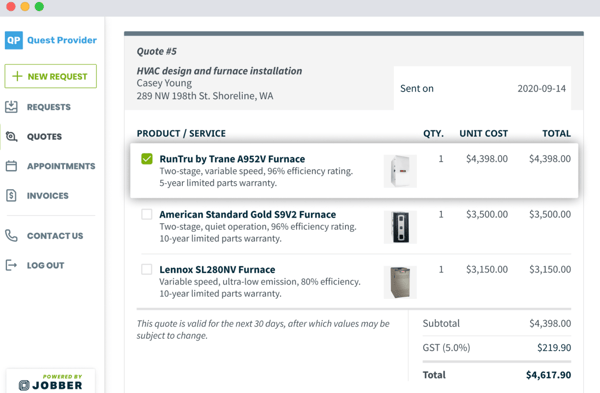
Another aspect that gets a lot of praise is payment processing and quote management. Jobber has streamlined these processes, allowing users to handle payments and generate quotes directly through the platform. This feature seems to be highly valued, with reviewers noting that it eliminates the need for multiple systems, creating a centralized hub for client communication and financial transactions.
However, I’ve come across noticeable dissatisfaction around Jobber’s lack of optimization for HVAC businesses with maintenance agreements. From what I’ve seen, users in this space often mention having to create workarounds to handle service contracts, which adds unnecessary complexity. This feedback seems to be a common pain point for businesses looking for a more straightforward approach to managing service agreements.
Another feature that some G2 reviewers have pointed out as lacking is the inability to add tips during payment processing. Many users, especially those in industries where clients might want to reward outstanding service, have expressed frustration over this absence. It’s a small but significant feature that could make a big difference in improving the overall customer experience.
Lastly, a consistent theme in G2 reviews is the need for employee tagging functionality. Multiple users have mentioned how the lack of this feature limits how well they can use Jobber’s online booking tool and AI receptionist. With employee tagging, businesses could automate and personalize the booking process further, which seems like a highly requested enhancement.
What I like about Jobber:
- I’ve seen G2 reviewers praise the intuitive design, which requires minimal training and allows businesses to get up and running quickly.
- I’ve read positive feedback about Jobber’s scheduling functionality and how it helps reduce mistakes and no-shows, especially for businesses with high scheduling demands.
What G2 users like about Jobber:
“The simple, straightforward nature of every feature and function is a big plus. The startup phase was easy, and connecting it with our accountant for QuickBooks integration was simple. Their customer support was proactive, reaching out early on—almost to the point of being persistent, which was exactly what we needed while we were busy working in the field. We’re two years in, use Jobber every day, and it’s been a great benefit to our company.”
– Jobber Review, Keith B.
What I dislike about Jobber:
- I’ve noticed dissatisfaction from G2 users in HVAC businesses who struggle with creating workarounds for maintenance agreements due to a lack of optimization for service contracts.
- I’ve come across multiple reviews mentioning frustration with the inability to add tips during payment processing, particularly for industries where tipping is important for service quality recognition.
What G2 users dislike about Jobber:
“My least favorite thing about Jobber is that it doesn’t have a basic call log entry page. I’d like it to capture the date, client’s first and last name, phone number, email, address, and a section for notes on the reason for the call and where the client got our number. It would be great if this could be in an easy-to-use form that feeds into a list, like Excel, for quick access and review. Right now, I have this set up in Excel, but it would be amazing if it could integrate directly into Jobber and automatically create a new client with all the details.”
– Jobber Review, Kristi S.
5. Housecall Pro
Housecall Pro is often highlighted for its user-friendly interface and quick implementation, which is especially beneficial for small business owners.
Many G2 reviewers appreciate how intuitive the design is, making it easy for anyone to get up and running without needing extensive training. This ease of use is invaluable, as it reduces the time spent onboarding new users.
A commonly appreciated element in reviews is the price book setup and the ease of processing credit and debit card payments. From what I’ve seen, many users, especially small business owners, really like how simple it is to track job and customer information through tags. There’s also a lot of praise for the ability to track lead sources, making it easier to assess marketing effectiveness and optimize strategies.

However, I’ve noticed that reporting capabilities are a common point of frustration. While G2 users acknowledge that reports have improved, multiple reviewers have mentioned the inability to track commissions on specific services as a notable drawback. This lack of granularity seems to be a recurring issue for those in industries where commission tracking is critical.
Another recurring theme in user feedback is the inability to apply discounts to individual line items or easily add tips for checks in a way that integrates seamlessly with QuickBooks. I’ve encountered several reviewers who find this limitation inconvenient, as it adds extra steps to manual processes.
I’ve also read multiple reviewers mention bugs with photo uploading on the mobile app. While the app works well most of the time, there’s noticeable dissatisfaction with inconsistent performance in uploading photos, which seems to be a major point of frustration for many users.
What I like about Housecall Pro:
- I’ve seen G2 users praise the user-friendly interface and quick setup, especially beneficial for small business owners.
- I’ve read a lot of positive feedback about the price book setup and how easy it is to track job and customer information with tags.
What G2 users like about Housecall Pro:
“It’s very user-friendly and offers many features I didn’t even know I needed. When we implemented HCP into our business, the transition was smooth, and it organized all of our customers with their attached jobs and invoices. The HCP team is quick to respond whenever I have a question. We use it daily to schedule estimates, which makes booking jobs a breeze! I run the office, and the techs can easily attach pictures and notes directly to the job. Features like receiving reviews, automatic reminders for overdue invoices, and revenue reports make HCP incredibly versatile. I definitely recommend HCP to business owners!”
– Housecall Pro Review, Nick R.
What I dislike about Housecall Pro:
- I’ve come across multiple reviews mentioning frustration with limited reporting capabilities, particularly around commission tracking.
- I’ve noticed dissatisfaction with photo uploading bugs in the mobile app, which many users find inconsistent.
What G2 users dislike about Housecall Pro:
“The app can be a bit ‘glitchy’ and sometimes doesn’t perform all the functions it should. There are small nuances I’d like to see improved, such as making the ‘copy to job’ function for approved estimates a one-click option in the pipeline. However, most of my dislikes are just personal preferences. I’ve also noticed that some integrations or add-ons are being offered, which seem like extras, and these are being pushed pretty heavily through pop-ups and emails. Despite this, for what we need and do, we’re very happy with HCP.”
– Housecall Pro Review, Jeff L.
6. FieldPulse
Based on the feedback I’ve gathered from G2 users, FieldPulse stands out for its ability to simplify job management by consolidating key operational functions into one platform.
A consistent theme in G2 reviews that I’ve noticed is how businesses previously juggling multiple tools—often five or six—found immediate relief in switching to FieldPulse, using it alongside QuickBooks to cover both operational and financial needs. This reduction in tool sprawl is frequently cited as a major time-saver.
One aspect G2 reviewers often praise is FieldPulse’s onboarding support. I’ve read several accounts highlighting the quality of the implementation process, with users commending their onboarding specialists for providing tailored guidance and helping them focus on features with the highest return on investment. This level of personalized support seems to make the transition smoother and less overwhelming for new users.