



You hear it everywhere, right? Everyone’s pitting AI tools against each other. It’s a new showdown every week. (We’re guilty of it too! Check out our other articles and give them some love, okay?)
This week, I’m diving into a particularly interesting matchup: Copilot vs. ChatGPT.
What makes it so interesting? We’re looking at a quintessential AI chatbot going head-to-head with an “everyday AI companion” that isn’t quite a chatbot in the traditional sense.
Personally, I like to keep both tools open on a second screen most days, flipping between them depending on the task. Copilot, true to its Microsoft DNA, blends into apps like Word and Edge, offering rewrites, recaps, and helpful nudges right when I need them. ChatGPT is where I go to think out loud, whether I’m brainstorming ideas, drafting long-form content, or chasing oddly specific questions.
Despite these distinct ‘go-to‘ uses, the real eye-opener was discovering their frequent interchangeability. I often found myself using them for the very same things, and that overlap demanded a direct comparison.
So, I gave both tools the same set of challenges. Seven real tasks I actually run into during the week: writing, summarizing dense docs, working with CSVs, and even digging into real-time research. No gimmicks. Just a head-to-head look at how they perform when you’re deep in the work.
TL;DR: Copilot was fast, focused, and excelled at structured tasks like summaries, file analysis, and quick visual output. ChatGPT offered more flexibility, a stronger tone, and better performance in creative writing, coding, and content creation. With recent updates like new modes and workflows in ChatGPT (powered by GPT‑5) and GPT‑5 integration in Copilot, both tools are more capable than ever, but in my tests, ChatGPT had the edge for broader, more nuanced work.
Copilot vs. ChatGPT: At a glance
Before we get into the tests, here’s a quick feature comparison of both AI assistants.
| Feature | ChatGPT | Microsoft Copilot |
| G2 rating | 4.7/5 | 4.4/5 |
| AI model | Free: GPT-5 Paid: Adds GPT 5 Thinking, GPT-5 Pro, Sora for video generation |
A combination of models, including GPT-4 via Azure OpenAI. Additionally, access to GPT 5 for quick and deep thinking |
| Interface | Web, mobile apps, desktop apps, browser extension, API for developers | Web, Bing, Edge sidebar, Windows 11 taskbar, mobile apps, integrated into Microsoft 365 apps |
| Multimodal input | Accepts text, voice, images, videos, and files (DOCX, PDFs, CSVs) for analysis and generation | Accepts text, voice, image prompts, and file inputs |
| Best for | Creative writing, complex coding tasks, general chat | Structured outputs like summarizing text and rewording content, and generating visuals quickly |
| Speed and response | Mostly quick, but image generation is significantly slower | Very fast across the board |
| Creative writing and conversational ability | Handles longer narratives and dialogue naturally, with stronger tone, pacing, and emotional depth | Tends to stay concise and factual, producing shorter, well-structured outputs that stay close to the prompt |
| Image generation | Generates high-quality images with strong composition and tone, but can be noticeably slower | Faster at generating visuals with prompt-specific details and good composition |
| Code generation | Effective for writing, explaining, and iterating on code across use cases | Capable of code generation or editing, but better suited to task-based or utility scripts |
| File and data analysis | Can summarize content and spot patterns, but may lean generic without specific prompts | Extracts key insights clearly and structures feedback well when working with tables or summaries |
| Real-time research | Can surface recent, relevant info when browsing is enabled, but not always consistent | Uses Bing-powered search, but sometimes returns outdated or less contextual sources |
| AI agents | Handles complex tasks from start to finish using a virtual computer | Executes web-based actions like booking or shopping |
| Supported languages | 60 languages | 50 languages |
| Pricing | ChatGPT Plus: $20/month ChatGPT Teams: $25/month ChatGPT Pro: $200/month |
Copilot Pro: $20/month (1 month free) |
Note: Both OpenAI and Microsoft frequently roll out new updates to these AI assistants. The details below reflect the most current capabilities as of August 2025, but may change over time.
Copilot vs. ChatGPT: What’s different and what’s not?
You’ve probably heard people talk about these two in the same breath, and sure, they’re both AI tools that chat with you. But once you work with them, the differences become pretty clear. One blends into your day-to-day workflow. The other feels like an open canvas for almost anything you throw at it.
Let’s walk through what really sets them apart and where they overlap more than you’d expect.
ChatGPT vs. Copilot: Key differences
Before discussing the similarities, let’s consider the ways in which these tools differ: from how they’re built to how you actually use them.
- Positioning and purpose: ChatGPT is more like a general-purpose AI, a standalone assistant for brainstorming, writing, debugging, and analyzing. Copilot, on the other hand, is more like a built-in utility. It’s not just a chatbot; it’s meant to enhance whatever you’re already doing while working in Word, Excel, Edge, or even within your browser.
- Interface and experience: ChatGPT gives you a clean, focused space to explore long, multi-step conversations. You can ask follow-ups, try different tones, upload files, and go down rabbit holes without distractions. Copilot is much more streamlined. It shows up in the sidebar, gives quick responses, and keeps things moving. It’s optimized for “in the moment” use, or clarifying something mid-task.
- Customization and memory: ChatGPT (in the paid plan) lets you build Custom GPTs, tailored assistants with specific instructions, files, and even voice personalities. It also supports memory, so it can remember preferences and previous interactions. Copilot doesn’t offer custom assistants or memory at the moment.
- Web browsing and real-time results: Copilot’s web browsing is always on, pulling in real-time results via Bing to back responses with sources. ChatGPT also supports web browsing, but you’ll need to enable it in the chat to access fresh, up-to-date information.
- AI model access: While both Copilot and ChatGPT utilize advanced language models, there are key differences in their accessibility and transparency. ChatGPT now uses GPT-5 as its core model, replacing earlier versions like GPT-4, GPT-4o, and the o-series. It routes between fast and deep-thinking modes automatically based on your prompt. Copilot, on the other hand, still runs on GPT-4 and other unspecified models through Azure OpenAI. While it doesn’t show which model is in use, it recently added the ability to choose GPT-5 for quick or deep thinking mode to better match your task.
ChatGPT vs. Copilot: Key similarities
For all the differences, I was honestly surprised at how often I could complete the same kinds of tasks with both tools. Here’s where they’re more alike than different.
- Natural language fluency: Both tools respond in clean, easy-to-read language that feels (almost) human, at times. Whether you’re writing a social caption, summarizing a whitepaper, or asking for phrasing help, they handle nuance, tone, and context remarkably well. For most text-first tasks, you could use either without much learning curve.
- AI agents and task automation: Both tools are stepping into agent territory, where the AI doesn’t just respond but actually does things for you. Copilot Actions lets you offload web tasks like booking flights, making reservations, or sending a gift. ChatGPT agents can handle full workflows using a built-in virtual computer. You can ask it to prep for meetings, research competitors, or plan meals, and it will navigate websites, run code, and return outputs like slide decks or spreadsheets.
- Solid for lightweight coding: While neither is meant to replace an integrated development environment (IDE), both ChatGPT and Copilot can generate basic HTML, CSS, or JavaScript, help debug snippets, or explain code logic. For smaller web projects or quick utilities, they’re more than capable, especially if you’re not a developer by trade.
- Multimodal abilities (in free plans, too): Even without a paid plan, both tools can handle text and images. You can drop in a photo and ask for a description or request an image be generated from a prompt. Neither gives full creative control, but both support image tasks well enough for everyday use.
- Easy to access across platforms: Both tools offer web apps and mobile versions, so switching between devices is seamless. Whether you’re on your phone during a commute or working from your desktop, the experience is stable and consistent.
- No expert prompts required: You don’t need to master prompt engineering to get value from either. Casual instructions work well, and both tools do a good job of interpreting vague or shorthand input. They’re built for real users, not just AI power users.
- Voice functionality: Both tools support voice input and interactions (no endless typing, pheww). It’s a handy feature when you’re multitasking or on the go.
How I compared Copilot and ChatGPT: My prompts and evaluation criteria
To keep things fair, I used the free versions of both ChatGPT and Microsoft Copilot — no Pro plans, no special integrations, just what you get out of the box. This wasn’t a technical benchmark test. It was more like: “Can either of you help me get this done faster? And their tasks were:
- Text-based tasks: Writing, summarizing, rewriting, short creative work
- Coding: Simple scripts, code explanations, light debugging
- Image generation and analysis: Prompting visuals and interpreting charts
- File and data analysis: Uploading PDFs/CSVs to extract insights
- Research: Real-time lookups and deeper multi-source questions
I scored each response based on:
- Accuracy: Was it correct, logically sound, and relevant to the prompt?
- Creativity: Did it sound original and stylistically appropriate or just… meh?
- Efficiency: Was it clear, quick, and well-formatted?
- Usability: Could I actually use the output, or did it need a lot of rewriting or cleanup?
To round out my perspective, I also reviewed recent G2 reviews for both ChatGPT and Microsoft Copilot to compare my experience with what other users have reported.
Disclaimer: AI responses may vary based on phrasing, session history, and system updates for the same prompts. These results reflect the models’ capabilities at the time of testing. This review is an individual opinion and doesn’t reflect G2’s position about the mentioned software’s likes and dislikes.
Copilot vs. ChatGPT: How they actually performed in my tests
Alright, enough setup, let’s get into what really matters. For every task, I’ll break it down like this:
- What stood out? The good, the bad, and the “wait, what?” moments. Anything worth calling out goes here.
- Who did it better? Based on how accurate, creative, fast, or usable the output was. I’ll call it like I see it.
- Final verdict: Which one I’d actually use for that task, and why?
You can access my prompt list here. Alright, read on!
1. Summarization
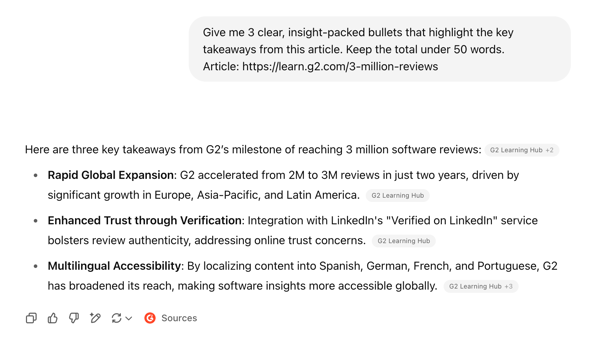
To kick things off, I asked both tools to summarize this G2 announcement about the company reaching 3 million verified software reviews. The prompt was simple: give me the core insights in three bullet points, under 50 words. I wanted to see how well each tool could extract the actual takeaways without regurgitating the article structure.

Copilot’s response to the summarization prompt
Copilot’s output was formatted well. The bolded insights made it easy to scan, and the structure looked polished. But the phrasing felt a bit generic, and while it tried to stay focused, it didn’t really go beyond surface-level takeaways. Also, it didn’t stick to the word limit.
GPT’s response to the summarization prompt
ChatGPT also ignored the word count, but the copy was stronger. The points were better phrased and felt more natural to read. It didn’t pick up on the deeper signals in the article either, but the tone was clearer and easier to repurpose.
Neither tool nailed the full depth of the article, but ChatGPT’s version was easier to work with. Copilot had the better structure, but ChatGPT read better. I liked that both included the source.
Winner: ChatGPT
ChatGPT and Copilot aren’t the only contenders to text generation. Check out how two more contenders, Perplexity vs. Gemini compare to each other and generate content.
2. Content creation
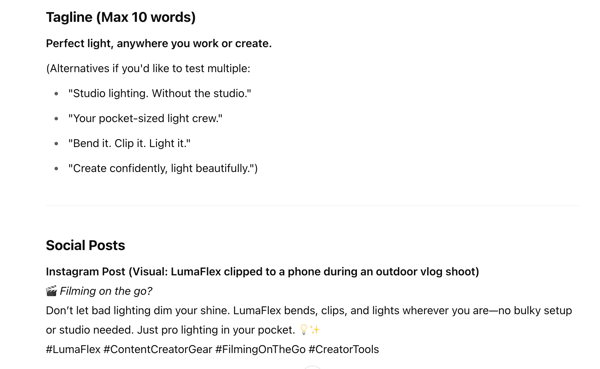
This is the kind of thing I actually use AI for. For this test, I gave both tools a single request. I asked them to create launch content for a fictional product called LumaFlex. It’s a foldable, pocket-sized light designed for creators, vloggers, and remote workers who need solid lighting wherever they are.
I wanted to see how each tool handled the full package. That meant a product description, a tagline, two social posts, an email teaser, and a short-form video script. No hand-holding, no follow-ups. Just one prompt to get the job done.
Spoiler alert: It was very easy to pick the winner here.

Copilot’s response to the content creation prompt
Copilot’s response was clear and structured. The product description was straightforward and hit the right features. I liked how polished the email and social copy felt, and it was nice to see hashtags included. But the tone leaned a bit too formal. The bolding was heavy, to the point where it got hard to tell where one section ended and the next began. It all felt clean, but safe. For something that’s supposed to market a creative product, it missed some of that energy.
GPT’s response to the content creation prompt
ChatGPT’s output was instantly more usable. The product description read like actual launch copy: smooth, confident, and targeted at the right kind of buyer. It gave multiple tagline options (which I didn’t ask for, but loved), and one of them “Your pocket-sized light crew” stuck with me. It even suggested a visual for the Instagram post, which Copilot didn’t do. That kind of detail matters. The tone throughout was more creator-friendly, and the short-form ad script included timestamps, which made it super easy to imagine how the video would actually play out.
Copilot kept things clean and got the structure right, but ChatGPT brought the creativity. It understood the tone, added helpful details without being asked, and made the kind of content I’d actually use. This one wasn’t close; ChatGPT clearly won.
Winner: ChatGPT
3. Creative writing
This one was less about structure and more about storytelling. I wanted to see how each tool handled something open-ended.
The prompt was an interesting one: write a story (150 words max) about someone who discovers a hidden feature on their device that lets them relive one memory, but only once.

Copilot’s response to the creative writing prompt
Copilot’s story was quiet, reflective, and surprisingly moving. It focused on a son reliving a moment with his mother without trying too hard to overdramatize. The pacing felt right, the descriptions were subtle, and it ended cleanly. I also appreciated the small touch of including a title. It added a bit of polish and made it feel like a finished piece.

GPT’s response to the creative writing prompt