


As a marketing professional, I am best friends with data. If we zoom in to the absolute core of my job nature, you will find visual customer data. As I set foot in the B2B industry, it took me a good number of business days to understand how raw business data is converted and transformed via an ETL (Extract, Transform, and Load) tool into a data warehouse or data lake that simplifies data management for teams.
Data engineers, CTOs, and data scientists consider the best ETL tools to handle APIs, data processing, and data warehousing for smooth data management.
Naturally, this raised a few questions for me: Which ETL tools handle complex APIs and data pipelines well? Which ones scale with growing data needs? And how do teams choose the right solution without overcomplicating their stack?
To get a clearer picture of what works in practice, I evaluated 30+ ETL tools based on G2 user reviews and data, including platforms like Databricks, Google Cloud BigQuery, and Celigo, to narrow down the 6 best tools for reliable data transfer and replication for external use.
If you are already contemplating the best ETL tools to handle data securely and offer cost-efficient pricing, this detailed review guide is for you.
6 best ETL tools in 2026: Which stood out?
- Google Cloud BigQuery: Best for real-time analytics across data sources
Supports real-time analytics and federated querying across multiple data sources. (Starting at $6.25 per TiB) - Databricks Data Intelligence Platform: Best for unified data engineering
Built for end-to-end data workflows with strong support for analytics and machine learning. (Starting at $0.15/DBU for data engineering) - Domo: Best for business users with data discovery and automodeling
For non-technical users supporting data discovery, automodeling, and self-serve analytics. (Pricing available on request) - IBM watsonx.data: Best for open data lakehouse architectures
Combines data warehouse and lake capabilities with support for open formats and governance. (Pricing available on request) - SnapLogic Integration Intelligence Platform (IIP): Best for ETL automation
Enables scalable data extraction, transformation, and delivery with AI-powered workflows. (Pricing available on request) - Workato: Best for secure data integration with pre-built connectors
Offers low-code automation with a strong focus on security and enterprise-grade integrations. (Pricing available on request)
These ETL tools are top-rated in their category, according to the G2 Spring 2026 Grid Report. Pricing is listed where publicly available; for all others, contact the sales team directly.
The global ETL software market size is valued at USD 10.24 billion in 2026 and is poised to grow to USD 21.25 billion in 2031, growing at a CAGR of 15.72% during the forecast period.
6 best ETL tools that I recommend for 2026
Even though I operate in the marketing sector, I am a prior developer who probably knows a thing or two about how to crunch data and sum variables in a clean and structured way via relational database management system (RDBMS) and data warehousing.
Although my experience as a data specialist is dated, my marketing role made me revisit data workflows and management techniques. I understood that once raw data files enter a company’s tech stack, say CRM or ERP, they need to be readily available for standard business processes without any outliers or invalid values.
Evidently, the ETL tools that I reviewed based on G2 Data and user reviews, excelled at transferring, managing, and replicating data to optimize performance.
Whether you wish to regroup and reengineer your raw data into a digestible format, integrate large databases with ML workflows, and optimize performance and scalability, this list of ETL tools will help you with that.
How did I find and evaluate the best ETL tools?
I started with G2’s Grid® Report for ETL tools to identify platforms consistently rated high for user satisfaction and market presence. This helped me identify solutions consistently trusted by data engineers, developers, and analysts for their reliability and performance.
Using AI-assisted analysis, I examined G2 review data to surface recurring feedback on performance, scalability, schema management, and usability, and also researched vendor documentation to ensure accuracy in reporting key features, integrations, and pricing details.
The screenshots featured in this article may be a mix of those obtained from the vendor’s G2 page or from publicly available materials.
What makes an ETL tool worth it: my opinion
ETL tools’ prime purpose is to help both technical and non-technical users store, organize, and retrieve data without much coding effort. According to my review, these ETL tools not only offer API connectors to transfer raw CRM or ERP data but also eliminate invalid data, cleanse data pipelines, and offer seamless integration with ML tools for data analysis.
It should also integrate with cloud storage platforms or on-prem platforms to store data in cloud data warehouses or on-prem databases. Capabilities like microservices, serverless handling, and low latency made it to this list, which are features of a well-equipped ETL tool in 2026.
- Schema management and data validation: Schema drift is one of the most common reasons data pipelines break. A good ETL tool needs to do more than just handle schema changes; it should anticipate them. The tools that stood out consistently offered automated schema detection, validation rules, and alerts when something breaks upstream. This helps maintain data integrity and saves countless hours of backtracking and debugging faulty transformations.
- Wide range of prebuilt API connectors: One of the first things that stands out while evaluating ETL tools is how many systems they can natively connect to. Whether it is Snowflake, Redshift, Salesforce, SAP, or flat files, broader connector support makes it easier to centralize data workflows. Tools that also support flexible API integrations or webhook-based triggers feel more future-proof, especially as data stacks evolve.
- Scalability and distributed processing: Scalability plays a huge role in how well a tool holds up over time. Many teams outgrow platforms that can’t keep up with increasing data volumes or velocity. ETL tools that support parallel processing and distributed workloads tend to perform better in the long run. Compatibility with technologies like Spark, Kubernetes, or serverless frameworks also adds to their ability to scale without performance bottlenecks.
- Support for both real-time and batch workflows: Flexibility across workflows is another important factor. Whether the use case involves powering real-time dashboards or running scheduled data jobs, the ability to handle both streaming and batch pipelines within the same platform makes a big difference. This adaptability helps reduce complexity across the data stack and avoids the need for multiple tools.
- End-to-end metadata and data lineage tracking: Tracking how data moves from source to output is critical. Without proper data lineage visibility, debugging and auditing can quickly become time-consuming. ETL tools with built-in visual lineage mapping and metadata tracking make it easier to understand data flow, improve transparency, and support stronger governance practices.
- Enterprise-grade security and role-based access controls: Security is non-negotiable when working with data. Strong ETL platforms offer granular access controls, encryption standards, and compliance certifications like SOC 2 or ISO 27001. These capabilities form the foundation for building trust in data systems while protecting them from vulnerabilities.
- Compliance readiness and legal documentation support: For teams working with sensitive or regulated data, compliance support is essential. ETL tools that align with frameworks like GDPR, HIPAA, CCPA, or FINRA stand out, especially when they also provide access to audit logs, data processing agreements, and clear data retention policies. This adds an extra layer of accountability and reliability.
- AI/ML readiness and native integrations: With the growing importance of AI-driven decision-making, ETL tools that integrate well with machine learning workflows offer a clear advantage. Features like native model integrations, automated feature generation, and support for predictive analytics help turn raw data into actionable insights. Some platforms also include capabilities like anomaly detection or AI-assisted transformations, which further speed up data processing.
Out of 30+ ETL tools evaluated based on G2 data and user feedback, these 6 stood out for their performance, security, API support, and ability to support AI and ML-driven workflows.
The list below contains genuine reviews from the ETL Tools category page. To be included in this category, software must:
- Facilitate extract, transform, and load processes
- Transform data for quality or visualization
- Audit or record integration data
- Archive data for backup, future reference, or analysis
*This data was pulled from G2 in 2026. Some reviews may have been edited for clarity.
1. Google Cloud BigQuery: Best for real-time analytics across data sources
Google Cloud BigQuery is an AI-powered data analytics platform that allows your teams to run DBMS queries (up to 1 tebibyte of queries per month) in multiple formats across the cloud. It has been ranked as a category leader on G2, with a customer satisfaction score of 97 and a market presence score of 99. Further, 91% of users are also likely to recommend it to others.
As I went through G2 reviews on Google Cloud BigQuery, what immediately stood out to me was how fast and scalable it is. Teams are dealing with fairly large datasets, millions of rows, sometimes touching terabytes, and BigQuery consistently processes them in seconds.
I didn’t come across much about infrastructure setup either. It’s fully serverless, which means teams can jump right in without provisioning clusters, managing infrastructure, or worrying about scaling. There’s no overhead to deal with before you start doing actual data work, and that alone removes a significant amount of friction for data and analytics teams.
The SQL interface made it approachable. Since it supports standard SQL, there’s no need to learn anything new. You can write familiar queries while still getting the performance boost that BigQuery offers.
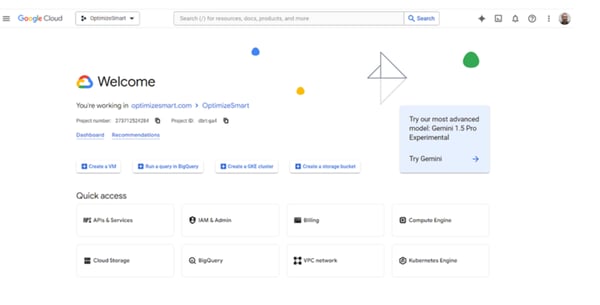
One thing I kept noticing in reviews was how smooth the query experience feels overall. Features like query history, saved queries, and inline validation make it easier to test and refine queries without slowing things down, especially when working with more complex datasets.
What also comes through clearly is how well it integrates with other Google services in the ecosystem. Whether it’s GA4, Google Cloud Storage, or tools like Looker, the connections feel seamless. You can also run models using BigQuery ML directly from the UI using SQL, which makes it easier to bring machine learning into the same workflow. It fits naturally into a modern data stack without much friction.
Something that comes up less in general comparisons but is consistently valued by reviewers is BigQuery’s built-in security and access control. Features like policy tags and column-level permissions make it possible to control exactly who can see what, without needing to create separate tables or duplicate datasets. For teams handling sensitive data across multiple users or departments, this level of governance is a real operational advantage.
One thing that does come up across multiple reviews is around cost visibility. Since pricing depends on how much data each query processes, it can sometimes catch teams off guard if queries aren’t optimized or monitored closely. That said, teams that keep an eye on usage and structure their queries well seem to find it fair for the performance and flexibility it offers.
Another area reviewers point out is around debugging and handling more complex workflows. When queries fail or jobs run into issues, the error messages aren’t always very detailed, which can slow things down a bit. But once teams get more familiar with how things work, they’re usually able to work through it without too much friction.
Overall, BigQuery feels like a strong fit for teams that want fast, scalable analytics without worrying about infrastructure, especially if they’re already working within the Google Cloud ecosystem.
What I like about Google Cloud BigQuery:
- Google Cloud BigQuery makes it easy to work with massive datasets while keeping performance consistently fast, even for day-to-day analytical workloads.
- The query experience itself stands out too. The interface feels clean and responsive, and features like saved queries and inline validation make it easier to iterate quickly, even on complex queries.
What do G2 Users like about Google Cloud BigQuery:
“Best thing about BigQuery is its scalability and managed service provided by GCP(Google Cloud Platform), it can connect seamlessly with almost all services available in the market, whether it is on premises or cloud-based. It is one of the largest data warehouses, which also comes up with Data Lakehouse feasibility. I also like its security features, like policy tags and authorized view.”
– Google Cloud BigQuery Review, Aayush M.
What I dislike about Google Cloud BigQuery:
- Since pricing depends on how much data each query processes, it can sometimes be hard to predict costs, especially when running large or exploratory queries. With better query planning and usage monitoring, though, teams are able to keep this under control.
- Debugging and managing more complex workflows can take some time, particularly when error messages aren’t very detailed or when multiple tools are involved. Once teams get more familiar with the setup, it becomes easier to navigate.
What do G2 users dislike about Google Cloud BigQuery:
“One ongoing challenge is cost visibility and control. Because pricing is based on the amount of data processed per query, costs can rise unexpectedly when queries aren’t optimized. This means users need to pay close attention to query design and monitor usage carefully. The UI can also feel somewhat limited for more advanced workflows.”
– Google Cloud BigQuery Review, Rakshith N.
Once you set your database in a cloud environment, you’ll need constant monitoring. My colleague’s analysis of the 5 best cloud infrastructure tools for 2026 is worth checking.
2. Databricks Data Intelligence Platform: Best for unified data engineering
Databricks Data Intelligence Platform displays powerful ETL capabilities, AI/ML integrations, and querying services to secure your data in the cloud and help your data engineers and developers. As a category leader, Databricks has a satisfaction score of 100 and a market presence score of 83, making it a trustworthy provider. Around 93% of G2 users are likely to recommend Databricks for ETL data-driven workflows.
As I dug into G2 reviews for Databricks, it quickly came across as a platform that fundamentally changes how data engineering teams work. What stood out right away was how it eliminates the need to switch between tools for different parts of the data workflow. By consolidating data engineering, analytics, and machine learning into one lakehouse architecture, it blends the reliability of a data warehouse with the flexibility of a data lake, which is a significant productivity gain for teams managing complex pipelines.
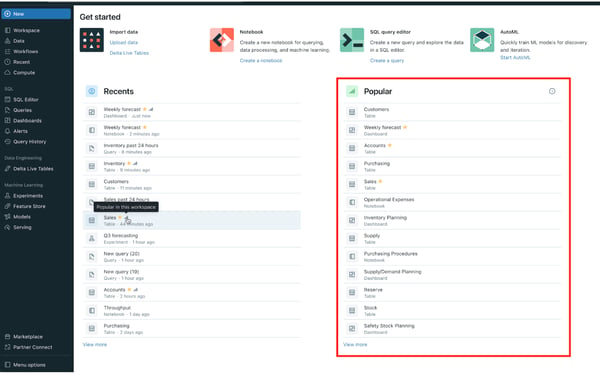
I also loved its support for multiple languages, such as Python, SQL, Scala, and even R, all within the same workspace. For data engineers and scientists who regularly move between languages depending on the task, that interoperability makes a noticeable difference to day-to-day workflow efficiency.
Plus, the Spark integration is native and incredibly well-optimized, making batch and stream processing smooth. There is also a solid machine-learning workspace with built-in support for feature engineering, model training, and experiment tracking.
MLflow also comes up frequently in reviews, and having it integrated means teams spend less time on configuration and more time on training models. G2 reviewers working on machine learning pipelines specifically call this out as one of the reasons they stay on Databricks rather than moving to separate ML tooling.
I also found repeated mentions of the Delta Lake integration being a major advantage. It brings ACID transactions and schema enforcement to big data, which means teams don’t have to worry about corrupt datasets when working with real-time ingestion or complex transformation pipelines. It’s also super handy when rolling back bad writes or managing schema evolution without downtime.
The collaborative notebooks are also a recurring theme in recent reviews. Multiple team members can work within the same environment simultaneously, share experiments, and track progress without the friction that usually comes with coordinating across separate tools. For larger data teams especially, this has a real impact on how quickly projects move forward.
Some reviewers point out that cost management can be challenging, particularly around cluster sizing and DBU billing. If clusters aren’t monitored carefully or are left running longer than needed, costs can increase faster than expected. That said, reviewers also note that once teams establish good cluster management practices and set up cost alerts, the platform’s performance and breadth of capabilities justify the investment for most enterprise use cases.
A few also note that new users may take some time to get comfortable with advanced ETL configurations, but once they do, they find the environment intuitive and highly customizable for complex data workloads.
Overall, G2 sentiment positions Databricks as a robust, enterprise-ready platform that delivers exceptional scalability and flexibility for organizations looking to unify data engineering, analytics, and AI in one workspace.
What I like about Databricks Data Intelligence Platform:
- I love that Databricks has evolved into a platform that genuinely replaces multiple tools rather than just connecting them. The lakehouse architecture handling both structured and unstructured data in one place, is something I find practically valuable, not just architecturally elegant.
- The MLflow integration stands out to me. Having model tracking and experiment management built in rather than bolted on removes a real coordination overhead for ML teams
What do G2 Users like about Databricks Data Intelligence Platform:
“I like that Databricks brings everything into one place, making it unnecessary to use different tools for data processing, analytics, and pipeline work. It handles large data well, and we don’t have to worry about managing clusters manually. Additionally, Databricks handles collaboration and experimentation well, making it easy to try out new things.”
– Databricks Review, Banu Prakash M.
What I dislike about Databricks Data Intelligence Platform:
- Cost management around cluster sizing and DBU billing can be harder to track than expected. Costs can increase quickly if clusters aren’t monitored carefully, though teams that set up proper governance and cost alerts tend to get this under control effectively.
- There’s also a bit of a learning curve for new users, especially around advanced ETL configurations and performance optimization. Once that initial ramp-up is out of the way, the platform becomes highly adaptable for complex data engineering and analytics use cases.
What do G2 users dislike about Databricks Data Intelligence Platform:
“One thing I dislike about Databricks is that it can be expensive, especially for large workloads. Sometimes the interface and setup can feel complex for beginners. Also, managing clusters and configurations can take some effort if you’re not very familiar with it.”
– Databricks Review, Fabin P.
3. Domo: Best for business users with data discovery and automodeling
Domo is an easy-to-use and intuitive ETL tool designed to create friendly data visualizations, handle large-scale data pipelines, and transfer data with low latency and high compatibility. Based on 985 reviews, Domo has received a G2 satisfaction score of 93. Around 87% of users are likely to recommend Domo to others for data automation.
At its core, Domo is an incredibly robust and scalable data experience platform that brings together ETL, data visualization, and BI tools under one roof. Even if you are not super technical, you can still build powerful dashboards, automate reports, and connect data sources without feeling overwhelmed.
The Magic ETL feature is a go-to for many users. It’s a drag-and-drop interface that makes transforming data intuitive, and you don’t have to rely on SQL unless you want to go deeper into customizations. G2 reviewers specifically highlight how easy it is to train non-technical team members on it, with sales teams, operations staff, and HR professionals all building their own data flows without needing analyst support.
And while we’re on SQL, it is built on MySQL 5.0, which means advanced users can dive into “Beast Mode,” Domo’s custom calculated fields engine. It gives you flexibility when working with more complex logic and custom metrics.
Domo’s integration capabilities are another consistent strength. With over 1000 connectors including Salesforce, Google Analytics, and Snowflake, syncing data from multiple sources feels straightforward. Reviewers highlight how having all their data sources connected in one place eliminates the manual consolidation work that used to take hours, and the connectors cover enough ground that most teams rarely need to build custom pipelines.
Real-time data updates are also something reviewers value significantly. Dashboards refresh automatically as underlying data changes, which makes Domo particularly useful for teams monitoring live KPIs or operational metrics throughout the day rather than relying on overnight batch reports.
Cross-functional collaboration is another theme that comes through strongly in recent reviews. Having data, dashboards, and reporting consolidated in one platform makes it easier for different teams to work from the same source of truth. Reviewers describe being able to give decision-makers self-service access to validated data without creating governance risks, which is something that typically requires a lot more infrastructure to achieve on other platforms.
That said, some reviewers mention that while Domo covers most use cases well, certain advanced features or customization options can feel limited, especially when compared to more specialized BI tools. However, for most business users, it still provides enough flexibility to build and share insights without getting too technical.
Another thing that comes up is how frequently the platform evolves. With regular updates and new features being introduced, it can sometimes be hard for teams to keep up or fully utilize everything available. That said, many users also see this as a sign of how quickly the platform is improving and adapting to new use cases.
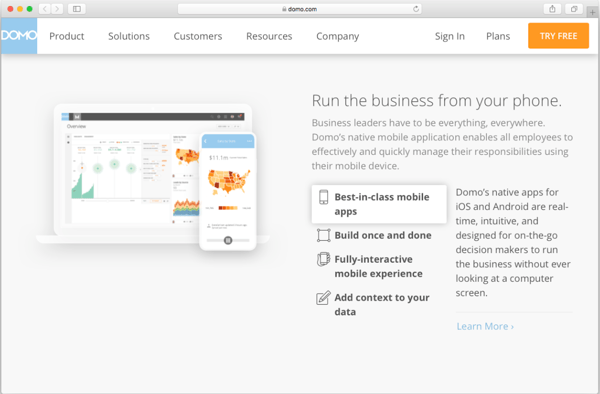
Based on G2 reviews, Domo is a great fit for organizations that want to make data visualization and reporting more accessible across teams. Its intuitive dashboarding and wide connector network make it well-suited for business users and analysts who want quick, self-service insights.
What I like about Domo:
- I find the combination of Magic ETL and Beast Mode genuinely well thought out. It covers the full range from non-technical drag-and-drop transformation to custom SQL logic, all within the same environment.
- The cross-functional self-service angle stands out to me. Giving decision-makers validated data access without creating governance overhead is harder to achieve than it sounds, and Domo handles it well.
What do G2 Users like about Domo:
“What I like best about Domo is its ability to bring data from multiple sources into a single, easy-to-use dashboard. The real-time data updates and interactive visualizations make it very convenient to monitor performance and make quick decisions. It also offers strong reporting features and a user-friendly interface, which helps both technical and non-technical users work efficiently. Additionally, the cloud-based access allows me to view insights anytime, anywhere, improving overall productivity.”
– Domo Review, Anuj T.
What I dislike about Domo:
- Some advanced features and customization options can feel limited, especially for teams that need deeper control over analytics or reporting. That said, for most standard use cases, it still offers enough flexibility without adding complexity.
- Keeping up with frequent updates and new features can take some effort, especially for teams that want to make the most of everything Domo offers. However, this also reflects how actively the platform is evolving and improving over time.
What do G2 users dislike about Domo:
“The main things that don’t work and should improve are complex data modeling and governance. There’s no strong semantic layer like Looker’s LookML, which makes it harder to enforce metric definitions across large organizations. It should have better version control, testing, and reuse for ETL, along with stronger centralized metric governance. Additionally, the cost and licensing complexity can be an issue; the pricing feels high as usage scales, and the licensing for users and storage can be confusing. It should improve by offering simpler, more transparent pricing and better cost visibility for admins.“
– Domo Review, Venkata M.
4. IBM watsonx.data: Best for open lakehouse data architecture
IBM watsonx.data is a flexible data platform built on an open lakehouse architecture that allows teams to query, manage, and govern large volumes of data across hybrid environments without moving it between systems. Based on G2 Data, IBM watsonx.data holds a strong 4.4 out of 5 rating from 140+ reviews, with 91% of users likely to recommend it. It also scores well across key usability metrics, such as 93% for ease of doing business, which reflects how well it fits into real-world enterprise workflows.
As I went through G2 reviews, what stood out right away was how flexible the platform feels. You’re not locked into a single query engine. Instead, you can choose different engines depending on the workload, which gives teams more control over how they manage performance and cost.
Another thing that comes through clearly is how well it handles hybrid environments. Teams are able to work across cloud and on-prem data without constantly moving or duplicating datasets, which makes a noticeable difference when dealing with large, distributed systems.
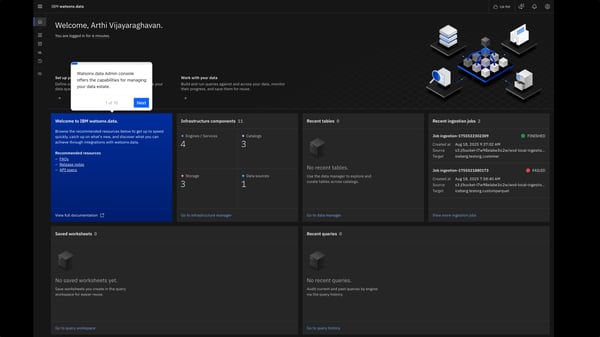
The open architecture is another big advantage. Support for formats like Iceberg and integration with engines like Presto and Spark means you’re not tied into a closed ecosystem, and that flexibility shows up a lot in how teams structure their data workflows.
Governance is also built into the platform in a way that feels very enterprise-ready. Features like access control, metadata management, and centralized data handling make it easier to manage data securely while still keeping it accessible for analytics and AI use cases.
There’s also strong support for analytics and AI workflows. Teams highlight how easy it is to run queries, extract insights, and even build and deploy machine learning models within the same environment, without having to move data across multiple tools.
And despite all that depth, it still manages to simplify data access. Being able to bring structured and unstructured data into one place and query it directly makes everyday data work feel more streamlined and less fragmented.
That said, some reviewers mention that while the platform is powerful, navigating certain features isn’t always as intuitive as expected. Important settings and advanced capabilities can take a few extra steps to access, especially in the beginning. That said, once teams get familiar with the layout, it becomes easier to move around and work efficiently.
There are also mentions that integrations outside the IBM ecosystem can require additional configuration or steps compared to more tightly integrated environments. While this can slow things down initially, teams still find that the platform offers enough flexibility to connect diverse systems with the right setup.
Overall, IBM watsonx.data comes across as a strong choice for organizations that need flexibility, governance, and scalability in a modern data architecture, especially when working across hybrid environments and AI-driven workflows.
What I like about IBM watsonx.data:
- I like that IBM watsonx.data offers flexibility with multiple query engines, allowing teams to optimize workloads without being locked into a single approach.
- It also does a great job of bringing structured and unstructured data together in one place, making it easier to access, manage, and analyze data across hybrid environments.
What do G2 Users like about IBM watsonx.data:
“I used IBM watsonx.data in several client projects over the past few months, mainly for data-heavy tasks where we needed a lakehouse-style setup. What I liked most is that it allowed us to keep data in object storage while still querying it with SQL, without needing to move everything into a traditional warehouse. This cut down on a lot of unnecessary data duplication. The support for open formats like Iceberg was truly helpful. In one project, we had schema changes halfway through. Being able to manage versioning without disrupting existing queries saved us time.”
– IBM watsonx.data Review, Swamy G.
What I dislike about IBM watsonx.data:
- Navigating certain features can feel a bit unintuitive at first, especially when working with more advanced configurations or settings that aren’t immediately easy to find. Once teams get used to the layout, though, it becomes easier to work through.
- Integrating with non-IBM tools can sometimes require extra configuration or additional steps compared to more native integrations. That said, with the right setup, teams are still able to connect and manage diverse data environments effectively.
What do G2 users dislike about IBM watsonx.data:
“IBM watsonx.data is a strong and scalable platform overall. Some advanced features may require initial familiarity to fully utilize, so a bit of onboarding or guidance can be helpful. Additionally, having more simplified out-of-the-box configurations for certain use cases could further enhance ease of use. Overall, these are minor areas, and the platform continues to evolve with improvements that enhance usability and performance.“
– IBM watsonx.data Review, Preeti Y.
5. SnapLogic Intelligent Integration Platform (IIP): Best for ETL automation
SnapLogic Intelligent Integration Platform (IIP) is a powerful AI-led integration and plug-and-play platform that monitors your data ingestion, routes data to cloud servers, and automates business processes to simplify your technology stack and take your enterprise to growth. As a category leader on G2, SnapLogic has a customer satisfaction score of 95. Around 88% of G2 users are likely to recommend it to others for data automation.
After spending some time with G2 user feedback on SnapLogic Intelligent Integration Platform, I have to say that this tool hasn’t received the recognition it deserves. What stood out right away was how easy it is to set up a data pipeline. The platform’s low-code/no-code environment,