



The list below contains genuine user reviews from the applicant tracking software category page. To be included in this category, a solution must:
- Collect, sort, and screen resumes and any associated candidate information
- Manage talent pools within a custom workflow
- Enable communication between HR personnel, hiring manager, or recruiter and candidate
*This data was pulled from G2 in 2025. Some reviews may have been edited for clarity.
1. Greenhouse: Best for structured hiring and interview planning
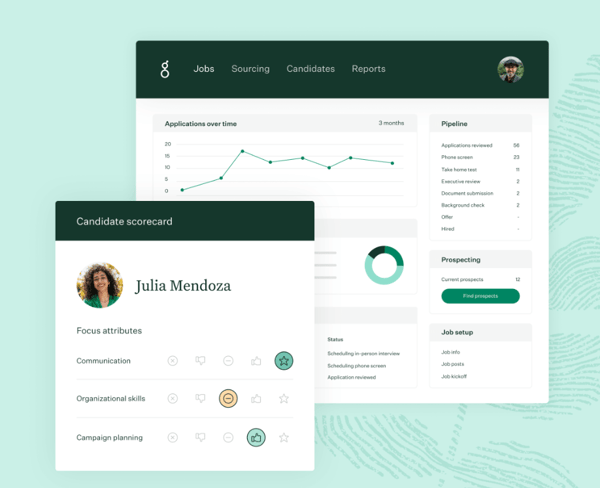
Based on my review of G2 user feedback, Greenhouse simplifies recruitment workflows with tools for candidate tracking, team collaboration, and seamless integrations with various HR software.
One feature that I frequently see getting a lot of praise is ease of use. Users often highlight the clean and logically structured interface, which makes navigation easy for hiring managers and recruiters. Tracking candidates through different hiring stages feels seamless, with critical information readily accessible. Many G2 reviewers appreciate the system’s ability to facilitate collaboration by allowing multiple team members to leave structured feedback without cluttering the process.
Another standout capability, according to users, is robust integrations. Greenhouse integrates with a wide variety of HR tools, ranging from background check providers to scheduling software. G2 reviewers consistently mention that the integration process is straightforward, without requiring excessive configurations or workarounds. This makes Greenhouse an ideal choice for companies that rely on multiple tools for different aspects of the recruitment process.
A commonly appreciated element is reporting and analytics. Greenhouse’s customizable reports provide deep insights into hiring trends, recruiter performance, and candidate pipelines. From my review of G2 user feedback, many users value the clear, data-driven metrics that help improve recruitment strategies over time. Whether it’s for a quick overview or more detailed reports, users note that the system makes it easy to pull the numbers they need.
However, customization tends to receive mixed feedback. Some G2 users feel that while Greenhouse covers all the essential features, it lacks flexibility in areas like workflows and automated actions. I’ve noticed that for teams looking for a fully tailored ATS, this can be a limitation, as they may need to work within the platform’s existing constraints.
Additionally, candidate management is a point of frustration for some users. While the system does a good job of keeping applicants organized, managing more complex hiring pipelines isn’t always smooth. Multiple reviewers mention that the search and filtering functions could be improved, especially when dealing with large applicant pools.
That said, Greenhouse continues to be one of the most widely trusted ATS platforms, especially for larger teams that need structure and scalability. With a G2 rating of 4.4 out of 5, it earns consistent praise for its usability, integrations, and ability to keep hiring workflows on track.
What I like about Greenhouse:
- I’ve noticed that the system’s intuitive interface is frequently praised for making hiring workflows smoother, allowing users to move candidates through different stages without confusion.
- Seamless integrations with other HR tools are often highlighted, saving time on manual data entry and eliminating the need to constantly switch between platforms to keep information up to date.
What G2 users like about Greenhouse:
“What I love most about Greenhouse is its ease of use and the extensive marketplace of third-party applications, which give it superpowers through the many available integrations. It’s rare to find a vendor that isn’t integrated with Greenhouse. Many recruiters have worked with Greenhouse at some point in their careers, which means the ramp-up time for them is usually very short. Their support team is reliable, providing efficient solutions, and their learning center is incredibly comprehensive.”
– Greenhouse Review, Daniel M.
What I dislike about Greenhouse:
- I’ve come across feedback mentioning that customization options for workflows and automations feel a bit restrictive, with users wishing for more flexibility to tailor hiring processes to specific needs.
- Managing candidates across multiple roles or complex hiring needs seems to be a challenge, as searching and filtering through large volumes of applicants isn’t as refined as many users expect.
What G2 users dislike about Greenhouse:
“Searching for candidates in the resume database is Greenhouse’s greatest weakness. While you can do a Boolean search and use filters, the displayed results aren’t particularly helpful. If they added AI with natural language search, it would greatly improve the experience. Additionally, the workflow for reviewing applicants is to look at one resume at a time and either reject or advance them. It would be better to narrow down the list of applicants being reviewed before going through this process.”
– Greenhouse Review, Bill B.
2. BambooHR: Best for seamless hiring-to-onboarding transition
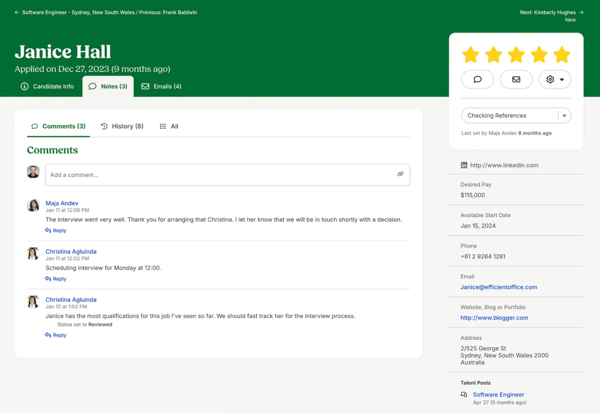
From my review of G2 user feedback, BambooHR offers a comprehensive suite of HR tools designed to streamline hiring and employee management. It features a user-friendly interface, a dedicated mobile app for on-the-go access, and an ATS that simplifies the recruitment process.
One feature that I frequently see getting a lot of praise is mobile accessibility. G2 users appreciate how the mobile app allows employees to check schedules, request time off, and stay updated without needing a desktop. Many reviewers mention that this convenience of accessing HR tools anytime, anywhere, significantly enhances daily operations.
Another commonly appreciated element is BambooHR’s applicant tracking system (ATS). Users highlight its ability to simplify resume screening, track candidate progress, and schedule interviews. According to feedback I gathered, reviewers value how it organizes applicant data efficiently, reducing the need for manual tracking. This is particularly useful for hiring teams seeking a straightforward, well-structured ATS solution.
In terms of ease of use, BambooHR’s user-friendly interface stands out in reviews. Many G2 users appreciate how the platform makes navigation effortless, even for non-tech-savvy individuals. The logical menu design and clean layout are consistently praised for making it easy to manage employee records or generate HR reports.
On the downside, chat support tends to receive some mixed feedback. Several G2 users mention that when facing technical difficulties or urgent queries, relying on email or phone support slows down the resolution process.
Additionally, reporting and dashboard capabilities are often pointed out as a limitation. I’ve seen G2 users note issues with BambooHR’s basic analytics, noting that reports lack depth. Multiple reviews mention that the limited customization options make it difficult to generate highly specific insights, which can hinder data-driven decision-making.
BambooHR remains a favorite for HR teams that value simplicity and seamless onboarding. With a G2 rating of 4.4 out of 5, it’s praised for its user-friendly design and all-in-one HR functionality.
What I like about BambooHR:
- I’ve noticed that the mobile app is often praised for making it easy to access HR functions on the go, allowing users to manage tasks like time-off requests and schedules without needing to log into a desktop.
- The ATS functionality is frequently highlighted for its structured and user-friendly design, enabling efficient tracking of applicants without the need for manual organization of candidate data.
What G2 users like about BambooHR:
“BambooHR is a highly user-friendly and intuitive HR system. The platform is designed for ease of use, making it simple to update and manage both candidate and employee records efficiently. It is an excellent tool for tracking and organizing HR processes. Additionally, BambooHR is easy to implement and offers great virtual event features, enhancing employee engagement and collaboration.”
– BambooHR Review, Aicha B.
What I dislike about BambooHR:
- I’ve seen some users express frustration with the real-time chat support feature, as there are gaps that can make it harder to get quick answers when needed, often forcing reliance on slower email or phone support.
- Reporting capabilities are frequently mentioned as limited, with many users finding the customization options restrictive when generating detailed analytics.
What G2 users dislike about BambooHR:
“My biggest complaint about BambooHR is when I receive email replies from Customer Support, they don’t include my original email to them. I’m a busy person, as most HR pros are, and if too much time goes by before I get a reply, I sometimes forget exactly what I needed help with. I really can’t think of any complaints I have with the BambooHR system itself.”
– BambooHR Review, Sandy K.
Related: Assess the success of your hiring strategy. Discover how to calculate recruitment ROI.
3. JobDiva: Best for AI-driven resume matching and sourcing
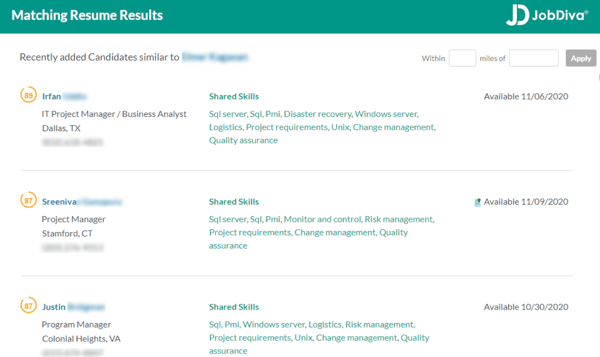
Based on my review of G2 user feedback, JobDiva is recognized for integrating AI-powered features with robust data management capabilities, helping recruiters streamline sourcing, hiring, and tracking applicants while maintaining a centralized database.
One feature that I see getting a lot of praise is AI-powered candidate matching. The platform’s algorithm scans resumes and job descriptions to suggest top candidates, significantly reducing manual search time. From the feedback I gathered from G2 users, many appreciate how this automation allows recruiters to focus on engaging with suitable candidates, saving them hours of sifting through applications.
Another standout capability, according to users, is centralized data management. JobDiva centralizes all recruitment data, including candidate history, job details, and communication logs, making it easier for users to track hiring progress and revisit past interactions. I’ve noticed that G2 reviewers frequently highlight the system’s structured approach to organizing recruitment data, which ensures that important details are easily accessible and not lost in the process.
Some users have also highlighted JobDiva’s customer support as a major strength. Multiple G2 reviews mention that the support team is responsive and helpful, resolving both minor and more complex issues efficiently. This level of support is a commonly appreciated element for recruiters who rely on seamless platform performance.
On the flip side, slow loading times are a recurring theme in the G2 reviews. Some users find certain pages take longer to load than expected, which can become a bottleneck when working under tight deadlines.
Additionally, occasional lag and glitches have been pointed out in several G2 reviews. Users have mentioned that navigating specific features can sometimes result in delays or minor bugs, which require refreshing the page. While this isn’t considered a dealbreaker, I’ve noticed that these issues can hinder efficiency, especially for users managing multiple candidates at once.
Nonetheless, JobDiva shines with its AI-driven candidate matching and centralized data management. Holding a strong G2 rating of 4.7 out of 5, it’s often regarded as one of the most powerful ATS solutions for staffing agencies and high-volume hiring.
What I like about JobDiva:
- The AI-powered candidate matching feature is often praised for saving time by surfacing the most relevant applicants, simplifying workflows and reducing the need for manual resume screening.
- I’ve noticed that JobDiva’s data management system is frequently highlighted for organizing recruitment information, making it easy to track candidate progress and revisit past interactions.
What G2 users like about JobDiva:
“The aspect I appreciate most about JobDiva is its ease of finding suitable candidates from a pool of over a hundred thousand individuals. Additionally, we can update the notes section for each candidate, making information accessible to all users. JobDiva also offers excellent customer support, with responses typically received within minutes. Its straightforward implementation of rules and regulations is another reason why it has so many users.”
– JobDiva Review, Yuven B.
What I dislike about JobDiva:
- I’ve noticed that slow page loading can sometimes be an issue, with delays when navigating between sections, which can be frustrating during busy tasks.
- I’ve experienced occasional lags or glitches on the platform, which can be disruptive, especially when managing multiple candidates at once.
What G2 users dislike about JobDiva:
“When dealing with a large number of data, sometimes it becomes a little bit slow, or the site gets down, especially during the peak time.”
– JobDiva Review, Sumit K.
4. Ceipal ATS: Best for automated sourcing and VMS integration
From my analysis of G2 user feedback, Ceipal ATS is widely appreciated for its ease of use. Many G2 users highlight how intuitive the interface is, making it easy to navigate between different recruitment functions. Whether users are searching for candidates or managing job postings, the platform’s simplicity eliminates the need for extensive training, allowing recruiters to focus on hiring tasks rather than mastering complex software.
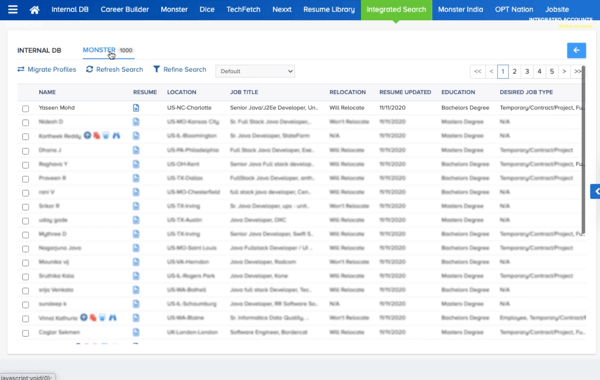
Another feature that G2 users consistently praise is resume parsing. The platform effectively extracts key details from resumes and automatically organizes them into structured profiles. According to feedback, this feature is a significant time-saver, reducing manual data entry and ensuring that candidate information is consistently formatted, which improves the effectiveness of searches.
Candidate database organization also receives positive feedback. The ability to store, search, and retrieve candidate profiles efficiently is a commonly appreciated aspect. Reviewers mention how having all candidate information in one place streamlines their workflow and reduces administrative tasks, allowing recruiters to focus on engagement.
However, I’ve seen some users express issues with performance speed on G2. Some reviewers mention that processes like loading candidate profiles or running searches can take longer than expected. While these delays aren’t a dealbreaker for most, they can become disruptive when working under tight deadlines.
Another point of feedback I’ve come across on G2 is the limited customization options. While Ceipal ATS covers the core recruitment needs, some G2 users note that the ability to tailor workflows, reports, and search parameters is somewhat restricted. This could be an issue for teams that require more flexibility to adapt the platform to specific needs.
Nevertheless, Ceipal ATS consistently impresses with its intuitive interface and advanced resume parsing. Its G2 rating of 4.6 out of 5reflects strong user satisfaction, especially for recruiters managing large applicant pools.
What I like about Ceipal ATS:
- I’ve noticed that the interface is often praised for being straightforward, making it easy to manage hiring tasks without needing to spend much time learning the system.
- Resume parsing is frequently highlighted as a time-saving feature, automatically extracting key candidate details and reducing the need for manual data entry.
What G2 users like about Ceipal ATS:
“Ceipal is the best platform for sending mass emails to all my candidates. It is also very easy to post jobs on job boards. My favorite feature of Ceipal is how simple it is to create a job post.”
– Ceipal ATS Review, Uday K.
What I dislike about Ceipal ATS:
- I’ve come across feedback mentioning that the platform can be slow at times, especially when searching for candidates or loading profiles, with users occasionally having to wait longer than expected for results.
- Many users, including myself, feel that customization options are somewhat limited, particularly when it comes to reports and workflow adjustments, with a desire for more flexibility to tailor the system to specific needs.
What G2 users dislike about Ceipal ATS:
“Sometimes the system runs slowly, causing delays in uploading profiles. Additionally, I am uncertain about how to contact customer support if I encounter any technical issues or errors with Ceipal ATS.”
– Ceipal ATS Review, Dhivyashree J.
5. Lever: Best for collaborative hiring with CRM functionality
From my review of G2 user feedback, Lever is highly regarded for its integrations, which are seen as one of its biggest advantages. Many G2 users highlight how seamlessly the platform connects with key recruitment tools like LinkedIn RSC, enabling them to track outreach and sync notes without manual intervention. Additionally, the Data Explorer add-on is frequently praised for enhancing reporting capabilities, allowing users to generate custom insights with ease.
Another standout feature that I see getting a lot of praise is ease of implementation. G2 users consistently mention how smooth the onboarding process is. The setup is described as straightforward, and many reviewers note the proactive role played by customer support in ensuring they were up and running quickly. The low need for extensive training during setup is also appreciated by several users.
Usability is another area where Lever receives positive feedback. Many reviewers mention how the clean, modern interface makes navigation easy, which simplifies managing job postings, tracking candidates, and reviewing reports. Based on feedback, the low learning curve stands out as a notable benefit, allowing new users to get comfortable with the system quickly.
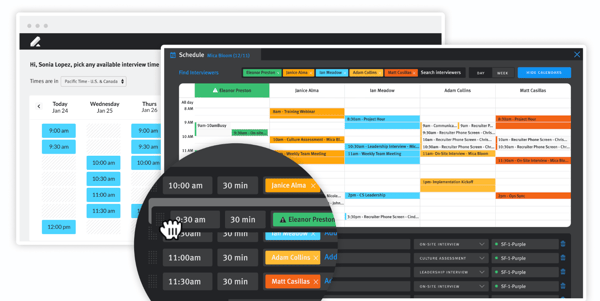
However, I’ve come across concerns around lag issues. Some G2 users point out that certain actions, like loading profiles or switching between views, can feel slow at times. Although these delays aren’t frequent, they can disrupt workflow at times.
Another point of feedback that I’ve noticed on G2 is the use of different terminology. While this doesn’t affect functionality, some G2 users find it slightly confusing compared to the standard ATS terminology they are used to. This adjustment period can make the platform feel less intuitive for some users at first.
Even with occasional lag and a slight learning curve around terminology, Lever stands out for its modern design, integrations, and built-in CRM features. With a G2 rating of 4.3 out of 5, it remains a popular choice for collaborative hiring teams.
What I like about Lever:
- I’ve noticed that Lever’s integrations are frequently praised for making it easy to connect with recruitment tools like LinkedIn RSC and advanced reporting features, eliminating the need to switch between different platforms.
- The implementation process is often highlighted as well-structured and well-supported, allowing new users to get started quickly without much hassle.
What G2 users like about Lever:
“I find that Lever is easy to use for adding candidates from various sources, scheduling interviews, customizing interview templates, and uploading an unlimited number of resumes and documents. We also utilize it to search for candidates in the database.”
– Lever Review, Susan H.
What I dislike about Lever:
- Occasional lag in the system is something I’ve seen some users mention, especially when switching between sections or loading candidate profiles, which can slow down the process.
- Terminology adjustments can be a hurdle, as I’ve personally found that it took some time to get used to certain terms, especially coming from a different domain.
What G2 users dislike about Lever:
“There is not a good way to pause a candidate’s progress, especially when a job goes on hold or will be delayed but you’re still sourcing candidates.”
– Lever Review, Betsy K.
6. Zoho Recruit: Best for customizable workflows and multi-channel sourcing
From my review of G2 user feedback, Zoho Recruit stands out for its customization capabilities. A consistent theme in reviews is the platform’s customization options, which allow users to modify modules and automate workflows. Many G2 reviewers highlight how easy it is to tailor recruitment processes to specific business needs. This flexibility ensures that tasks can be more efficient and suited to each organization’s unique workflow, without relying on cumbersome workarounds.
I frequently see G2 reviewers mention recruitment management as one of Zoho Recruit’s strengths. The platform centralizes candidate tracking, interview scheduling, and collaboration, covering every stage of the hiring process. This reduces the need for external tools, making it easier to manage job postings and applicant progress. Once users become familiar with the layout, many note how the system simplifies these tasks.
A commonly appreciated element is customer support. Users consistently praise Zoho Recruit’s support team for being responsive and helpful. According to feedback from G2 users, having quick assistance available is particularly useful during the initial setup phase, easing the transition and helping users navigate the platform with minimal frustration.