



Managing cash flow is rarely a one-time task. For founders and finance teams, it’s a constant cycle of checking balances, following up on invoices, approving payments, and planning the next few weeks of expenses. When incoming payments slow down or expenses spike unexpectedly, finance teams need to know exactly where their cash stands.
That urgency is reflected in the data. According to an article by SCORE, 82% of small business failures are attributed to poor cash flow management. While spreadsheets may work early on, they quickly break down as transactions, tracking, forecasting, and payments grow more complex.
And it’s here that the best cash flow management software comes into the picture. Be it maintaining liquidity, optimizing working capital, navigating regulatory complexities, or reducing DSO, a viable FinStack ensures streamlined financial operations. Many companies are already recognizing this need, and the numbers are proof: the cash flow management market is forecast to reach $2.35 billion by 2032, with a CAGR of 9.66%.
However, with so many options available in the market, it can be difficult to choose the one that suits your business needs. To assist in your quest to find the best cash flow management software, I have curated this list using all G2 Data.
5 best cash flow management software for 2026
1. Agicap: Best for mid-market teams for cash visibility and short-term forecasting
Centralizes multi-bank cash positions with near-term forecasting, recurring payment tracking, and shared dashboards built for SMB finance teams. (Custom pricing)
2. Qonto: Best for SMBs for simplified daily financial operations
Combines business banking, spend management, invoice handling, and transaction tracking in a clean interface designed for small teams managing everyday finances. (From €9/month)
**As of May 2026, Qonto only operates in Europe.
3. BILL AP/AR: Best for automated accounts payable and receivable workflows
Streamlines invoice routing, approval workflows, vendor payments, and contractor payouts with built-in accounting integrations like QuickBooks Online. ($49/user/month)
4. Kyriba: Best for enterprise treasury and multi-bank cash visibility
Provides consolidated global cash visibility, high-volume payment processing, and ERP integrations for treasury teams managing complex financial environments. (Custom pricing)
5. Quadient AR Automation: Best for AR teams that want collections automation and invoice follow-ups
Automates dunning workflows, centralizes invoice tracking, and organizes customer communication to help AR teams accelerate collections. (Custom pricing)
*These cash flow management software are picked based on G2’s Spring 2026 Grid Report. I’ve added their standout features for easier comparison.
5 best cash flow management software I recommend
To narrow the list, I looked at how each product supports the finance work that happens every week: checking cash positions, updating forecasts, syncing financial data, tracking invoices, routing approvals, and following up on payments. The tools below stood out because users consistently connected them to clearer visibility, less manual work, and more reliable cash planning.
While reviewing G2 Data, I noticed how similar the day-to-day challenges are for many finance teams. As businesses grow, cash flow management becomes more difficult to handle with spreadsheets and disconnected systems. More accounts, higher transaction volumes, and increasing payment activity make it harder to maintain an accurate view of cash in real time. That is where cash flow management software adds value by bringing visibility, structure, and control to everyday financial operations.
The best tools reduce that manual work. They centralize cash visibility, keep forecasts updated, route invoices for approval, track payments, and flag overdue accounts so follow-ups don’t slip. Choose a platform that doesn’t make decisions for you but rather provides your team with reliable numbers, reduces surprises, and helps you move forward with confidence.
How did I find and evaluate the best cash flow management software?
To build this list, I started with G2’s Grid® Report cash flow management software to create a shortlist, using a mix of user satisfaction scores and market presence as my guide.
From there, I checked how each tool supports the core jobs finance teams expect from this category: cash flow reporting, cash forecasting, the ability to handle one-time and recurring items, and data sync with financial systems.
Next, I used AI to review and standardize verified feedback on G2 and to pull recurring themes across each product’s reviews. I paid attention to what users praised most, where teams got stuck, and what kept showing up across roles and company sizes.
Any screenshots referenced in the article come from G2 product listings and public product documentation.
What makes the best cash flow management software: My criteria
After going through the G2 Grid and reading through pages of reviews, a few patterns kept emerging. I did not look at feature lists in isolation. Rather, I mapped how finance teams use these tools day to day, where they struggle, and what they praise most. Here’s what I focused on.
- Clear cash visibility: To start, I looked for tools that gave teams a clean view of their cash position without juggling tools or accounts. Reviewers kept talking about wanting a single place to view balances across accounts, entities, or currencies. The stronger products make it easy to answer simple questions. How much cash do we have today? What is due this week? Where are we exposed?
- Clear forecasting: A usable cash tool requires forecasting that finance teams can maintain week to week. I paid attention to tools that teams use weekly to plan collections, vendor payments, and short-term liquidity.
- Smooth integration with banks and accounting: A cash tool is only as good as its data. If bank feeds break or accounting is out of sync, it can disrupt cash monitoring. I gave weight to products that connect cleanly to banks and accounting/ERP systems, so transaction data syncs reliably and reduces reconciliation work.
- Reporting flexibility: Finance teams still export data to create board decks. And for that, they require the numbers in a prescribed format. I looked for solutions with strong reporting foundations and noted where reviewers repeatedly asked for more flexibility in exports, templates, or filtering.
- Automation functionality: Finance operations break down when everything depends on manual reminders and follow-ups. So I looked at how each product handles workflow. Does it route invoices? Does it track approvals? Does it send structured reminders for collections? Does it batch payments instead of forcing one-by-one execution?
After evaluating these factors, I narrowed my recommendations to the cash flow management tools that consistently stood out for cash visibility, forecasting reliability, workflow automation, and day-to-day usability for finance teams.
The list below contains genuine user reviews from the Cash Flow Management Software category. To be included in this category, a solution must:
- Provide users with detailed cash flow reports, identifying sources of income and areas of expenditure
- Allow editing of one-time and recurring cash flow items, with breakdowns by individual transactions or line items
- Integrate with financial systems to sync financial data automatically
- Offer cash flow forecasting tools that project future cash positions based on historical data
*This data was pulled from G2 in 2026. Some reviews may have been edited for clarity.
1. Agicap: Best for mid-market teams for cash visibility and short-term forecasting
After going through Agicap’s G2 reviews, it stood out as a tool that’s built for teams that have outgrown spreadsheets — bringing all cash data into one place with real-time visibility and forecasting that helps you plan ahead without manual updates. Agicap has a 4.4/5 rating, with 97% of users giving it a 4- or 5-star rating; 95% believe it is headed in the right direction, and 88% say they would recommend it.
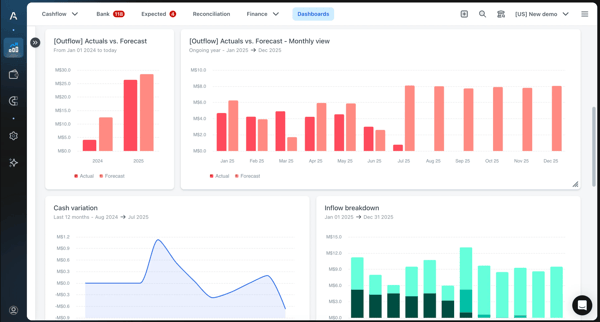
A theme I have seen repeatedly praised is cash visibility. Teams like having a clearer view of cash in one place, without having to keep multiple spreadsheets up to date. It is positioned as a practical place to check where things stand today and what the next few weeks could look like, especially when they’re managing several bank accounts and recurring payments. Feedback like this is the main reason many teams sign up. They want a daily view that updates in under an hour.
Agicap helps teams bring cash flow data, bank activity, and forecasts into one place, rather than managing them across spreadsheets and separate files. Several users report spending less time on manual updates and having a more reliable day-to-day view of liquidity, which is one reason some reviewers say it has become part of their regular workflow.
Ease of use comes up often as well, and the G2 score lines up with that (91%). Users have mentioned that they can get value without needing a long ramp-up, plus the intuitive interface that makes it easier to keep forecasts updated during the week. This matters because cash tools tend to fall apart when only one person can run them.
Forecasting is also a steady topic I came across in G2 reviews. Many reviewers have mentioned that the tool helps them plan around timing. This includes planning cash across the next few weeks or months, when to push collections, when to pay vendors, and what that means for short-term decisions to avoid surprises. Agicap appears to be a tool for day-to-day decision-making that makes it easier to keep a reliable short-window forecast up to date.
Support is one of the strongest parts of all the reviews I have gone through for Agicap, and it also has the highest rating (93%). Reviewers have praised the onboarding help and quick responses when questions come up during setup.
Another pro that comes through in the reviews is how Agicap helps centralize payment-related workflows. You can use it to keep invoices, receipts, card spend, and other finance tasks in one place instead of tracking them across separate tools or email threads. That kind of consolidation seems especially useful for teams managing routine AP or employee expense processes, because it can make follow-up more organized and reduce the amount of scattered manual work needed to keep things moving.
Agicap is a popular choice in countries like France, Germany, and Italy. However, it is gaining a foothold in other countries, such as the US and the UK. Moreover, Agicap is a favorite among Accounting firms, followed by Computer Software, IT, Consulting, and Consumer Services.
Based on G2 reviews, Agicap may require a bit more coordination around connections and integrations, particularly in accounting-heavy environments. Some users mention that bank syncing or ERP/accounting connections can need occasional follow-up during setup or ongoing use. That said, this does not appear to affect every customer in the same way, and many reviewers still describe the platform as effective once workflows are in place.
Reporting and exports are areas where some teams may want more flexibility. A few users mention wanting greater control over output formats or more tailored reporting views so they align more closely with internal templates and processes. For teams with structured reporting routines, this may mean some additional cleanup after export, though many still find the broader cash management experience valuable.
Overall, Agicap stands out as a strong choice for SMB and mid-market finance teams that want clearer day-to-day cash visibility and reliable short-term forecasting. If your team manages multiple bank accounts, recurring payments, and near-term liquidity planning, Agicap feels like a practical tool to keeping everything visible in one place without relying on spreadsheets.
What I like about Agicap:
- Agicap’s robust short-term forecasting capabilities help companies align their day-to-day business needs and plan around cash outflows and inflows to avoid surprises.
- I liked Agicap’s ease of use and customer support. A robust support system by Agicap ensures that users stick to the product for the long term, reduces churn rate, and lowers pre-purchase hesitation.
What G2 users like about Agicap:
“I love the simple use of Agicap and how it communicates effectively with our accounting software. This makes it easier to track and pay suppliers. Agicap retrieves information from supplier and customer invoices, simplifying my daily routine and providing a clearer view of cash flow. I chose it because it allows me to better manage the group’s cash flow as well as better visualize and project cash flow.”
– Agicap review, Nelson B.
What I dislike about Agicap:
- Reviews state that the reporting capabilities can be more flexible. The present reporting structure works well for SMB companies, but teams wanting deeper reporting views may want more reporting verticals within the dashboard.
- Some reviewers also mention that bank integrations may require occasional monitoring, especially in accounting-heavy environments with multiple banks or complex account structures. For teams with simpler setups, the sync tends to run more smoothly.
What G2 users dislike about Agicap:
“Sometimes the automatic rules or categorizations require too many manual adjustments, especially when working with multiple banks or more complex accounting structures. I also miss having more flexibility in certain reports and customization options, as some views feel limited for more advanced analysis. Although customer support is generally good, responses can take longer than expected when dealing with technical questions.”
– Agicap review, Beatriz S.
Related: You don’t have to go anywhere. Discover the best accounting software to keep your balance sheet “balanced”.
2. Qonto: Best for small teams for simplified daily financial operations
While going through G2 reviews of Qonto, I noticed one pattern: users weren’t describing it as a financial extravaganza or a FinTech sorcerer. Instead, they talked about completing their financial tasks faster, such as paying suppliers, tracking outgoings, staying on top of invoices, and maintaining a clean accounting record.
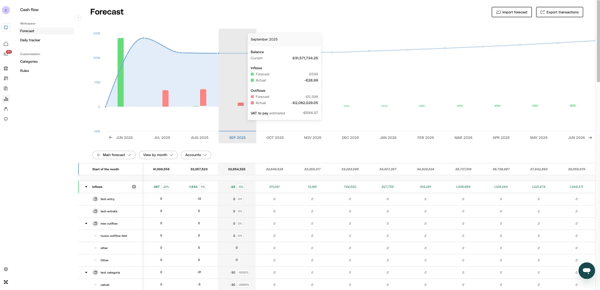
The software’s average G2 rating is 4.7/5, which suggests most people feel comfortable relying on it for everyday money work. That matters in this category because cash flow tools often live or die on routine usage. What struck me was its ease of use. A lot of reviewers talk about how fast they can get started and how clear the product feels once they are inside it.
Moreover, the software has been scored 98% for ease of use and setup, 97% for ease of admin, and 95% for quality of support, which are way above the industry average, indicating how approachable the product is for day-to-day operations.
Transfers come up constantly. Everyday payments are quick and straightforward, especially compared to older bank portals. I have also seen comments about the move from their previous bank being smooth, which matters when a business is switching its main account.
Expense management and spend management are two highly cited themes I encountered in the reviews. You can track spending, stay on top of card activity, and keep transactions tidy so month-end does not turn into a cleanup project. Going by this, I can say that Qonto can be an excellent fit for a growing company, as it streamlines cash tracking, saving time and money.
Invoice work is another area reviewers often bring up, especially for teams that want to keep documents close to the transaction record. It’s a breeze to create and edit invoices, store receipts, and match invoices to transactions, which makes it easier to chase payments and close the loop. For smaller businesses, Qonto reduces the juggling between tools that many companies have to go through.
Cash flow management has been another top tag in the reviews. The user can easily track the daily cash flow without having to pull reports from multiple sources. Moreover, you can also manage the account online or on mobile at a speed that makes it usable during the day, not just during finance admin time.
Accounting-related workflows are another steady thread that I came across while reviewing the reviews. Qonto’s capabilities around exports, transaction histories, and record-keeping are helpful for staying organized and making life easier for whoever handles bookkeeping. This comes across more as “this makes accounting cleaner” rather than “this is a full accounting system,” which is the right expectation given how reviewers have described it.
On the G2 listing itself, Qonto is reviewed across categories like Expense Management, Invoice Management, and Cash Flow Management, which fits how teams have described using it.
Qonto is often seen as a strong fit for day-to-day banking and finance operations, but some G2 reviewers suggest that integration depth may feel more limited as business needs become more complex. This tends to come up more for growing teams that want Qonto to play a broader role in cash flow and finance workflows over time. For many companies, this is less a drawback than a consideration to validate early, especially since Qonto continues to deliver strong value for core financial operations.
Some G2 reviewers mention that certain account-related steps, such as administrative validation or setup requirements, can occasionally take a bit more time than expected. These comments appear to be tied more to onboarding or compliance-related processes than to everyday platform use. Even so, once these initial steps are completed, many users still describe Qonto as a reliable and efficient platform for managing day-to-day financial tasks.
From the G2 Data I saw, Qonto has a strong European footprint, especially across France, Italy, Germany, and Spain. It’s most commonly used by consulting firms, with solid adoption across finance, software, and IT teams.
Qonto works best for small businesses that want a simple way to manage daily financial operations without dealing with overly complex finance tools. If your team mainly needs clear transaction tracking, spend visibility, and invoice management in one place, Qonto feels like a practical option that keeps everyday finance work straightforward.
What I like about Qonto:
- I found Qonto to be an excellent product for teams wanting a clean banking experience with minimal tool-hopping. Users can oversee daily operating accounts, team spending, and invoice/receipt hygiene in one place.
- Echoing its high rating for ease of use, navigating the software feels like a breeze once the account is live. This makes it ideal for teams starting with cash flow management systems, as there’s minimal friction during setup.
What G2 users like about Qonto:
“I love the simplicity, speed, efficiency, and reduced cost of Qonto. I feel a sense of freedom compared to traditional banks. The simplified and immediate transfers are particularly appreciable. The ergonomics of Qonto make the transfer action smooth and fast, and the subscription cost is low.
Even the additional fees when making transfers beyond the threshold make the overall service more competitive. I also feel that Qonto simplifies and prioritizes the business of small companies. Moreover, AI makes the service of a banking advisor obsolete. The initial setup of Qonto was quick and flawless.”
– Qonto review, Alexandre C.
What I dislike about Qonto:
- A few reviews note that Qonto’s interface is structured around small teams that prefer clarity or extensive customizations. So teams with highly specialized or advanced operational needs might seek deeper financial verticals alongside the account.
- Some reviewers note that certain financial operations or account processes can take longer than expected, particularly during account setup or administrative validation. For most users, this tends to happen only in specific situations, but a few note that quicker turnaround times could make the experience smoother when funds or approvals are time-sensitive.
What G2 users dislike about Qonto:
“I find that there is a lack of clarity regarding the account’s yield. It seems the option is only valid for a specific amount due to service costs. There is no simulation to estimate at what account balance the service fees apply. ”
– Qonto review, Bruno S.
3. BILL AP/AR: Best for automated accounts payable and receivable workflows
For many finance teams, BILL AP/AR becomes the system they use to move invoices from “received” to “approved” to “paid” without losing track of who signed off and when. Its average rating stands at 4.4 out of 5, with almost 98% of users giving it a 4- or 5-star rating. Moreover, according to G2 Data, 92% of users believe it is headed in the right direction, and 90% of reviewers are likely to recommend it.
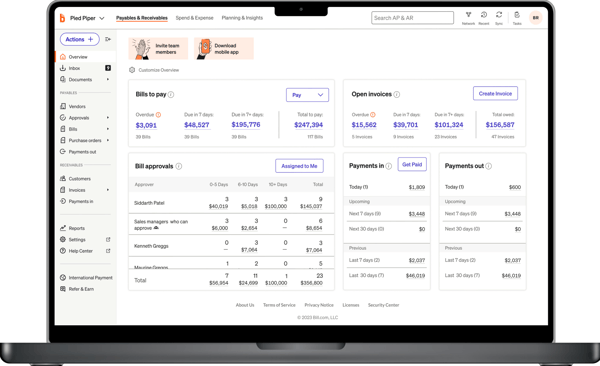
As I read the reviews, the clearest theme I noticed was structure. Reviewers talked about getting bills into one place, routing them to the right approvers, and keeping an audit trail that makes month-end easier. AP Automation and invoice management are the most common, which tells you what most buyers are using it for day to day.
Payments show up as a major part of the value. Users have mentioned being able to pay vendors once approvals are done, then track payment status without chasing emails. Major themes in the reviews have been spread across payment processing, billing, and contractor payments. That mix fits teams that manage both vendors and contractors, and want a single workflow rather than separate tools.
Integrations cover a good percentage of the themes for BILL AP/AR. QuickBooks is the most common example, but there are also mentions of NetSuite, Sage Intacct, and Expensify. What stood out to me is that users like not having to re-enter bills, payment details, and vendor records across systems. That matters because AP tools are much easier to keep running consistently when the accounting sync runs in the background, and finance teams don’t have to do duplicate work to keep records aligned.
Reviewers often describe the platform as intuitive, straightforward, or easy to learn, which is notable given that it touches approvals, payments, invoice entry, and accounting sync. That kind of usability matters because AP/AR systems tend to work best when more than one person can use them confidently, rather than relying on a single experienced admin to keep everything moving.
Not every comment focuses on support, but there are enough mentions of responsive help, straightforward setup, and useful implementation guidance to call it a real theme. For smaller finance teams in particular, that seems to reduce the burden of getting the system up and running and makes it easier to adopt the platform without a long rollout.
Users frequently mention having invoice images, payment records, vendor details, and proof of payment stored in a single location. That seems especially useful for follow-up, internal review, and audit readiness, because teams can see what was paid, when it moved, and what documentation sits behind it without having to reconstruct the story from inboxes or shared folders.
A smaller group of users has noted that QuickBooks sync may require closer review in more detailed accounting environments due to layered workflows. For teams with layered charts of accounts or custom mappings, tightening internal accounting processes can lead to clean data flow between systems and fewer issues with QuickBooks sync. That said, organizations with simpler setups tend to describe the sync as more straightforward, which shows that configuration plays a role in long-term efficiency.
Some reviewers note slower support response times for urgent issues, such as payment clarifications or sync-related questions. For lean finance teams, that can mean relying more on internal troubleshooting than they would prefer. Many higher-rated reviews have also suggested that once processes are established, operations become highly streamlined and reliance on external assistance reduces considerably.
Country-wise data in the reviews show that BILL AP/AR is a popular software in the United States, followed by India, Canada, and the UK. However, it is spread in smaller pockets across Germany, Armenia, Italy, Spain, Mexico, and Colombia.
Industry-wise, Accounting accounts for the largest share (almost 50%), followed by Computer Software, Marketing and Advertising, Non-profit Organization Management, and Wholesale. Apart from these, BILL AP/AR has been scored the highest (92%) in two categories: ease of use and ease of admin, which exceeds the average industry rating for these categories.
All in all, BILL AP/AR fits perfectly with SMBs that require a clear structure for their cash flow management. The software’s automation capabilities can also help slightly larger companies track cash flow without continuous or close reviews. QuickBooks integration is another strong point. The G2 reviews implied that many users with an already streamlined financial process in place were able to integrate BILL AP/AR into their processes with ease.
What I like about BILL AP/AR:
- The first thing I liked about BILL AP/AR was its integrated process for both vendors and contractors. This enables the company to keep track of the cash flow to two different entities at the same place without hopping between tools or emails.
- I liked how structured BILL AP/AR is. Reviewers rave about how structured the whole workflow becomes with it, making it easier to handle the month-end rush without any setbacks.
What G2 users like about BILL AP/AR:
“I love how easy to use it is and how friendly it is with everything. It’s very straightforward if you want to take a look. Especially when making payments, I think the AP part is the one I’m happiest with because it saves a lot of time. Even creating a new vendor to add new invoices to that customer is pretty useful.”
– BILL AP/AR review, Jose G.
What I dislike about BILL AP/AR:
- In some cases, QuickBooks sync can require a closer inspection in accounting-heavy environments. Custom setups and layered processes can sometimes cause sync delays. However, this can be resolved once internal processes are streamlined and the integration is complete. From here, BILL AP/AR takes over and automates the required workflows.
- Some reviewers mention that support can take a bit longer for urgent issues like payment or sync questions, which may mean lean finance teams need to handle more internally until workflows are in place.
What G2 users dislike about BILL AP/AR:
“At times, the system requires manual adjustments, particularly for returned payments or when payments and cancellations fall into two separate fiscal years. Year-end processing can require additional review and corrections. While the platform is generally reliable, it is not entirely error-free and occasionally requires manual intervention to ensure accuracy.”
– BILL AP/AR review, Hasan D.
4. Kyriba: Best for enterprise treasury and multi-bank cash visibility
According to G2 reviews, Kyriba is among the most widely used cash flow management solutions for enterprises. Moreover, just like BILL AP/AR, it’s highly favored in the United States. G2 reviewers have given it a 4.5 out of 5 rating, and it is also present in other categories like treasury management systems and enterprise payments on G2.
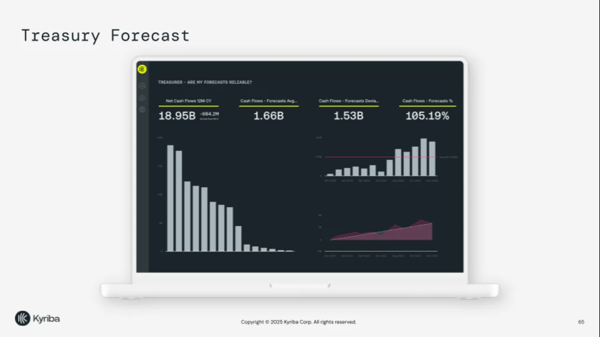
What stood out to me in Kyriba’s reviews is how central it becomes to daily treasury operations. Teams rely on it to get a consolidated view of cash across entities, and that visibility flows directly into how they manage high-volume payments and reporting. You can see cash by bank, entity, currency, and day type (prior day and intraday) without logging into separate bank portals.
For larger organizations with multiple subsidiaries, this becomes central to daily treasury operations. Kyriba also allows you to drill down from a high-level cash position into transaction-level detail without leaving the platform. That depth is a common reason users rely on Kyriba every day.
One reviewer (among many) goes deep on bulk ACH uploads, describing a shift from entering payments one by one in a bank portal to loading a batch, approving a single total, and pushing a single control total through the bank. That kind of workflow is a big time-saver for teams processing high volumes of payments.
A few reviews have praised the automation of journal entries and their posting to ERP systems such as SAP. Treasury accounting and transaction research tools have also been mentioned by users who manage complex financial environments. The ability to filter and investigate transactions within the system helps teams reconcile faster and maintain cleaner records. These features highlighted in G2 reviews show that buyers want a system that reliably supports their accounting functions.
Integration has also come up positively: connecting to internal systems, getting bank data flowing in, and supporting decision-making from that feed. One review has specifically mentioned connecting FX trade flows to payments through an FX hedging platform integration.
Reporting and reconciliation appear to be a meaningful part of the value for many teams. Reviews mention end-of-month balancing, GL reconciliation, variance reporting, and custom report creation as practical strengths. What I liked is that Kyriba is not only used to collect treasury data, but also to make that data usable for internal reporting and close processes. For teams that need both visibility and documentation, that seems to reduce the amount of manual work required to prepare recurring reports.
Support also comes through positively in the reviews, especially around bank reporting and issue resolution. A few users specifically mention helpful support for connectivity issues, variance analysis, and follow-up when processes break. That matters in a treasury environment, where delays in payments, reporting, or bank data can affect broader finance operations. I can say that buyers value not just the platform itself, but also the support behind it when critical workflows need attention.
Kyriba is widely used in industries with heavy accounting requirements. Some industries include Finance, Insurance, Real Estate, Manufacturing, and Transportation. In these industries, the in-depth configurations within Kyriba provide granular-level controls that help maintain consistency across entities and accounts.
Coming to feature ratings, Kyriba’s highest-rated features are “access” (exceeds the average industry rating) and “cashflow tracking” (meets the average industry rating), both at 92%. It has also scored 90% for “file exports”. According to G2 Data, 100% of users have given it a 4- or 5-star rating. 98% of users believe it is headed in the right direction, 92% say they would be likely to recommend Kyriba, and 90% say it meets the requirements.
A smaller group of users has suggested that advanced configurations, such as setting up automated journal entries, understanding how modules connect, and handling special cases like multi-leg intercompany loans, may require internal expertise to manage effectively. For teams with standard treasury flows, this may be less visible. For more layered structures, investing time in setup can pay off later with cleaner posting, better controls, and fewer manual fixes.
Another point that I came across was Kyriba’s steep learning curve. Several reviewers mentioned that understanding how different treasury modules connect can take time, especially when setting up automated journal entries within the cash accounting and financial accounting modules.
Getting the configuration right often requires a significant investment in learning the system’s logic and properly linking processes. However, once everything is set up correctly, many users note that Kyriba becomes highly reliable for managing day-to-day treasury operations.
Based on my review of Kyriba, it is best suited for enterprise treasury teams managing complex financial structures across multiple entities and bank accounts. If your organization needs deep cash visibility, high-volume payment capabilities, and strong ERP integrations, Kyriba offers the control and scale that larger finance teams typically require.
What I like about Kyriba:
- I liked Kyriba’s extensive configuration and integrations, which automatically position it as software for enterprises with custom workflows. Having extensive integrations ensures that decision-making doesn’t get clouded by scattered accounts.
- Another theme I liked in the G2 reviews was the consolidation of workflows across entities. Reviewers have stated that Kyriba simplifies day-to-day tasks, such as monitoring cash flow across accounts.
What users like about Kyriba:
“I really appreciate Kyriba for the excellent customer service support that is available whenever needed. I also like that Kyriba provides 24/7 support on variance analysis and bank reporting connectivity issues. It integrates well with other tools like ICD and Oracle Fusion, giving peace of mind that there are no connectivity or reporting hiccups. This integration helps make our day-to-day operations much smoother.”
– Kyriba review, Charlie C.
What I dislike about Kyriba:
- A handful of G2 reviewers have suggested that Kyriba’s in-depth configurations can feel feature-rich for enterprises with simplified financial workflows. It’s safe to say that Kyriba’s configurations fit more extensively with entities having established and layered processes.
- Some users have also pointed out that understanding how different treasury modules connect can take time. Once configured, however, many reviewers say the system becomes highly reliable for daily treasury operations.
What users dislike about Kyriba:
“The learning curve for configuring automated journal entries within the Cash Accounting and Financial Accounting modules can be fairly steep. It requires a significant investment of time to fully understand the configuration logic and properly link processes to ensure journal entries are generated accurately.”
–