


I’m not a developer. I don’t work inside an integrated development environment (IDE) or ship production code. I work on campaigns, content performance, and growth strategy.
So when AI platforms started claiming that anyone could build software with simple prompts, I wanted to test that claim properly.
Not with a toy project. With something I would actually use.
To evaluate the best vibe coding tools, I built a web-based content analyzer that calculates SEO performance, assesses SERP competitiveness, and suggests LLM-optimization improvements using real search queries.
I tested five browser-based platforms from the latest Winter 2026 G2 Grid Report for AI code generation software: ChatGPT, Gemini, Replit, Lovable, and GitHub Copilot. These tools consistently rank at the top of the category and frequently surface in community discussions around vibe coding. I limited the comparison to tools that a non-developer can open and use in a browser without setting up a traditional development environment.
Each tool had to build the analyzer from scratch, refine it without breaking logic, and expand it into something more product-ready. I evaluated task completion, output quality, ease of use, customization, and efficiency, and then validated those findings against G2 user data.
What is the best vibe coding tool I tested?
Lovable delivered the strongest overall result, while ChatGPT was the fastest and easiest to prototype with. Replit offered the most control, Gemini took the most structured approach, and GitHub Copilot was best suited to a more code-first workflow. If I had to choose, I’d validate ideas quickly in ChatGPT and build them out fully in Lovable.
At a glance: Vibe coding tools comparison
Here’s a side-by-side comparison of the five best vibe coding tools I tested. Each platform completed the same three build tasks using identical prompts. I evaluated them across five core criteria: task completion, output quality, ease of use, customization, and efficiency.
| Criteria | ChatGPT | Gemini | Replit | Lovable | GitHub Copilot |
| G2 score | ⭐️4.7/5 | ⭐️4.4/5 | ⭐️4.5/5 | ⭐️4.6/5 | ⭐️4.5/5 |
| Task completion | Good | Excellent | Good | Outstanding | Good |
| Output quality | Good | Good | Good | Excellent | Good |
| Ease of use | Outstanding | Fair | Good | Excellent | Fair |
| Customization | Good | Good | Excellent | Excellent | Good |
| Efficiency | Good | Fair | Fair | Excellent | Fair |
| Strengths | Rapid prototyping | Structured analysis | Custom app builds | Stable product-style builds | Clean code generation |
| Challenges | Feature retention during expansion | Manual code execution workflow | Preview sync during iteration | Daily usage credit limits | Requires reruns to validate output |
| Free plan available | Yes | Yes | Yes | Yes | Yes |
| Pricing | Go: $8/mo Plus: $20/mo Pro: $200/mo Business: $25/user/ mo Enterprise: available upon request |
Google AI Plus: $7.99/mo Google AI Pro: $19.99/mo Google AI Ultra: $249.99/ mo |
Replit Core: $17/mo Replit Pro: $95/mo Enterprise: available upon request |
Pro: $25/mo Business: $50/mo Enterprise: custom |
Pro: $10/mo Pro+: $39/mo Business: $19/user/ mo Enterprise: $39/user/ mo |
Ratings reflect hands-on testing across three build iterations and focus on workflow stability, iteration reliability, and ease of building with prompts rather than deep engineering benchmarks.
The global vibe coding market is projected to reach USD 36,970.5 million by 2032. Demand for faster app prototyping and AI-powered development is driving that surge.
How did the best vibe coding tools perform in my test?
I evaluated the best vibe coding tools using the same three-stage workflow: build a content analyzer, refine it, and expand it into a more product-ready version. All five platforms produced a working tool in the first round, but differences emerged during iteration.
Lovable was the only platform that retained functionality across all three stages without removing earlier features. ChatGPT delivered the fastest prompt-to-preview workflow, though some refinements were lost during expansion. Replit offered the most project-level control but required additional prompts to render updates. Gemini generated structured output, but involved several manual steps to run the code. GitHub Copilot produced clean layouts but sometimes needed reruns before the final version executed correctly.
The tools were similarly effective at generating code but varied in iteration stability, workflow friction, and reliability during feature expansion.
How I tested and scored these best free vibe coding tools
To keep the comparison practical and accessible, I limited testing to browser-based platforms from the latest G2 Grid Report for AI Code Generation Software. Tools that require a full IDE setup or local installation were excluded. The goal was to evaluate what a non-developer could realistically open in a browser and start building with immediately.
I selected five widely used tools with strong adoption in the category: ChatGPT, Gemini, Replit, Lovable, and GitHub Copilot. All testing was conducted using the free versions of each platform to reflect what a typical new user can access without upgrading to a paid plan.
Each platform completed the same three standardized tasks using identical prompts:
- Build a functional web-based content analyzer from scratch
- Refine and improve the analyzer without breaking core logic
- Extend the tool with additional product-style features
This was not intended to be a deep engineering benchmark. Instead, the test focused on a practical question: can a non-developer turn an idea into a usable web tool using prompts alone?
Each tool was evaluated across five core criteria:
- Task completion: Did the tool successfully deliver all requested functionality?
- Output quality: How polished and usable was the final result?
- Ease of use: How simple was the workflow from prompt to working output?
- Customization: How well did the tool handle refinements and feature expansion?
- Efficiency: How quickly did a stable result emerge without repeated fixes?
Performance was scored using a five-tier scale:
- Outstanding: Delivered fully with minimal friction and high polish
- Excellent: Strong performance with minor issues
- Good: Delivered core functionality with moderate friction
- Fair: Functional but required significant fixes
- Poor: Failed to meaningfully complete the task
To reduce bias, I also cross-checked my observations with recent G2 user feedback, particularly around usability, reliability, and support experience.
Which prompts did I use to test the best vibe coding tools?
To evaluate the five free vibe coding tools, I used three standardized prompts across each platform. Each prompt increased in complexity, progressing from initial implementation to refinement and, finally, to feature expansion.
Task 1 prompt: Build a working content analyzer
In the first round, each tool was asked to generate a browser-based content and LLM optimization analyzer from scratch. The application needed to calculate click-through rate (CTR), identify a primary SEO bottleneck, and generate structured recommendations.
Prompt used for building a content analyzer:
Build a responsive, browser-based content and LLM optimization analyzer as a single self-contained HTML file with embedded CSS and JavaScript.
The tool must include the following input fields:
- Clicks (last 30 days)
- Impressions (last 30 days)
- Average position
- Primary keyword
- CTA type (dropdown)
- AI Overview present (yes/no toggle)
- Dominant SERP type (dropdown)
The application must:
- Automatically calculate CTR (clicks/impressions × 100)
- Classify CTR and position into performance tiers
- Identify a single primary bottleneck
- Provide 3 ranked SEO optimization priorities
- Provide 3 LLM optimization recommendations
- Provide SERP alignment recommendations based on the dominant SERP type
- Output a concise final strategic summary
Use clean modern styling and clear section separation. The tool must run immediately when opened in a browser without external dependencies.
Task 2 prompt: Refine and improve the analyzer
For the second round, each platform was asked to improve the existing analyzer without breaking its core logic. The goal was to evaluate how well the tools handled refinement while preserving previously generated functionality.
Prompt used for tool refinement:
Improve the existing content and LLM optimization analyzer without rewriting or breaking its core logic.
Add the following enhancements:
- Input validation with inline error messages
- Color-coded diagnostic tiers
- Clear visual hierarchy between sections
- A copyable export summary block
- More specific explanation text in each recommendation section
Maintain all existing calculations, classifications, and decision logic. Provide the complete updated single-file application.
Task 3 prompt: Expand it into a product-style tool
In the final round, the analyzer was expanded with additional features intended to make the tool feel closer to a lightweight product. The platform had to introduce new capabilities while preserving everything created in earlier steps.
Prompt used for tool expansion:
Extend the existing content and LLM optimization analyzer into a more product-ready application without removing or breaking any existing functionality.
Add:
- A simulation mode that models a +1% CTR improvement and recalculates outcomes
- A simple title rewrite suggestion generator based on keyword input
- A downloadable text-based summary report
- Cleaner, modular JavaScript structure for maintainability
Preserve all existing features and output structure. Provide the full updated single-file application.
1. ChatGPT: Best for fast prototyping in vibe coding
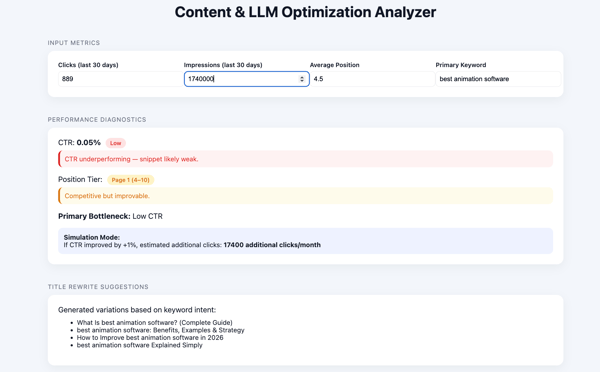
ChatGPT moved from prompt to a working content analyzer quite fast. It generated a fully self-contained HTML file immediately, allowed me to toggle between code and preview, and produced a runnable tool without external dependencies. The first two rounds felt stable and structured, but the third round exposed some regression in feature retention and expansion durability. Overall, ChatGPT excels at rapid implementation and clean first-pass iteration, but complex expansion can introduce instability.
How ChatGPT performed in building a working content analyzer
ChatGPT generated a complete, responsive HTML file immediately and clearly explained how to use it: save the file and open it in a browser. The CTR calculation logic was correct, and the diagnostic layer accurately identified the primary constraint for the test case: Low SERP click-through rate. The UI rendered cleanly in preview, and the structure was intuitive.
The recommendations were directionally solid but leaned slightly generic in this first pass. It included both SERP alignment and LLM optimization recommendations, such as improving title and meta descriptions for clickability, adding structured FAQ content, and formatting answers more clearly for AI extraction. While useful, the guidance remained fairly high-level rather than deeply differentiated. That said, everything worked out of the box, and the experience required zero setup friction.
Verdict: Strong implementation with immediate usability.
How ChatGPT performed in refining and improving the analyzer
ChatGPT handled iteration cleanly and quickly. It preserved the original logic while enhancing the UI and adding contextual improvements. Performance diagnostics became color-coded, sections were more clearly segmented, and recommendations became more specific and structured.
The export summary section was visually implemented, and a copy option was included. However, the copy button did not function properly in preview mode. Despite that limitation, this round felt like a true refinement rather than a rebuild.
Verdict: Clean iteration with stronger specificity, minor functional friction.
How ChatGPT performed in expanding it into a product-style tool
ChatGPT remained fast, but this round showed structural regression. Instead of layering new product-style features on top of the existing analyzer, it removed some prior sections and focused heavily on title suggestions. The core expansion objective, building out the analyzer into something more robust, was only partially fulfilled.
The copy/download actions again did not function properly in preview. While output speed remained high, structural durability weakened under expansion pressure.
Verdict: Fast output, but weaker expansion stability.
Scoring snapshot (ChatGPT)
To summarize performance across all three tasks, here’s how ChatGPT ranked against the five evaluation criteria.
| Criterion | Build a working analyzer | Refine and improve analyzer | Expand into a product-style tool | Overall |
| Task completion | Outstanding | Excellent | Fair | Good |
| Output quality | Excellent | Excellent | Good | Good |
| Ease of use | Outstanding | Outstanding | Outstanding | Outstanding |
| Customization | Excellent | Excellent | Fair | Good |
| Efficiency | Excellent | Excellent | Fair | Good |
Do G2 user insights align with ChatGPT’s performance?
ChatGPT’s hands-on performance closely aligns with its G2 satisfaction profile. With 96% for ease of use and 97% for ease of setup, the testing experience felt immediate and low-friction. Generating a runnable analyzer, previewing it, and iterating required no additional configuration, which reflects the strong usability sentiment in the data.
Its 92% meets requirements rating is also consistent with how accurately it implemented structured prompts in the first two tasks. Instructions were followed cleanly, core logic was preserved during refinement, and output remained stable through iteration.
Feature-level ratings further explain this behavior. A 94% interface score and 93% natural language interaction score help clarify why plain-English prompts translated into structured, runnable code so efficiently. The only friction emerged when complexity increased in the final expansion round, where structural consistency weakened slightly.
Overall, the testing experience reinforces the G2 Data: ChatGPT stands out for speed, accessibility, and responsiveness, with minor durability trade-offs as requirements scale.
What G2 users like best:
“ChatGPT is incredibly versatile and easy to use. I rely heavily on it for understanding complex academic topics, writing papers, brainstorming project ideas, and generating or debugging code. As a master’s student, I appreciate how clearly it explains concepts and adapts its responses based on my level of understanding. It’s like having a personal tutor, research assistant, and coding helper, all in one platform.”
– ChatGPT review, Utsav S.
What G2 users dislike:
“Sometimes, when writing code, even after giving a good command, the response isn’t exactly what I expect. For R&D or complex logic, it can get confusing and frustrating. In such cases, I need to open a new chat and start again with the same command to get a better response.”
– ChatGPT review, Aniket K.
2. Gemini: Best for structured diagnostic logic in vibe coding
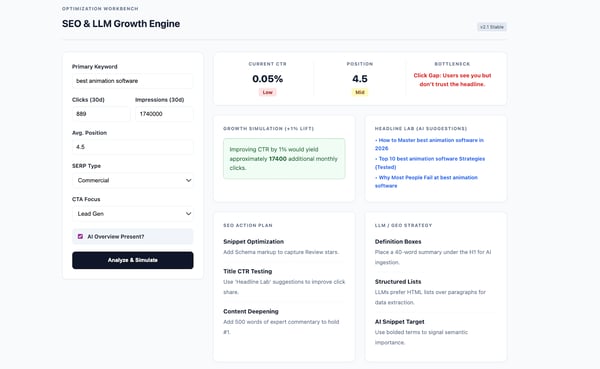
Gemini generated working code quickly and showed strong, structured reasoning. Its analyzer included clear performance tiers and smart bottleneck prioritization, which made the diagnostic logic feel thoughtful and layered. However, there was no built-in preview or direct HTML download, which added extra manual steps. The tool itself was solid once deployed, but the process felt less beginner-friendly. Overall, Gemini is strong in structured analysis, but the workflow introduces friction.
How Gemini performed in building a working content analyzer
Gemini generated working HTML code quickly and included detailed explanations of the tool’s architecture. It introduced performance tiers (High, Mid, Low), intelligent bottleneck prioritization, and GEO-specific recommendations, such as including citable facts and statistics, updating content freshness, adding FAQ schema, and incorporating a short 2-3 line summary at the top for AEO-style formatting. The CTR calculation was accurate, and it correctly identified the primary issue as a CTR/relevance gap.
However, there was no preview option inside Gemini. I had to manually copy the code, paste it into a text editor, and convert it to an HTML file. For a beginner, these additional steps create friction.
Once deployed, the interface was clean and structured. It required input before generating analysis, which felt more workflow-driven than ChatGPT’s instant rendering.
Verdict: Strong analytical structure, but operational friction due to lack of built-in preview and download flow.
How Gemini performed in refining and improving the analyzer
For the second task, Gemini offered two response variations. I chose the longer, more structured version with an improvement summary. It added input validation, conditional styling for critical bottlenecks, clearer visual hierarchy, and a functional copyable executive summary block.
The recommendations became more specific, with explanatory context for each action. Structurally, this version felt more polished and closer to a usable diagnostic product.
However, the same friction remained: no direct HTML download. I had to repeat the manual save-and-convert workflow before testing it in a browser. Once opened, the UI was clean and logically segmented across input, analysis, and executive summary sections.
Verdict: Strong refinement with improved specificity and validation logic, but recurring workflow friction.
How Gemini performed in expanding it into a product-style tool
Gemini remained fast in generating code, but expansion introduced mixed results. It reduced the number of CTA type options and simplified SERP context selection compared to the prior version. The layout shifted from horizontal to vertical formatting, altering the visual hierarchy without a clear benefit.
The headline suggestions leaned toward “How to,” “Why,” and strategy-based angles, which did not align well with a commercial listicle-style query like “best animation software.” While the executive report became downloadable, the broader strategic suggestions were less compelling than in the second iteration.
Structurally, version two felt stronger than version three. The third expansion added surface-level product elements but weakened contextual precision.
Verdict: Fast output, but expansion reduced clarity and commercial alignment.
Scoring snapshot (Gemini)
To summarize performance across all three tasks, here’s how Gemini ranked against the five evaluation criteria.
| Criterion | Build a working analyzer | Refine and improve analyzer | Expand into a product-style tool | Overall |
| Task completion | Outstanding | Outstanding | Good | Excellent |
| Output quality | Excellent | Excellent | Fair | Good |
| Ease of use | Fair | Fair | Fair | Fair |
| Customization | Excellent | Excellent | Good | Good |
| Efficiency | Good | Good | Fair | Fair |
Do G2 user insights align with Gemini’s performance?
Gemini’s testing experience aligns well with its G2 satisfaction metrics. With 92% ease of use and 97% ease of setup, getting started was straightforward. The tool began generating code immediately after the prompt, and the interaction felt intuitive. The main friction came from running the code, as there was no built-in preview or direct HTML download. Although Gemini provided instructions on how to save and run the file, the extra steps added complexity for a beginner.
Its 87% meets requirements rating reflects generally reliable performance. In the first two tasks, Gemini delivered a functional analyzer, implemented performance tiers correctly, and preserved logic during refinement. In the third expansion task, structural consistency weakened slightly. The tool still worked, but some context and formatting options were reduced.
Feature ratings support this pattern. An 88% interface score reflects generally positive user sentiment around Gemini’s platform experience. 86% for input processing suggests reliability in handling and interpreting user inputs across scenarios.
Overall, the testing experience reinforces the G2 Data: Gemini stands out for structured reasoning and reliable implementation, with minor workflow friction as complexity increases.
What G2 users like best:
“I like Gemini a lot because it’s so fast for my day-to-day coding. I’m feeding it complex architectural diagrams, and it’s getting the hang of everything. As a tool, it is good for Python and ML logic. I’ve loved the Vertex AI integration I have been putting into practice.”
– Gemini review, Santosh M.
What G2 users dislike:
“Sometimes it provides C++ libraries that are slightly outdated or hallucinates functions that don’t actually compile. I always have to double-check the syntax for more advanced algorithms before running them.”
– Gemini review, Md. Azharul I.
3. Replit: Best for idea-to-product builds
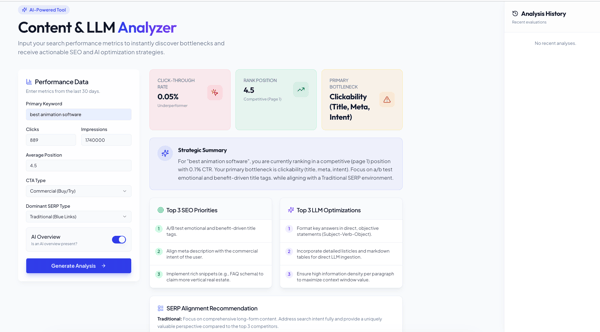
Replit felt less like “prompt-to-code” and more like “prompt-to-project.” It took a bit longer to load, but once it did, I had a real workspace with preview, file structure, publish options, and collaboration controls. That power is great when you want to treat this like a mini product build, but it can feel a little busy if you’re brand new. Overall, Replit shines when you want an app-style workflow, even if the extra surface area adds a small learning curve up front.
How Replit performed in building a working content analyzer
Replit eventually produced a clean, structured analyzer, but it didn’t feel as instant as Gemini or ChatGPT because the workspace itself took a moment to render. Once the app loaded, the UI was polished and organized, and I liked the broader SERP dropdown options (featured snippet, traditional, video/image pack, local pack).
CTR math looked right, and the primary bottleneck callout landed in the same place as the other tools: clickability. It included SERP and LLM optimization recommendations, such as using markdown tables and structured list formats to align with traditional SERP expectations, implementing FAQ schema to capture rich results, and formatting answers as direct, subject-verb-object statements with higher information density to improve LLM extraction. The suggestions were usable but didn’t meaningfully differentiate from the other tools. The “Analysis History” section was a nice idea, but it didn’t populate in preview during my run.
Verdict: Strong output inside a richer interface, with a slower start and a few UI elements that didn’t fully show value yet.
How Replit performed in refining and improving the analyzer
In the second iteration, the first response didn’t reflect clearly in the preview. The underlying code had changed, but the UI didn’t update right away, which made it seem like nothing had improved.
After re-running the prompt and explicitly calling out that the changes weren’t visible, the updated version finally rendered correctly. Once it did, the improvements were clear. The analyzer included a better structure, more defined sections, and the additional elements expected from this stage.
The core is