



I remember when ChatGPT first launched. The entire marketing community was split on whether they should use AI chatbots or not. Posts about ChatGPT would get hundreds of comments, with one side debating the convenience of AI and the other arguing that AI can never match human creativity.

While the debate is still ongoing, AI chatbots are already everywhere. I’m seeing marketers relying on custom bots for social media, enterprises integrating voice assistants, and customer service teams scaling operations with AI.
As someone who has worked in both automation and marketing, I’d say the shift to AI chatbots is here. And it’s here to stay.
Marketers now have tons of solid chatbot options that can hold conversations almost as naturally as a human.
In this post, I’ll walk you through the top 14 chatbots for marketers, how I tested them, and which ones you should consider for your marketing workflow. I’ll also give you the exact prompts I used and the results so you know what to expect.
Table of Contents
What is an AI chatbot?
An AI chatbot is a conversational program that uses machine learning (ML) and natural language processing (NLP) to understand what you’re saying to it and give you human-like answers. It’s trained on a ton of data to understand patterns and word associations, allowing it to understand complex queries. Additionally, an AI chatbot learns from previous conversations, gradually improving its responses over time.
Sounds like a lot? Let me break it down.
Here’s what happens under the hood when you send a prompt to an AI chatbot:
- Input processing. Your prompt is broken down into tokens (words, phrases, or even parts of a word).
- Context mapping. The model tries to build relationships between words and their positions. This helps the model differentiate between “Sarah caught the bear” versus “The bear caught Sarah” — two very different problems to have.
- Self-attention. Now, it’s time to actually understand intent. The model identifies the key entities in your message and, based on previous training data, understands how they relate to each other.
- Response. The model starts forming the output options. This is a prediction system where the model predicts the next most likely word based on previous patterns.
- Feedback loop. As the final step, the chatbot runs the response candidates through different safety filters and quality controls. Each response is scored, and the best one is delivered as the output.
All of this happens in the seconds/minutes you wait after sending the prompt. While I’ve described how a typical AI chatbot works, each model might implement the architecture differently. The end goal, though? Helping solve business (or personal) problems faster and more reliably.
Conversational AI vs. Chatbots
Chatbots and conversational AI are closely related, but differ in their scope and capabilities.
Conversational AI refers to any technology that can talk to humans, understand sentiment, and answer questions. It can be a chatbot, AI agent, or other AI-generated application.
AI chatbots are a subset of conversational AI, but not all chatbots use conversational AI. Some chatbots are purely rule-based, which rely on simple rules and decision trees to determine the best course of action.
Rule-based chatbots can only handle specific, expected inputs. I’m sure you’ve interacted with many of them in the pre-ChatGPT era. Ask them something outside their script, and they’ll either give you a vague answer or redirect you to a human.
In contrast, AI chatbots understand context and nuance, and are more capable of handling unexpected queries.
If you want the user to choose between set options without much flexibility, opt for rule-based chatbots to save costs. However, if you want to deliver an upgraded user experience, I’d recommend choosing an AI chatbot.
Why use AI chatbots? 4 Use Cases and Benefits of Chatbots for Marketers
I’ve seen AI chatbots become significantly more intelligent over the last year. Earlier, you had to scrape and feed a ton of data to chatbots, and even then, the outputs were usable. Chatbots couldn’t even connect to the internet natively.
However, with newer models and integration technologies like AI agents and MCP servers, the possibilities are endless. I recently connected my email to my Claude account via MCP. Now, I can get a handy summary of my day’s meetings and newsletter highlights with just a prompt.
Here are some other ways businesses can use AI chatbots.
Customer Support
Sales and Marketing
- Automate sales prospecting and market research.
- Personalize automated outreach to your target audience at scale.
- Managing your sales pipeline by summarizing meetings, sending follow-up reminders, etc.
- Support customers through every stage of the buying journey by providing personalized and timely information.
Writing and Editing
- Content strategy and ideation for blogs, emails, and social media posts.
- Deep research on specific topics to create article outlines.
- Brand-tailored first drafts for emails and social copy.
- Tweaking copy for certain audiences, platforms, and formats.
Recruitment and HR
- Shortlist potential candidates based on resume strength.
- Answer common questions about open positions or company policies.
- Schedule interviews and meetings without endless back-and-forth emails.
The examples here are just the tip of the iceberg. People have used chatbots for therapy, travel planning, ordering meals, and so much more. According to our State of AI report, 39% of marketers use chatbots like ChatGPT, Gemini, and Copilot to create content and organize research.
Thus, AI chatbots can:
- Save time, reduce employee burnout, and let them focus on strategic tasks instead of grunt work.
- Reduce the cost of labor and generate outputs faster.
- Conduct extensive data crunching and analysis more effectively.
- Help you scale your business without increasing headcount.
Bottom line? You can easily customize AI chatbots to fit almost any organizational need.
What makes an AI chatbot good?
Here are some features I look for when experimenting with AI chatbots.
Accuracy and Reliability
AI chatbots are notorious for hallucinations, i.e, confidently making up misleading claims. According to HubSpot’s State of AI survey, 43% of marketers struggle with AI generating inaccurate information. I’ll admit, sometimes I get frustrated too.
Some models perform better than others. For instance, reasoning models like OpenAI o3 and DeepSeek R1 reduce hallucination by showing you the steps they took to arrive at the conclusion. Models that are trained on domain-specific datasets are far more accurate in answering specialized questions.
Pro tip: Introduce guardrails to your prompt and training data to reduce the chances of hallucinations. I generally include specific instructions like “don’t make up claims,” “give source links and mention the page number of the information,” and “if you are uncertain about a fact, just say so.” Regardless, you should always double-check what AI spits out.
Emotional Intelligence
Remember: We’re using chatbots to simplify user experience.
So, a good AI chatbot should:
- Be able to understand user intent (and not get stuck with typos).
- Remember conversation context, or at the very least, document past interactions and refer to them when needed.
- Know when to escalate to a human agent.
It should also be able to assess the tone and overall feeling of the customer’s inquiry. Is the customer:
- Angry? (“Why is my monthly payment increasing?!”)
- Sad? (“Please don’t discontinue your lavender chai latte chocolate! It’s my favorite flavor. I used to drink it with my dad before he passed.”)
- Happy? (“I love, love, LOVE the new sneaker designs! Please tell me they come in pink!”)
The best chatbots I’ve used make me feel heard and understood.
Types of Output
Instead of just text responses, can your chatbot handle images and videos? With AI-generated content on the rise, this feature is a massive plus for chatbots.
Imagine this: a customer asks, “How do I change this setting on your tool?” A normal chatbot would link the customer to the documentation or provide a text-based guide. However, a multimodal chatbot trained on your product can send annotated screenshots or even a video walkthrough.
Less confusion, better user experience.
Integrations
As we move to an agentic era, I recommend choosing a chatbot that is compatible across other popular tools and software. For instance, your chatbot should be able to sync with your sales data, fetch the numbers, and spin up a dashboard to present them.
HubSpot’s CRM is built for this connected workflow with seamless integrations across your tech stack, such as Claude, Zapier, and 1700+ business apps.
How I Tested the Best AI-Powered Chatbots
Most AI-powered chatbots have roughly the same value prop, i.e., answering user questions like a human would. However, I’ve found that some models excel at specific industries or tasks.
If a model is exclusively trained for code generation (GitHub Copilot), it will naturally be better than an all-purpose chatbot like ChatGPT. Similarly, an AI chatbot trained on your CRM data would be able to handle product queries more accurately.
Thus, I took a nuanced approach to testing these chatbots. I tested each tool with prompts that showcase its core strengths. I also added in some straightforward tasks here and there to help decide the best combination for your stack.
The 14 Best AI Chatbots
- Breeze
- ChatGPT
- Claude
- Grok
- Github Copilot
- Gemini
- DeepSeek
- Perplexity
- HubSpot Chatbot Builder
- Intercom Fin AI Agent
- Tidio Lyro
- Drift
- Zendesk AI Agents
- Chatbase
With so many solid AI chatbot options on the market, it can be hard to decide where to start.
To help you make an informed decision, I’ve compiled a list of the best AI chatbots based on their features, usability, and performance in testing.
Whether you’re looking for a chatbot to support your business or improve personal productivity, there’s an option here for everyone.
Note: I’ve divided this list into two parts. The first eight chatbots are focused on internal business and personal productivity use cases like generating ideas, content creation and more. Later, I’ll discuss consumer-facing chatbots.
1. Breeze
Get Started with Breeze for Free
Setting up a new chatbot is a very time-consuming process for me. It’s not just the initial training either. I need to continuously update it with new customer conversations and product features to get brand-aligned outputs.
Breeze, HubSpot’s AI chatbot, helps you skip all of these setup steps.
Breeze lives inside your CRM, so it has complete context about your customer journey, product features, sales pipeline, and more. It also integrates unstructured communication like emails and calls to external data, such as buyer intent and company news, to give Breeze the full picture.
With hundreds of customer success stories, businesses using Breeze are seeing results across the board. HubSpot customers are already using it to:
Breeze delivers what marketers and businesses want: more qualified leads, faster sales cycles, customer retention, and satisfaction.
How I Tested Breeze
I tested Breeze through their “product demo” page. Honestly, I was expecting a video walkthrough and maybe a basic chatbot with standard responses.
However, I was pleasantly surprised. The demo walked me through almost every bit of the chatbot’s AI capabilities, ranging from an AI avatar (Fiona) to intelligent demo recommendations.
Of course, this experience set a very high bar for the tool. So, I set out to give it the first task: writing a follow-up email for prospects.
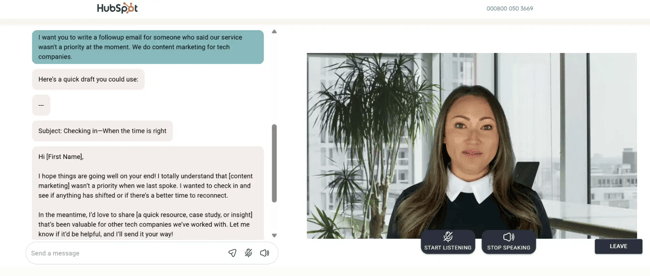
The email I got back was quite good, despite the limited background information. I could directly ship it with some minor tweaks and personalization.
Now, imagine this done at scale with real-time data, powered by your conversations, deal history, and customer experience. The possibilities are endless.
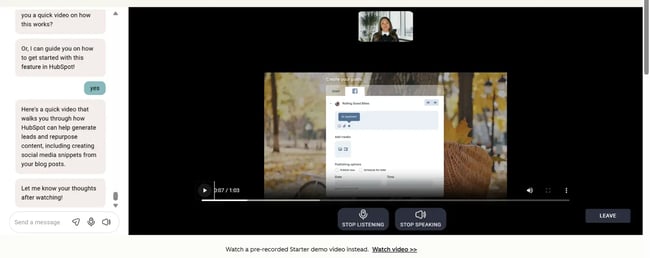
Another thing I liked about the whole process was how responsive the chatbot was. She asked me intelligent yet natural-sounding questions to guide me through the sales process. If there was a lull in the conversation, she gently nudged me with casual questions.
All of this showed how well the chatbot knew HubSpot’s offer, which is precisely the kind of product knowledge you’d want from an AI chatbot.
Breeze Features I Liked
- Seamless HubSpot CRM integration.
- Combines both structured (CRM) and unstructured data (email) to power their intelligence software.
- Specialized agents for every marketing use case: content, social media, prospecting, and customer service.
What I Didn’t Like
- The free demo didn’t let me test any advanced features.
- HubSpot-generated images are decent, but some of the chatbots on this list do a better job.
Breeze Pricing
- Get started with basic AI features like content generation for free.
- HubSpot Starter ($15/seat/month, billed annually) – Starter marketing, sales, service, content, and operations software, with simple automation and Breeze intelligence.
- Professional Customer Platform ($1,300/month, includes 5 seats) – Includes customer agent functionality & 3,000 monthly HubSpot credits.
- Enterprise Customer Platform ($4,700/month, includes 7 seats) – Advanced Breeze features + 5,000 monthly HubSpot Credits.
Note: You can unlock Breeze Intelligence only in the HubSpot Starter pack and Breeze Customer agent in the Professional plan. Credits can be used across HubSpot products, including Breeze.
Why I Recommend Breeze
If you’re a HubSpot user, Breeze serves as a natural extension of your existing tech stack. It’s the first AI assistant that knows your business as well as you do.
While I wouldn’t recommend Breeze for media creation, you can use it to automate your daily marketing tasks. If you’re in the process of scaling your company, I’d highly recommend giving it a try.
TL;DR: It’s a breeze to integrate HubSpot Breeze to your marketing workflows.
2. ChatGPT
Launched in 2022 by OpenAI, ChatGPT made headlines as the fastest-growing consumer app in history.
Fast forward to today, ChatGPT processes over 2.5B user queries per day. That’s roughly 1/3rd of Google’s 8.5B searches per day, making it a serious contender to traditional search. I’d give it a couple more years before using an AI chatbot like ChatGPT becomes muscle memory for users.
So, what exactly are marketers asking ChatGPT? Well, a lot of things. The right GPT prompts can help you create brand-aligned content, polished images, crunch campaign numbers, and more. I use ChatGPT Plus for research, Excel analysis, and image generation.
But that’s not all. The one GPT feature I’m most excited to test (but don’t have access to yet) is the ChatGPT agent. While chatbots typically wait to be prompted, agents can independently take and act on decisions.
For instance, if I want the GPT agent to purchase a pair of socks for me at the cheapest price, the agent can compare different sites, test out coupon codes, and then share the results with me. I’m already seeing GPT agent use cases implemented across social media, so I can’t wait for a broader rollout. As of this writing, the ChatGPT agent is only available to Pro users.
How I Tested ChatGPT
Let’s start with a simple prompt. I was working with a client in the project management niche, who wanted a report on how they stack up against competitors. So, I decided to use ChatGPT to augment my research. For each competitor, I prompted it to draw up a SWOT analysis and identify winning features that my current client did not have.
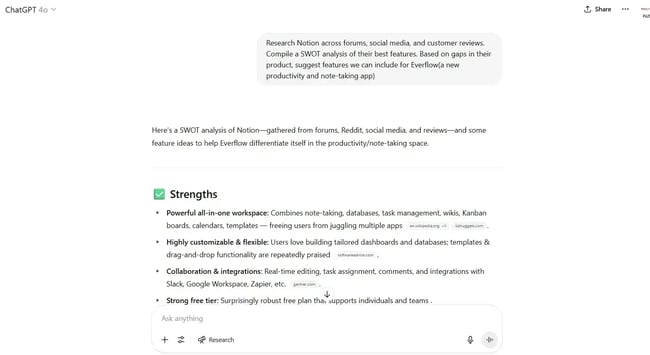
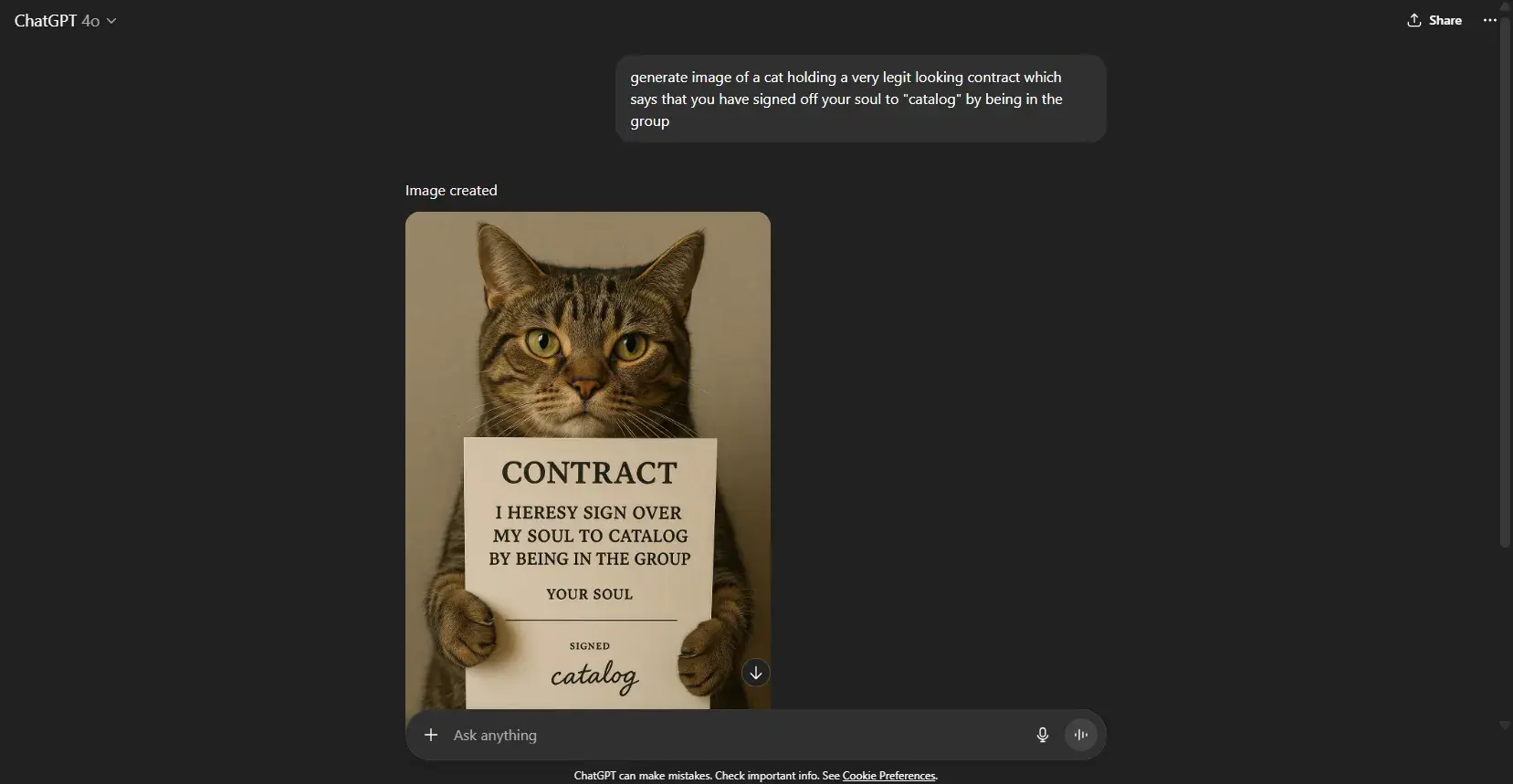
The SWOT analysis was pretty helpful. Next, I wanted to test GPT for image generation. Here, I went slightly goofy, asking GPT to generate a cat image with a sign. ChatGPT did a great job of adhering to my unusual request.
ChatGPT Features I Liked
- ChatGPT agent. Automate complex, multi-step workflows.
- Custom GPT. Build a specialized chatbot with custom instructions, or use one from their library of GPTs trained on social media, legal, data science, and many domains.
- Image generation. I use Sora, ChatGPT’s built-in image generation model, to generate design references and edit existing images.
- Deep research. I find GPT’s deep research mode quite helpful for complex research, especially historical research.
What I Didn’t Like
- Image generation takes quite a bit of time and sometimes doesn’t work very well for human features and text.
- ChatGPT agent throws errors while navigating websites if it doesn’t load quickly enough.
ChatGPT Pricing
- Free users get access to GPT 4.1 with unlimited usage and limited usage of advanced models.
- Plus users ($20/month) include ChatGPT agents, Sora video generation, and research access to new models.
- Pro users ($200/month) get extended limits on everything in Plus and access to o3-pro and the Codex agent.
3. Claude
As a writer, I’m quite partial to Claude. Claude is an excellent creative thinker, and when I give it enough context, it can emulate brand voices very well. I heavily depend on Claude for content strategy, first drafts, and editing sentences.
For each new client, I typically set up a new project and provide it with documents like brand guidelines, podcasts, etc, as context. This is similar to the CustomGPT feature by ChatGPT. However, since Claude has a larger context window, the model produces better outputs.
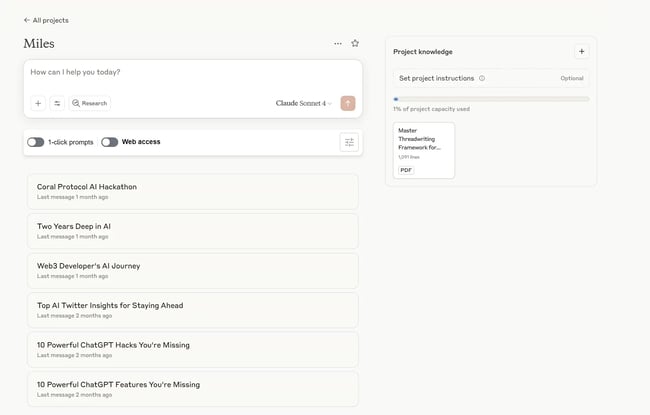
I also love Claude’s MCP feature. Like I mentioned earlier, I used it to sync my email to the AI assistant, which I’ll show you below. You can also connect to a variety of other tools such as Asana (project management), Canva (graphic design), and more.
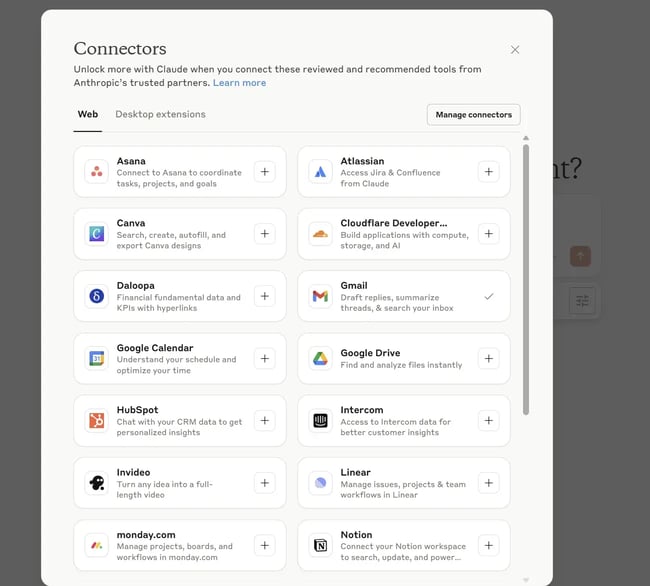
P.S.: HubSpot recently released a MCP connector for Claude, which I’m super excited about.
How I Tested Claude
Let’s start with the research test. I usually like to start my week by reading up on trending AI news so I can think of content ideas around them. So, I prompted Claude to give me a summarized version, pulling information from my newsletter subscriptions plus additional web research on its own.
Here’s the prompt I ran: “Can you give me a summary of the AI news highlights from the last week? Access my newsletter subscriptions via my email to pull information from. Also, conduct independent research to find any other important news. Present this in a tabular format, with headline, short blurb, and if you think any can be made in social media content pieces.”
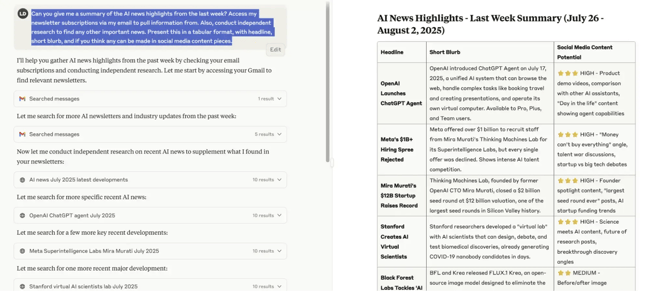
Well, color me impressed. While the first item was from July 17th (outside the request timeframe), Claude did a fair job of collating recent AI news. The content ideas weren’t too great, but I’ve gotten much better results when I give Claude context about my client and goals.
I especially liked how the information was presented — organized and easy to scan. And that’s something I find in other Claude features too. For instance, here’s how I used Claude to iterate on a landing page for my clients.
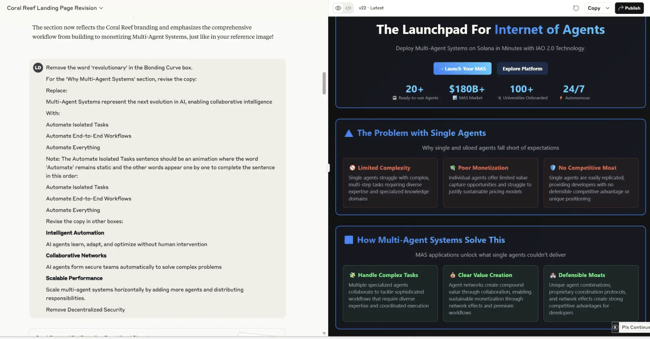
It was helpful to see how my copy looks in a design mockup. I can spot issues, tweak my copy and optimize for production faster.
Claude Features I Liked
- Writing quality. Out of all AI chatbots I’ve tried, Claude produces the most on-brand and natural content.
- Projects. I use projects for organizing conversations and documents.
- Integrations. Claude is now rolling out MCP connectors for most major apps.
- Emphasis on privacy. Anthropic, Claude’s parent company, uses a proprietary algorithm called Clio to anonymize user conversations for training.
What I Didn’t Like
- Claude has strict usage limits. If you’re using advanced features like artifacts, research, etc., you’re going to hit your limit fast.
- No image or video generation features.
Claude Pricing
- Free tier – Limited access to top models.
- Pro tier – ($17/month/user, billed annually) – Unlocks higher message limits, projects, Claude Code, integrations, and more.
- Max tier – (from $100/month/user, billed annually) – 5-20x higher usage than Pro, early and priority access to new features.
4. Grok
Have you ever doomscrolled for hours in the name of “content research”? I know I have. So, when X rolled out its native AI chatbot, Grok, I knew I had to try it.
While other chatbots have limited access to social media (anti-scraping laws), Grok can tap into X’s live field to monitor trends and analyze other accounts. I frequently use Grok’s “explain this post” feature — it’s a handy way to get context on things I’m clueless about without leaving the platform. You can also tag @grok in tweets to fact-check the accuracy of information.
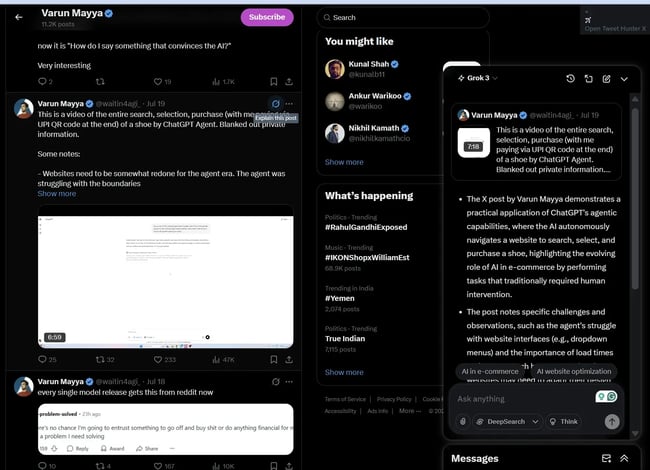
How I Tested Grok
For the first part of the test, I asked Grok to analyze the top tweets about AI agents in the past month. The output was a high-level overview of the key themes in trending posts. I could easily verify the source and authenticity of the tweets by following the linked handles.