


GitHub Copilot vs. ChatGPT: if you’re exploring the best AI code generation software, chances are these two are at the top of your list. Think of GitHub Copilot as a travel guide that already knows the shortcuts, ideal when you know where you’re going and want to get there faster. ChatGPT is more like a GPS, giving you step-by-step directions and explaining the road ahead.
TL;DR: GitHub Copilot vs. ChatGPT
- GitHub Copilot is best for developers who want real-time code suggestions and autocompletion directly inside their IDE.
- ChatGPT is better for explaining code, debugging errors, and generating logic or scripts from scratch.
- GitHub Copilot works best when you already know what you’re building, while ChatGPT is more helpful when you need guidance or learning support.
- Neither tool fully replaces the other; many developers get the best results by using GitHub Copilot and ChatGPT together for different stages of development.
As a non-coder and productivity geek, I put both tools through seven real coding tasks, from building a to-do list app to fixing JavaScript bugs to designing a color palette creator, using the same prompts, with no changes. Here’s what I found: GitHub Copilot shines at speeding up active development with smart autocomplete directly in your editor, while ChatGPT excels at generating structured code and teaching you the how and why along the way.
What is the difference between GitHub Copilot and ChatGPT for coding?
|
Feature |
GitHub Copilot |
ChatGPT |
|
G2 rating |
4.5/5 |
4.7/5 |
|
AI model |
GPT-4.1, GPT-5, GPT-5 mini, GPT-5.1, GPT-5.2, Claude Haiku 4.5, Claude Sonnet 4/4.5, Claude Opus 4.1/4.5, Gemini 2.5 Pro, Gemini 3 Pro/Flash, xAI Grok Code Fast 1, Raptor mini |
GPT-5.3 Instant (default), GPT-5.4 Thinking, GPT-5.4 Pro
|
|
Best for |
Code generation, completion, suggestion, documentation, and productivity |
Conversational AI, creative writing, task automation, learning, coding (Codex), image generation, deep research |
|
Coding workflow |
Inline completions in IDEs + Copilot Chat + agent mode + coding agent (issue→PR) + code review + Copilot CLI |
Conversational chat for planning, coding, debugging + Codex (agentic coding agent for autonomous multi-step tasks) |
|
Pricing |
Free: $0 (2,000 completions + 50 premium requests/mo) Pro: $10/mo or $100/yr Pro+: $39/mo or $390/yr Business: $19/user/mo Enterprise: $39/user/mo |
Free: $0 (includes ads in US) Go: $8/mo (includes ads) Plus: $20/mo (ad-free) Pro 5x: $100/mo Pro 20x: $200/mo Business: $25/user/mo
|
|
IDE integration |
VS Code, Visual Studio, JetBrains IDEs, Neovim, Xcode, Eclipse, Azure Data Studio, Raycast + natively on GitHub |
No native IDE integration; available via desktop app (macOS, Windows), web, mobile, and API |
|
Multimodal support |
Code input/output only |
Text, image input/output, file uploads, voice, video, and computer use |
|
Code explanation |
Full code explanations via Copilot Chat in IDEs and on GitHub.com |
Logic breakdown teaches concepts |
|
Language supported |
All languages in public repos; best for Python, JS, TS, C++, C#, Java, Go, Ruby, PHP, Swift, Rust, Kotlin, etc. |
Python, JavaScript, C++, C#, Ruby, PHP, Swift, Go, TypeScript, HTML/CSS, SQL, MATLAB, R, Shell scripting languages (Bash, PowerShell), and more. |
Note: Both GitHub (a Microsoft subsidiary) and OpenAI frequently roll out new updates to these AI coding assistants. The details below reflect the most current capabilities as of April 2026, but may change over time.
GitHub Copilot vs. ChatGPT: What’s different and what’s not?
GitHub Copilot and ChatGPT are both some of the best AI coding assistants out there, but they serve very different roles in how you write, debug, and ship code. GitHub Copilot whispers suggestions directly into your IDE, while ChatGPT is your brainstorming partner in the chat window.
Recently, GitHub Copilot’s chatbot has expanded beyond OpenAI models to include other AI models, making it even more powerful. Let’s dig into how they compare and their shared strengths.
GitHub Copilot vs. ChatGPT: The differences
So, should developers use GitHub Copilot or ChatGPT for writing code? GitHub Copilot is a dedicated coding tool embedded in your editor that completes, reviews, and refactors code as you type. ChatGPT is a flexible AI assistant that helps with coding, planning, learning, research, and more. GitHub Copilot speeds up active development, whereas ChatGPT explains, guides, and handles end-to-end tasks. Both are powerful, but built for different kinds of workflows.
- Primary use case: GitHub Copilot is a specialized AI tool focused on code completion, code review, and agentic coding workflows. It works inside your code editor, suggesting and completing code in real time, and can now autonomously handle multi-step tasks like turning issues into pull requests through its coding agent. ChatGPT is a versatile, general-purpose AI assistant designed to help with coding, planning, debugging, deep research, learning, and content creation. With the addition of Codex, its agentic coding tool, ChatGPT now also supports autonomous multi-step coding tasks. GitHub Copilot reserves advanced features like agent mode and the coding agent for paid plans, while ChatGPT offers free-tier coding support with progressively more powerful capabilities across its paid plans.
- Learning and explainability: Copilot now offers code explanations through Copilot Chat in IDEs and on GitHub.com, but its primary strength remains inline completion and refactoring. ChatGPT can explain code line-by-line, generate tutorials, teach concepts with analogies, and walk through entire project architectures conversationally.
- AI models and processing power: Both tools now run on significantly more advanced models than their earlier versions. GitHub Copilot offers a multi-model lineup including OpenAI’s GPT-4.1 through GPT-5.2, Anthropic’s Claude (Haiku 4.5 through Opus 4.5), Google’s Gemini 2.5 Pro and Gemini 3 series, and others like xAI Grok Code Fast 1. ChatGPT runs on OpenAI’s GPT-5 family, GPT-5.3 Instant as the default, GPT-5.4 Thinking for deeper reasoning, and GPT-5.4 Pro for maximum performance, with older models like GPT-4o fully retired.
- Context awareness: GitHub Copilot works inside your IDE and pulls real-time context from the file you’re editing, nearby code, and your broader workspace, making its suggestions sharper for inline editing and live coding. It can also index organization codebases on Enterprise plans for deeper contextual awareness. ChatGPT can process large chunks of code across multiple files or uploads, making it strong for deep debugging, architecture reviews, and whole-project reasoning. With GPT-5.4’s expanded context window and native computer-use capabilities, ChatGPT can now also interact with desktop environments and handle longer, more complex tasks. Copilot feels more immediate during active development; ChatGPT offers a broader scope and flexibility.
GitHub Copilot vs. ChatGPT: Key similarities
Despite their different styles, these tools have a lot in common, and when used together, they can be surprisingly complementary.
- Contextual code completion: Both can generate lines, functions, and code blocks that reduce manual typing and repetitive work.
- Multilingual programming support: Python, JavaScript, HTML, CSS, SQL, Go, and more. They both handle a wide range of modern programming languages.
- Productivity and learning: Whether you are building or troubleshooting, both tools help you write better code faster and learn as you go.
- Powered by Codex: Both GitHub Copilot and ChatGPT now offer agentic coding tools. Copilot’s coding agent can take GitHub issues and autonomously create pull requests, while ChatGPT’s Codex handles multi-step coding tasks such as writing features, fixing bugs, and proposing changes for review. Both tools have moved well beyond simple code completion into processes that can plan, run, and verify code independently.
How I compared GitHub Copilot vs. ChatGPT: My prompts and evaluation criteria
To thoroughly compare, I run the same prompts independently on both tools in coding scenarios, using their paid versions (Copilot Pro and ChatGPT Plus). I tested them using the following tasks.
- Basic web development: To-do list web app, personal portfolio landing page
- Debugging and error resolution: Fixing a logical error
- Algorithm implementation: Search implementation
- Data intellect: Weather dashboard
- Creative coding: Inspirational quote generator, color palette creator
I evaluated their response based on
- Accuracy: Is the code logically sound, correct, and relevant to the prompt?
- Creativity: Does the output feel original, visually engaging, or thoughtfully designed (especially in UI/web tasks)?
- Efficiency: Is the response clearly structured, concise, and quick to implement?
- Usability: Can the output be used as-is, or with minimal edits and debugging?
To add other user perspectives, I also cross-checked my findings with G2 reviews to see how other users experience these models.
Disclaimer: AI responses may vary based on phrasing, session history, and system updates for the same prompts. These results reflect the models’ capabilities at the time of testing.
GitHub Copilot vs. ChatGPT: How they actually performed in my tests
If you are all the way here, I am guessing you are just as curious as I was to find out which tool came out on top. I will walk you through how I tested both tools, what the experience was like, and how I have broken down my verdict to make it easy (and hopefully fun) to follow.
- What stood out? I will highlight the strengths, weaknesses, and any surprises (good and bad) I noticed from both tools.
- Who did it better? I will tell you which AI came out on top based on accuracy, creativity, efficiency, and ease to use of the output.
- Final verdict: I’ll share my honest take on which AI is a better choice for a particular task.
Ready? Let’s go!
1. To-do list web app
I wanted to build a simple to-do list web app to test how GitHub Copilot and ChatGPT handled everyday coding tasks.
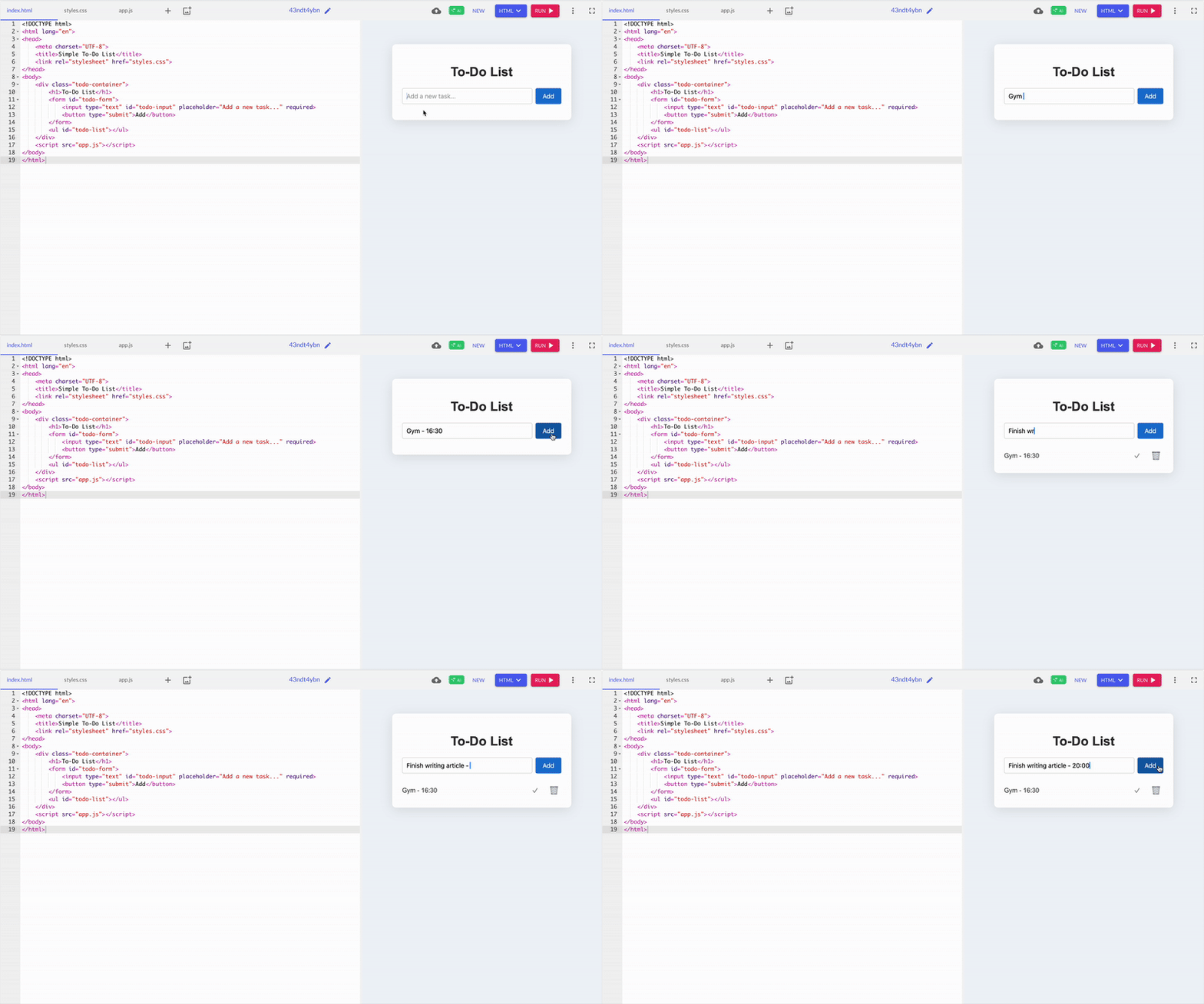
GitHub Copilot surprised me with a sleek, minimal design. It automatically split the code into separate HTML, CSS, and JS files, making things much cleaner and easier to manage. The structured layout felt more maintainable in the long run.
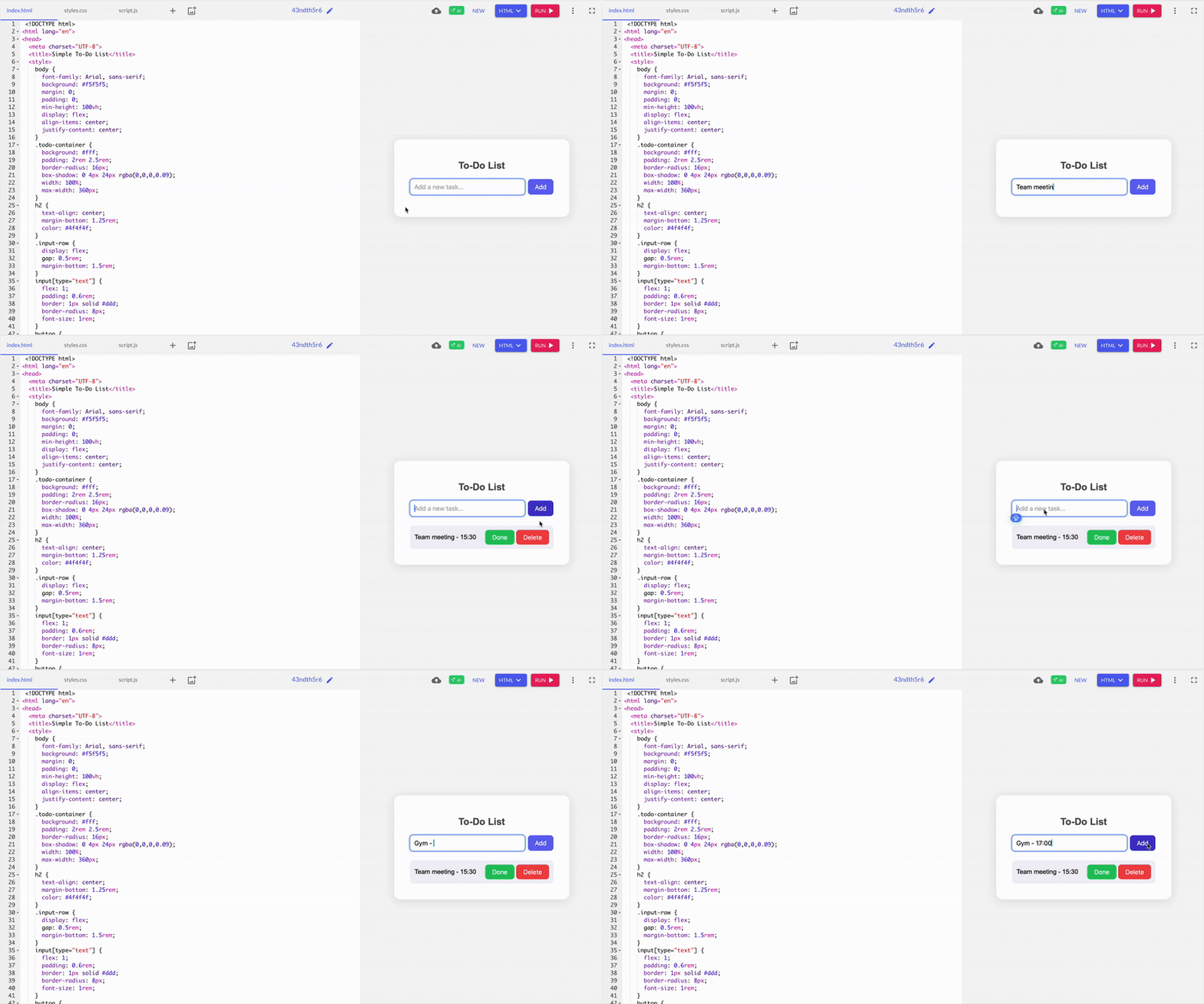
ChatGPT returned a neat single-file demo with colorful buttons and a friendly interface. However, I felt ChatGPT’s response, having all the HTML, CSS, and JavaScript bundled together, was a bit cluttered once I thought about extending the app later.
Winner: GitHub Copilot
Not everyone wants to write code, and that’s okay! For those who prefer drag-and-drop magic over typing commands, check out these top no-code platforms that make building apps a breeze.
2. Personal portfolio landing page
Creating a portfolio is common for beginners who are working on real-world projects. I have wanted to build a portfolio site for myself, so this was a perfect opportunity to put my skills to the test.
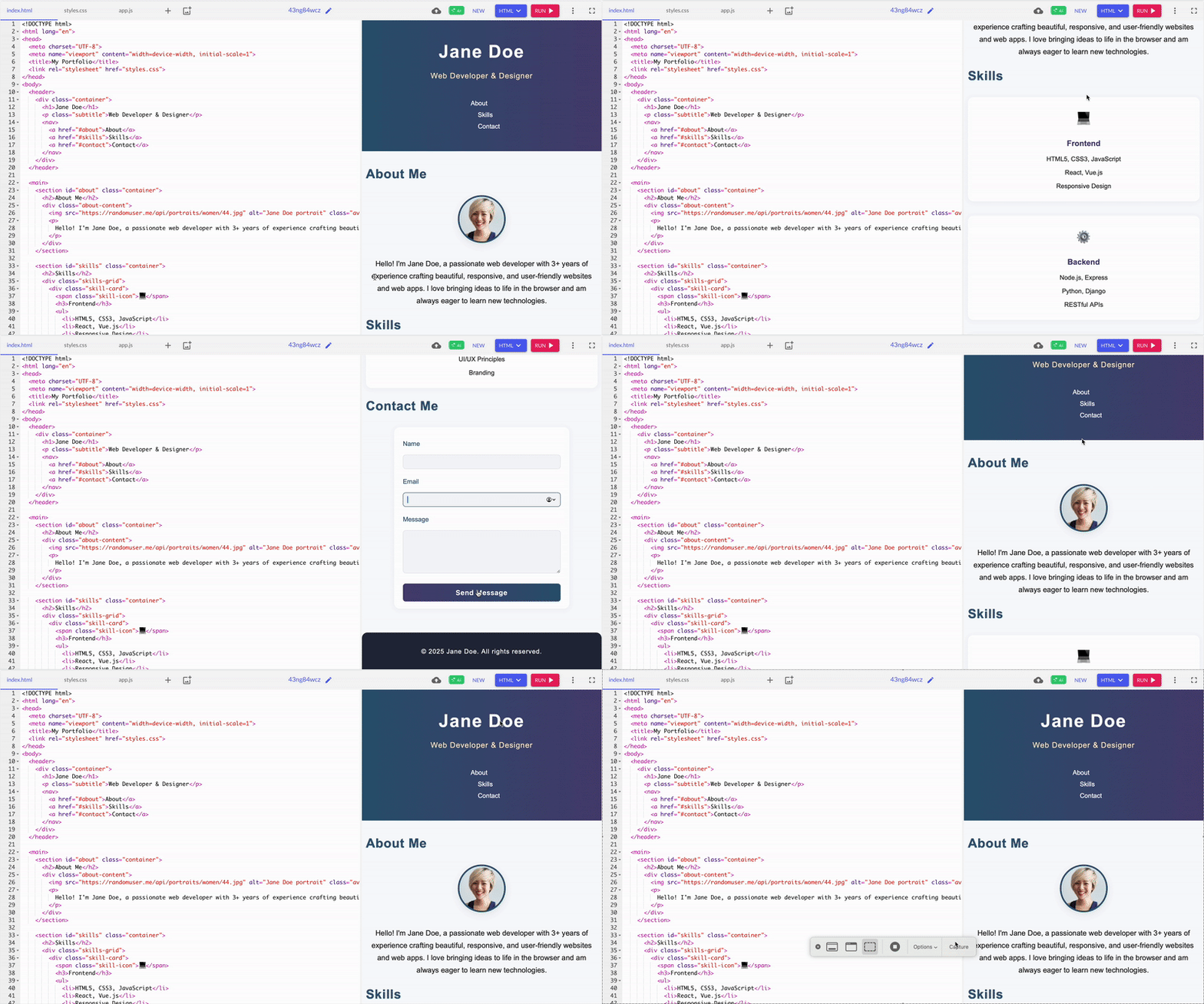
GitHub started strong, especially with CSS separated into its file for easier future updates. But compared to ChatGPT, Copilot’s design felt simpler and lacked important features, like project cards and detailed navigation, elements that make a portfolio truly showcase your work and engage visitors.
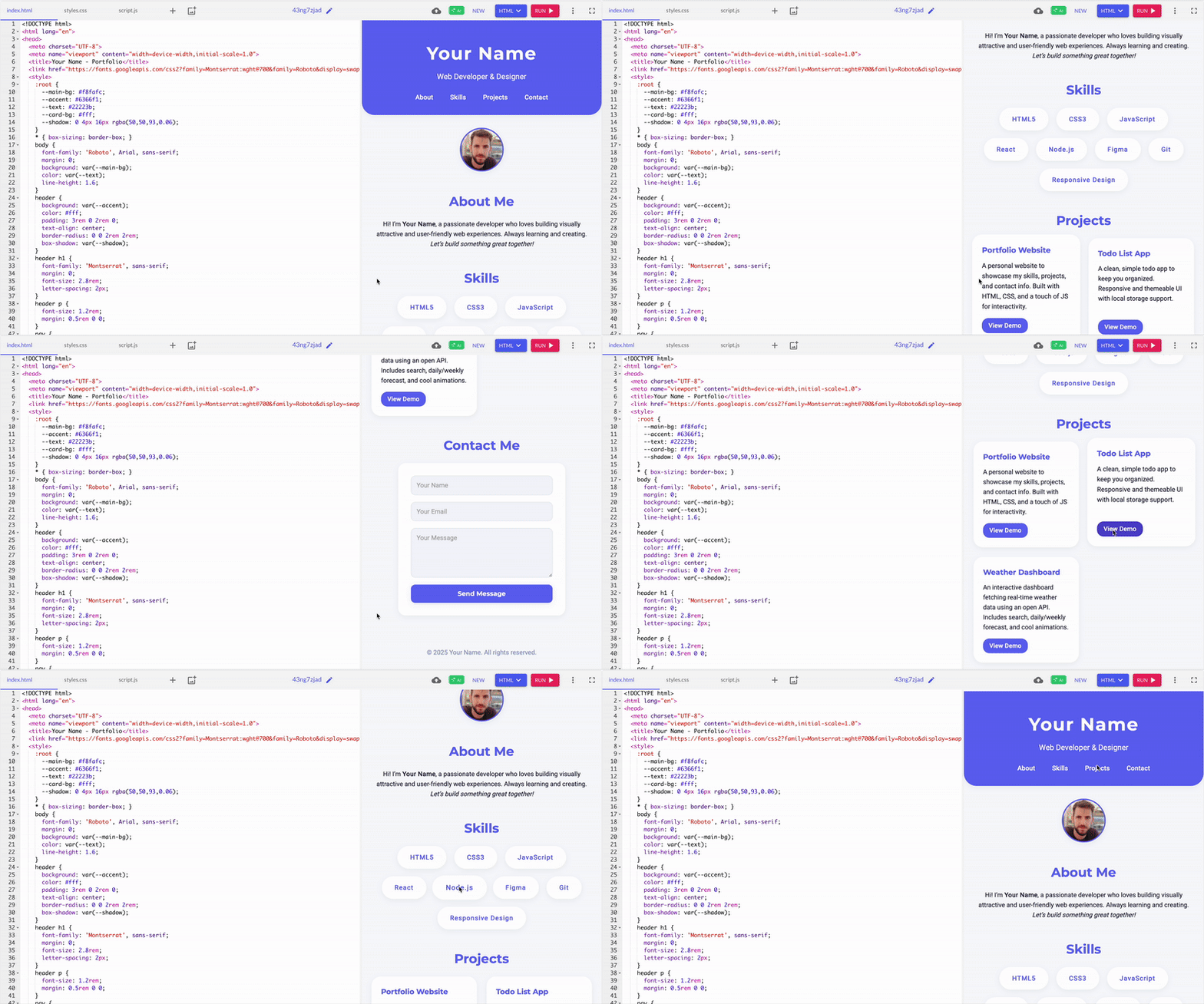
ChatGPT’s solution, on the other hand, felt smooth right from the start. Everything came out well, like displaying all sections, navigation, project cards, and the contact form — exactly as expected, without errors. Having project cards included was particularly helpful since portfolios typically need this feature.
Winner: ChatGPT
3. JavaScript logical error
For this test, I gave both tools a common JS bug, using the assignment operator (=) instead of the equality check (===) inside a conditional statement. This bug trips up many beginners, so I wanted to see not just if they could fix it but also how they explained the solution.
.png?width=600&height=437&name=VERSION%20B%20(3).png)
GitHub Copilot’s fix was equally effective in solving the problem, but it just spotted the error and rectified it. I found the explanation a bit repetitive. As a beginner, I still wouldn’t have understood why the error happened without more context.
So, in my case, I felt GitHub Copilot’s explanation fell short. There was nothing technically wrong, but these minor distractions stood out.
.png?width=600&height=380&name=Version%20A%20(3).png)
ChatGPT’s correction felt smooth and concise. It quickly pinpointed the error and clearly explained why the bug happened, and immediately showed the corrected code. Then, it wrapped everything up with a one-line summary that even someone new to coding could follow. ChatGPT gave me both the what and why without overwhelming me.
ChatGPT’s more precise explanation and straightforward presentation made it feel slightly easier to follow, especially for beginners looking for a straightforward answer.
Winner: ChatGPT
G2 user rating: Which AI coding assistant excels in accuracy?
GitHub Copilot: 87%
ChatGPT: 86%
GitHub Copilot edges out ChatGPT on G2’s accuracy rating, reflecting its strength as a purpose-built coding tool that delivers precise, context-aware suggestions directly in the editor.
4. Search algorithm
I asked both GitHub Copilot and ChatGPT to compare the implementation of the JavaScript binary search function to see which felt easier and more practical to use. Binary search is one of those foundational algorithms that every coder runs into at some point.
It’s a fast way to find a specific item in a sorted list, something that comes up often in technical interviews and real-world projects. I wanted to see if they could write it correctly and how clearly they explained it.
.png?width=600&height=450&name=VERSION%20B%20(4).png)
GitHub Copilot offered a concise and efficient take on iterative binary search. The function was well-structured, and its brief inline comments conveyed its purpose. I liked how it delivered just what was needed, no extra content or prolonged explanations.
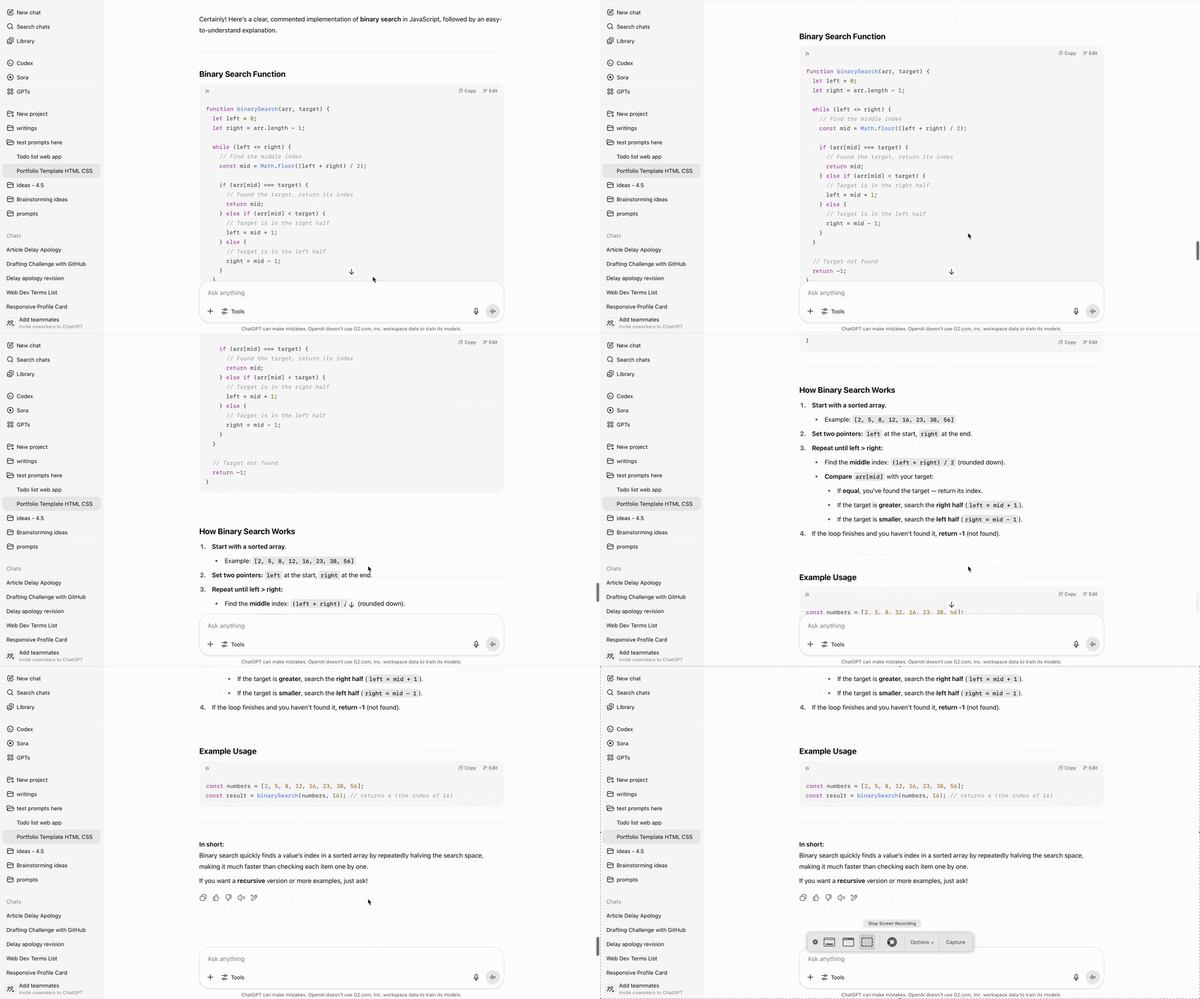
In contrast, the ChatGPT solution was also correct and easy to follow. The inline comments were helpful, making the logic easy to understand quickly. However, I felt the explanation was overly extensive and created unnecessary scrolling when I just wanted a quick reference.
Winner: GitHub Copilot
G2 user rating: Which AI coding assistant is best in terms of code quality?
GitHub Copilot: 8.5/10
ChatGPT: 8.5/10
Both GitHub Copilot and ChatGPT score identically on G2 for code quality, showing that users find both tools equally capable of generating clean, reliable, and maintainable code.
Take a look at the best AI code generators, my colleague Sudipto Paul personally tested and reviewed.
5. Weather dashboard
I wanted to build a small weather-themed UI as a beginner project, something simple, visual, and easy to customize later. I specified that the dashboard should show weather data for global locations, and asked for basic features like temperature, weather condition, and an icon representing the current weather.
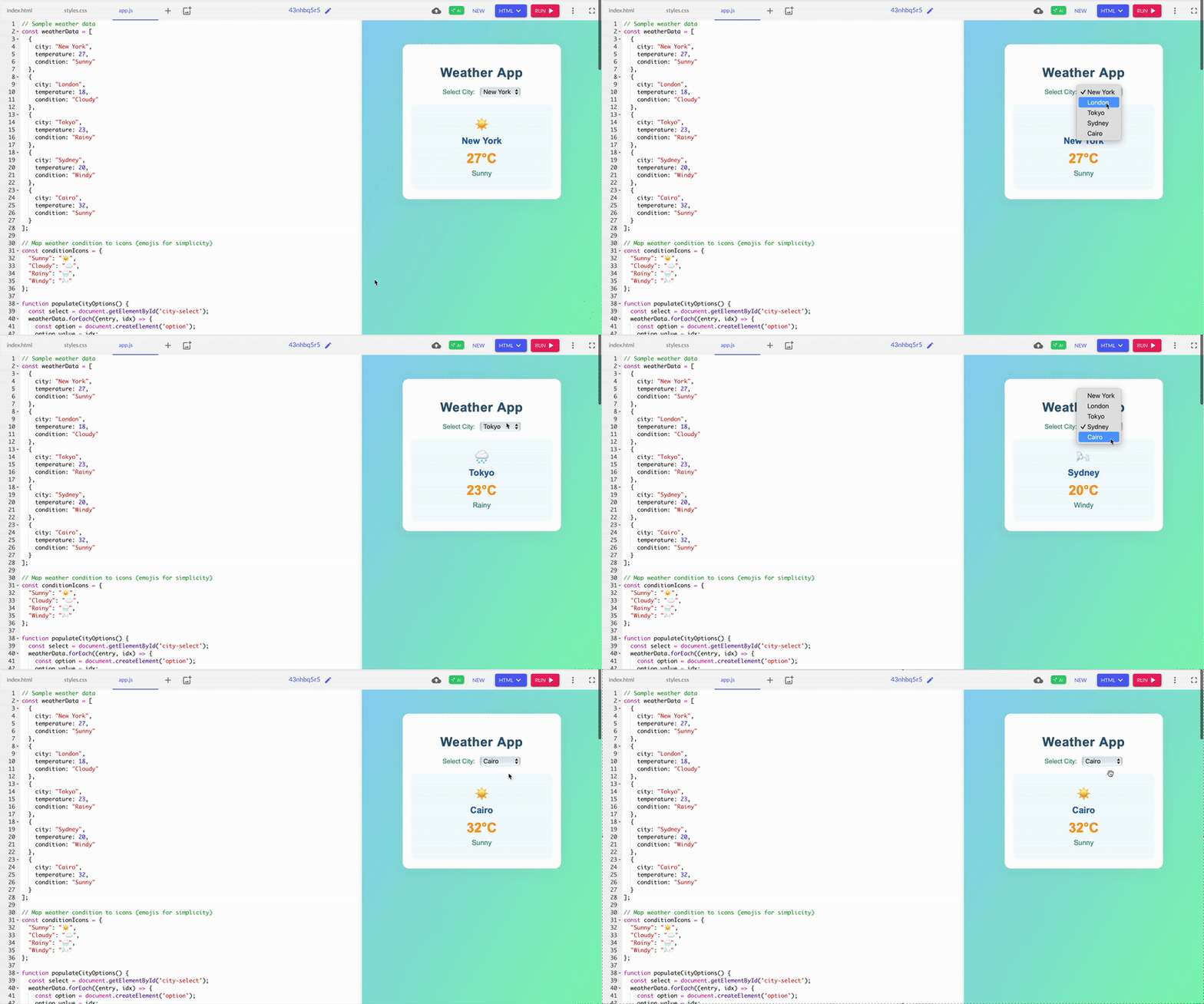
Like all the other responses, GitHub Copilot put HTML, CSS, and JS in separate files. It felt way cleaner, especially when I wanted to change colors or fonts. The design also has a gradient background, and weather emojis make it feel more polished.
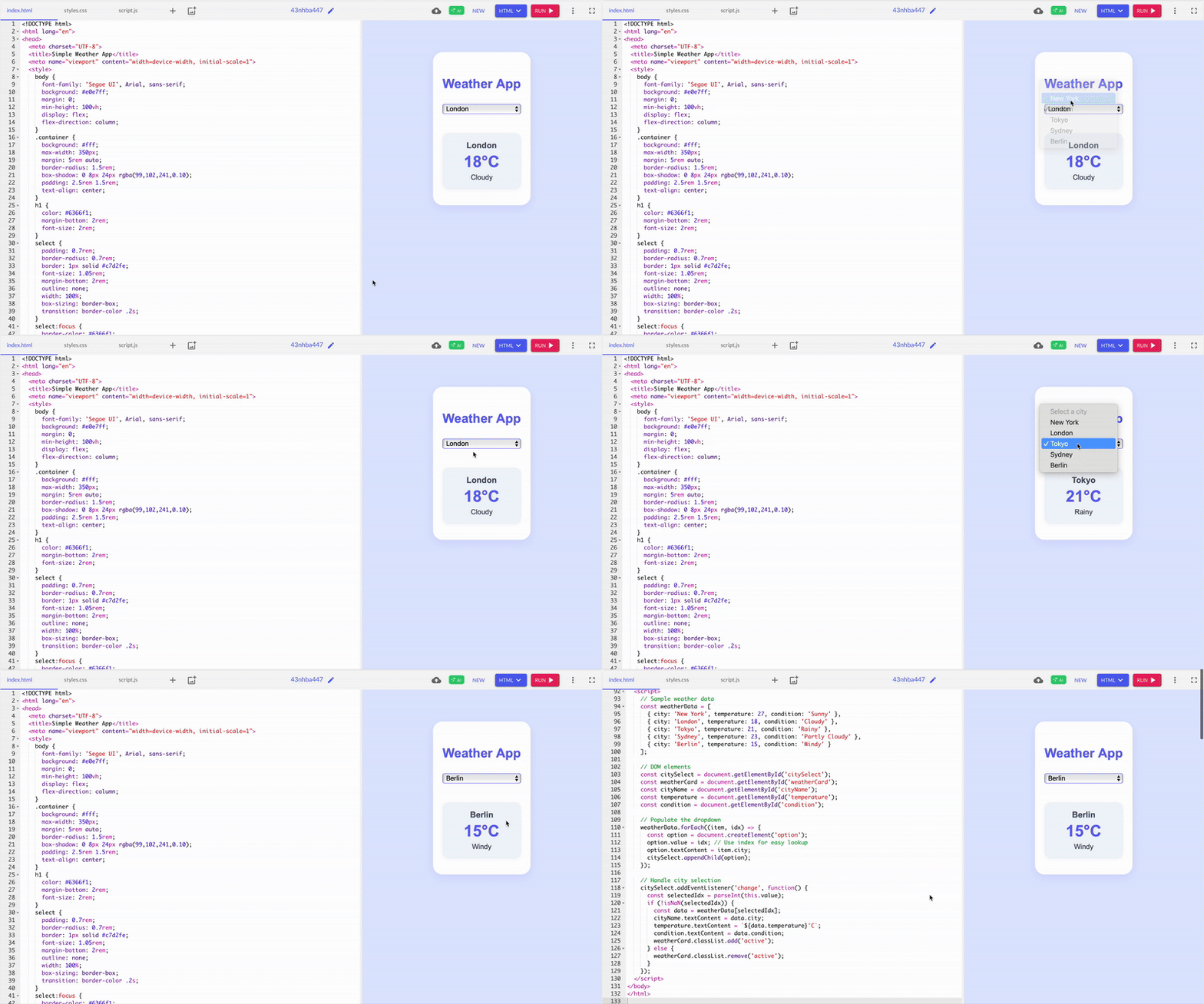
ChatGPT felt like opening a snack pack, just one HTML file to copy and open. It was easy to tweak, but finding style rules buried in the HTML was challenging. Still, it worked out of the box and didn’t break. The design was nice enough, with a pastel card layout that, while basic, looked decent.
Winner: Split; GitHub Copilot made future edits way easier, while ChatGPT made it easy to set up with just one code.
6. Inspirational quote generator
This time, I just wanted the tools to say nice things to me! Testing quote generators sounded like a chill way to explore tools. One nailed the vibe; the other one needed a pep talk.
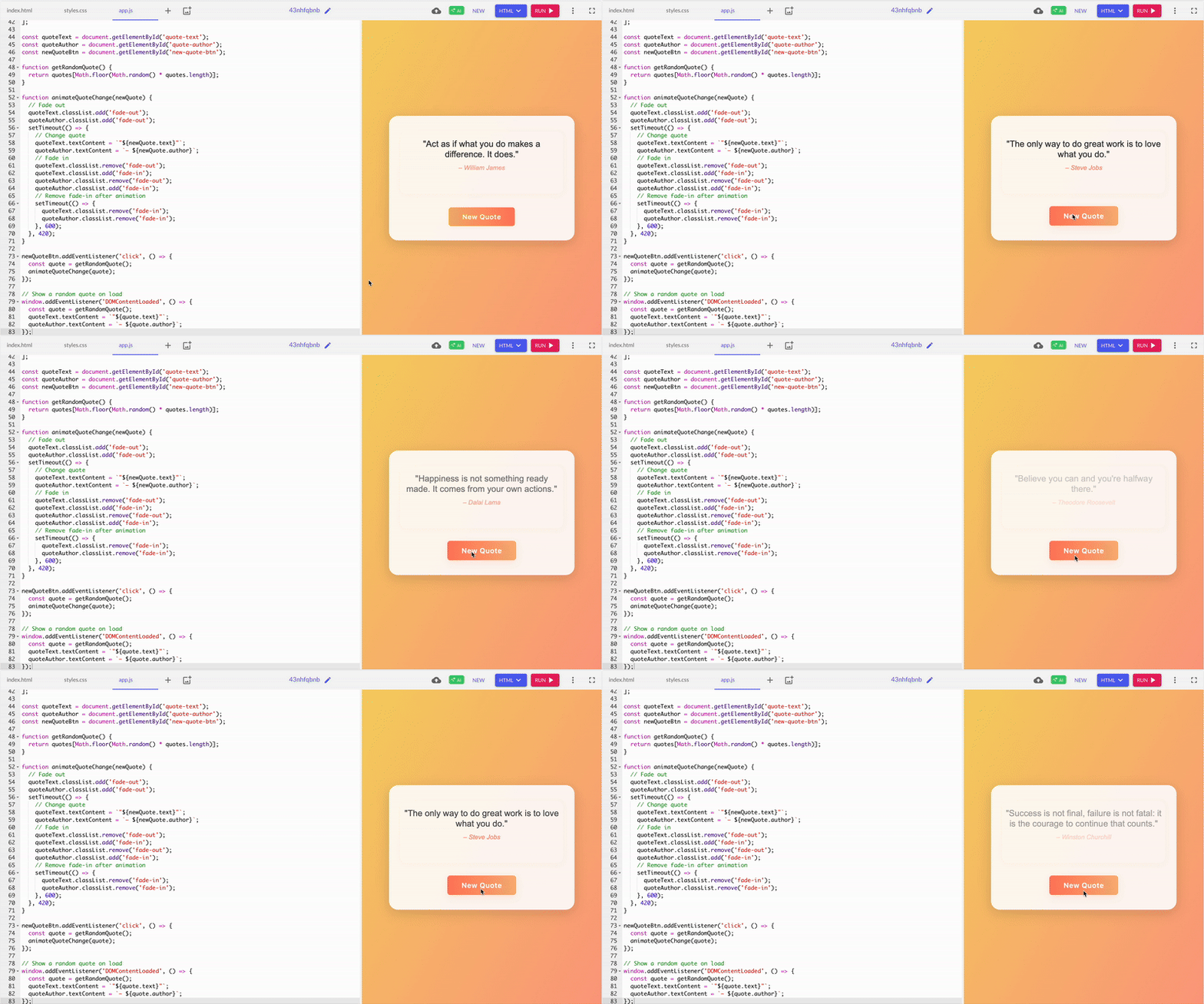
GitHub Copilot looked good with an orange gradient and strong shadows. Clicking worked well and added a nice fade effect, but sometimes, it repeated the exact quotes, which broke the experience a bit. So, for a beginner, ChatGPT made me smile faster.
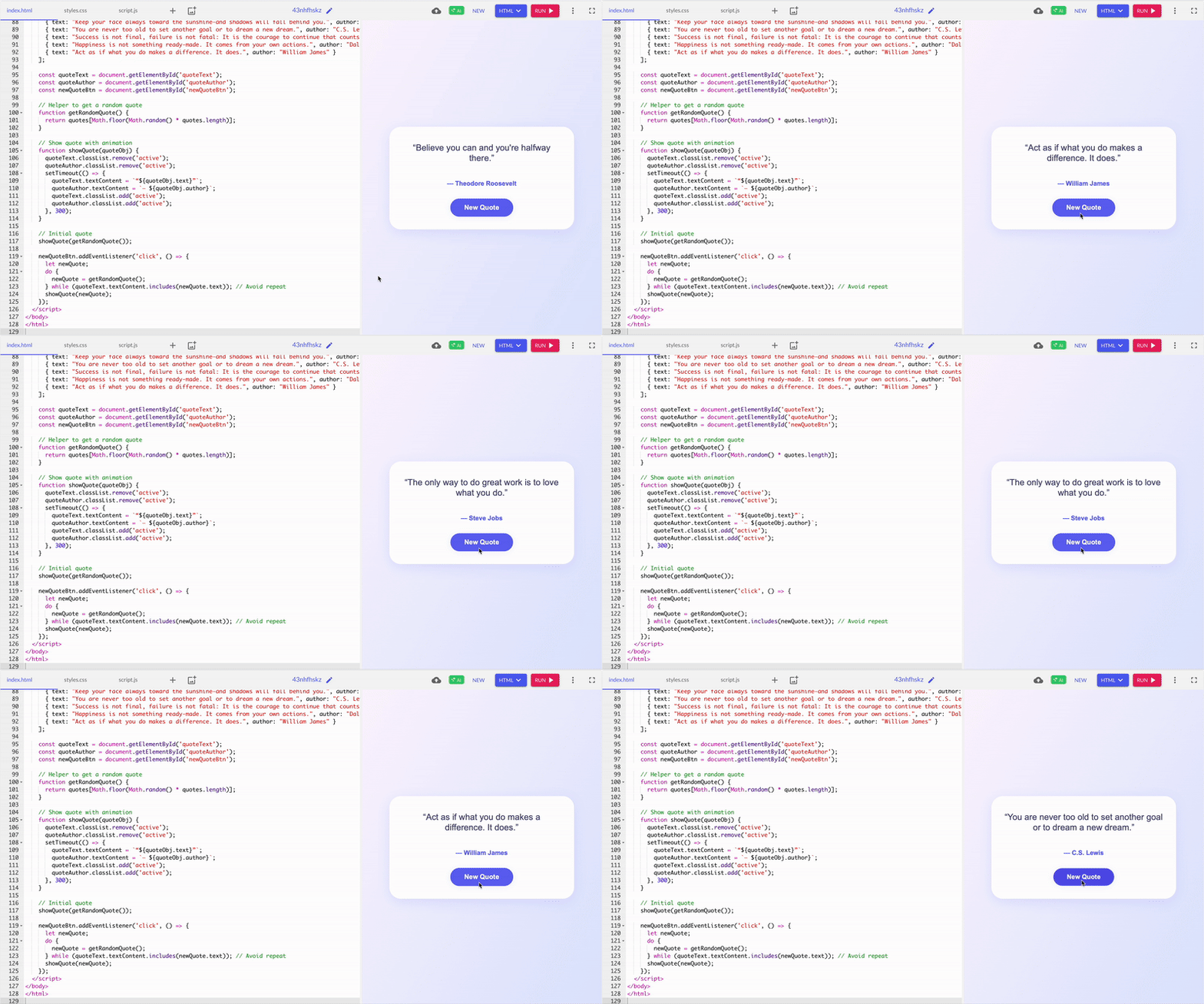
ChatGPT was ready to go the moment I entered the prompt. There are no missing links or blank screens; it works immediately. I liked the styling; it was clean, with soft colors, round edges, and smooth transitions. Also, there is no repetition of quotes.
Winner: ChatGPT
7. Color palette creator
After testing to-do lists, portfolios, and quote generation, I wanted to end with a little more fun: a color palette generator. I asked GitHub Copilot and ChatGPT to design a webpage that generates random aesthetic color palettes.
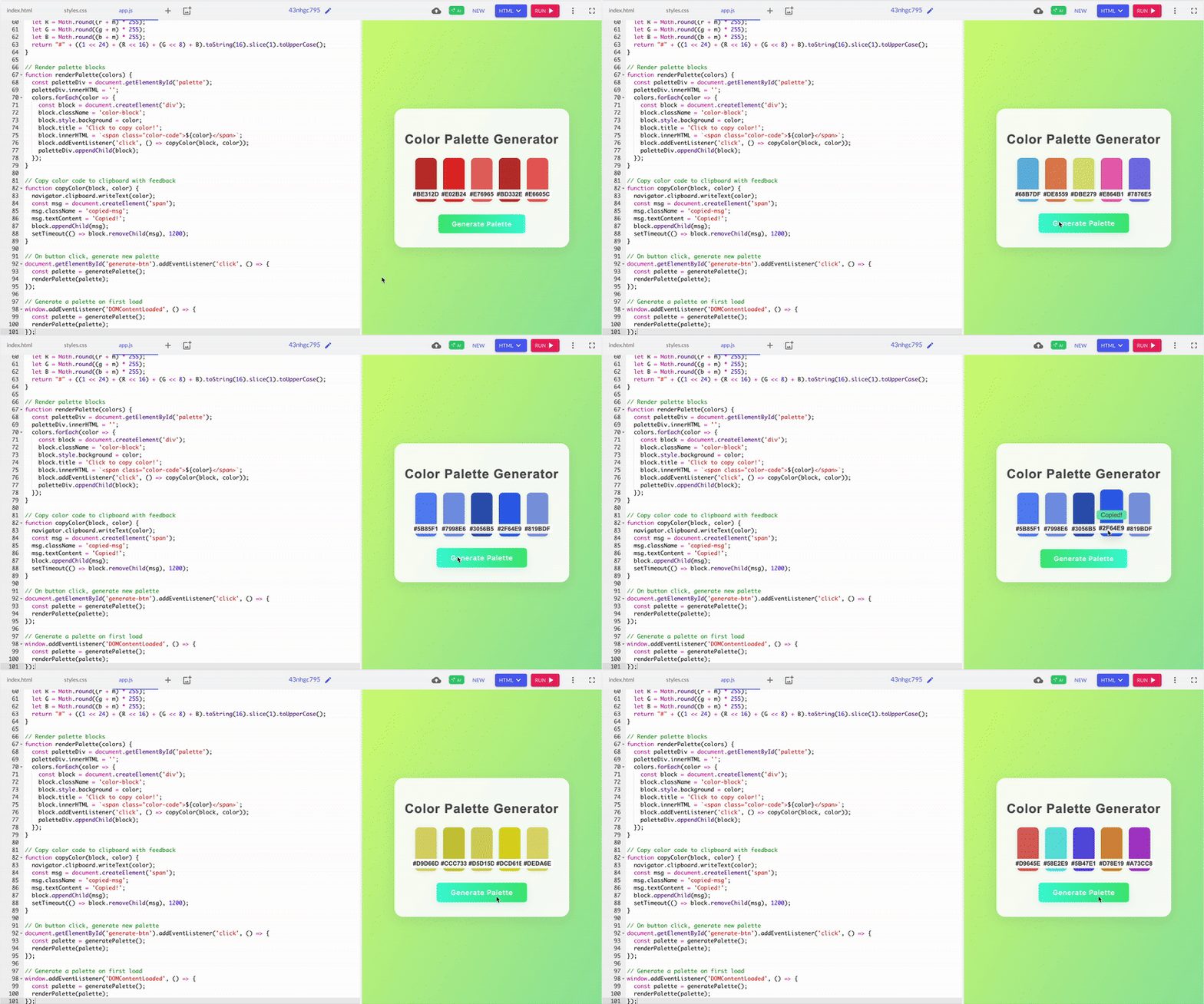
GitHub Copilot’s color palette was more monochrome than just random colors. This gave its output a sense of harmony as if the colors belonged to a theme or brand board rather than a truly random set. The background was also a calming green; the extra details made it feel more like a finished tool than a demo.
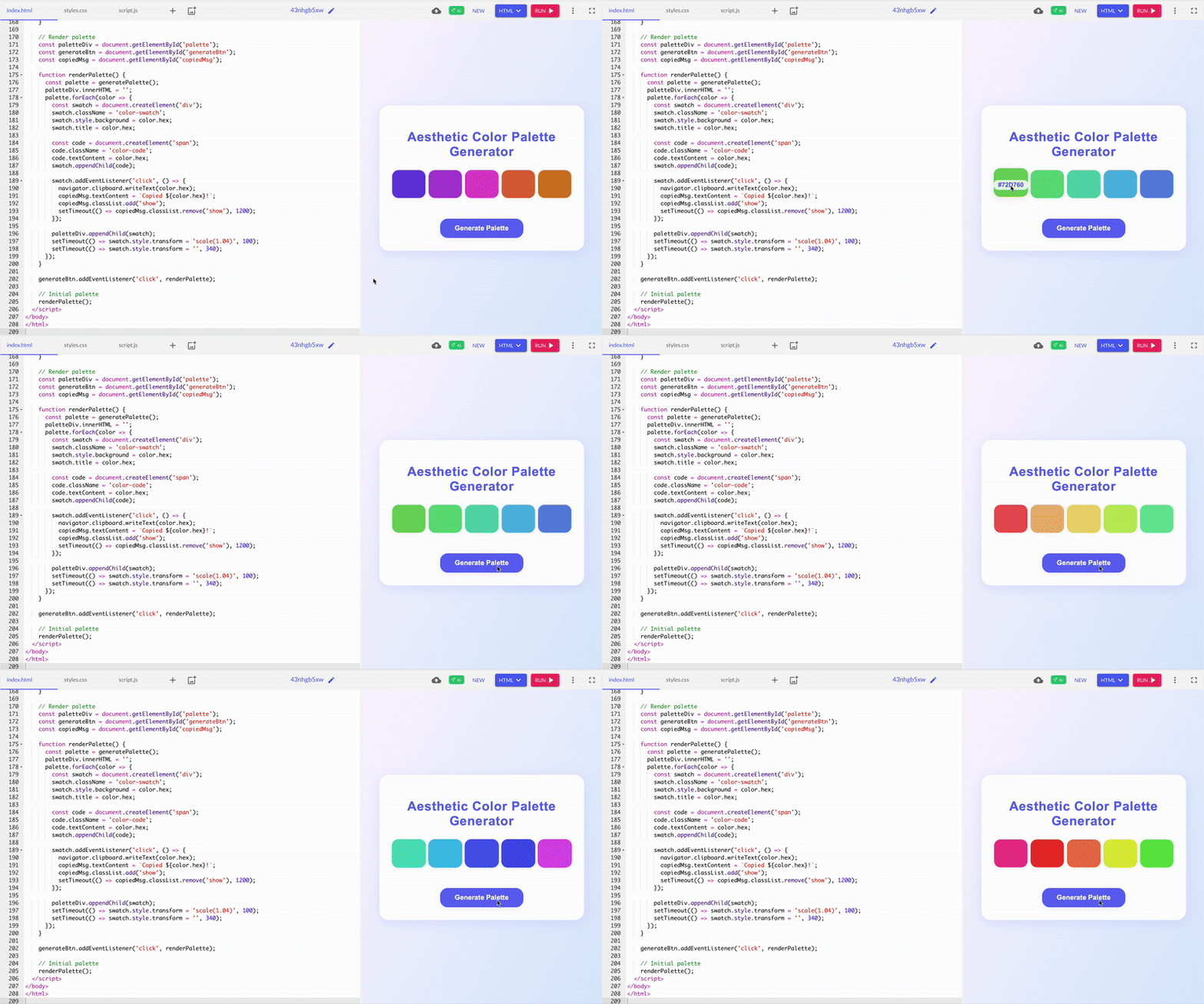
ChatGPT’s five color swatches looked nice. Each swatch had its HEX code clearly displayed, and clicking one instantly triggered a slick confirmation message, “#HEX copied!” that appeared at the center of the page. It is great for quick use or showing a friend.
Winner: GitHub Copilot
Here’s a summary of which chatbot won each task.
| Task | Winner | Why it won |
| To-do list web app | GitHub Copilot | Clear structure with separate files made it easier to manage and scale. |
|
Personal portfolio |
ChatGPT | ChatGPT included all key sections like project cards and worked perfectly out of the box. |
| JavaScript logical error | ChatGPT | ChatGPT’s clear and concise explanations made the fix easy for a beginner to understand. |
| Search algorithm | Github Copilot | GitHub Copilot has the same correct logic but is more compact and easier to reference. |
| Weather dashboard | Split | ChatGPT was quick to set up and worked instantly; GitHub Copilot offered a cleaner structure and a more polished design for future edits. |
| Inspirational quote generator | ChatGPT | ChatGPT showed a quote instantly with no repeats, and it felt more polished and satisfying. |
| Color palette creator | Github Copilot |