



Hiring the right people is tough. It’s even tougher when you’re relying on gut feel and a resume alone.
Between the buzzwords and endless pool of resumes, it’s not always easy to spot real talent. That’s why talent assessment tools are no longer just a nice-to-have, they’re essential for teams that want to hire smarter, faster, and more confidently.
I’ve spent the past few weeks testing some of the top-rated talent assessment tools to see which ones actually deliver. From AI-powered skill tests to role-specific cognitive assessments, I dug into what each tool offers, where it shines, and where it falls short.
I’m breaking down my top six picks for the best talent assessment tools in 2025. Whether you’re hiring developers, sales reps, or customer support pros, these tools can help you reduce bias, speed up screening, and ultimately make better hires.
6 best talent assessment tools for 2025: My top picks
- The Predictive Index for understanding workplace behaviors to optimize team dynamics and improve workforce engagement (Available on request)
- TestGorilla for facilitating pre-employment testing and enhancing the recruitment process with scientifically validated tests (Starts at $552 per month and varies based on company size)
- Equip for providing customizable assessments that improve talent acquisition and employee development strategies ($1 per candidate per month)
- Talent Science for using predictive analytics to match candidates to roles based on behavioral and cognitive fit (Available on request)
- HiPeople for candidate reference checking, using automation and data to enhance recruitment efficiency (Starts at $489 per month and varies based on company size)
- HiBob HRIS for for managing comprehensive HR functions, from talent acquisition and onboarding to performance and development (Available on request)
These best talent assessment tools are top-rated in their category, according to G2 Grid Reports. I’ve also added their monthly pricing to make comparisons easier for you.
6 best talent assessment tools I’d recommend
Hiring the right person shouldn’t feel like a shot in the dark. But without the right tools, it often is.
These platforms go beyond resumes and gut instinct to give you real, data-backed insights into a candidate’s skills, potential, and fit for the role. From cognitive tests to job simulations, they help you make more confident, consistent hiring decisions.
After trying out several tools firsthand and evaluating G2 user reviews for the rest, I’ve narrowed it down to six that really stood out, whether for their assessment variety, reporting capabilities, user experience, or customization options. Depending on your hiring goals, one of these might be exactly what your process needs.
Let’s take a closer look at the ones I’d actually recommend.
How did I find and evaluate these top talent assessment tools?
I spent weeks testing and evaluating talent assessment software, narrowing down the best options based on features, ease of use, pricing, and real user feedback. I also used AI-driven research to analyze software updates, recruiter preferences, and common hiring challenges to ensure these recommendations are as accurate and helpful as possible.
In cases where I couldn’t personally test a tool due to limited access, I consulted a professional with hands-on experience and validated their insights using verified G2 reviews. The screenshots featured in this article may be a mix of those captured during testing and ones obtained from the vendor’s G2 page.
Each tool on this list is reliable, intuitive, and designed to help businesses assess candidate skills, reduce bias, and make smarter hiring decisions. My research and analysis are also based on real-time buyer sentiments and the proprietary G2 scores each talent assessment software offers.
What makes the best talent assessment software worth it: my perspective
As I tested different talent assessment tools, I realized that evaluating candidates is about more than just checking off skill boxes. Some platforms gave me meaningful insights into how a candidate thinks and behaves, while others felt like generic quiz generators with little real-world value.
I learned that the best talent assessment software doesn’t just test people. It helps you understand them. Here are the features I paid close attention to while evaluating these tools:
- Role-specific and customizable assessments: Generic questions don’t cut it when you’re hiring for unique roles. I looked for tools that let you customize assessments by job type, industry, and seniority level. Some even offer question banks tailored to specific functions, sales, support, leadership, and more. Flexibility here was a huge plus.
- Cognitive and behavioral insights: Resumes rarely tell you how someone thinks under pressure or solves problems on the fly. I gave extra points to platforms that go beyond surface-level skills assessment and assess cognitive ability, personality traits, and work style. These are the kinds of insights that help predict long-term success.
- Candidate experience: A clunky or overly complex test can drive great candidates away. I looked closely at how intuitive and mobile-friendly the test-taking experience was. The best tools were clear, concise, and respectful of the candidate’s time, without sacrificing depth.
- Real-time reporting and scoring: Instant access to results matters, especially when hiring at scale. I prioritized tools with dashboards that made it easy to compare scores, flag stand out candidates, and share results with hiring managers. Bonus if it visualized strengths and gaps in a way that was easy to act on.
- ATS integrations and workflow fit: I didn’t want a tool that felt like a silo. Seamless integrations with applicant tracking systems (ATS) were key, especially for syncing candidate results automatically and avoiding manual data entry. The smoother it fit into the hiring workflow, the better. Learning how to make your resume ATS friendly is also key.
- Validation and fairness: Finally, I paid attention to whether each tool offered science-backed assessments that were regularly validated for fairness. Bias in hiring is real, and tools that take steps to minimize it through standardized testing and inclusive design got a big thumbs-up from me.
Over the span of several weeks, I researched and tried close to 20+ talent assessment software. I narrowed down the best six based on their features and ease of use.
To be included in this category, a solution must:
- Provide tools that test candidates’ aptitude, personality, behavior, and skills
- Include reporting tools that sort, compare, and analyze candidate results
- Integrate with ATS solutions for easy results management
*This data was pulled from G2 in 2025. Some reviews may have been edited for clarity.
1. The Predictive Index
The Predictive Index is more than just a hiring tool. It’s a full-spectrum platform that gives teams a deeper understanding of how people work, communicate, and fit into a role or team. What really came through in the feedback was how consistently users mentioned ease of use and the accuracy of insights as big wins.
The interface itself is something users seemed to genuinely enjoy. It’s simple, clean, and easy to navigate even for people who aren’t super tech-savvy. I saw a lot of feedback highlighting the user-friendliness of the portal, especially when it comes to sending out assessments or reviewing reports. One person even described it as straightforward and intuitive, and that sentiment echoed across multiple reviews.
What really impressed me, though, was how many users talked about the accuracy of the behavioral assessments. Hiring managers especially appreciate how The Predictive Index helped them match candidates to roles more effectively. It wasn’t just about scoring people, it was about making informed choices. Several users said they rely on the platform to streamline the hiring process and build teams that actually work well together.
And it’s not just about hiring. I noticed a big theme around team development too. Users shared that the platform helps with understanding how team members collaborate, communicate, and even clash. Tools like relationship guides and interview templates were called out for being genuinely helpful, especially when onboarding new employees or navigating team dynamics.
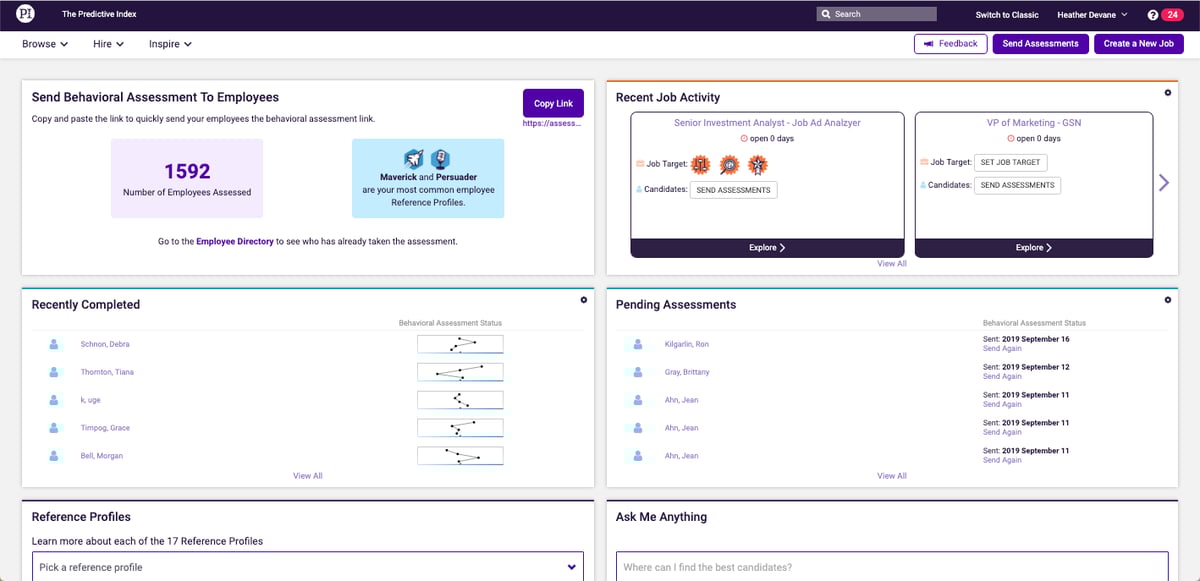
Apart from this, a number of users mentioned minor technical hiccups, like occasional slow loading speeds or laggy navigation on the portal. Others found report generation a bit clunky, especially when trying to pull data for multiple candidates or teams. Some users also had trouble with assessment delivery, noting cases where both assessments (behavioral and cognitive) were sent at once, which wasn’t ideal.
On a more nuanced level, a few users felt that the training curve was steep, particularly when trying to interpret the data in a meaningful way. While the platform is simple to use, understanding what to do with all that information sometimes took extra guidance.
There were also requests for more customization, like refined user permissions or more tailored reports as well as calls for a mobile app and additional features like technical skill testing. One user even mentioned wanting cognitive reports integrated directly into the report kits, which seems like a reasonable ask for a more cohesive experience.
That said, The Predictive Index is a strong platform that delivers real value, especially when it comes to hiring and team building. It’s easy to use, the insights are meaningful, and the support is solid. Just be prepared for a bit of a learning curve.
What I like about The Predictive Index:
- A lot of people raved about how accurate the behavioral reports are. They felt these reports gave them a clearer picture of candidates’ working styles, strengths, and potential red flags.
- Several users said they rely on The Predictive Index not just for hiring, but for improving team communication and collaboration.
What G2 users like about The Predictive Index:
“Predictive Index is the best! It is so easy to use and has been essential for building our team starting with Design to figure out what kind of team we were to using it to identify who/where we needed to hire. Kat and the PI team were so helpful in getting our team set up on how to use PI. Once we got rolling, it was so easy to use. Hire has been our biggest flex of the year in our hiring process. It not only makes the hiring process a breeze and helps identify the most qualified candidates, it also provides amazing questions to use during the interview process. Additionally, Inspire has helped our team learn how to communicate with one another better and grow both individually and as a team. There has not been a day in the last year where I haven’t either referred to PI or accessed it!”
– The Predictive Index Review, Megan P.
What I dislike about The Predictive Index:
- There’s a bit of a learning curve. Some users mentioned that it takes time to fully understand how to interpret and apply the results effectively.
- Few reviewers called out frustrations with downloading or accessing certain reports. It’s a small thing, but when you’re in a hiring sprint, it adds friction.
What G2 users dislike about The Predictive Index:
“It is a little clunky to run/send/download reports for a group of participants. Some of the reports are too similarly named, causing confusion for users (“Management Development Report” and “Management Strategy Guide” for example…”Placard” isn’t a useful title either). Personal and Management Development Guides are essentially the same, duplicative and confusing.”
– The Predictive Index Review, Jinnie Lee S.
2. TestGorilla
From the reviews I’ve gone through, it’s clear that TestGorilla hits the mark in key areas and it’s built real momentum, especially with hiring teams looking for a smarter, more efficient way to screen candidates.
Let’s start with what users consistently appreciated: the ease of use. This came up again and again. Setting up assessments, inviting candidates, and viewing results all felt straightforward and intuitive for most people. Whether you’re sending out one test or managing a batch of applicants, the interface makes it feel like less of a chore.
The test library is another standout. Users love how many options are available—from personality tests and cognitive ability assessments to more technical challenges like coding tasks and language proficiency. And there’s flexibility, too. You can build custom assessments, tailor them to different roles, and even add things like custom SQL questions for more specialized screening. It’s especially helpful for teams hiring across a range of departments.
Something else that stood out? The free version. Several users called it out as a great way to get started, particularly for small teams or startups. It includes enough functionality to run real hiring workflows, which is rare these days. That said, more on the limitations in a bit.

I also saw positive mentions about the candidate experience. TestGorilla doesn’t just work well for recruiters, it’s smooth for applicants too. Most users felt that candidates could easily navigate the platform, complete assessments without friction, and receive clear instructions along the way. A few even said it helped them reduce bias, thanks to the structured format and objective scoring.
One of the biggest areas of friction? Pricing. A lot of users felt that the paid tiers are expensive, especially for small businesses or teams that hire infrequently. Some wished for a credit-based model rather than a recurring subscription.
There’s also a bit of a divide on customization. While many liked the ability to build custom tests, others wanted more control over branding, test formats, or tailoring questions for niche roles. A few noted that email invites and reports carried TestGorilla branding, which wasn’t ideal for companies wanting a fully white-labeled experience.
Reporting was another theme. While results are available quickly, several users said they wanted more detailed breakdowns, especially when comparing candidates across a large pool. Batch reporting and more advanced analytics came up as wishlist items.
TestGorilla does a lot right, especially for teams looking to add structure and objectivity to their hiring process. It’s easy to use, offers a wide range of tests, and gives you the ability to screen candidates faster without relying solely on gut feel.
What I like about TestGorilla:
- Over and over, users said the platform is clean, intuitive, and simple to navigate. I kept seeing phrases like user-friendly and easy to set up, which tells me it doesn’t take a ton of effort to get up and running, even for non-tech folks.
- A lot of users really appreciated the large test library. From cognitive skills and personality to software-specific tasks, the flexibility to pick and mix different assessments based on role needs came up again and again.
What G2 users like about TestGorilla:
“TestGorilla is an excellent platform for streamlining the hiring process! The site is incredibly intuitive and easy to use, making it simple to set up assessments and send links to participants. The wide variety of tests available allows for a comprehensive evaluation of both soft and hard skills, ensuring that candidates are properly assessed for the role.
The scoring system is accurate and insightful, saving me a ton of time in ranking candidates. Most importantly, it gave me confidence that I was only speaking to truly qualified individuals during interviews. If you’re looking to make smarter hiring decisions while cutting down on manual screening, TestGorilla is a game-changer! Highly recommend!“
– TestGorilla Review, Cheena Sarah N.
What I dislike about TestGorilla:
- There were quite a few mentions of wanting more control like editing test formats, changing time limits, or managing user permissions more flexibly.
- Plenty of users on the free or starter version felt restricted. Whether it was limits on the number of assessments or access to features, the free plan didn’t offer as much as some teams hoped.
What G2 users dislike about TestGorilla:
“Tried using it as part of company recruiting processes, including screening and skills questionnaires. You can’t get rid of the Test Gorilla branding, which is terrible. The service is always remarketing itself to your end users, which is terrible. The email invites always get flagged as spam, which is terrible. When integrated with Greenhouse, it only returned summary scores, not the individual answers. Not very useful. And, it’s expensive. Replaced it with Microsoft Forms and a Power Automate for 1/10 the annual license fee.”
– TestGorilla Review, Karl L.
3. Equip
Equip strikes a solid balance between simplicity and functionality. It’s not trying to be everything, but what it does offer, it delivers cleanly and efficiently.
The most common thing people raved about? How user-friendly the interface is. Equip’s design is clean, structured, and honestly relaxing to work with. The layout is intuitive, the learning curve is minimal.
Another standout is the demo test feature. Users loved having the ability to preview the format, sections, and question types before diving into the real thing. It’s especially helpful for reducing candidate anxiety, no surprises, no confusion, just a smooth experience.
On the security side, Equip leans hard into AI proctoring features. Face detection, noise detection, screen and camera monitoring, it’s all there. Multiple users called out how Equip generates