



As a civil engineering student, I loved environmental sciences. We spent a lot of time outdoors, and when we weren’t, we were in the lab conducting interesting tests, mostly on water and soil samples.During one visit to a testing lab, I wondered how every sample was handled so efficiently — how it was sent to the right testing stations, kept safe from contamination, and tracked for accurate results. Curious, I asked my professor, who introduced me to the best laboratory information management system (LIMS) software. A week later, I was using one of these tools to manage soil samples for my entire batch!
That experience showed me how the best LIMS software makes lab work much easier. It helps track samples, keeps data secure, and ensures everything runs smoothly. Over time, I’ve learned what labs need most from these tools, like accuracy, efficiency, and seamless integration with lab equipment.
Now, as a writer who also reviews software on G2, I’ve combined my own experience and analyzed user reviews on G2 to create this list of the best LIMS software. Read on to find the right one for your lab. Let’s get started!
7 best LIMS software: My picks for 2025
- STARLIMS: Best for regulated, end-to-end data management
For labs that need validated workflows, audit trails, and multi-industry compliance (GxP, ISO) with enterprise integrations. - QBench: Best for simple, flexible LIMS configuration ($300/user/mo)
For teams that want quick setup, custom fields/workflows, and easy API integrations without heavy admin overhead. -
Thermo Scientific SampleManager: Best for complex labs needing automation
For high-throughput environments that require instrument connectivity, scheduling, and advanced workflow orchestration. - Labguru ELN LIMS: Best for research teams combining ELN + LIMS
For R&D groups that want protocols, inventory, and sample tracking in one place to speed experiments and collaboration. - Genemod: Best for intuitive workflows in molecular biology and genomics
For teams managing plasmids, sequences, reagents, and sample lineage with clean UI and collaboration tools. - LabWare LIMS: Best for large, diverse labs that need scalability
For enterprises standardizing across sites with configurable modules, complex permissions, and robust reporting. - CloudLIMS: Best for cloud-native LIMS with real-time sample tracking ($162/user/mo)
For labs prioritizing quick deployment, browser access, and straightforward integrations without on-prem infrastructure.
* These LIMS software are top-rated in their category, according to G2’s Fall 2025 Grid Report. Pricing for these products is available upon request, except for those I’ve already included the details.
Did you know? The global laboratory information management system (LIMS) market was valued at USD 2.44 billion in 2024 and is expected to reach USD 3.56 billion by 2030, expanding at a compound annual growth rate (CAGR) of 6.22% between 2025 and 2030.
My top 7 best LIMS software recommendations for 2025
LIMS software helped me efficiently manage and track laboratory samples, ensuring accurate data collection and analysis.
The best LIMS software went beyond traditional record-keeping, automating workflows, minimizing human error, and integrating seamlessly with lab equipment. It became an indispensable tool in my daily work by streamlining lab processes and making research more manageable.
When I first started working in a lab, managing samples and data felt overwhelming. I spent hours tracking down information, sorting through paper records, and ensuring everything was in the right place. Once I started using LIMS software, sample management became far easier and faster. It helped me stay organized, ensured accuracy and freed up time for more critical tasks like data analysis. These tools not only made my work more efficient but also improved the overall quality of my research.
In this article, I’ll share my personal picks for the best LIMS software in 2025. I’ve evaluated each tool and will highlight what made them stand out and how they helped me tackle common lab challenges.
How did I find and evaluate the best LIMS software?
I evaluated the best LIMS software extensively to manage and track laboratory samples, automate lab workflows, and assess its efficiency in ensuring accurate data collection and analysis.
To enhance my understanding, I also spoke with laboratory professionals to learn about their needs and challenges in sample management. I used AI to analyze user feedback and reviews on G2 and G2’s Grid Reports to gain further insights into each tool’s features, ease of use, and overall value.
By combining hands-on evaluations with expert feedback and user reviews, I’ve compiled a list of the best LIMS software to help you select the right one for your lab’s needs.
What I look for in LIMS software
When evaluating various LIMS solutions, I focused on a few key factors to evaluate how well they address the complex needs of modern laboratories. Here’s a breakdown of the aspects I paid attention to when selecting the best LIMS software:
- Sample tracking: In my evaluation, LIMS systems that offered precise sample tracking using unique identifiers like barcodes, radio frequency identification (RFID) tags, or QR codes consistently performed the best. These identifiers were integrated seamlessly across all stages of the sample lifecycle — from collection and preparation to testing and analysis. The ability to track samples provided transparency, ensuring I could always monitor their status from receipt to final analysis. Mobile app integrations were also a great bonus, allowing laboratory staff to quickly scan identifiers in the field or at remote locations, enhancing flexibility and speed.
- Chain of custody: I expected LIMS to offer real-time updates on sample location, status, and chain of custody, and the best LIMS in my evaluation set met this expectation. Real-time tracking capabilities were crucial for preventing accidental sample contamination or misplacement. One standout feature was the ability to receive alerts if a sample was misplaced or not processed on time. I also appreciated the integration with laboratory instruments for automatic electronic data capture, which enhanced the accuracy of sample tracking by eliminating manual entry errors.
- Compliance management: LIMS systems that offered detailed audit trail functionality stood out during my evaluation. These audit trails captured every action performed on sample data, whether it was data entry, modifications, approvals, or result generation. This ensured full traceability, which is essential for compliance with standards like FDA 21 CFR Part 11, ISO 17025, and Good Laboratory Practice (GLP). I particularly liked the secure, read-only access to historical data, which prevented unauthorized changes. Role-based access control (RBAC) was another feature I valued, as it restricted sensitive data access and modifications to authorized users only. Electronic signatures for data approval were also a key feature, giving me confidence in the integrity of the data throughout its lifecycle.
- Automation and workflow optimization: I found that LIMS systems with customizable workflows were essential for streamlining laboratory processes, such as sample logging, test scheduling, approval routing, and result generation. This flexibility allowed me to tailor workflows to meet the lab’s specific needs, reducing human error and ensuring tasks were completed on time. Automated triggers for notifications, such as alerts for out-of-range results, were also very useful. More advanced systems could dynamically assign tasks based on factors like technician availability or test priority, which helped further optimize efficiency and reduce bottlenecks in the lab’s operations.
- Data analytics and reporting tools: The systems that stood out for me were those with built-in analytics tools for real-time trend analysis, data visualization, and statistical analysis. These features allowed me to monitor lab performance and ensure quality control. I could quickly identify trends, detect anomalies, and make data-driven decisions based on those insights. I also valued customizable report templates that made it easy to generate comprehensive reports, including test results, sample history, and compliance documentation. The ability to export data in formats like CSV, PDF, Excel, and XML made sharing and further analysis a breeze.
- Security and data privacy: Ensuring the security and privacy of sensitive data was a non-negotiable priority in my evaluation. I focused on LIMS systems with robust encryption for data in transit and at rest, providing an added layer of protection. The best systems also implemented two-factor authentication (2FA) and Single Sign-On (SSO) to enhance user account security while streamlining the login process. I also valued granular RBAC functionality, which ensured that only authorized personnel could access or modify specific data. The audit trail, which captured every action within the system, further ensured compliance with regulatory guidelines, providing peace of mind knowing that the data was protected from unauthorized access.
The list below contains genuine user reviews from our best LIMS software category page. To qualify for inclusion in the category, a product must:
- Track and manage the data associated with samples, tests, and results
- Be customizable to meet the needs of different types of laboratories, laboratory staff, and clients
- Support data sharing between the lab, instruments, and associated facilities
This data was pulled from G2 in 2025. Some reviews have been edited for clarity.
1. STARLIMS: Best for regulated, end-to-end data
Based on my review of G2 user feedback, STARLIMS stands out as a comprehensive laboratory information management system (LIMS) that supports the full spectrum of lab operations. Many reviewers describe it not just as a tool, but as a complete ecosystem that integrates various workflows across a lab’s lifecycle.
One feature that I see getting a lot of praise is sample lifecycle management. From what I’ve read, users value how STARLIMS tracks each step, from collection and processing to storage and archival, with precision and clarity. This is especially important in regulated environments, where accuracy and traceability are non-negotiable.
Looking at broader review trends, I can see recurring appreciation for the platform’s scalability. According to G2 users, STARLIMS adapts well to different lab sizes and needs, whether you’re running a small research facility or a high-throughput testing operation. The ability to scale without major system overhauls is often cited as a key advantage for long-term growth.
Across multiple reviews, I’ve noticed users highlight the platform’s ability to bridge research and quality control processes. This transition from development to manufacturing workflows is seen as a major benefit, particularly in pharma and biotech sectors where reducing time-to-market can have a significant impact.
Something G2 reviewers seem to really appreciate is the reporting and analytics capability. Users consistently mention that STARLIMS goes beyond basic reporting by offering deep insights that support informed decision-making. Many also commend its ability to automate compliance documentation and align with FDA and ISO standards, helping streamline audit processes.
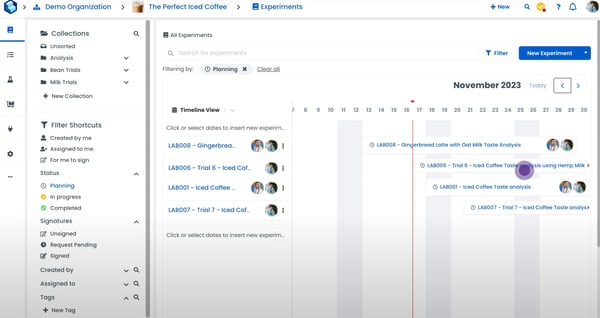
The SDMS is highly precise, which helps maintain data accuracy. Some G2 reviewers mention that this precision can make it overly sensitive to formatting discrepancies in instrument files, leading to longer troubleshooting times. Many teams streamline workflows by standardizing file templates and validation checks to minimize friction.
Going digital with ELN is a major advantage for documentation. However, G2 users note that issue resolution within the ELN can be slow during critical moments, occasionally disrupting productivity. Teams that build internal SOPs and maintain clear escalation paths generally see smoother performance.
Manual entry functions reliably for most workloads. G2 feedback indicates that under heavy data volumes, the results entry module can slow down, creating temporary throughput bottlenecks. Optimizing batch uploads and archiving inactive data typically restores responsiveness.
The platform’s feature breadth is a clear strength. Yet, new users often describe a steep learning curve, particularly in SDMS and ELN modules. G2 reviewers recommend structured onboarding, training programs, and gradual module adoption to unlock the platform’s full potential.
Rated 4.5/5 on G2, G2 reviewers consistently highlight the STARLIMS robustness, data integrity, and compliance-readiness as key benefits. With thoughtful onboarding, standardized workflows, and resource planning, most teams transform initial complexity into long-term operational strength.
What I like about STARLIMS:
- From what I’ve seen in G2 reviews, I really appreciate how STARLIMS offers seamless sample lifecycle management, ensuring efficient and accurate data collection and transcription processes. This is crucial in maintaining precision in lab environments.
- Another feature I’ve noticed that G2 reviewers frequently praise is STARLIMS’ scalability. It’s impressive how it can handle hundreds to millions of samples, making it a solid, long-term solution for labs expecting growth without needing major overhauls.
What G2 users like about STARLIMS:
“STARLIMS offers robust data management capabilities, enabling centralized storage, quick retrieval, and efficient analysis of experimental data. Its comprehensive audit trail function allows users to trace and record the source, processing steps, and results of samples, ensuring the reliability and traceability of the data.”
– STARLIMS Review, Xueyan Z.
What I dislike about STARLIMS:
- STARLIMS scales well across sites. Some G2 users report that initial setup can feel heavy without dedicated IT; most labs smooth this with a vendor-guided rollout, baseline templates, and phased module activation.
- The platform’s breadth is a strength. G2 reviewers note certain features take time to master, especially for teams new to advanced systems; role-based training and quick-start SOPs typically shorten the time taken to get the hang of the tool.
What G2 users dislike about STARLIMS:
“The SSL language is quite limited, offering only basic functionality with very few system features. Additionally, there is a lack of detailed and up-to-date documentation for these functions, making it difficult for users to fully utilize the system.”
– STARLIMS Review, Soy H.
2. QBench: Best for simple, flexible LIMS configuration
Based on my review of G2 user feedback, QBench consistently earns praise for its fast and straightforward setup process. Many reviewers highlight how the platform is easy to get up and running without lengthy onboarding or complex configurations. That simplicity seems to be a welcome change for labs used to more cumbersome LIMS implementations.
One standout capability, according to users, is workflow automation and order tracking. I frequently see G2 reviewers highlight how the system enables real-time monitoring of orders, samples, and test progress. The no-code automation tools are especially well-received, helping labs eliminate repetitive manual tasks and streamline operations — without needing a developer on hand.
A commonly appreciated element is QBench’s flexibility in sample tracking. From what I’ve seen, users value its support for custom fields, which allows teams to tailor the system to their own workflows. This adaptability is cited as a key reason labs across different industries choose QBench over more rigid alternatives.
Something G2 reviewers seem to really appreciate is the platform’s bulk reporting tools. Many users mention how reusable templates simplify the process of generating high-volume reports. This appears to be a huge time-saver for labs with fast turnaround requirements, especially when accuracy and consistency are critical.
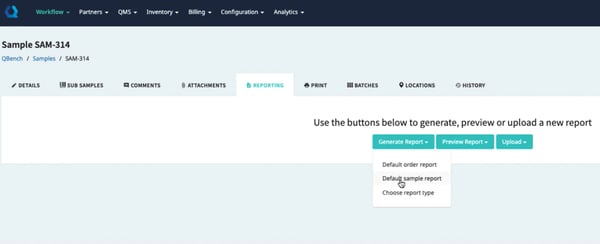
QBench’s quick-find and dropdown suggestions make locating records fast once you know the flow. Some G2 reviewers note that pressing Enter after typing a sample number can redirect unexpectedly, which disrupts new users; most sidestep it by selecting from the suggestions or using saved searches.
Out-of-the-box filters like Today and This Week cover common ranges. G2 users would like added options (e.g., Tomorrow) and flag occasional late-night date rollovers that can misplace entries; labs typically standardize shift cutoffs and use custom views to keep timelines clear. Spreadsheet-friendly teams adapt quickly to QBench’s exports and tabular edits. For users without Excel experience, G2 feedback mentions a short learning curve and occasional workarounds for niche workflows; starter templates and brief enablement sessions usually close the gap.
With an overall rating of 4.5/5, G2 reviewers consistently describe QBench as powerful and dependable after initial configuration.
What I like about QBench:
- I’ve noticed that G2 reviewers consistently praise QBench for its fast and straightforward setup, making it an attractive option for labs seeking a quick, hassle-free implementation compared to more complex LIMS systems.
- From the feedback I’ve gathered, users often highlight QBench’s workflow automation and order tracking, especially the no-code automation tools, which significantly streamline operations and reduce the need for manual tasks.
What G2 users like about QBench:
“We’ve been using QBench for about 8 years, and it has proven to be a modern, modular, and highly customizable LIMS. It offers our laboratory the flexibility to adapt to the ever-changing requirements set by regulatory bodies and our customers. Its robust APIs, responsive local customer service team, and reasonable, scalable cost structure make it a great choice for our needs.”
– QBench Review, Zachary E.
What I dislike about QBench:
- Quick-find and dropdown suggestions make lookups fast once you know the flow. Some G2 users note that pressing Enter after a sample number can trigger an unexpected redirect; selecting from suggestions or using saved searches avoids the disruption.
- Built-in ranges like Today/This Week cover common needs. Reviews point to missing options (e.g., Tomorrow) and occasional late-night rollovers that misplace entries; teams typically set shift cutoffs and use custom views to keep timelines clear.
What G2 users dislike about QBench:
“There is a learning curve, and prior experience with Excel or VBA is very helpful for developing the mindset needed to fully utilize the software’s strengths. If your processes are already well-documented, the software can assist in implementing them, which helps reduce the workload for administrators.”
– QBench Review, Aaron R.
3. Thermo Scientific SampleManager: Best for complex labs needing automation
Thermo Scientific SampleManager is frequently described by G2 reviewers as a robust laboratory information management system (LIMS) that offers powerful data analytics through pre-configured dashboards. These dashboards are interactive and present key lab metrics, such as resource availability, inventory status, and performance indicators, in a user-friendly way. From what I’ve read, users consistently praise how easy it is to extract insights without needing to dig too deeply into the data.
Another commonly appreciated element is the deployment flexibility. According to feedback I gathered from G2 users, the option to deploy either on-premises or in the cloud gives labs more control over infrastructure decisions. Many find this useful for balancing IT costs and system security, with cloud deployment offering added benefits like disaster recovery and reduced hardware dependency.
One standout capability, based on several reviews, is the Laboratory Execution System (LES). G2 users report that LES provides clear, step-by-step process guidance that helps ensure SOP compliance. I’ve also seen reviewers mention how well the system manages training records, allowing labs to assign and track training by role and enforce access controls to maintain compliance before tests or equipment usage.
I frequently see G2 reviewers highlight SampleManager’s traceability features, especially how it captures actions and process history. Reviewers say this visibility makes audits and process reviews much easier. In addition, the contract lab portal receives positive attention for simplifying quote, sample, label, and invoice management, all within a secure interface.
From what I’ve seen, integration with the Chromeleon Chromatography Data System (CDS) is another highly valued feature. Users report that it makes handling chromatography and mass spectrometry data smooth, centralized, and secure, which is especially useful for labs managing complex analytical workflows.

Analyzer links can deliver seamless data flow once configured. Some G2 reviewers report that establishing analyzer-to-computer connections may require programming know-how, which is tough without developer support; labs typically smooth this by using vendor connection kits, standard HL7/ASTM profiles, and a short, assisted onboarding. Normal operations are stable for most teams. A few G2 users note that rare server issues can pause sample processing entirely; high-uptime labs often add failover, scheduled maintenance windows, and monitoring alerts to keep workflows moving.
Imports handle standard cases reliably. Multiple G2 reviews mention rigidity with formats like .xls and .cdx, creating error-prone steps versus drag-and-drop tools; template-based CSVs and guided import wizards usually reduce friction.
The platform is highly configurable and supports compliant processes. G2 users say specialized workflows can involve trial-and-error early on; starter SOPs, sandbox testing, and vendor solution-architect sessions help teams reach “steady state” faster.
The core web experience covers most lab tasks. G2 feedback frequently calls out limited mobile access, which constrains real-time monitoring; many labs address this with secure VPN + browser access or lightweight mobile dashboards for key KPIs.
With a 4.3/5 rating on G2, reviewers consistently highlight strong process standardization, auditability, and compliance once configurations are in place.
What I like about Thermo Scientific SampleManager:
- I frequently see G2 reviewers highlight the robust data analytics through pre-configured dashboards. Users appreciate how easy it is to extract insights without digging too deeply into the data.
- Something G2 reviewers seem to really appreciate is the deployment flexibility. Many find it useful to choose between on-premises or cloud deployment for better control over IT costs and system security.
What G2 users like about Thermo Scientific SampleManager:
“As the Lab Supervisor, we needed a solution that could grow with us, both now and in the future, and SampleManager has delivered on that promise. We’re a contract lab that tests in-service lubricants, handling numerous clients and various pieces of equipment. When evaluating potential LIMS software, SampleManager stood out and has certainly met our expectations. The biggest benefit so far has been the significant improvement in turnaround time by streamlining the logging and reporting processes. This has been a major win for our team.”
– Thermo Scientific SampleManager Review, Craig B.
What I dislike about Thermo Scientific SampleManager:
- Connectivity is solid once interfaces are in place. Some G2 users report that linking analyzers to computers can require technical expertise; vendor-led onboarding and standard protocols (HL7/ASTM) typically smooth setup.
- Standard formats import reliably. G2 reviewers note that .xls and .cdx imports can feel rigid versus drag-and-drop tools; using predefined templates or guided imports usually reduces errors and speeds configuration.
What G2 users dislike about Thermo Scientific SampleManager:
“The speed is an issue. Despite using AWS within the company, some Windows load very slowly. For example, modifying folders takes around 20 to 30 seconds from clicking to opening. Software should open windows within half a second to ensure it feels fast and usable.”
– Thermo Scientific SampleManager Review, Raul P.
Ensure seamless audits and stay compliant — integrate compliance software with your LIMS today!
4. Labguru ELN LIMS: Best for research teams combining ELN + LIMS
Labguru ELN LIMS is often recognized by G2 reviewers for its streamlined sample and inventory management. From what I’ve seen, users consistently appreciate how easy it is to track where samples and supplies are stored, with automatic updates to inventory levels in real time. This level of visibility helps teams manage stock efficiently, something that’s especially valuable in labs dealing with high volumes of consumables and samples.
One feature that I see getting a lot of praise is the certification analysis tool. G2 reviewers describe how it allows users to digitally sign off on experiments, witness entries, or reject them based on set standards. This functionality supports better documentation and accountability, which reviewers say is critical for labs with strict quality assurance protocols. The shift away from paper-based records toward digital compliance is something users seem to really value.
According to feedback I gathered from G2, instrument management and orchestration also stand out. Users mention how helpful it is to monitor calibration or set equipment maintenance timelines. This proactive scheduling reportedly reduces downtime and improves lab efficiency, which I can imagine is a major win for lab managers overseeing complex instrument fleets.
Something G2 reviewers seem to really appreciate is the platform’s ability to handle large datasets. I’ve read that uploading and exporting sizable research files is smooth, and system performance doesn’t degrade even when working with heavy data loads. This is especially useful in data-intensive environments, where speed and data integrity are non-negotiable.
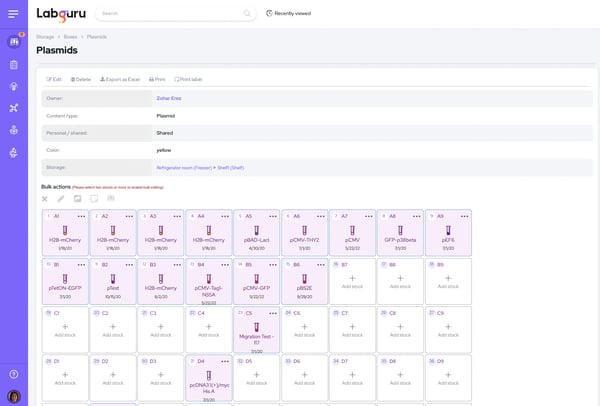
The mobile app is handy for quick checks and basic actions. Some G2 reviewers note it lacks desktop parity, tasks like report review or editing experimental workflows aren’t available on mobile, which can limit fully on-the-go use. Teams often reserve complex edits for desktop and use mobile for status, approvals, and field notes.
Core location tracking works for everyday moves. Across G2 reviews, labs needing ultra-granular mapping (e.g., multi-compartment ULT freezers) want finer coordinates; many address this with standardized naming schemas (rack/shelf/box/slot) and barcode labels to add precision.
File uploads centralize documentation. G2 users mention that documents aren’t always tied to specific events (service, calibration), making audits slower; linking via SOPs, consistent naming conventions, or periodic record reconciliations improves traceability until native event-level links expand. Inventory tracking covers routine stock visibility. Several G2 reviewers would like automatic alerts for nearing expiration to prevent waste and delays; labs commonly add scheduled reports, dashboard flags, or simple reminder rules as a stopgap.
Despite these gaps, Labguru ELN LIMS is rated 4.6/5 on G2 and is widely regarded as a capable platform. Based on G2 feedback, its strengths lie in compliance tracking, equipment scheduling, and managing research data at scale. It’s clear why this tool appeals to modern labs that prioritize both operational efficiency and regulatory rigor.
What I like about Labguru ELN LIMS:
- One standout capability, according to G2 reviewers, is streamlined sample and inventory management. Users consistently appreciate how easy it is to track where samples and supplies are stored, with automatic updates to inventory levels in real time.
- G2 reviewers highlight the certification analysis tool. Users find value in how it enables digital sign-offs and ensures better documentation and accountability, which is crucial for labs with strict quality assurance protocols.
What G2 users like about Labguru ELN LIMS:
“LabGuru makes it very easy to prepare protocols for experiments and track progress during a procedure. It allows different people to swap in and out, and it’s clear who has performed each step, ensuring accountability and smooth workflow.”
– Labguru ELN LIMS Review, Linda S.
What I dislike about Labguru ELN LIMS:
- The mobile app is convenient for quick checks and updates. Some G2 reviewers mention it lacks feature depth compared to the desktop version, tasks like report review or workflow edits aren’t available on mobile, which can limit flexibility for teams needing full remote access.
- Core storage tracking works reliably. However, G2 users note that it sometimes lacks the granularity needed for complex environments like multi-compartment ultra-low freezers; most labs handle this by implementing detailed naming schemes and barcode-based sub-location mapping.
What G2 users dislike about Labguru ELN LIMS:
“LabGuru offers so many features that it can be overwhelming to navigate. I know I’m not using all of its capabilities simply because there’s too much information to absorb at once.”
– Labguru ELN LIMS Review, Erica W.
5. Genemod: Best for intuitive workflows in molecular biology
Genemod is a cloud-based LIMS platform built for biotech R&D teams. From what I’ve gathered while analyzing G2 reviews, its cloud accessibility is frequently highlighted as a major strength, especially for distributed teams. I’ve seen users appreciate being able to log in from anywhere, making it easier to collaborate remotely and manage projects across lab locations.
The electronic lab notebook (ELN) receives consistent praise in G2 feedback. One standout capability, according to users, is how simple it is to organize experiments, projects, and folders. There’s a lot of love for the real-time collaboration it enables — users mention that changes sync instantly, streamlining teamwork. A commonly appreciated element is the ability to store and share protocols in a centralized, secure location, cutting down on time spent searching for scattered files.
I frequently see G2 reviewers highlight Genemod’s data integrity features. Built-in audit trails and version control tools are considered crucial by users working in regulated environments. Based on my review of user comments, many value how clearly the platform tracks changes, identifying who updated what and when, helping labs stay compliant and accurate.
Customizability also stands out in the feedback I reviewed. Users often mention how easy it is to tweak the platform t