


As a digital marketer, I find email marketing to be one of the trickiest but most rewarding and effective marketing tools out there.
I’ve spent most of my digital marketing career knee-deep in SEO, optimizing keywords, tracking rankings, and decoding algorithms. However, curiosity got the better of me, and I decided to experiment with a different side of marketing. I tested the 10 best email marketing software programs these past few months to see what all the hype was about. Spoiler alert: it was a ride.
Some days, I felt like I excelled at using these email marketing platforms. On other days, I got help from our sales and customer success teams to make sense of complex features and workflows.
Whether you’re a newbie or an experienced marketer, I am sure you will be able to relate to my thoughts below. Based on my personal experience, I’ve broken down the best email marketing tools that balance functionality, ease of use, and value. If you’re searching for best email marketing software for small business or scanning lists of top-rated email marketing tools, this guide will help you pick confidently.
10 best email marketing software for 2025: My top picks
- Constant Contact: Best email marketing software for small businesses
Provides comprehensive marketing tools, including templates, automation, and analytics. (Pricing from $12/mo) - Intuit Mailchimp: Best for email automation and third-party integrations
Offers robust automation workflows, extensive integrations, and advanced reporting. (Pricing from $13/mo) - Brevo Marketing Platform: Best all-in-one tool for email and SMS campaigns
Combines multichannel campaign management with strong analytics. (Pricing from $9/mo) - Systeme.io: Best for complete marketing automation in one platform
Includes email campaigns, funnels, automation, and sales management. (Pricing from $27/mo) - Moosend: Best budget-friendly option with strong automation
Delivers powerful editing tools, advanced automations, and detailed analytics. (Pricing from $9/mo) - Instantly: Best for scaling cold email outreach
Automates lead generation and outreach campaigns for sales teams. (Pricing from $37/mo) - Salesforce Marketing Cloud Engagement: Best enterprise cross-channel platform
Supports large-scale, multi-channel campaigns with advanced integrations. (Pricing from $1,250/mo) - Close: Best CRM-focused email marketing tool
Enhances productivity with seamless CRM integrations and workflow automations. (Pricing from $10/mo) - Apollo.io: Best for combining sales intelligence with email marketing
Helps drive revenue by uniting prospecting, engagement, and analytics. (Pricing from $49/mo) - GetResponse: Best for advanced segmentation and autoresponders
Automates campaigns with autoresponders, segmentation, and AI-driven tools. (Pricing from $13.30/mo)
* These email marketing software are top-rated in their category, according to G2’s Winter 2025 Grid Reports. I have included pricing information for the email marketing platforms that publicly share their pricing plans.
10 best email marketing software to try in 2025: My Recommendations
When I started testing these tools, I quickly realized that email marketing software has evolved into an all-in-one platform. And it’s no wonder why, the email marketing software market was worth USD 1.53B in 2024 and is on track to more than double to USD 3.73B by 2032, at an impressive 11.8% CAGR. Traditionally, email marketing software helped us communicate with our audience by streamlining the process of creating, sending, and managing email campaigns. These platforms allowed us to design emails and segment our audience for targeted messaging.
Not anymore! Now, they are built to handle the whole lifecycle of email marketing. These tools can help with the start of a campaign with lead generation, automation, and AI-powered personalization and the end of the campaign with tracking, reporting, and insights. Similar to other marketing tools, email marketing platforms also allow us to track performance metrics like open rates and clicks, perfect if you’re asking which email marketing platform is best for tracking metrics.
How did I find and evaluate the best email marketing software?
My curiosity to learn more about a different side of marketing led me to test these email marketing tools. I started by identifying tools with solid reputations in the industry. I explored reviews and the grid report on G2 to shortlist the tools that consistently stood out. From there, I tested each platform for similar tasks and workflows: creating drip campaigns, testing automation workflows, and analyzing engagement metrics.
In cases where I couldn’t personally test a tool due to limited access, I consulted a professional with hands-on experience and validated their insights using verified G2 reviews. The screenshots featured in this article may be a mix of those captured during testing and those obtained from the vendor’s G2 page.
I didn’t rely solely on my own experiences, though. I collaborated with other teams in my company, sales, customer success, and even design, to see how these tools performed from their perspectives. Some platforms excelled at collaboration, while others fell short. I took things a step further by tapping into AI-powered analysis of user feedback. I combed through hundreds of G2 reviews to uncover recurring themes, what users loved, what challenged them, and which features they relied on. After careful testing, some patience, and our team’s help, I was able to make a list of the best email marketing software.
So, I ended up using these tools for list management, audience segmentation, automating workflows, A/B testing, analytics, and even lead generation. However, not every tool made things easy. Some had steep learning curves, while others lacked the flexibility needed for complex campaigns. If you’re a retailer, keep an eye out for an email marketing platform for an e-commerce business; if you run client work, you’ll want the best software for email campaigns for a marketing agency.
What sets apart the best email marketing software?: My Take
Through all the testing, I kept one question in mind: “Does this tool make email marketing simpler, smarter, and more impactful?” These are some of the important factors I considered while evaluating these email marketing tools:
- Ease of use: A tool might be powerful, but it can slow you down if it’s too complex. I looked for platforms with intuitive user interfaces, straightforward navigation, and minimal learning curves. Whether it was setting up a campaign, integrating with other tools, or analyzing data, ease of use was a non-negotiable factor.
- Automation and AI features: Automation has become an integral part of modern email marketing. I prioritized tools that allowed me to set up advanced automation workflows, like nurturing leads or re-engaging dormant customers. Tools with AI capabilities, such as dynamically personalized content, earned extra points for their ability to streamline and enhance campaigns. If you’re specifically hunting for the best email marketing services with automation features, several options below stood out.
- Affordability and value for money: There are email marketing tools are available at all different price points. I considered tools that provided the best value for their price. I also prefer tools that give you a free trial period. In addition to free trials, I also looked at affordable pricing tiers and comprehensive features for premium users. In addition to free trials, I also looked at affordable email marketing software for startups with room to scale.
- Templates: I love using templates, which act as a great starting point for most email campaigns. So, I paid close attention to the quality and variety of each tool. I prioritized tools with modern, professional-looking templates that were easy to customize without needing design skills. Industry-specific templates, dynamic layouts, and mobile-responsive designs were also a bonus.
- Analytics and reporting capabilities: Analytics and reporting play an important role in SEO and any marketing campaign. So, it was important for me that the tools provided detailed analytics on open rates, click-through rates, conversions, and more. Having reporting features that turned raw data into clear, digestible insights was particularly important. This feature helped me identify what worked and what didn’t. This feature helped me identify what worked and what didn’t, crucial if you’re comparing which email marketing platform is best for tracking metrics.
- Integration options: I understand the importance of integrations because they make my work so easy! So, I favored tools that seamlessly integrate with our existing CRMs, e-commerce platforms, social media, and analytics tools. These integrations ensure smoother workflows and better data syncing, enabling a unified view of marketing efforts. If you’re wondering which email marketing software integrates with CRM, I call that out in the product sections below.
- Tracking and deliverability rates: Spending time crafting a beautiful email wouldn’t make sense if it doesn’t land in the inbox. I evaluated tools based on their deliverability rates and features, ensuring emails avoid spam folders, such as domain authentication and score analysis.
- Scalability: I wanted the tool to be useful, not only for solo entrepreneurs but also for businesses of all sizes. Scalability matters whether you’re a small business just starting out or an enterprise managing millions of subscribers. I prioritized tools that could grow with a business, offering flexible pricing plans and advanced features to accommodate larger campaigns and audiences.
- Customization and personalization options: I know that personalization has become a no-brainer for all domains in marketing. Hence, I valued tools that allowed for dynamic content, personalized recommendations, and custom segmentation. These features ensured that every subscriber got a message tailored to their preferences and behavior.
Whether you’re running a small business, managing campaigns for a larger organization, or just getting started with email marketing, these ten tools are worth exploring.
The list below contains genuine user reviews of email marketing software. It’s important to note that vendors offering a free trial are also considered free in this context.
To be included in this category, a solution must:
- Enable the creation and sending of emails via HTML or WYSIWYG editor
- Provide email templates
- Allow users to preview and send test emails
- Store, track, segment, and manage email contact lists
- Provide campaign-based reporting and analytics
- Not provide additional marketing automation features in channels other than email as their core function
*This data was pulled from G2 in 2025. Some reviews may have been edited for clarity.
1. Constant Contact: Best email marketing software for small businesses
If you’re wondering what the best email service is for newsletters, Constant Contact consistently came up for me as a reliable, easy starting point. When I first signed up, the simple, beginner-friendly interface stood out immediately, and that aligns with G2’s 87% ease-of-use score. Features like content assistant, guided setup, and pre-built layouts make it easy to start sending campaigns without getting lost in menus or settings.
Beyond building emails, I found Constant Contact useful for managing full campaigns end-to-end. The library of customizable templates helps speed up design work, and with solid list-management capabilities rated 86% on G2, it’s easy to keep contacts organized as you grow. I also appreciated how well it integrates with everyday tools. Its social media and CRM integrations cover most small-business workflows, making it easier to manage campaigns without constantly switching platforms.
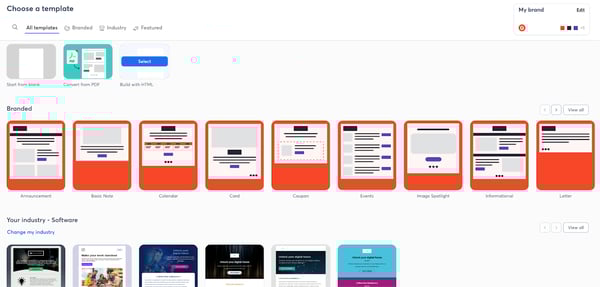
Constant Contact offers polished templates that make it easy to get campaigns up and running quickly. However, customization is more limited compared to some of the advanced tools on the market, so teams wanting highly tailored layouts or deeper design control may feel constrained. For small businesses and beginners who prefer simplicity and ready-made designs, this won’t be a hurdle, but marketers who rely heavily on fine-tuned branding might look for more flexibility.
Another area G2 users mention is that its more advanced features, especially automation and detailed analytics, could be stronger. While Constant Contact handles the basics well, marketers who rely heavily on granular reporting or more sophisticated journeys may feel constrained. Still, for teams running straightforward campaigns or early automations, the simplicity keeps things manageable and reduces the learning curve.
Overall, Constant Contact is a dependable, beginner-friendly platform that makes launching email campaigns simple and manageable, especially for small businesses that value ease of use and quick setup over heavy customization.
What I like about Constant Contact:
- The templates and drag-and-drop builder make it easy to get polished campaigns out quickly without design skills.
- Integrations with social platforms and CRMs help small teams manage campaigns and contacts in one place.
What G2 users like about Constant Contact:
Constant Contact is user-friendly and easy to use once you get used to all the features. We were able to design a professional and modern/clean-looking newsletter to share with our members using Constant Contact. It was especially helpful to see which addresses were undeliverable in our list and how many people had opened our newsletter. Being able to quantify how many people we are reaching is very useful. Customer support was very helpful in answering all of our questions. It was also nice to easily link to our newsletter on our website.
Constant Contact Review, Melissa M.
What I dislike about Constant Contact:
- The customization options on Constant Contact can be better. While the templates are great, I felt somewhat limited in how much I could tweak them. G2 reviewers have mentioned the same, pointing out that design flexibility is more restricted compared to other email marketing tools.
- I also found that their advanced features, like automation and detailed analytics, need some improvements. On G2, users echo this feedback, noting that while Constant Contact covers the basics well, its automation and reporting capabilities could be more robust.
What G2 users dislike about Constant Contact:
I’m happy with the product, but as we look to onboard a CRM and do more automation in our communication, we’ve found other products are better suited for our longer-term needs. I’d also like the option to send emails from our address instead of the CC-modified address for more action-oriented communication vs. marketing communications. We can get that functionality with other providers that we can’t get with Constant Contact. More out-of-the-box integrations and automation in actions would also help. For example, when you sign the form within this email, it is sent to path B, and an automated email goes out based on that action.
Constant Contact Review, Kimberly L.
2. Intuit Mailchimp: Best for email automation and third-party integrations
Intuit Mailchimp was one of the first email marketing tools I dabbled with. Over the years, the software has only improved, especially on the automation side. According to G2 Data, Mailchimp scores 89% for ease of use, and honestly, that shows in how quickly I was able to set up automated sequences for welcoming new subscribers, re-engaging inactive users, or sending time-based follow-ups. The reporting dashboard is also refreshingly clear. I found the performance metrics easy to interpret, which made it straightforward to tweak campaigns as they ran.
One area where Mailchimp still stands out is segmentation. Its audience management system is flexible enough to group people by purchase history, location, engagement level, or any other category that matters for your campaign. With G2 ratings showing 89% for building and personalizing emails, it’s clear users rely heavily on this feature for targeted outreach.
And if you run a shop, it’s a strong email marketing platform for ecommerce businesses as well. The platform’s ecommerce and CRM integrations both score 86% on G2 and plug directly into workflows like abandoned cart recovery or product recommendations.
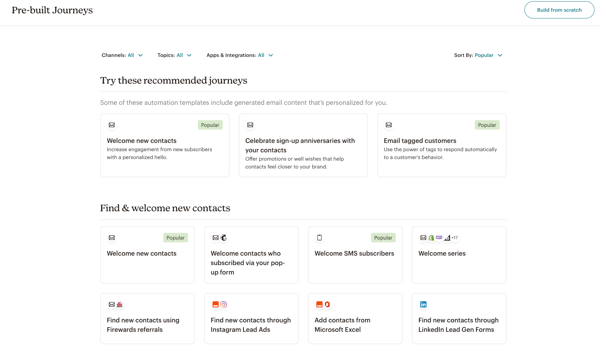
Mailchimp’s pricing is one area to keep in mind as your audience grows. Costs increase as you unlock more advanced features or expand your subscriber list, so very early-stage businesses or teams on tighter budgets may want to keep a closer eye on plan limits. But for growing ecommerce brands or agencies running frequent, automated campaigns, the breadth of built-in tools usually makes the pricing worthwhile.
List management is another aspect reviewers mention. Mailchimp handles everyday segmentation well, but managing larger or more complex lists can take extra steps, especially if you’re working with many sub-segments or building layered audience rules. Teams with straightforward lists won’t feel this friction, but marketers who depend heavily on advanced segmentation or intricate data models may find more specialized tools a better match.
Overall, Mailchimp remains a reliable, scalable choice for teams that want strong automation, clean design tools, and seamless integrations, all in a platform that’s easy to grow with.
What I like about Intuit Mailchimp:
- I enjoyed how smooth it was to build and automate email sequences, especially with the reusable templates and clean drag-and-drop editor.
- The segmentation and reporting features felt polished, giving me clear insights and letting me target the right audience at the right time.
What G2 users like about Intuit Mailchimp:
The first feature I liked about MailChimp is its ability to create new advertising campaigns. This platform is incredible for creating new campaigns because it offers a different system that makes it not so complicated to create a campaign. It offers a drag-and-drop system where you can create a campaign in just a few minutes, which allows the user to save time while keeping campaigns active in the company. Another feature I liked about MailChimp is that this platform allows for high integration with most of the platforms we use in the company. We have been able to integrate it with platforms such as Facebook, Instagram, Linkedin, and X. This has helped us send campaigns quickly to these social networks without having to do it manually, just by keeping the synchronization active. I also liked the complete way MailChimp offers its statistics section. This is one of the most important sections for me as it offers statistics to know which region the clients come from, what type of personal profile each client has, which social networks they have accessed the campaign from, and much more. MailChimp’s statistics are too complete to correctly understand the direction of each campaign; I love that.
– Intuit Mailchimp Review, Danielle R.
What I dislike about Intuit Mailchimp:
- Pricing can increase quickly as your audience grows, which G2 reviewers also mention. It’s still a solid fit for ecommerce brands or agencies that fully use automation and integrations, but smaller teams may need to budget carefully.
- Managing larger or highly complex lists can require more steps, a common theme in G2 feedback. Mailchimp works well for simpler segmentation needs, but teams relying on very advanced audience structures may find specialized tools a better match.
What G2 users dislike about Intuit Mailchimp:
What I didn’t like first is that, compared to the free version of MailChimp, it is a great alternative for small businesses just starting in the world of email marketing. However, it may be too expensive for businesses that have limited funds. As your email distribution list grows, so does the cost of your email list, and the payment tiers may be too much for some companies. In addition, MailChimp’s designs do not provide all the features of MailChimp; that is, you may have to pay more to get certain tools and features. Another negative aspect is that MailChimp offers a wide variety of email templates to choose from and customize; however, if you want to make major alterations to the aesthetics or structure of your email, the customization possibilities are limited.
– Intuit Mailchimp Review, Raul B.
3. Brevo Marketing Platform: Best all-in-one tool for email and SMS campaigns
I loved how seamless the sign-up process was for Brevo Marketing Platform. No credit card is required for the sign-up process, and the tool is priced reasonably. Similar to Mailchimp, the drag-and-drop editor comes in very handy when creating campaigns, and I found their reusable templates a huge time-saver. You can tweak them to match your brand’s style and reuse them across multiple campaigns without having to start from scratch.
One more feature that stands out is the API integrations. Their API is super easy to work with, and I’ve been able to use it to automate some of my workflows. Reviewers also highlight how solid the core email features are, from list management to deliverability controls, which echoes my experience with the platform.
What surprised me is how well Brevo balances its all-in-one approach without feeling overwhelming. The platform includes email, SMS, WhatsApp, segmentation, and basic CRM functions in one place, and most users say this setup makes day-to-day work much smoother. According to G2, Brevo maintains a strong ease of use score of 91%, and that matches how intuitive the interface felt, especially when setting up simple automations or checking campaign performance.
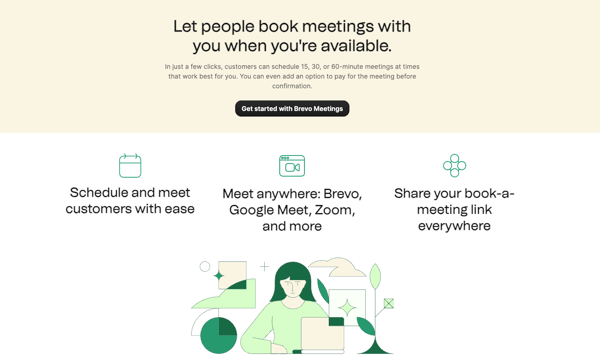
The free plan is helpful for testing and early-stage growth, but the daily email limit can feel restrictive if your campaigns require more volume. Several G2 users pointed out that once you hit the 300-per-day cap, you’ll likely need to upgrade to keep momentum, making the free tier better suited for small newsletters or early-stage businesses experimenting with email marketing.
The mobile version of the platform is another area with room for improvement. It’s functional and covers the essentials, but reviewers frequently mentioned slower responsiveness and a slightly clunky interface on mobile browsers. For users who prefer managing campaigns on the go, these limits may feel noticeable, though the desktop version remains smooth, reliable, and much better suited for daily campaign operations.
Overall, Brevo remains a strong choice for small businesses and growing teams that want simple, efficient email and SMS marketing under one roof. The combination of ease of use, solid deliverability, and multi-channel support makes it a reliable companion for everyday marketing tasks.
What I like about Brevo Marketing Platform:
- It was incredibly easy to get started, no credit card, quick setup, and the drag-and-drop editor plus reusable templates made campaign creation feel effortless.
- The API integrations genuinely save time; automating workflows and syncing data felt smooth and reliable across different tools.
What G2 users like about Intuit Mailchimp:
I’ve been using Brevo (formerly Bluehost) for my email marketing, and I’m blown away by how smooth and effective it is. Before, I struggled with finding an email service that could handle my growing list without breaking the bank or getting overly complicated. But Brevo hit the sweet spot for me.
First, the interface is super user-friendly, I don’t have to be a tech wizard to get things done. I can set up automated campaigns, segment my audience, and monitor my results in one place. It saves me so much time and energy, especially since I’ve got a lot going on in my business.
The deliverability is spot on my emails land in people’s inboxes, which is a huge win. I’ve also been impressed by their customer support. I had a couple of questions early on, and their team was quick to help, making sure I understood everything without being overwhelmed.
Brevo’s features are packed with value, from customizable templates to advanced automation tools, and they’re all available at a price that works for me. The platform is designed to scale with your business, which I love. I can see it growing alongside me as my email list needs to grow.
– Brevo Marketing Platform Review, Steve D.
What I dislike about Brevo Marketing Platform:
- Several G2 reviewers mention that the free plan’s daily sending cap can feel limiting, especially once campaigns start growing. This isn’t a dealbreaker, but it’s something smaller newsletters or early-stage teams will feel more than established businesses that can comfortably upgrade when needed.
- G2 users also point out that the mobile experience lacks responsiveness and can be slow, particularly when editing or previewing campaigns. This makes it less ideal for marketers who manage email on the go, but it still works perfectly well for teams operating primarily from desktop, where the full interface is smooth and reliable.
What G2 users dislike about Brevo Marketing Platform:
While Brevo covers the basics very well, some more advanced features (like detailed reporting and A/B testing) feel limited compared to other platforms. The dashboard’s load time is slow at times, which can get challenging if you’re managing multiple campaigns. Also, after the rebranding from Sendinblue to Brevo, the price increased rapidly, and it is already starting to be quite expensive compared to other tools.
– Brevo Marketing Platform Review, Tomáš N.
4. Systeme.io: Best for complete marketing automation in one platform
Systeme.io surprised me with its all-in-one marketing options, including the affiliate program tools. From setting up sales funnels to managing email campaigns, the platform felt very intuitive, especially considering how much it packs into a single dashboard. According to G2 Data, it scores 92% for ease of setup and 90% for ease of use, which aligns with my own experience while building sequences and landing pages.
The drag-and-drop editor, built-in A/B testing, and payment integrations with Stripe and PayPal make it easy to launch a full funnel system without juggling different apps. Customer support has also been a highlight; reviewers rate it strongly, and I’ve found the team to be genuinely responsive and quick to help. If you manage multiple brands or clients, Systeme.io can slot into a stack as the best software for email campaigns for a marketing agency when you want funnels and email under one roof.
The automation engine is especially useful if you want something simple but effective; it handles tagging, sequences, and subscriber movement without much manual setup. Features like outbound email sending and email deliverability perform reliably, and G2 users back this up with 92% satisfaction for automated email responses and 91% for deliverability, impressive for an all-in-one platform at this price point.
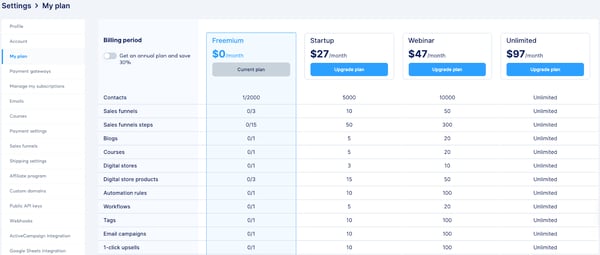
The platform offers excellent built-in automation for email sequences, making it easy to set up and run campaigns for most needs. That said, it may not fully replace specialized tools if you’re looking to build very intricate, multi-branch workflows. Teams that rely on heavy logic-based automation or advanced segmentation may still want a more technical email platform alongside Systeme.io. For most creators, coaches, and online businesses, though, the automation here is more than enough.
Customization is another area with some limits. While templates, page layouts, and the dashboard work well out of the box, there’s less design flexibility for users who want deeper personalization. G2 reviewers often mention that things like styling options, visual control, page layout behavior, and template variety aren’t as expansive as those found in standalone builders. If you prefer clean, functional funnels and quick setup, the current options work well. But designers or brand-heavy teams may find themselves wanting more control and more modern templates.
I also noticed a few minor lags and layout quirks while using the editor, especially when switching between desktop and mobile views. These weren’t major disruptions, and overall, the platform remained reliable for day-to-day marketing tasks. For budget-focused businesses, new creators, and solopreneurs who want marketing, funnels, and email under one roof, Systeme.io still delivers strong value, and its 94% meets requirements score on G2 reflects that.
Overall, Systeme.io delivers far more than you’d expect from an all-in-one platform at this price point. It combines funnels, email marketing, automation, and digital product tools in a way that feels practical, stable, and surprisingly beginner-friendly.
What I like about Systeme.io:
- I like how effortlessly it brings funnels, email marketing, automations, and payments into one place without feeling challenging.
- I enjoy how smooth the email automation and deliverability are, making it easy to run campaigns without extra tools.
What G2 users like about Systeme.io:
I have completed migrating from other applications to systeme.io, and the migration department has handled everything. It has done an excellent job migrating contacts, email automation, sales funnels, and courses hosted on other platforms. I am very happy with this help with the migration and consider that systeme.io is a complete platform that will help me easily make sales. Additionally, it continuously improves and updates its services, which gives me more satisfaction knowing that it is adapting to market needs. I also want to emphasize that the support service, when you have a question, is very quick to respond, and they immediately help you or access your account and solve the problem.
– Systeme.io Review, Beatriz M.
What I dislike about Systeme.io:
- G2 reviewers frequently mention that customization options are limited, especially for users who want more control over layouts, styling, or advanced design elements. This works well for beginners and creators who prefer simplicity, but brand-heavy teams or designers looking for deeper visual flexibility may find it restrictive.
- Several G2 users point out that the template library is functional but not very extensive, with many requesting more modern or aesthetically polished options. This is perfectly suitable for straightforward funnels and quick launches, but agencies or marketers who rely on diverse, high-impact templates may need to supplement System.io with additional design tools.
What G2 users dislike about Systeme.io:
There are some… Starting with the inability to use one click order bump feature. This feature is so crucial for our business and others like us that we had to use another tool just to use one click order bump feature. We have shared it in their rodmap page as well but they haven’t srtarted working on it yet. Second, Their image optimisation is crap. Even if you upload the highest quality image, their software will automatically optimise the image to bring its size down (for website performance) but they don’t focus on the image quality. Seems like their only purpose is to bring down the size of the image and in result, the image looks pixelated on the final site.
– Systeme.io Review, Sannidhya B.
5. Moosend: Best budget-friendly option with strong automation
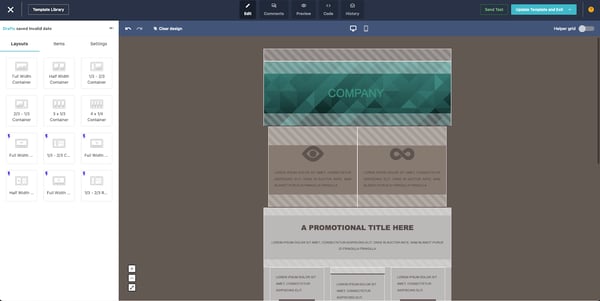
The most helpful thing with Moosend was the step-by-step guide after onboarding. For newbies like me, this platform makes the email marketing process easy. Moosend’s drag-and-drop editor, templates, and ready-made layouts made building campaigns simple, and the interface feels intuitive in a way that explains why its ease of use sits at 93% on G2.
The 30-day free trial gave me enough room to experiment with different features, including automation, which is one of Moosend’s strongest capabilities. Reviewers consistently highlight how easy it is to set up personalized workflows, and with automated email responses rated at 92%, the tool clearly supports teams that want to run lifecycle campaigns without constant manual work.
Reporting was another area that stood out. As someone who relies on data to guide content decisions, I appreciated how Moosend surfaces essential metrics without making the dashboard feel overwhelming. The heatmaps, open-rate insights, and click-through data are laid out cleanly, and it matches G2’s 93% score for basic reporting.
What makes all of this even stronger is the price. Moosend stays affordable even as your list grows, and reviewers repeatedly mention that it gives them the automation depth, personalization, and segmentation tools usually found in much more expensive platforms. With meets requirements at 92%, it’s easy to see why small teams and solo marketers treat it as a budget-friendly upgrade from tools like Mailchimp or Brevo.
Some workflows may require more time depending on your goals. For example, Moosend’s deeper segmentation and multi-step automation options are powerful, but they take a bit longer to maste