


Homepage design shapes the first impression potential customers have of your business, yet many companies underestimate its impact on conversions and credibility.
When I first meet with a potential client, I’ll often hear: “The website is fine, it just needs to be optimized for visibility.” Then I visit the site and, as soon as the homepage loads, I see that’s not quite the case. Unclear messaging, messy layouts, poor design choices … I’ve seen it all.

What you might not realize is the bottom-line impact your homepage design can have, good and bad. The homepage is usually where leads and customers get their first look and impression of your business. It’s a digital representative, acting on behalf of your business to introduce your brand, products, and services.
In this guide, I’ll share best practices for homepage design along with brilliant homepage design examples that have implemented them.
Table of Contents
Homepage Design Best Practices
Through trial and error (and a whole lot of website analytics ), I’ve developed a set of homepage design best practices that consistently deliver results. The goal is to capture attention at the first page load, while also leaving a lasting impression that encourages visitors to return and take action.
1. First impressions and next steps happen in the hero section.
The most important part of your homepage lies above the fold (also known as the “hero” section). That means everything that a visitor sees when they first load the page, and before they start to scroll.
I spend a lot of time carefully crafting this section, from the layout and background to the copy. Here are some things I always make sure to have in place in the homepage hero:
- Consistent brand identity, from colors to tone of voice
- Sharp, clear visuals without cluttering the space
- A punchy headline that encapsulates the key message of the business
- Very brief paragraph text underneath the headline to provide more detail
- A strong call-to-action
These are the basics, but there are other important elements to think about.
For example, I always try to test the headline in the hero section over time. I use different variations and see which impacts website metrics like Time On Page, Scroll Depth, or Bounce Rate.
For the call-to-action, I might use a button that takes the visitor to a contact or demo page. Sometimes, I’ll embed a form right within the hero to remove the extra step.
The most important factor is stating what your business provides so the user knows where they’ve landed. I always try to combine the product or service of the business with a user benefit to encourage visitors to learn more.
For example, an online clothing store might write “Comfortable Clothing for Parents on the Go” with a “Shop Now” call-to-action button. The user then knows:
- This is an online store for day wear
- It’s designed with them in mind (busy parents)
- The unique selling point is comfort
2. Write for your target audience.
I have two main focus points when it comes to writing your homepage copy:
- Write for your target audience
- Write like your target audience
Many companies I work with believe they should focus solely on their brand and products on their homepage, with little to no content beyond that. But if you’re not writing with the target audience in mind, the messaging won’t resonate, and visitors will disengage.
Taylor Shanklin , CEO and founder of Barlele, a branding strategy and web design agency, says when designing a homepage, you should start by creating a clear list of problems your target audience has and the solutions you offer for those problems.
“ Once you have that really well defined, it is easier to design the website interaction journey in a way that quickly and clearly communicates how you are the best company to provide a solution to their problem.”
Tone matters, too. I research my target audience’s behaviors, preferences, needs, and challenges. Those findings guide the language and tone I use in my homepage elements. My goal is to speak in terms they use daily and avoid confusing them with technical jargon.
Pro tip: Head to forums and online communities for advice and feedback.
If you’re unsure what problems your target audience has or how they speak about the solutions your business provides, head to places like relevant subreddits or other online spaces. Check out discussion threads for insight into their needs and write your homepage copy accordingly.
3. Use design to showcase your unique selling proposition.
Your homepage must clearly explain your unique selling proposition (USP). That includes:
- What makes the products, services, and brand unique
- Why they’re superior or different from the competition
I already spoke about your hero design and copy above. But don’t forget visual elements, too. Use consistent brand design across your colors, fonts, and graphics. Consider adding an explainer video or customer testimonials that hone in on your USP.
For example, HubSpot’s USP is perfectly captured in the homepage subheading: “Unite marketing, sales, and customer service on one AI-powered customer platform that delivers results fast.”
As you move through your homepage design, outline this in a logical way to guide visitors through your offerings. The order or layout might look something like this:
- Hero section
- Brief brand story speaking to the customer about why you’re the best choice for them
- Section on your products or services with links to other pages for more detail
- Customer testimonials
- Final call-to-action banner
Leave plenty of whitespace between elements and sections to let the information stand out.
Pro tip: Use color or animation to enhance your homepage design.
Consider contrasting colors in your palette or simple animations to focus attention on your USP.
4. Optimize your webpage for multiple devices.
In 2024, mobile devices accounted for 67.3% of website traffic. When I’m in a website builder or Content Management System (CMS), the default view is usually desktop. So, I know it’s easy for the tablet or mobile view to feel like a secondary priority.
But that’s where most of your visitors are going to see the website, especially if you’re running a direct-to-consumer business.
How do I optimize a homepage for multiple devices? It depends on the platform a customer uses to manage the website, but here are some fundamentals:
- I use a responsive design that automatically adjusts the layout to fit the screen of any device.
- I prioritize mobile usability, so I use clear and concise navigation bars and menus, large tap-friendly buttons, and larger font-size text.
- I hide some elements on the mobile version of a site if they’re going to clutter the layout or cannot re-size responsively.
- I avoid elements like flash banners, bulky animations, and pop-ups that can overload mobile screens, slow page loading times, and cause higher bounce rates.
Avoiding slowing your page is especially important. Paige Arnof-Fenn, founder and CEO of marketing network Mavens & Moguls, says that if your website doesn’t load in 3 seconds or less, “your users will go somewhere else, and the opportunity will be lost.”
Pro tip: I always fully test a website’s responsiveness on multiple devices. It might look good on mobile, but grab a tablet and use a large desktop monitor to double-check the site is usable everywhere.
5. Include multiple calls-to-action (CTAs).
I know a potential customer getting in touch or making a purchase via your website is a top priority. However, when reviewing your homepage design, I recommend considering what a customer might want to do now, rather than what you would like them to do.
Not everyone buys in the same way, and website visitors often like options.
Let’s say I’m working on the homepage layout and design for a construction company. I’ll include a call to action to get in touch or book a consultation, of course. But I might also include a form to access a cost calculator for home renovations. Multiple CTAs keep visitors engaged and provide other ways for you to capture their contact details to nurture them further through other channels like email marketing
Other CTA options include things like:
- Signing up for a free trial
- Exploring a specific product category
- Downloading a valuable resource
- Contacting your sales team
Homepages with multiple CTAs act as a bridge between interest and conversion.
Here are some quick tips I keep in mind to maximize the effectiveness of my CTAs.
- I position them prominently on the homepage, with the first one easily visible in the hero without scrolling.
- I use design elements like contrasting colors or images to make them stand out.
- I use strong verbs and action-oriented language to compel action. Verbs like get, start, join, and discover are powerful because they convey both action and outcome.
Pro tip: Don’t go overboard. too many CTAs can create visual clutter on your homepage.
Don’t overload your homepage with too many CTAs. Consider one or two per section of your homepage. The goal is for them to be easy to find, not overpowering.
6. Stay on brand.
One of my pet peeves is seeing inconsistent design elements on a homepage. It shouldn’t feel like the visitor is seeing a completely different website from one section to the next. You’d be surprised how much that comes down to the little things.
Staying on brand is all about cohesion throughout your website, but also on individual pages like the homepage. Consistency builds a strong visual identity that visitors can recognize and remember.
For me, that covers:
- Making sure I place the logo in the main navigation so it’s visible on the homepage at all times
- Using the brand’s color palette for text, backgrounds, icons, graphics, and buttons.
- Using the same font for all headers and all paragraph text.
- Maintaining a consistent tone, which means avoiding a casual tone in one area and a formal tone in another.
Pro tip: It’s totally acceptable (and even typical) to use a different font for headings and subheadings than your paragraph text. I might use a bold, fun font for headings. But for paragraph text, I always lean on something very clean and readable.
7. Localize your homepage content.
This tip applies whether you’re a local business, serve multiple regions, or operate internationally.
For local businesses like restaurants or home improvement services, I always recommend highlighting the location prominently. People like to know that providers live and operate in the same community they do, and it helps improve your visibility in places like Google Search. I might add the town or county’s name to the hero heading, for example, or embed a map on the homepage to help people find a brick-and-mortar location.
Regional or international businesses have other things to consider, like:
- Do your products or services vary from one location to another?
- Do your customers speak different languages depending on where they’re visiting the site?
- Are there multiple office or store locations to consider?
Let’s say I’m working on the site for a franchise business, for example. It may be a national chain, but the customers want to know what’s available in their area. So, I might include a “Locate Store” CTA in the homepage hero to take users directly to the most relevant sub-website or location page.
Similarly, I’ve worked on international websites that need to serve the content in multiple languages. One site even needed completely different content for homepages in different countries because they offer different services in each.
Like all homepage design considerations, it’s all about the user and making their journey as frictionless as possible.
Pro tip: If I need to serve a website in different languages but I’m tight on time and budget for translating pages, I often use paid tools that automatically translate content and create language-specific variations of the homepage.
8. Pay close attention to your website analytics.
I’ve spent a lot of time on homepage designs previously, only to be disappointed by the results, such as low conversion rates. But I’ve learned over time that analytics are crucial to avoiding and correcting homepages that aren’t driving results.
Many website building platforms like HubSpot come with built-in analytics to help you see things like:
- How many visitors the homepage is getting
- How long visitors are spending on the page
- Whether they’re taking action like clicking buttons or visiting other pages
- How many conversions the homepage and overall site is driving
I also usually create and connect a Google Analytics account to provide more detailed information or the ability to drill down into important metrics a bit further.
Keeping an eye on analytics monthly or quarterly means I can begin pinpointing areas for improvement. For example, I might decide to change the hero CTA on the homepage and see if that leads to more conversions.
Pro tip: Other tools allow you to see how users interact with your homepage by recording their visits into video clips that you can watch, or by showing heatmaps to determine where users scroll and click the most. I often use Microsoft Clarity for this purpose as it’s free, but there are more advanced paid tools available, too.
Brilliant Homepage Examples To Inspire You
I’ve shared my personal best practices for website homepage design. Now, let’s take a look at some of the best real-world homepage examples that put these best practices into action.
1. HubSpot
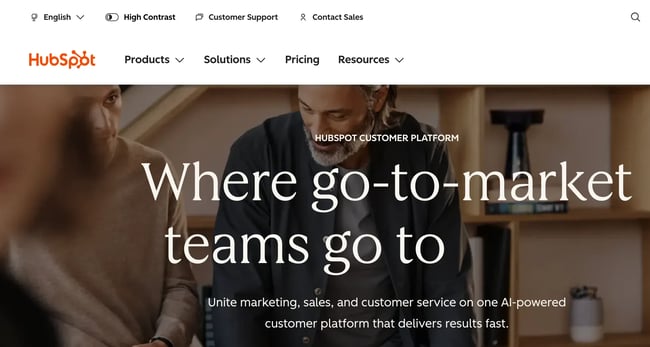
There might be a bit of bias here since it’s our website, but HubSpot is one of the best examples of good homepage design.
The background visuals are strong, it provides multiple CTAs, and the layout stays super clean while still fitting in feature explanations and plenty of social proof.
As Garry West, director at Imagefix, a design and digital marketing agency, says, social proof tells potential customers and visitors that a company “isn’t just making promises — it delivers for others like them.”
HubSpot’s homepage also uses lots of small animations and microinteractions to keep users scrolling and learning more without overwhelming the design.
What I love: I love the subtle animation in the hero header. The final word in the sentence scrolls through terms like “grow,” “scale,” and “retain” to communicate the all-in-one power of the platform.
2. Barkbox
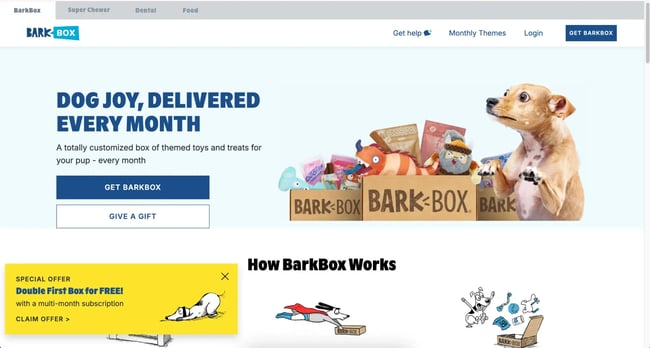
Barkbox is a subscription service for monthly toy and treat packages for dogs. On their homepage, they combine real visuals of dogs with cute graphics and cartoons to explain the service.
Alongside cohesive design, they use a strong brand voice in the copy, complete with dog-related puns, while maintaining clear messaging.
What I love: Social proof can be tricky to come by when your end user communicates in tail wags rather than in writing. But Barkbox still embeds customer stories on their homepage, showing some of their canine customers enjoying the treats and toys from their packages.
3. A24 Films

A24 Films takes a unique approach to its homepage engagement, which works quite beautifully.
I think this is a great example of how to lean on visuals to communicate, rather than a text-heavy homepage. A24 uses a simple layout, with each section containing a striking image and a simple subheading to direct users to podcasts, interviews, merchandise, or membership.
What I love: There are no fancy bells and whistles on the A24 website. Everything is focused on clear calls-to-action and giving each one plenty of space to stand out.
4. Pixelgrade
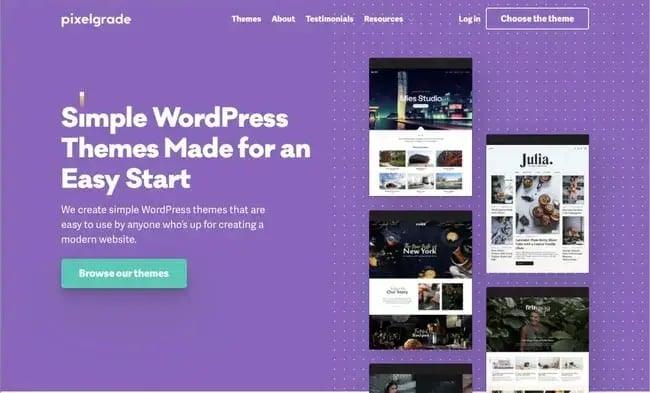
Pixelgrade provides WordPress themes for people building WordPress websites.
They use visuals right within the hero to showcase examples of their themes, before highlighting the benefits of their themes, interspersed with customer testimonials further down the page.
Color is used liberally but consistently to add style without overwhelming the user, with lots of white backgrounds and contrasting element backgrounds
What I love: The simple design and the color combination that makes the above-the-fold CTA stand out is beautifully done.
5. Chipotle
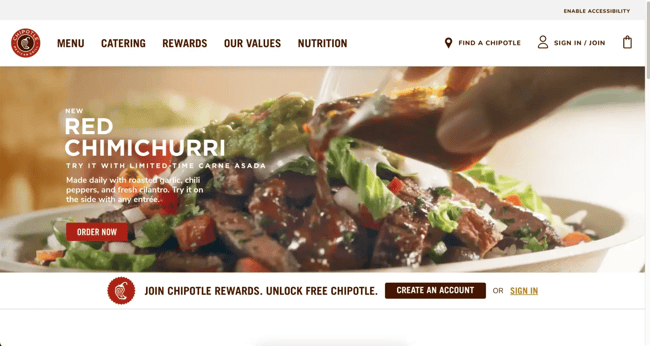
The Chipotle homepage uses tons of background video. That includes close-up food shots in the hero, and video background where you’d usually expect to see images in modular sections further down the page.
It gives the whole page movement and life to reflect the fun atmosphere customers can expect in their many locations.
What I love: Some brands think homepages have to be static or only update them once in a while. Chipotle features upcoming events and current offers right on their homepage to drive interest among both new and loyal customers.
6. Spotify
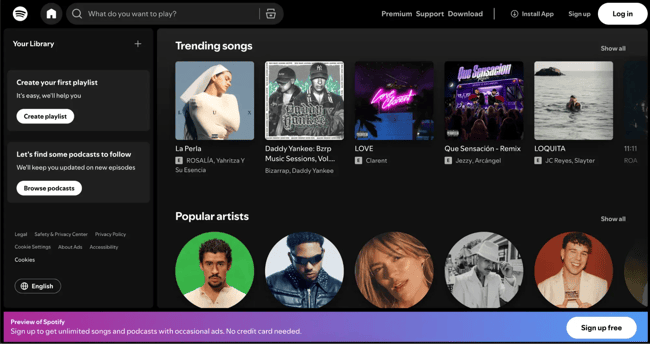
Spotify is an interesting one. They used to have a fairly standard, static homepage with a CTA to sign up to the platform. Now, when you open the site, the homepage looks like you’re already signed in, even if you’re not yet a user. Every element on the page opens up a path to conversion, leading to a sign-up opportunity.
It gives new visitors a snapshot of what the app looks like and they use the space to show key features like playlists, podcasts, and trending items.
What I love: Instead of generic text, Spotify uses a “What do you want to play?” placeholder in the search bar. It’s the perfect opening for new users to find something that will instantly engage them.
7. Future Current
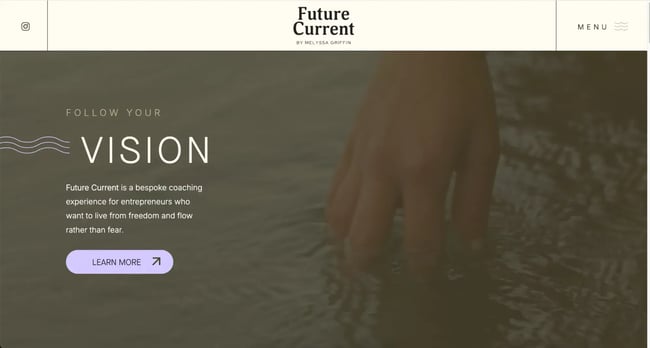
I’ve worked with a few coaches and individual consultants, and it can be tricky to nail down a personal brand. Future Current does this beautifully while still finding space to place founder Melyssa’s story front and center on the homepage.
The homepage uses a simple but cohesive combination of colors and visuals to instill the sense of calm and “inner knowing” that Melyssa’s services are based on.
What I love: Future Current focuses on the target audience all throughout the homepage, highlighting what they can gain from working with the company and providing CTAs for their free community space.
8. Digiday
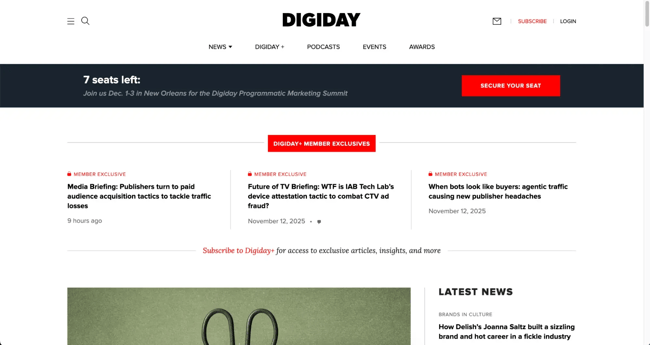
Digiday is an online trade publication geared towards digital marketing and media professionals. Since the site is almost exclusively focused on publishing and promoting content, it uses a typical news media layout for the homepage.
From “Latest News” to topic-based rows as users scroll, Digiday ensures anyone in the industry can find something interesting and useful to engage with on the homepage.
What I love: At the very top of the homepage is a banner promoting content for “Digiday+ Member Exclusives.” If you’re running a content-based site and finding it challenging to monetize, small CTAs like this can help nurture free users into paid subscribers.
9. Evernote
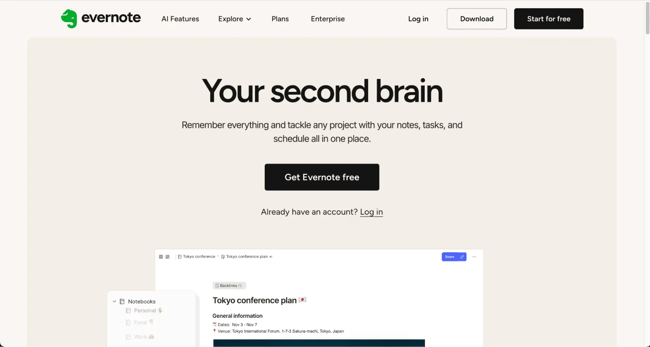
Evernote’s homepage will feel like a beacon of hope if your desk is a warzone of sticky notes like mine. The headline “Your second brain” is enough to make me want to try it immediately.
The design stays true to the promise of organization with a simple layout and graphics. The CTA, with its sleek black color against the white space, is impossible to miss as well.
What I love: The primary visual is an image of Evernote in action. I can almost see my own to-do lists and notes neatly organized within the app. It’s a powerful image that fuels a desire to get started and experience that organization firsthand.
10. charity: water
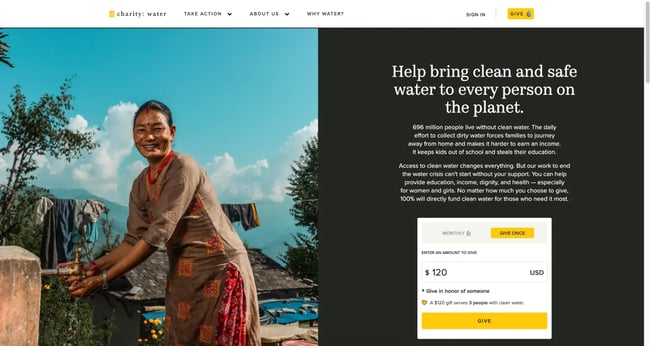
Charities and non-profits need to be more heavily CTA-focused than many other organizations. Donations are the primary goal of the website, and charity: water does an excellent job of this by placing a donation payment form right within the homepage hero.
Users can enter an amount and donate with as little friction as possible. Meanwhile, the rest of the homepage focuses on driving home the mission behind the organization with beautiful visuals and several other methods through which visitors can donate.
What I love: charity: water uses an extensive navigation menu for users to discover more, so they don’t clutter the homepage with too many sections. It keeps the focus purely on donations towards their important cause.
11. Medium
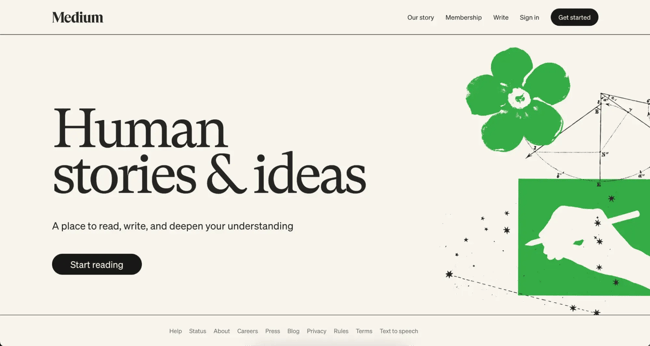
Medium’s homepage is another brilliant example of less is more. It uses simple messaging on a minimalist background that communicates what the brand is all about and the key value proposition.
This is followed by a prominent and action-oriented CTA that invites me to take the next step. By minimizing messaging, they lean into their “Human stories & ideas” headline and create curiosity to drive clickthroughs.
What I love: Unique CTA button text is one of my favorite things to try on websites. I love the “Start reading” CTA text on Medium’s homepage.