



Attracting qualified candidates today is harder than it looks.
Between managing job postings, tracking engagement across multiple channels, nurturing talent pools, and maintaining a consistent employer brand, the recruitment process can quickly become complex, even for seasoned talent acquisition teams.
While I don’t work as a recruiter myself, I’ve spent months analyzing how hiring teams use recruitment marketing tools by digging through hundreds of G2 reviews and speaking with talent leaders about the challenges they face. What I learned is clear: the right recruitment marketing platform doesn’t just help you promote jobs; it shapes every touchpoint of the candidate journey.
This blend of hands-on research, user interviews, and real-world feedback provided me with a practical understanding of what actually drives results, which features are most effective, which workflows are time-saving, and which platforms consistently deliver high-quality pipelines.
After evaluating more than 20 recruitment marketing tools, I narrowed the list down to the 9 platforms that truly stand out for 2026. I examined targeting capabilities, job distribution, CRM-style nurturing, employer branding tools, and integration strength to understand how each one performs in fast-paced hiring environments.
In this article, I’ll break down everything I found, from standout features to usability insights, so you can choose the best recruitment marketing platform that helps your team attract, engage, and convert the right talent more efficiently.
9 Best recruitment marketing platforms for 2026: My top picks
- Bullhorn: Best for high-volume staffing teams
Centralizes candidate, client, and communication data in one place to help recruiters manage large pipelines efficiently. (Available on request) - Greenhouse: Best for structured hiring workflows
Offers customizable pipelines, interview plans, and reporting tools that help teams run predictable, consistent hiring processes. (Available on request) - Ceipal ATS: Best for deep sourcing integrations
Connects with multiple sourcing channels while automating resume harvesting, ranking, and high-volume candidate management. (Available on request) - JobDiva: Best for all-in-one staffing ops
Combines sourcing, ATS, CRM, and workflow tracking into one ecosystem designed for fast, coordinated recruiting. (Available on request) - CareerBuilder Talent Network: Best for broad, fast candidate sourcing
Delivers high applicant volume and targeted search tools to help recruiters find qualified candidates quickly across diverse roles. (Available on request) - Teamtailor: Best for polished, candidate-friendly hiring
Provides modern design, drag-and-drop workflows, and strong branding tools to elevate both recruiter and candidate experiences. (Available on request) - 100Hires: Best for simple, automation-ready hiring
Streamlines hiring with easy setup, LinkedIn integration, and automated communication that keeps workflows organized and efficient. ($49/month) - Handshake for Employers: Best for early-career talent outreach
Connects employers to universities and student networks with precise targeting tools for internships and entry-level roles. (Available on request) - JazzHR: Best for small teams needing easy hiring
Simplifies posting, reviewing, and communicating with candidates through an easy-to-adopt, centralized hiring system. ($79.00/month)
*These best recruitment marketing platforms solutions are top-rated in their category, according to the G2 Fall 2025 Grid Report. I’ve also included their monthly or annual pricing to facilitate easier comparisons for you.
9 recruitment marketing platforms I evaluated and truly recommend
Recruitment marketing tools, at least in my experience, play a bigger role in hiring than most people realize. To me, they’re not just software; they’re the systems that help attract the right talent long before a recruiter ever reviews a resume. These platforms turn job ads into campaigns, candidate interest into measurable engagement, and employer brand content into real pipelines. And when you’re working in fast-moving hiring environments, having the right tools behind the scenes makes everything feel more intentional and structured.
What surprised me most while evaluating these platforms is how different they are beneath the surface. Some tools focus heavily on job distribution and automation, making it easy to publish roles simultaneously and track candidate behavior in real-time. Others shine through their CRM-style features, nurturing talent pools, sending personalized campaigns, and helping teams stay proactive instead of reactive. A few platforms go even deeper, offering analytics that show which messages resonate, which audiences convert, and where your employer brand has the strongest pull.
And it makes sense that this category is gaining momentum. The global recruitment marketing platforms market is projected to grow to $2,656.9 billion by 2033, expanding at a steady 8.4% CAGR. With hiring becoming more competitive and candidate expectations shifting quickly, companies are turning to recruitment marketing not just to reach more people, but to reach the right people at the right time.
In my view, the best recruitment marketing software should help teams do three things really well: attract qualified talent, stay visible in competitive markets, and create a consistent, engaging candidate experience. When a tool can support all of that without forcing teams into complicated workflows, it becomes a real advantage in today’s recruiting landscape.
How did I find and evaluate these recruitment marketing platforms?
I started by reviewing the G2 Grid Reports for recruitment marketing platforms to identify the top-rated tools, and then spent time digging into hundreds of verified G2 reviews to understand how these platforms actually perform for real recruiting teams. From there, I looked closely at how each platform supports the core pillars of recruitment marketing: talent sourcing, job distribution, employer branding, campaign personalization, and candidate engagement.
I wanted to go beyond surface-level features, so I explored real-world use cases shared by recruiters, talent acquisition teams, and staffing firms. I paid attention to how these platforms help teams promote roles, build talent pipelines, measure engagement, and integrate with existing ATS systems. Understanding how each tool handled things like targeted messaging, candidate segmentation, and multi-channel outreach gave me a clearer sense of their strengths and limitations.
After gathering insights from professionals who use these tools daily, I validated everything against verified G2 feedback to make sure the experiences aligned. Any screenshots you’ll see in this article may be taken from vendor G2 pages or from publicly available product materials.
What I look for in the best recruitment marketing platforms (and why it matters)
Recruitment marketing platforms aren’t just add-ons to the hiring process, at least not in my experience. They’re the foundation for how effectively companies attract talent, run campaigns, understand audience behavior, and compete in increasingly crowded markets. When I evaluated these tools, I focused on the features that directly shape how well recruiters can reach, nurture, and convert candidates into actual applicants.
Across the 20+ platforms I explored, I examined how they handled job distribution, audience targeting, CRM workflows, and employer branding. From that broader list, I narrowed it down to the 9 recruitment marketing platforms that clearly stood out for performance, reliability, and real-world impact.
Here are the key factors that shaped my recommendations:
- Targeting and segmentation: The strongest recruitment marketing platforms make it easy to reach the right audience without wasting outreach efforts. I paid attention to whether tools allowed users to segment candidates by skills, interests, behavior, or job preferences. This matters because targeted campaigns consistently outperform broad blasts, and I’ve seen many reviewers highlighting how much more efficient their sourcing became once they used tighter, more intelligent segmentation.
- Talent pool management and nurturing: A major part of recruitment marketing is keeping long-term pipelines warm. I looked for platforms that let teams build talent pools, send personalized campaigns, track engagement, and follow up automatically. The more a tool could help maintain relationships over time, the more valuable it became, especially for teams hiring recurrently or in competitive markets.
- Job distribution and channel reach: I’ve noticed a significant difference between tools that simply post jobs and those that actually maximize reach. I evaluated how easily each platform published roles across job boards, universities, niche channels, and social platforms. Reviewers often emphasized the importance of this, particularly for teams with multiple open roles or limited sourcing bandwidth.
- Campaign analytics and reporting: Effective recruitment marketing should be measurable and trackable. I focused on platforms that offered clear insights into campaign performance, candidate behavior, conversion rates, and ROI. Tools with strong analytics give teams the ability to double down on what works and stop guessing, which is something recruiters repeatedly called out as essential for long-term success.
- Employer branding support: Whether it’s career page customization, branded campaigns, or storytelling tools, employer branding played a big role in my evaluation. I found that platforms offering flexible and customizable branding options helped companies present a polished and consistent talent experience. This makes a noticeable difference when candidates compare multiple employers at once.
- Integrations and ATS connectivity: Because recruitment marketing doesn’t exist in a vacuum, I also evaluated how well each tool connects to downstream workflows, especially ATS platforms. Seamless integrations mattered a lot in the reviews, since teams want candidates to move from being “interested” to “applying for the role” without extra steps or manual work.
*This data was pulled from G2 in 2025. Some reviews may have been edited for clarity.
1. Bullhorn: Best for high-volume staffing teams
When I started going through Bullhorn’s G2 reviews, one theme surfaced almost immediately: this platform is built around keeping every part of the recruiting workflow organized and visible in one place. Reviewers consistently highlight how easy it is to track candidates, clients, communications, and outreach without having to switch between multiple tools. Several users have even said that Bullhorn helps them maintain order across large pipelines, and this focus on centralized tracking aligns with Bullhorn’s strong “meets requirements” score of 90%, according to G2.
The more I read, the clearer it became that Bullhorn’s filters and search capabilities are the backbone of how most teams work. Recruiters described the filtering options as a practical way to quickly find jobs, candidates, and past conversations, especially when managing hundreds of profiles at once. This is also where Bullhorn’s ease of use rating of 90% on G2 is reflected; users repeatedly mention that once they understand the system, searching and managing activities become far smoother than in other ATS tools.
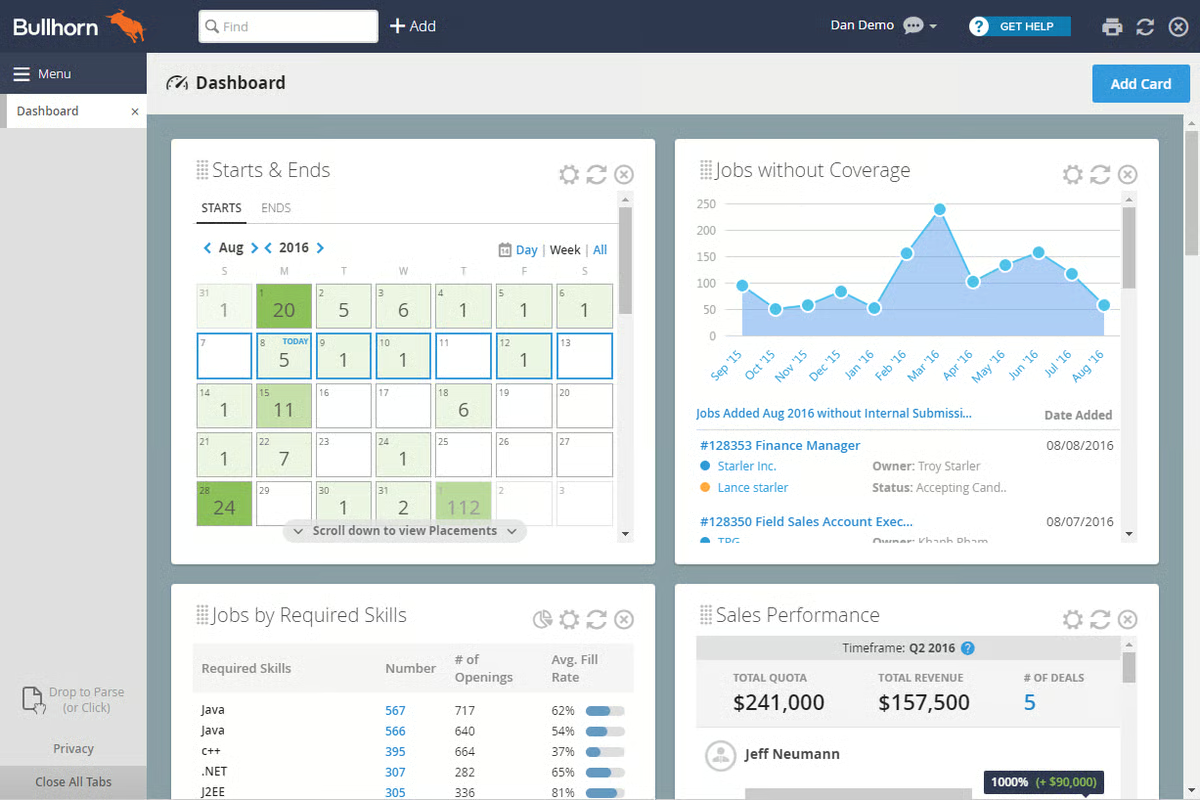
A theme I kept seeing across the G2 reviews is how well Bullhorn’s integrations fit into daily recruiting workflows. Users describe the process as smooth and reliable, especially when it comes to connecting timesheets, onboarding tools, and other contractor-facing systems. Several reviewers pointed out that these integrations cut down on manual steps and help candidates move through required tasks without confusion, which makes high-volume staffing environments run more predictably.
Some reviewers mentioned that Bullhorn’s wide set of tools, particularly its filtering options, CV parsing, and multi-step workflows for managing candidate data, requires time to learn. These features give recruiters a lot of control, but teams without structured onboarding or those bringing in new recruiters frequently may need extra training to use them effectively.
A number of users also pointed out that Bullhorn can load slowly during specific actions, especially when switching between candidate profiles, applying multiple filters, or navigating across several tabs inside the ATS. These delays tend to show up most in high-volume environments where recruiters move rapidly through records. For teams that manage moderate workloads or rely on steadier, scheduled searches instead of constant profile switching, these performance issues are less impactful.
In the broader context, Bullhorn proves itself as a system that not only organizes high-volume recruiting activity but also supports the momentum needed to fill roles quickly and consistently.
What I like about Bullhorn:
- Recruiters repeatedly highlight how well the platform organizes candidate and client activity, making it easier to manage large pipelines without losing track of conversations.
- I’ve seen strong feedback on Bullhorn’s integrations, especially around onboarding and timesheet logging, which helps keep administrative work moving smoothly.
What G2 users like about Bullhorn:
“Bullhorn is a great Recruiting and Staffing Software. The best part is that we can keep all kinds of databases in Bullhorn, which we do on a daily basis. It keeps a great track of candidates, candidate complete profiles, submissions, interviews, placements, and much more data that it can hold on our candidates. I can put a note in Bullhorn to make the candidate exclusive from the whole organization so that if one candidate is in the interview process, no one else can submit that to other positions. Bullhorn also keeps track of candidates, including when they were entered into Bullhorn, when they submitted, when they were placed, when they were interviewed, and how many times someone has submitted that candidate. Additionally, we can enter a complete profile for a candidate, including address, email, contact information, location, visa status, and the portal from which they were sourced, among other details.
We can also review our activities from past years. We can directly get the whole report of different teams. We can also search candidates with a Boolean search, with so many filters according to our need. With Bullhorn, my recruitment process gets better each day”.
– Bullhorn review, Richa S.
What I dislike about the Bullhorn:
- Several G2 reviewers mentioned that some of Bullhorn’s more advanced capabilities, such as advanced filters, parsing tools, and multi-step workflows, require time to learn. This tends to matter most for teams that frequently onboard new recruiters, while established staffing groups with structured training usually adopt these tools more smoothly.
- Users also noted that the system may take an extra moment to respond when switching rapidly between detailed candidate records or navigating across multiple ATS modules. Fast-paced recruiting environments that rely on constant profile movement may notice this more, whereas teams reviewing candidates at a steadier pace typically work without interruption.
What G2 users dislike about Bullhorn:
“The system can be slow to load at times. Occasional glitches or lag when searching or updating records. The Mobile app doesn’t always offer the same functionality as the desktop”.
– Bullhorn review, Bri L.
2. Greenhouse: Best for structured hiring workflows
As I worked through the Greenhouse reviews, one pattern showed up immediately: users consistently praise how structured and organized the hiring workflow is. Reviewers often mention that Greenhouse’s pipeline stages, interview plans, and progress tracking give them a dependable framework for running hiring processes at scale. According to G2 Data, 90% of users find it easy to do business with Greenhouse, which aligns with how many reviewers describe their day-to-day experience using these structured workflows to keep candidates moving smoothly from one stage to the next.
Another theme that stood out is how effectively Greenhouse manages information across roles, teams, and candidate histories. Recruiters noted that having past applicants, warm candidates, and long-term interactions in one place makes it easier to re-engage talent when new roles become available. Users also highlighted how Greenhouse simplifies external job posting and organizes incoming applications without extra effort. Several reviewers highlighted customization as a significant strength, particularly the ability to tailor pipelines, interview plans, and stage transitions to match their organization’s hiring practices.
Reporting and visibility also appeared repeatedly in reviews. While most teams rely on the built-in reporting to understand pipeline health or referral activity, reviewers noted that these insights help them maintain consistent hiring across teams. This steady usefulness supports Greenhouse’s broader momentum. G2 Data shows that 91% of users believe the product is moving in the right direction, which lines up with feedback about recent improvements to workflows, job posting flows, and referral tracking.
Several reviewers shared that while Greenhouse supports customization, building highly detailed or tailored reports requires more effort. For teams that rely heavily on advanced analytics or specialized dashboard formats, this can add extra time and may require additional tools. Greenhouse tends to be a better fit for recruiting teams that mainly use standard reports and only occasionally need deeper breakdowns.

Scheduling came up as another area that some users pointed out. A few reviewers noted that scheduling interviews, especially when relying on specific calendar integrations or mass-sending invitations, can necessitate additional steps. This tends to impact teams that coordinate high volumes of interviews or rely on automated scheduling flows. For organizations with steadier hiring rhythms or smaller interview loops, the scheduling flow is usually sufficient.
On the whole, reviewers describe Greenhouse as a structured and dependable platform that supports consistent hiring from start to finish. Companies that value process visibility and coordinated hiring across multiple roles tend to benefit the most from the way Greenhouse brings every part of the candidate journey into one place.
What I like about Greenhouse:
- Many G2 users highlight how well Greenhouse structures hiring stages, helping teams keep candidate progress consistent and visible.
- G2 reviewers also appreciate the customizable nature of the pipelines and interview plans, which makes it easier to adapt Greenhouse to different hiring workflows.
What G2 users like about Greenhouse:
“I like how flexible Greenhouse is when it comes to setting up every aspect, whether it be permissions or job-based. The interface is generally easy enough to navigate that most new hiring managers need minimal training to get started. The Greenhouse team is very helpful and knowledgeable, and always willing to help with any issues and suggest solutions”.
– Greenhouse review, Mark H.
What I dislike about Greenhouse:
- G2 reviewers noted that creating highly customized or in-depth reports can take more time, which is something data-intensive teams or organizations with complex analytics requirements will likely notice more. For companies that rely primarily on standard metrics or routine pipeline visibility, the built-in reporting generally meets their needs without added configuration.
- Some G2 users shared that coordinating interviews, especially when handling multiple stages or working with specific calendar setups, can involve a few additional steps. This tends to matter most for hiring teams running large, fast-moving interview loops, while organizations with a steadier volume or simpler scheduling structures typically move candidates through the process without difficulty.
What G2 users dislike about Greenhouse:
“I see an opportunity to improve the search functionality so it can retrieve more relevant candidate results from the entire database. Enhancing keyword matching and filtering would make it even more effective for recruiters handling large volumes of profiles”.
– Greenhouse review, Shivananda G.
Once you’ve built strong pipelines, the next step is reducing manual work. Learn how recruiting automation can help your team move faster with less effort.
3. Ceipal ATS: Best for deep sourcing integrations
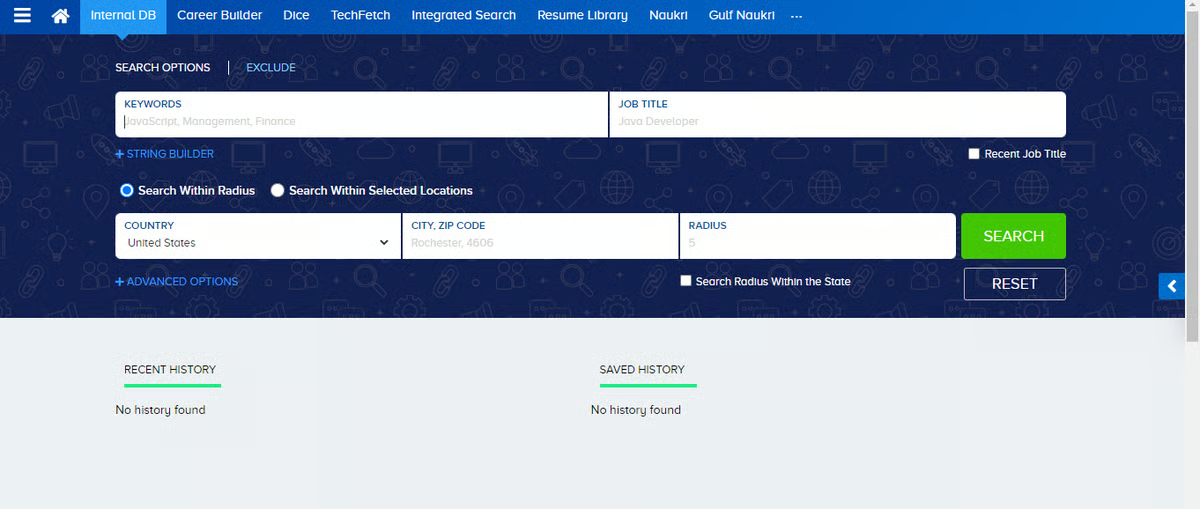
As I reviewed Ceipal ATS feedback, one theme dominated nearly every comment: users consistently praise how well the platform connects with job boards, email, LinkedIn, and multiple sourcing channels at once.
Recruiters rely heavily on these integrations to pull in applicants, search across portals, and manage profiles from a single interface, and reviewers frequently point to this ecosystem as the core strength of Ceipal. This aligns with the strong sentiment in G2 Data, where 97% of users are likely to recommend the platform, reflecting the high value that staffing teams place on these integrations in their daily workflows.
Another theme that appears repeatedly is Ceipal’s ability to centralize large volumes of candidate data. Reviewers noted that the platform streamlines the management of sourcing, submissions, onboarding checklists, and communication records, eliminating the need to switch between tools.
Many users have called out the resume harvesting capabilities and AI-driven ranking as time-savers, highlighting how Ceipal supports recruiting teams that work through hundreds of applications simultaneously. According to G2, Ceipal scores 94% in meets requirements and 95% in ease of setup, which aligns with what reviewers describe, especially teams that emphasized how quickly they were able to adopt the platform and plug it into existing processes.
Users also mentioned that Ceipal’s automation plays a meaningful role in streamlining high-volume recruiting tasks. From shortlisting to email reminders to onboarding workflows, the platform reduces manual steps that typically slow down large staffing teams. Recruiters working across multiple clients seemed to appreciate how these automations help them stay organized while dealing with shifting requirements and heavy sourcing loads.
A few reviewers did mention areas that depend on team workflows. Several users have pointed out that the user interface becomes more difficult to navigate when working across advanced modules or when switching quickly between detailed candidate profiles. This tends to be more noticeable for teams coordinating large databases or managing multiple job pipelines simultaneously. Organizations with structured training processes or experienced recruiters typically adapt more easily, making Ceipal a better fit for staffing firms with defined workflows rather than small teams that need minimal UI complexity.
Performance at scale also frequently came up. Some reviewers noted that Ceipal slows down when handling deep searches, large resume banks, or high-volume activity. Teams that rely on rapid profile switching or run intensive searches throughout the day may encounter occasional delays. However, staffing teams with steady workloads or those who run searches in batches often find these slowdowns manageable within their overall processes.
All things considered, reviewers describe Ceipal ATS as a powerful and highly integrated platform designed for high-volume recruiting. Its ecosystem of job boards, centralized candidate management, and strong automation support make it a strong match for staffing agencies and talent teams that prioritize scale, breadth of sourcing, and fast execution.
What I like about Ceipal ATS:
- G2 reviewers frequently highlight Ceipal’s strong integrations with job boards, email, and sourcing channels, which help consolidate recruiting activity.
- Many G2 users appreciate how well Ceipal manages large databases, from resume harvesting to tracking submissions and onboarding steps.
What G2 users like about Ceipal ATS:
“CEIPAL utilizes AI to scan job requirements and compare them with candidate profiles (skills, experience, location, willingness, etc.), automatically ranking the best-fit candidates. This helps recruiters focus their efforts on the most promising applicants first. All incoming applications (from job boards, social media, email, referrals, etc.) are collected into a single, unified database. The system automatically parses resumes (extracting information into structured fields), making searching, filtering, and retrieving candidate information much easier compared with spreadsheets or manual files.
By automating resume parsing, matching, and communications, hiring teams don’t have to manually sift through hundreds of applications, which speeds up selection and placement. With centralized data and efficient matching, even qualified candidates from older applications or passive databases are searchable”.
– Ceipal ATS review, Sarath S.
What I dislike about Ceipal ATS:
- G2 reviewers mentioned that Ceipal’s more advanced features, such as deep search filters or detailed candidate profile views, take longer to learn. This is mainly a consideration for teams without a formal training process, while staffing groups with experienced recruiters or a structured onboarding routine usually become comfortable with these modules quickly.
- Some G2 users also mentioned that performance can slow down during particularly large searches or when processing high volumes of resumes at once. This is most noticeable for agencies running heavy, fast-paced sourcing cycles, whereas teams with moderate applicant flow or more routine search patterns generally work within the system without experiencing these delays.
What G2 users dislike about Ceipal ATS:
“The platform has made candidate recruitment easy, and it boasts all amazing features – no dislikes”.
– Ceipal ATS review, Gerald S.
Recruitment marketing brings candidates in, but your ATS determines what happens next. Explore the best ATS tools of 2025 to strengthen your entire hiring funnel.
4. JobDiva: Best for all-in-one staffing ops
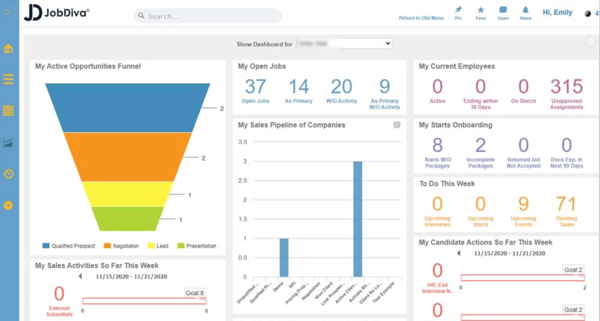
As I moved through the JobDiva reviews, one core theme was impossible to miss: users consistently praise how well JobDiva brings sourcing, submissions, client updates, and communication into one connected workflow.
Recruiters rely heavily on its integrated environment to search for candidates, review resumes from multiple job boards, and send updates without having to jump between tools. This end-to-end visibility is a big part of why JobDiva maintains strong satisfaction metrics. According to G2 Data, 92% of users say the platform meets their requirements, which aligns with how often reviewers describe it as a comprehensive system for daily staffing operations.
Another recurring theme is JobDiva’s sourcing capabilities. Reviewers noted that the platform gives them broad access to talent across job portals, and many pointed out how effective the search experience is when finding candidates with specific skills or backgrounds. Several users mentioned that they rely on JobDiva to quickly identify qualified applicants and move them into pipeline stages without manual work. This sourcing depth, combined with its applicant tracking tools, is a major reason why staffing teams describe it as a productivity booster for high-volume recruiting.
Workflow management also appears repeatedly in the feedback. Users appreciate how JobDiva streamlines submissions, keeps records organized across clients, and centralizes updates in a single location. Recruiters working across multiple roles highlighted that being able to see activity end-to-end helps them coordinate faster. And with G2 showing 90% ease of doing business, this aligns with reviewers who describe JobDiva as a supportive system for staying on top of shifting client needs.
Some G2 users noted that the system would benefit from more precise filtering options, particularly when searching for specific candidate levels or refining integrated job board results. This tends to matter more for teams that rely on highly segmented searches or need very granular talent mapping. Organizations with broader sourcing needs or teams that mostly search mid-level roles often find the current filters sufficient.
Performance during heavier usage also surfaced in several G2 reviews. Several G2 users reported that JobDiva can run slowly or feel sluggish when switching between modules or reviewing large numbers of profiles simultaneously. This is most noticeable for staffing agencies that work through large databases or run frequent, deep searches throughout the day. Teams with moderate activity or a steadier recruiting pace typically experience fewer slowdowns.
When you weigh it all up, reviewers describe JobDiva as a comprehensive, workflow-driven ATS that supports sourcing, submissions, and client activity within a single, connected platform. Its strong job board reach, consistent workflow visibility, and all-in-one structure make it a strong fit for staffing firms that prioritize breadth, coordination, and efficiency across every stage of the hiring process.
What I like about JobDiva:
- Reviewers frequently highlight how JobDiva centralizes sourcing, submissions, and communication into one seamless workflow.
- Many users appreciate its strong access to job boards and reliable search tools for quickly finding qualified candidates.
What G2 users like about JobDiva:
“I appreciate that JobDiva combines an ATS and CRM into one platform, making it easy to manage candidates, clients, and job pipelines without needing to switch systems. Its automation features and AI matching significantly reduce manual work”.
– JobDiva review, Ali S.
What I dislike about JobDiva:
- Some G2 reviewers mentioned that JobDiva’s filtering tools aren’t always precise enough for roles that require very specific experience levels or tightly defined candidate segments. This tends to be more noticeable for staffing teams that depend on fine-grained search criteria, while organizations with broader sourcing needs usually work well within the existing filters.
- G2 users also shared that JobDiva can take extra time to process deeper searches or large resume banks, which can slow down teams managing heavy, rapid-fire pipelines. Companies with moderate search volumes or those reviewing candidates in smaller batches generally experience smoother performance and aren’t affected to the same degree.
What G2 users dislike about JobDiva:
“The interface can feel dated and a bit cluttered, especially for new users. It takes some time before everything feels intuitive. Some features feel buried under too many clicks, so simple tasks can take longer than they should.
The system is powerful, but because of that, the learning curve is steeper compared to newer ATS platforms. And occasionally, certain modules feel less flexible; you can do the task, but not always in the smoothest or most customizable way”.
– JobDiva review, Aashish S.
5. CareerBuilder Talent Network: Best for broad, fast candidate sourcing
One of the clearest themes in CareerBuilder Talent Network reviews is how reliable it is for sourcing a wide range of candidates across industries, roles, and experience levels. Recruiters often mentioned that they can customize the platform to fit their workflow, integrate it with their own ATS, and rely on it throughout the entire workday to find relevant talent quickly.
Many users highlighted how easy it is to implement and how helpful CareerBuilder’s customer support team is during setup and daily use, which aligns with CareerBuilder’s strong G2 Data, 90% of users say they are satisfied with the platform, and 92% highlight ease of doing business, which matches the straightforward sourcing experience reviewers talk about.
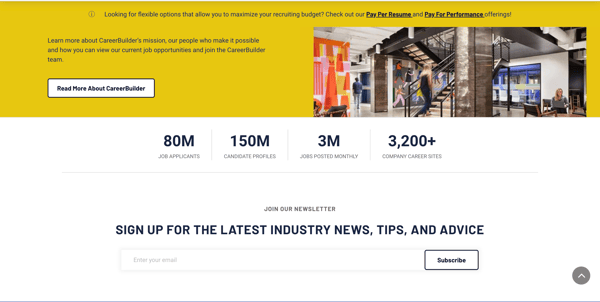
CareerBuilder also stands out for the volume of applicants it brings in. Recruiters mentioned that the platform consistently delivers strong inbound applications and helps them fill roles that otherwise would take longer to staff. Several G2 reviewers appreciated how simple it was to post jobs, manage applicants, and filter through profiles at speed. The system’s structure supports common staffing workflows, and users often rely on it as their primary tool for high-frequency sourcing.
Another theme that showed up often is its usefulness for matching candidates with client requirements. Many reviewers mentioned that CareerBuilder helps them locate profiles closely aligned with job descriptions, making it easier to move qualified applicants into the next stages quickly. This steady performance across sourcing and matching is reflected in G2 sentiment, where 92% of users say CareerBuilder meets their requirements, reinforcing its reliability as a core sourcing engine.
I also noticed reviewers consistently calling out the platform’s ability to surface candidates who may not appear on other job boards. Several recruiters explained that CareerBuilder’s talent pool felt broader and more varied, which helped them identify applicants who would otherwise be difficult to reach.
Others highlighted the platform’s filtering and sorting tools, explaining that they make it easier to navigate large batches of applicants without losing track of qualified profiles. And for teams that rely on ongoing sourcing throughout the day, users repeatedly mentioned that CareerBuilder delivers a steady flow of relevant candidates without requiring constant adjustments or campaign resets.
Reviewers noted that while CareerBuilder handles sourcing well, limitations in email-based outreach, such as the inability to run mail merges directly within the platform, can slow down teams that rely heavily on bulk communication. This tends to matter more for staffing agencies or high-volume coordinators who send batch outreach regularly. Smaller teams or organizations with steadier hiring rhythms may not feel this limitation as strongly.
A few G2 reviewers also pointed out restrictions around resume downloads, mentioning that caps or limits can impact teams that manage large pipelines or frequently hand off candidate profiles to clients. This is more relevant for agencies working across many simultaneous roles; companies with fewer openings or internal hiring teams typically operate comfortably within the platform’s download boundaries.
CareerBuilder Talent Network is consistently described as a dependable sourcing tool for recruiters who value reach, speed, and reliable access to active job seekers. Its broad candidate pool and straightforward workflows make it a strong choice for staffing teams and in-house recruiters who need fast, high-volume sourcing without complexity.
What I like about CareerBuilder Talent Network:
- G2 reviewers consistently call out how effective CareerBuilder is for sourcing a wide range of active candidates across industries and skill levels.
- Many G2 users appreciate how quickly they can post jobs and start receiving relevant applicants without extra configuration.
What G2 users like about CareerBuilder Talent Network:
“Career Builder is very use, you can implement it and customize it as per your need, you get excellent customer support, based on your subscription, you can almost use it throughout your day, it has multiple useful features for talent search, and most importantly, you can integrate it with your own ATS as well”.
– CareerBuilder Talent Network review, Aazam S.
What I dislike about CareerBuilder Talent Network:
- G2 reviewers noted that the platform doesn’t support mail merge for bulk outreach, which can slow down teams that send high-volume candidate communications. This tends to matter most for staffing agencies or sourcing teams that rely on batch emailing as part of their daily workflow; teams with steadier hiring needs usually work comfortably within the existing outreach tools.
- Some users mentio