


I compared more than 15 tools to select the 5 best compensation management software: Deel Payroll, Salary.com, Hibob HRIS, Paycom, and Payscale Ascent.
Compensation planning sounds straightforward until you’re knee-deep in spreadsheets, juggling budgets, bonus structures, and equity grants, and chaos inevitably hits. I’ve seen too many teams try to manage it all with clunky Excel files or disconnected HR systems, only to end up with frustrated employees, costly errors, and serious compliance risks.
If you’re wondering which compensation software is best for small businesses, many HR leaders point to user-friendly tools with simplified workflows, clear dashboards, and easy integration. If ease of use is your top priority, start with the best user-friendly compensation software tools that offer guided workflows, role-based tips, and clean manager views.
That’s why I decided to find the best compensation management software. While I don’t manage comp plans directly, I’ve worked closely with HR leaders, finance teams, and people ops pros who live and breathe pay transparency and performance-based rewards.
To build this list, I analyzed top-rated tools on G2, combed through user reviews, demoed a few platforms, and even chatted with professionals to get real-world insights.
What I found was eye-opening. Some platforms radically simplify the way teams plan, model, and communicate compensation. Others… well, not so much. Whether you’re handling base salaries, variable pay, equity, or global comp plans, the right tool can save you hours, reduce costly errors, and give employees the clarity they deserve.
If you’re shopping for the best compensation management software, this guide will help you cut through the marketing fluff and find the right fit before the next planning cycle sneaks up on you.
5 best compensation management software: my top Picks
- Deel Payroll: Best for multi-country payroll and compliance
Runs global payroll, contracts, and compliance in one platform with multi-currency payouts and fast, transparent international payments. (Starting from $8 per employee per cycle) - Salary.com: Best for market data and salary benchmarking
Offers deep compensation insights, reliable salary benchmarks, and analytics for HR and comp teams. (Custom Pricing) - HiBob HRIS: Best compensation management software for tech startups
Combines HR, payroll, and compensation modules in one modern platform designed for growing businesses. (Custom Pricing) - Paycom: Best for midsize to large organizations
Streamlines payroll and compensation management in one system, ideal for companies already using Paycom. (Custom Pricing) - Payscale Ascent: Best for centralized data and pay analysis
Provides compensation teams with survey integration, structured pay analysis, and market data for scalable insights. (Custom Pricing)
*These are the top-rated products in the compensation management software category, according to the G2 Summer Grid Report 2026. Pricing of their paid plans is available on request.
5 best compensation management software I recommend
After speaking with HR leaders, finance teams, and compensation experts, I came to understand that compensation management software helps organizations plan, manage, and communicate employee pay. It covers everything from base salaries and bonuses to equity grants and merit increases, all while keeping budgets, compliance standards, and company goals on track.
The demand for these tools is only increasing. In fact, the compensation management software market is projected to nearly double to $7.23 billion by 2030, growing at a CAGR of 9.5%. This growth shows how more companies are moving away from manual spreadsheets and investing in platforms that make pay planning fairer, faster, and more transparent.
What stood out to me is that the best compensation software goes far beyond tracking numbers. It helps teams model different scenarios, catch potential pay gaps early, and collaborate more easily across HR, finance, and leadership. Some platforms even equip managers with tools to lead more transparent and confident conversations about pay.
The strongest platforms are intuitive, flexible enough to support different company structures, and backed by robust analytics that drive smarter and more equitable pay decisions. From everything I saw, great compensation software is not just an operational tool. It is a strategic advantage for any organization that wants to pay more fairly, transparently, and efficiently. Great compensation management needs to be paired with reliable payroll and payment systems. Explore the top payment processing software trusted by businesses in 2026.
How did I find and evaluate the best compensation management software?
I started by pulling a list of top-rated compensation management software from G2, and I used AI tools to analyze reviews on top compensation management platforms, surfacing themes like “easy merit cycle management” or “confusing reporting dashboards. Prioritizing platforms with high ratings and a strong volume of reviews. I wanted tools that real users were actively recommending, not just ones with fancy marketing.
I looked closely at platform features, ease of use, integration capabilities, reporting options, and pricing transparency.
Since I didn’t personally test every platform, I reached out to a few HR leaders who had hands-on experience. Plus, I heavily referenced screenshots and product walkthroughs found directly on G2 profiles and vendor websites. The screenshots featured in this article may be a mix of those captured during testing and those obtained from the vendor’s G2 page.
What makes the best compensation management software: My criteria
When I set out to find the best compensation management software, I focused on what actually makes a tool useful in the real world. Here’s what mattered most.
- Ease of planning and modeling: The best platforms make it easy to plan and model different compensation scenarios. I looked for tools that let teams create salary bands, bonus structures, and equity grants without needing ten different spreadsheets open. Features like compensation modeling, budget forecasting, and “what if” scenario planning were must-haves. Some tools even allow you to set multiple comp cycles side by side, so you can plan for annual merit increases and mid-year promotions without confusion.
- Integration with core HR and payroll systems: Disconnected systems are a recipe for disaster. I paid close attention to whether a compensation tool integrates easily with existing HRIS (Human Resources Information Systems) like Workday, BambooHR, or ADP, as well as payroll systems. Real-time data syncing is key here, especially if you want to avoid manual uploads and last-minute surprises during compensation cycles. Bonus points if the tool offers pre-built connectors or open APIs for smoother setup. Cloud-first buyers at mid-market companies often shortlist the best cloud-based compensation systems for medium business to speed deployment and reduce IT lift.
- Support for global and complex structures: Compensation today is rarely one-size-fits-all. Companies often have employees across multiple countries, with different currencies, tax regulations, and equity structures. The best software supports global compensation plans, lets you handle multi-currency payments, and even accommodates regional bonus practices or country-specific compliance requirements. Some platforms even offer localization features to make sure terminology and calculations match local norms.
- Built-in pay equity and compliance tools: With pay transparency laws and DEI (diversity, equity, and inclusion) initiatives gaining momentum, I wanted to see which tools helped companies stay proactive, not just reactive. The top platforms offer built-in pay equity audits, real-time analytics on pay gaps, and compliance reporting features. Some even have alerts that flag when an offer or promotion could introduce an inequity into the system. For companies serious about fair compensation, this is no longer optional.
- User experience for both admins and managers: A lot of comp tools look great on the admin side but fall apart when managers actually need to use them. I looked for platforms that offered clean dashboards, easy-to-use workflows, and intuitive self-service portals for managers who might only log in during review cycles. Things like automated merit recommendation calculators, manager training modules, and pre-built templates for comp communication stood out as big wins.
- Security and data privacy: Compensation data is some of the most sensitive information a company handles. I made sure to check whether tools had enterprise-grade security, including SOC 2 compliance, role-based access controls, encryption in transit and at rest, and audit logs. If a platform could not guarantee serious security protocols, it immediately dropped down my list.
The list below contains genuine user reviews from the Compensation Management Software category. To be included in this category, a solution must:
- Provide a centralized dashboard to visualize compensation data.
- Enable users to publish internal compensation policies and facilitate diverse bonus structures.
- Help users create comprehensive salary budgets.
- Allow simple exporting and importing of compensation data for reporting purposes.
*This data was pulled from G2 in 2026. Some reviews may have been edited for clarity.
1. Deel Payroll: Best for multi-country payroll and compliance
Deel Payroll stood out to me right away as the tool teams reach to grow across borders. From everything I read in G2 reviews, it shines at taking the messiest parts of global pay — multiple countries, currencies, tax rules, and contracts — and pulling them into one platform that finance, HR, and employees can all actually understand.
What people love most is how much it simplifies paying a distributed team. Reviewers describe running payroll across multiple countries from a single system, with calculations and local compliance handled automatically. One reviewer estimated it cut their payroll processing time by 50–60% and removed hours of manual work every month — the kind of relief that lets growing teams focus on the business instead of the spreadsheet.
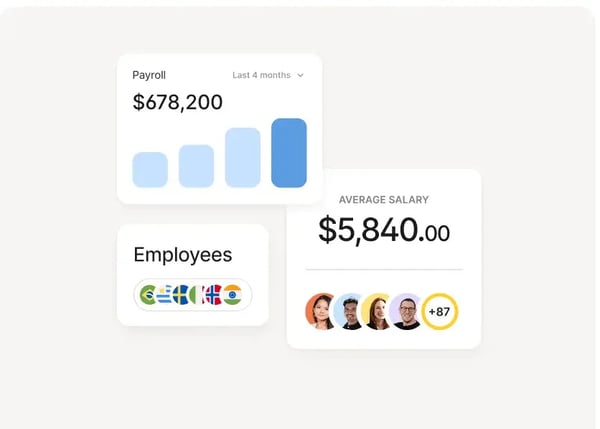
A theme that comes up again and again is transparency. Users say they can see exactly what they’re being paid and why, with clear breakdowns of deductions, fees, taxes, and exchange rates, plus notifications at each step of the payment process. That clarity builds real trust: Reviewer after reviewer mentioned the peace of mind of knowing precisely when money will land and never having to chase anyone to find out.
Speed is another standout. Many reviewers highlight near-instant payouts, with salaries hitting local bank accounts or the Deel card within minutes, and exchange rates they describe as close to real-time and often better than their local banks. For globally distributed teams, that combination of fast transfers and fair conversion takes a genuine financial worry off the table.
The platform’s ease of use earns consistent praise, too. Reviewers describe a clean, intuitive interface where reviewing payments, managing contracts, and tracking payroll status takes only a few steps, alongside a setup process that several said took as little as 10 minutes. Having contracts, invoices, tax documents, and time-off balances centralized in one place is exactly what makes it feel less like admin and more like a system working for you.
Customer support comes through as one of Deel’s strongest assets. Across company sizes and time zones, users repeatedly call out responsive, friendly live-chat support that resolves issues quickly — something that matters enormously when the subject is people’s pay. Several reviewers specifically credited support with turning a tricky question into a fast, stress-free fix.
A favorite feature worth singling out is Deel Advance. Reviewers describe being able to draw part of their salary ahead of payday for emergencies, with Deel automatically deducting it later so nothing slips through the cracks. Paired with multiple withdrawal methods and virtual cards, it’s the kind of flexibility that makes the platform feel built around how people actually manage money.
That said, the most common critique in reviews is cost: some users point to withdrawal fees, higher-tier pricing, or charges that can feel steep, particularly for smaller teams or workers in countries where the currency conversion stings. Yet, many of the same reviewers note the fees are transparent upfront and still come out cheaper than the multiple intermediaries they used before Deel.
The other point that surfaces is a learning curve at the start, with a few reviewers saying the wealth of features can feel like a lot to navigate in the first few days, and that occasional payment delays could be communicated more proactively — but nearly all of them add that the platform becomes intuitive quickly and that support fills the gap whenever clarity is needed.
Overall, Deel Payroll is best for growing companies that are hiring across countries and want global payroll, compliance, contracts, and payments living in one transparent, reliable system. If your team is scaling internationally and you’re tired of stitching together regional providers and manual calculations, Deel earns its place among the best compensation management software for keeping global pay accurate, fast, and stress-free.
What I like about Deel Payroll:
- Deel makes paying a global team genuinely simple. From what I saw in G2 reviews, users love running payroll across multiple countries from one platform, with currency conversion, taxes, and local compliance handled automatically, one reviewer said it cut their payroll processing time by more than half.
- The transparency and speed stood out to me, too. Reviewers consistently mention near-instant payouts, near-real-time exchange rates, and clear breakdowns of pay, fees, and deductions, plus standout live-chat support and handy extras like Deel Advance for drawing pay early.
What G2 users like about Deel Payroll:
“I like using Deel Payroll for its effectiveness and communication in processes and payments. It is perfect for receiving my salary in another currency, and the payment records and notifications help me a lot. I am always aware of how much and when I will receive my salary because I receive alerts via email, mobile, and other notifications, even for transfers when moving my money between accounts.”
– Deel Payroll review, Danillo G.
What I dislike about Deel Payroll:
- From what I saw in G2 reviews, the most common gripe is cost, some users find withdrawal fees or higher-tier pricing steep, especially smaller teams or workers in countries where conversion stings, but many of the same reviewers note the fees are transparent upfront and still cheaper than the intermediaries they used before Deel.
- Based on G2 user feedback, there’s also a bit of a learning curve at first, though nearly everyone agrees the platform becomes intuitive quickly and that support fills the gap whenever questions come up.
What G2 users dislike about Deel Payroll:
“What I dislike about Deel Payroll is its high pricing and unclear fees, which can increase costs. Payment delays and slow processing sometimes occur, and integrations are limited. The platform can feel complex initially, and advanced features often require higher-tier plans.“
– Deel Payroll review, Ashish T.
2. Salary.com: Best for market data and salary benchmarking
When I started digging into Salary.com’s CompAnalyst platform, it quickly became clear why it is a favorite among compensation teams. From everything I read in user reviews and saw during my research, the platform is known for being clean, intuitive, and packed with reliable data.
It is built around one of the largest HR-reported compensation datasets, which makes a huge difference for teams trying to benchmark roles accurately without relying on generic internet surveys.
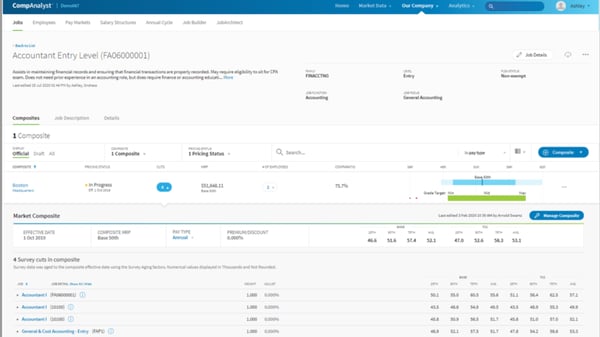
One thing I noticed while researching the platform is how much it focuses on speeding up the painful parts of compensation planning. Features like the Salary Structure Wizard and Job Range Wizard help HR teams build and update salary ranges without getting stuck in spreadsheet chaos.
From what I saw, another standout area is how much CompAnalyst focuses on pay equity and internal communication. It offers built-in analytics to help companies catch potential equity gaps early and provides tools for creating Total Compensation Statements, so managers can have clearer, more confident conversations about pay. That attention to both technical comp modeling and employee-facing transparency is something not every platform balances well.
CompAnalyst also makes survey management easier by letting users import third-party compensation surveys with a click, which is a big win for teams that spend weeks on survey submissions manually.
What also stood out in G2 reviews is how much the reporting does the heavy lifting once a job is benchmarked. Reviewers describe pulling detailed reports, covering industry scopes, compensable factors, and full job descriptions, that they then share with leaders, talent acquisition teams, and hiring managers during comp discussions. For HR pros, having that polished, defensible report ready to drop into a conversation makes pay decisions far easier to justify.
Reviewers also keep coming back to the support and onboarding experience. People describe an implementation team that’s competent, creative, and quick to find workarounds, plus reps who walk them through manually uploading their own data for future projects. Several called the customer service “beyond impressive” and timely, the kind of hands-on guidance that helps newer comp teams get to value fast.
Many G2 users highlight that CompAnalyst delivers reliable data and strong functionality, though some point out a few areas for improvement. A common one is the initial learning curve when getting started. While the platform is powerful, it can take some time for new users to feel fully comfortable. That said, once teams are onboarded, reviewers often note that the workflows become intuitive and highly efficient.
Another theme I’ve seen in the feedback relates to niche or highly specialized job titles. CompAnalyst performs very well for common roles and standard job families, but some users mention it may not always offer the depth needed for unique positions, which can mean a bit of extra manual work. Still, most agree that for the vast majority of use cases, the market-data depth and benchmarking features more than meet expectations.
Based on everything I gathered, CompAnalyst is a strong fit for companies that need reliable data, faster planning cycles, and stronger communication around pay decisions. I would recommend it for mid-sized and enterprise companies that are serious about pay equity, competitive benchmarking, and moving away from manual processes. Among the most recommended compensation management software for large enterprises, CompAnalyst stands out for market-data depth, robust modeling, and pay-equity analytics.
What I like about Salary.com:
- It’s built on one of the largest HR-reported compensation datasets out there. It gives teams real benchmarking power without relying on random internet salary ranges.
- The Salary Structure Wizard and pay modeling tools stood out to me; they really streamline the most painful parts of comp planning and help teams ditch messy spreadsheets.
What G2 users like about Salary.com:
“I use Salary.com to review positions within my company and appreciate the very detailed information it provides. I enjoy the breakdown and layout of the website because it is easy to view, and I can use that information to help people. I personally like a source that is organized by category and easy to use, especially as someone who is newer to this. Setting up Salary.com was a very quick and simple process, involving a straightforward verification.“
– Salary.com review, Hannah G.
What I dislike about Salary.com:
- From what I’ve seen in G2 reviews, there’s a bit of a learning curve at first, especially for teams new to compensation software.
- According to G2 user feedback, it might not be the best fit if you’re trying to benchmark really niche or specialized roles, as some reviewers said the data can fall short outside standard job families.
What G2 users dislike about Salary.com:
“The downside for me at the moment is that I can’t find the exact roles within my company, which is mainly a food company. I’d need to do a bit more research before I can choose a job that feels truly relevant.”
– Salary.com review, Frances S.
3. HiBob HRIS: Best compensation management software for tech startups
HiBob caught my attention because of how often it came up in reviews about flexibility, automation, and centralization. From what I gathered, it’s built for fast-moving companies that need to handle compensation in a more structured, transparent way without feeling like they’re forcing a traditional HR system to do something it wasn’t built for.
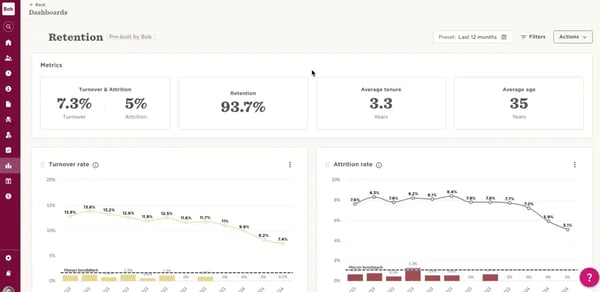
What stood out most in my research is how much HiBob simplifies the collaboration between HR, finance, and managers during compensation reviews. Users consistently mentioned how helpful it is to have all people’s data, like salary history, performance reviews, tenure, and bonus timelines, in one place.
What really impressed me was the end-to-end compensation flow. Teams can run full-company compensation events more easily, with fewer mistakes compared to manual processes. HiBob supports everything from planning and increasing allocation to reporting and letter creation.
What makes HiBob even more compelling is how it supports organizations in setting consistent compensation bands, aligning with local pay regulations, and driving DE&I goals.
During my research, I found that you can manage salary reviews by setting recommendations and guidelines for managers, all within a sleek UI. Users also echoed that the platform feels intuitive and well-designed, which helps when you’re trying to get multiple stakeholders aligned during compensation cycles.
There’s also support for multiple currencies and local benchmarks, which makes it easier for global teams to manage pay across regions.
A theme that comes through strongly in the reviews is how much HiBob consolidates by replacing multiple systems. Reviewers describe the compensation module saving them many hours of spreadsheet work, while analytics and dashboards give finance and leadership real-time visibility they didn’t have before, all from one platform that scales as the company grows.
That said, a few pain points came through as I analyzed user reviews. Reporting came up more than once as an area that could be improved. It works, but building custom reports isn’t always straightforward.
Some users also mentioned that the initial setup can take time, especially when configuring flows or permissions. Still, most reviewers seemed to agree that once you’re up and running, the time savings and clarity it brings to comp planning are well worth it.
If you’re looking for a modern HRIS that makes compensation reviews smoother and more collaborative, HiBob is definitely worth exploring.
What I like about HiBob HRIS:
- HiBob brings everything from salary history, performance reviews, and bonus data into one place so managers and HR can actually make informed decisions without chasing five different systems.
- Being able to run a full-company compensation cycle from planning to letter creation is a huge plus, and I gathered from user reviews that they’ve recently improved the letter generation process, too.
What G2 users like about HiBob HRIS:
“Hibob puts the power in your hands as an employee, not only can you easily put in leave/vacation days, you can also easily edit or remove them. The platform has a homepage where colleagues can engage and get to know each other, we can post cute and quirky posts on our birthdays or anniversaries and the team can celebrate with us. We can keep track of the entire team cause we have a view of who’s out and who’s in, we can see birthdays and a whole lot more.”
– HiBob HRIS review, Noxy P.
What I dislike about HiBob HRIS:
- From what I saw in G2 reviews, building custom reports can be a little tricky, and there could be small limitations, especially when you need something specific. But this is not a major drawback.
- G2 user feedback, the initial setup seems to take some effort, especially when configuring flows and permissions, and teams might hit small bumps as the platform evolves and new features roll out.
What G2 users dislike about HiBob HRIS:
“Two things come to mind. First, reporting, it works, but the export options are pretty limited, so if you want to do anything more complex with the data you’re a bit stuck.“
– HiBob HRIS review, Inma B.
4. Paycom: Best for midsize to large organizations
When I started looking into Paycom, I knew it was primarily known as payroll software. That’s what draws most companies in. But what surprised me is how much it’s grown into a full HR platform with compensation management tools that are actually pretty solid.
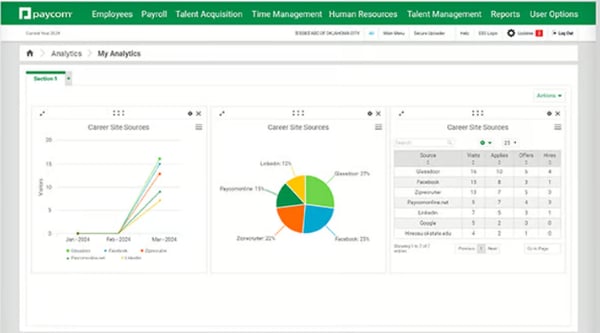
From what I gathered in user reviews and feature research, Paycom lets teams handle everything from payroll and performance tracking to salary adjustments and budget planning in one place. It’s not as specialized as some standalone comp platforms, but if you’re already using Paycom for payroll, its compensation features could be a smart extension.
That “all-in-one” approach seems to be one of Paycom’s biggest strengths, in my opinion. Because it brings payroll, benefits, and compensation into one system, it’s also one of the best compensation software for managing employee benefits alongside pay decisions. It helps companies eliminate paper processes, track compensation decisions more clearly, and stay compliant without having to bolt together multiple systems.
It supports centralized compensation budgeting, which means teams can build and adjust compensation plans while aligning with performance reviews, tenure, and department budgets.
I observed that its “Approve My Check” feature was mentioned a few times as a favorite, as it gives employees visibility into their payroll before it’s finalized, which helps catch errors early and builds trust. The system also lets HR and finance set parameters around raises and bonuses, making sure budgets stay on track while still allowing for flexibility.
Something reviewers highlight repeatedly is the employee self-service model built on Paycom’s single database. Because employees update their own information and it reflects instantly across payroll, HR, and time tracking, reviewers say it eliminates manual re-entry, lets people catch errors before payroll runs, and shortens payroll cycles by days — a quiet win that takes real pressure off HR.
Reviewers also praise how dependable the automation feels once it’s running. People describe automatic tax calculations and accuracy that build genuine trust that employees will be paid correctly and on time, and several call out responsive, same-day support and a steady stream of product updates that show the platform is actively listening to clients.
The flip side of packing so much into one system is that navigation can feel involved at first, some reviewers note that finding specific payroll or employment details can take a few steps and that notifications aren’t always clear, though most say that once they learn where things live, the all-in-one layout becomes second nature and saves far more time than it costs.
Like other tools mentioned above, there’s also a learning curve to consider. While the interface looks clean and modern, configuring compensation flows or training managers can take some time. That said, most reviewers highlight that once processes are set up, the system runs smoothly and integrates seamlessly with other HR workflows.
For teams already embedded in Paycom’s ecosystem, the convenience often outweighs these challenges. If your team is already using Paycom for payroll and wants to bring compensation planning under the same roof, it’s worth exploring. I’d recommend it to midsize and larger organizations looking to simplify pay decisions without leaving their payroll system.
What I like about Paycom:
- Paycom brings payroll, comp planning, and performance reviews together in one place. It makes the whole process feel more connected and less scattered.
- The “Approve My Check” feature stood out to me as a smart way to build employee trust and catch errors before payroll is finalized.
What G2 users like about Paycom:
“Paycom is a comprehensive solution with the ability to help employees and supervisors. The new AI widget has also made it easier to find support and understand the information you are looking at. Accessibility across multiple devices helps to make Paycom easy to access and use as both an employee and supervisor.“
– Paycom review, Jeremy H.
What I dislike about Paycom:
- Finding specific payroll or HR details can take a few extra clicks early on, and some notifications aren’t as clear as they could be, but reviewers consistently say the app becomes easy to navigate once they’re familiar with where everything lives.
- Based on G2 user feedback, there’s definitely a learning curve, especially when setting up comp rules or training managers on how to use the platform’s more advanced tools.
What G2 users dislike about Paycom:
“The app can sometimes be confusing to navigate, especially when trying to find specific payroll or employment information. Notifications are not always clear, and some features take multiple steps to access. It would also be helpful to have more detailed explanations for pay and deduction information so employees can understand their earnings more easily.”
– Paycom review, Nakeithia B.
While compensation tools handle salary structures and incentives, the best payroll software ensures employees get paid correctly and on time.
5. Payscale Ascent (formerly Payfactors): Best for centralized data and pay analysis
When I started looking into Payscale Ascent (formerly Payfactors) by Payscale, it felt like a platform built by and for compensation pros. It’s not flashy, but it’s focused, and that’s what stood out.
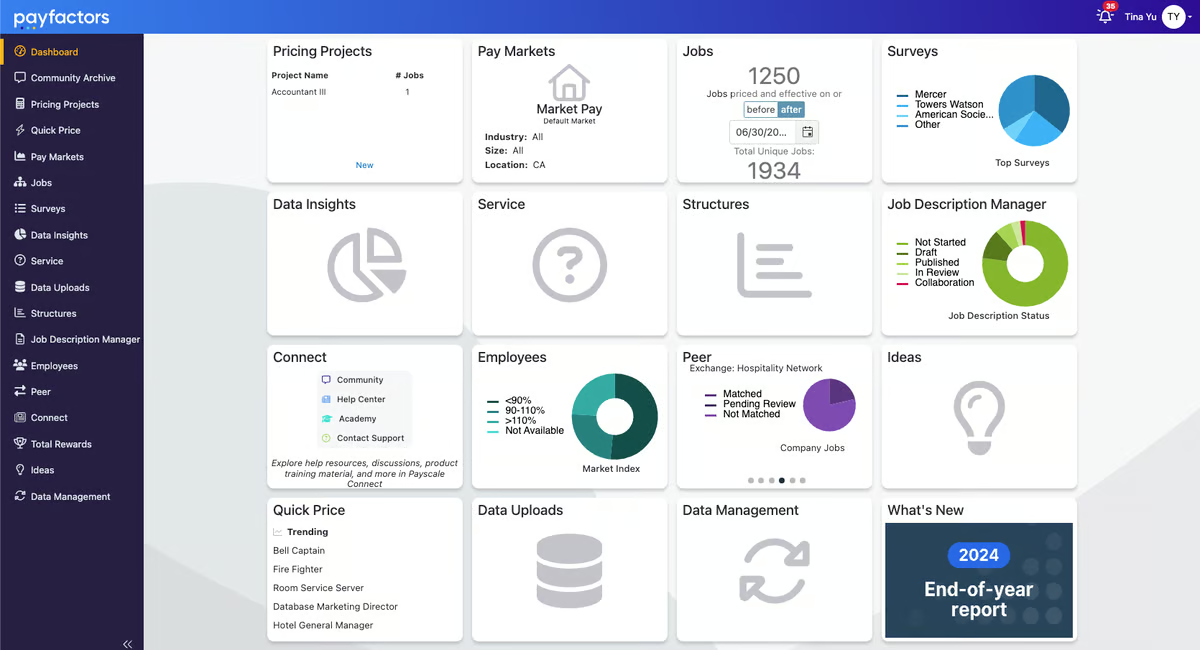
Based on the reviews I read, users love how it organizes compensation data into pricing projects, dashboards, and reports that are easy to reference and act on.
I could see that a lot of teams seem to rely on it for benchmarking against market data, managing internal equity, and building salary structures that are backed by real insights. I also saw multiple shoutouts for the JDM module (Job Description Manager), which helps streamline and centralize role definitions — something that can get messy fast in larger orgs. That’s why Payscale Ascent is often recognized among the leading compensation management solutions in the market, giving compensation teams a centralized way to manage pay data and frameworks more effectively.
From what I could tell, Payscale Ascent really shines when you’re dealing with salary surveys, market data, and internal comp modeling all at once. One reviewer called out how much it helped them tackle pay compression issues and build out their organization’s first compensation framework.
And while the UI isn’t the flashiest, the platform earns strong marks for customer support based on what I gathered. G2 users frequently highlight the team’s responsiveness and knowledge, particularly during implementation or when transitioning from other tools.
A standout in the reviews is the Job Description Manager (JDM). Reviewers describe it as an easy way to centralize, copy, route, and version job descriptions, replacing the old tangle of Word docs and email threads and supporting documentation and compliance needs along the way.
Reviewers also point to the platform’s newer AI-powered matching as a real time-saver. People describe Smart Price using job duties rather than titles to surface market matches, which speeds up pricing and helps reduce bias, so teams can benchmark new or acquired roles without working through each description by hand.
At the same time, some reviewers note that the tool can take a bit of effort to learn, especially for those new to compensation software or moving from older platforms. Still, most say that once they’re past the initial ramp, the workflows quickly become intuitive and the platform becomes a reliable part of their day-to-day.
I also came across a few mentions of gaps in market data for niche roles or very specific markets, where Payscale Ascent didn’t always provide the same depth. That said, most users see these as minor hurdles, and once teams are fully onboarded, they note the platform delivers reliable insights and smooth workflows.
If your team is deep into comp modeling and salary benchmarking, Payscale Ascent could be a strong fit.
What I like about Payscale Ascent (formerly Payfactors):
- Payscale Ascent brings salary surveys, job data, and comp modeling into one place. It’s built for people who actually live in spreadsheets.
- The JDM module stands out to me. Having a centralized way to manage job descriptions just makes everything else in the comp process more consistent.
What G2 users like about Payscale Ascent (formerly Payfactors):
“I like how intuitive Payscale Ascentis; if I’m unsure where something is, I can usually find it wh