



I’ve worked closely with finance and accounting teams to understand their operational challenges. Month-end close is a pressure cycle that demands precision, compliance, coordination, and real-time visibility. A single bottleneck can delay reporting, and a single manual error can cascade across statements. That’s what made me want to dig deeper into the best financial close software.
To understand which financial close platforms truly strengthen control, I evaluated 20+ leading financial close solutions using G2 Data, product comparisons, and verified user insights. I then shortlisted the eight best: Workiva, FloQast, BlackLine Financial Close Management, SAP Cloud ERP, Adra by Trintech, OneStream – Unified EPM, LiveFlow, and CCH Tagetik Software.
Some of these tools focus on reconciliation automation and real-time dashboards that simplify month-end visibility. Others go deeper with intercompany matching, regulatory reporting, multi-entity consolidation, and enterprise-grade governance frameworks built for complex accounting environments.
No matter your team’s size or close complexity, these are the financial close platforms that can genuinely help you reduce manual risk, improve reporting accuracy, and close with greater confidence.
8 best financial close software for 2026: My top picks
- Workiva: Best for governance-driven reporting and SEC compliance
Connects live data across statements, disclosures, and audit-ready workflows within a controlled reporting environment. - FloQast: Best for checklist-based close management
Centralizes reconciliations and task tracking while layering in AI-assisted automation for smoother month-end execution. - BlackLine Financial Close Management: Best for large-scale reconciliation automation
Streamlines transaction matching, journal workflows, and control frameworks for enterprise close environments. - Adra by Trintech: Best for user-friendly reconciliation workflows
Simplifies transaction matching and documentation management with clear visibility into account status. - LiveFlow: Best for real-time spreadsheet-connected reporting
Syncs accounting data directly into Google Sheets to enable dynamic, always-updated financial reporting. - OneStream – Unified EPM: Best for unified consolidation and performance management
Manages actuals, forecasts, and multi-entity reporting within a single extensible financial platform. - SAP Cloud ERP: Best for integrated enterprise financial operations
Embeds financial close processes within a fully connected ERP ecosystem spanning finance and operations. - CCH Tagetik: Best for unified financial consolidation and performance management workflows
Centralizes consolidation, budgeting, forecasting, and reporting with flexible workflows and built-in analytics.
*These are the top-rated products in the financial close software category, according to G2’s Spring 2026 Grid Report. The pricing of these tools is available on request.
8 best financial close software I recommend for 2026
From what I’ve seen across finance and accounting teams, financial close software means different things depending on the organization’s complexity. For some, it’s about organizing month-end checklists and improving reconciliation visibility. For others, it’s about automating intercompany transactions, managing multi-entity consolidations, strengthening audit trails, and meeting strict compliance requirements, all within one controlled environment.
Financial close software helps teams close faster, reduce risk, and maintain confidence in reported numbers. The features vary by platform; some emphasize reconciliation automation and task tracking, others focus on regulatory reporting, performance management, or ERP-connected reporting, but the goal stays the same: to bring structure, transparency, and repeatability to the close cycle.
And the demand for these systems is growing. According to Custom Market Insights, the global financial close software market valuation is anticipated to reach $18.5 billion by 2034. Organizations are moving away from spreadsheet-heavy processes toward integrated, automated close environments that can scale with regulatory pressure and operational complexity.
According to G2 Grid Reports, the 20+ financial close platforms I evaluated serve a broad mix of buyers across businesses. With an average of 26% from small businesses, 40% from mid-market, and 34% from enterprise organizations.
Below are eight financial close software platforms that consistently stand out based on G2 Data, user feedback, and how well they support modern accounting workflows.
How did I find and evaluate the best financial close software?
To build this list, I started with G2’s Grid® Report for financial close software to create a shortlist, using a mix of user satisfaction scores and market presence as my guide. This helped ensure a balance between platforms that are widely adopted by accounting teams and those that consistently receive strong feedback for usability and performance.
From there, I evaluated each tool based on how effectively it supports core close activities such as reconciliations, journal workflows, task management, reporting, multi-entity consolidation, and ERP integration. I also considered scalability, automation capabilities, audit readiness, and real-time visibility features that are critical for modern close environments.
I used AI to analyze hundreds of verified G2 reviews, focusing on what finance and accounting teams value most, where they encounter implementation or workflow challenges, and which platforms consistently improve close efficiency and governance.
The screenshots featured in this article are sourced from G2 vendor listings and publicly available product documentation.
What makes the best financial close software: My criteria
After evaluating G2 reviews and analyzing how modern accounting teams manage month-end and year-end close cycles, a few consistent themes stood out. Here’s what I focused on when evaluating the best financial close software:
- ERP and data integration: I prioritized platforms that integrate directly with enterprise resource planning (ERP), sub-ledgers, and spreadsheets to reduce manual uploads and version control issues. The best solutions create a connected data environment where reconciliations, journals, and reports reflect real-time financial data without repeated manual adjustments.
- Reconciliation and task automation: Month-end close is built on repetitive, high-volume processes. I focused on tools that automate transaction matching, journal workflows, recurring tasks, and checklist tracking. Strong automation reduces spreadsheet dependency, shortens close timelines, and allows teams to focus more on analysis rather than administrative follow-ups.
- Multi-entity and scalability support: For organizations managing multiple subsidiaries, currencies, or business units, scalability is critical. I looked for platforms that support structured hierarchies, intercompany workflows, and consolidated reporting within a centralized system, helping finance teams maintain visibility across complex environments.
- Real-time visibility and reporting: Close leaders need instant insight into progress and bottlenecks. I prioritized software that offers dashboards, certification tracking, reconciliation status monitoring, and customizable reporting. Clear visibility enables teams to identify delays early and maintain accountability throughout the close cycle.
- Compliance, controls, and audit readiness: Financial close software must strengthen governance. I focused on platforms that provide audit trails, approval workflows, documentation management, and role-based permissions. These features support compliance-heavy industries and reinforce internal control frameworks during reporting periods.
- Usability and structured implementation: Even the most powerful platform needs to be adoptable. I evaluated tools that balance configurability with structured onboarding, guided workflows, and intuitive interfaces. Platforms that support phased rollouts, training, and process standardization tend to scale more effectively over time.
The list below contains genuine user reviews from the Financial Close Software category in G2. To be included in this category, a solution must:
- Allow users to create checklists and individual tasks related to closing accounting books
- Track the financial close process so users can view progress, timelines, and approvals
- Provide tools, such as reconciliation depositories or reconciliation management, that help users compare various sets of financial data
- Integrate with or import spreadsheets from other databases or accounting software products
*This data was pulled from G2 in 2026. Some reviews may have been edited for clarity.
1. Workiva: Best for governance-driven reporting and SEC compliance
According to G2 Data, Workiva is mostly used by mid-market (28%) and enterprise teams (57%). It is a governance-first financial close platform built for regulated, audit-heavy environments.
One of the most consistently highlighted strengths I observed in user feedback is Workiva’s data linking capability. Reviewers frequently describe linking spreadsheet data directly into financial statements, footnotes, and disclosures, with updates automatically flowing across connected documents. This significantly reduces duplicate updates and reconciliation effort during the close cycle.
Collaboration across departments is also frequently mentioned. Reviewers describe multiple stakeholders working simultaneously in documents, managing permissions, and using contextual comments to streamline review cycles. Workiva seems particularly effective for finance teams that need to coordinate with legal, investor relations, treasury, and external auditors under tight reporting deadlines.
Based on my evaluation, another differentiator that stands out in G2 reviews is Workiva’s integrated Securities and Exchange Commission (SEC) reporting and filing functionality. Users describe it as an end-to-end solution that supports drafting, tagging, reviewing, and filing through EDGAR. Compared with tools that focus solely on close task management, Workiva appears to extend further into regulatory reporting.
I noted that auditability is another theme that comes up repeatedly. Users reference cell-level tracking, version history, and visibility into who made specific changes. These capabilities play a critical role in strengthening internal controls. Rather than manually reconstructing change logs, teams appear to rely on Workiva’s built-in audit trail to support compliance and review processes.
Integration and automation capabilities are also commonly referenced. Reviewers note ERP connectivity and the ability to pull underlying financial data directly into reporting environments. These integrations reduce manual data movement and accelerate recurring reporting cycles.
Efficiency gains receive recognition in user feedback. Reviewers often mention that Workiva streamlines reporting cycles by combining linked data, collaborative review tools, and workflow automation in one environment. From what I observed, this reduces repetitive manual work and helps teams manage high-pressure reporting periods with greater consistency and control.
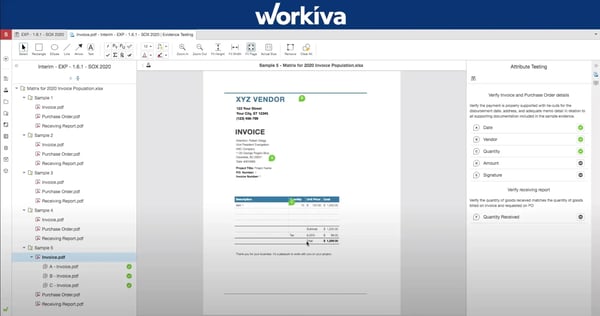
Workiva’s structured templates are designed to promote consistency and control, which many compliance-focused teams value. For organizations that prioritize highly tailored presentation styles, it may be helpful to plan additional configuration time to align layouts and formatting with internal branding preferences.
Workiva is a strong fit for compliance-driven teams managing complex, highly interconnected financial reports. In high-volume close cycles involving large datasets and multiple collaborators, teams may benefit from structured onboarding and intentional close planning to align with the platform’s depth. Organizations that establish clear workflows and peak-period timelines tend to maximize efficiency within the system.
Based on my evaluation of G2 reviews, I see Workiva as a platform built for organizations that treat financial close as a governance function, not just a reporting task. It is designed for structured, process-driven close cycles that prioritize control and transparency.
What I like about Workiva:
- Workiva links spreadsheet data directly into financial statements, footnotes, and disclosures, with updates automatically flowing across connected documents.
- Multiple stakeholders can work simultaneously on documents, manage permissions, and use contextual comments to streamline review cycles.
What G2 users like about Workiva:
“I really appreciate Workiva’s collaboration features. These features are exceptional because they allow multiple people to work on the same document simultaneously without disrupting each other’s workflow, which significantly enhances teamwork and productivity. Additionally, the audio track feature is another aspect I enjoy, as it combines with the collaboration tools to provide complete control and visibility over projects. This ensures that we can efficiently manage our tasks while maintaining clear communication and oversight.”
– Workiva review, Ismail B.
What I dislike about Workiva:
- Workiva is built for complex, highly linked reporting, so teams working with large datasets may need more structured close planning, but that depth also supports stronger control and consistency in regulated environments.
- Workiva’s structured templates are designed to promote consistency and control, which many compliance-focused teams value. Those who prioritize highly tailored presentation styles may need to allocate additional configuration time to align with internal branding preferences.
What G2 users dislike about Workiva:
“While Workiva is very powerful, there are a few areas that could be improved. At times, the platform can feel a bit complex for new users, especially when navigating advanced reporting features or setting up intricate workflows. Some of the reporting and formatting options could be more flexible, allowing for faster customization without having to spend extra time adjusting layouts or connections. Additionally, handling very large datasets or highly complex reports can occasionally slow down performance. Simplifying the interface for advanced tasks, enhancing customization options, and optimizing performance for large reports would make Workiva even more efficient and user-friendly.”
– Workiva review, Suman D.
Related: Reassessing your broader finance stack? Explore the best accounting software that works with your financial close workflows.
2. FloQast: Best for checklist-based close management
FloQast is an accounting transformation platform built for accountants. It brings structure, visibility, and accountability to the month-end close process without overcomplicating workflows. According to G2 Data, FloQast is mostly used by mid-market teams (59%).
One of the most consistently highlighted points I observed in G2 reviews is FloQast’s checklist-driven close management. Reviewers frequently describe how the platform centralizes close tasks, assigns ownership, tracks due dates, and provides real-time visibility into progress.
There were recurring mentions of ease of implementation and user-friendly design. Reviewers frequently describe FloQast as intuitive, Excel-aligned, and relatively quick to deploy. The familiarity of its structure makes onboarding smoother, especially for accounting teams transitioning from manual checklists and spreadsheet-based processes.
Reconciliation management is another standout capability of this financial close software. Reviewers mention the reconciliation module’s ability to tie general ledger balances directly to supporting documentation, automate sign-offs, and maintain a clear audit trail. This reduces reliance on disconnected spreadsheets and improves documentation quality during audits.
I noted that FloQast’s visibility and accountability features also receive strong praise. Reviewers highlight the ability to see task ownership, reviewer sign-offs, overdue items, and close metrics on a centralized dashboard. Email notifications further support communication without requiring constant manual follow-ups.
Reviews show a strong momentum around FloQast’s AI capabilities, particularly within FloQast Transform. Users describe using custom AI agents to automate reconciliations, journal entries, and recurring close workflows without requiring coding expertise. AI-generated flux commentary and automated reconciliation matching are frequently mentioned as time-saving enhancements, especially for teams managing high transaction volumes.
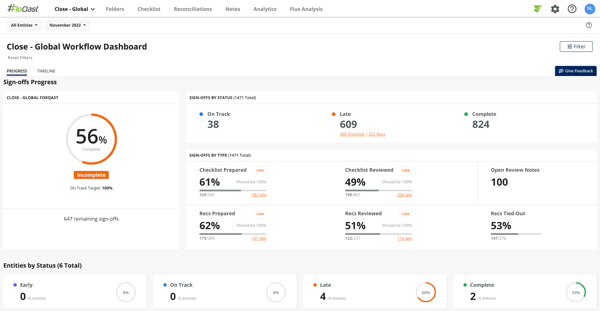
FloQast helps teams focused on structured close management, reconciliation tracking, and task visibility. Those requiring highly granular transaction-level analysis or more advanced reconciliation configurations may be complemented with specialized workflows or additional tools aligned to those needs. For accounting teams prioritizing close discipline, transparency, and ERP-connected reconciliations, this focused design supports consistent and repeatable month-end execution.
FloQast is designed to centralize documentation and reconciliation workflows within the close process. For teams that frequently upload large volumes of supporting files, managing document uploads may require some planning to keep workflows moving smoothly. Organizing files in structured batches or integrating document storage systems can help teams maintain efficiency.
Overall, FloQast is a close management platform that brings order and repeatability to accounting operations. It focuses deeply on the month-end processes, task tracking, reconciliations, and variance analysis, helping teams reduce close timelines and improve visibility without introducing unnecessary complexity.
What I like about FloQast:
- The checklist-driven close management centralizes close tasks, assigns ownership, tracks due dates, and provides real-time visibility into progress.
- The custom AI agents automate reconciliations, journal entries, and recurring close workflows without requiring coding expertise.
What G2 users like about FloQast:
“What I like best about FloQast is how it centralizes and automates the month-end close process. The checklists, task tracking, and automated reconciliations make it easy to see exactly where we are in the close at any time. It’s intuitive, collaborative, and eliminates the chaos of managing the close through spreadsheets and emails. The visibility it gives our leadership team is a huge bonus.”
– FloQast review, Muhammed R.
What I dislike about FloQast:
- FloQast helps teams focused on structured close management, reconciliation tracking, and task visibility. Those requiring highly granular transaction-level analysis may use specialized workflows or additional tools aligned to those needs.
- Handling frequent uploads of large supporting files can make reconciliation and close workflows feel more structured, particularly in high-volume environments. In these cases, the platform supports a more organized, process-driven approach to managing documentation at scale.
What G2 users dislike about FloQast:
“I would like the dashboard to provide an overview or progress tracking for a filtered group of people. While it’s simple to view progress across the entire department, this setup doesn’t work well for monitoring my team’s or my own progress. Additionally, I wish there were an option to attach supporting documents, such as analyses, to all sign-offs.”
– FloQast review, Yoko C.
Related: Explore the top financial reconciliation tools to compare leading platforms and find the best fit for your close processes.
3. BlackLine Financial Close Management: Best for large-scale reconciliation automation
BlackLine Financial Close Management aims to replace manual accounting processes by empowering businesses with a digital transformation. According to G2 Data, this financial close software is used by 59% of enterprise teams.
One of the most consistently highlighted strengths I observed in G2 reviews is BlackLine Financial Close Management’s ability to automate reconciliations and repetitive accounting processes. Reviewers frequently describe leveraging transaction matching, journal entry workflows, and recurring tasks to reduce manual spreadsheet work.
Centralized task management is another theme that surfaces repeatedly. Reviewers describe using the task module to track month-end activities, assign ownership, and monitor close progress in real time. The ability to manage dependencies and create structured hierarchies helps teams maintain visibility across complex close cycles.
Reviewers also frequently mention the audit readiness and control framework support. They highlight enhanced documentation, approval workflows, and system-based controls that strengthen compliance environments. The system’s visibility into certification status and reconciliation completeness contributes to stronger governance during the close process.
Based on my evaluation, reconciliations, journals, transaction matching, and task management operate within an integrated ecosystem. This end-to-end approach allows teams to standardize workflows while maintaining documentation within a single environment. For teams modernizing from spreadsheet-based processes, this consolidation appears to reduce operational fragmentation.
A recurring theme in the feedback is how effectively BlackLine’s real-time dashboards and AI-driven matching rules improve visibility during the close. Reviewers consistently mention that dashboards provide a clear snapshot of reconciliation status, outstanding tasks, and certification progress, making it easier to identify bottlenecks early.
Several users note that this combination of dashboards and automated transactions allows their teams to spend less time on repetitive data handling and more time analyzing variances and strengthening controls.
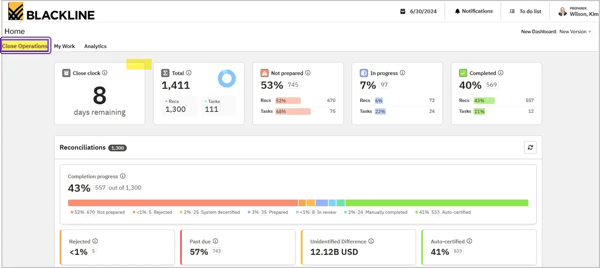
BlackLine Financial Close Management is built for organizations that require enterprise-grade automation and control across complex close processes. For teams with smaller accounting environments or limited module requirements, the platform’s pricing structure and add-on licensing model may require careful planning to align with budget expectations.
It is used for automation-driven close environments with multiple modules and layered workflows. For teams new to configurable close platforms, allocating dedicated onboarding time can help align the system with internal processes and user roles. Organizations that invest in structured training and phased rollouts tend to adopt the platform more smoothly. Once workflows are fully configured, many teams find that it supports long-term control and scalability.
Based on my evaluation of G2 reviews, BlackLine Financial Close Management is used by organizations that want to transform close operations through automation rather than incremental task tracking. It is best for teams seeking standardized reconciliations, stronger internal controls, and scalable close infrastructure.
What I like about BlackLine Financial Close Management:
- Its ability to automate reconciliations and repetitive accounting processes. Teams leverage transaction matching, journal entry workflows, and recurring task automation to reduce manual spreadsheet work.
- The platform comes with audit readiness and control framework support. It provides enhanced documentation, approval workflows, and system-based controls that strengthen compliance environments.
What G2 users like about BlackLine Financial Close Management:
“The Blackline Financial Close Management tool is effective in streamlining the often complex financial close process. It assists with tasks such as managing month-end checklists, posting recurring and accrual entries, and handling prepaid amortizations. Additionally, it simplifies these processes by automating intercompany reconciliations, making the overall financial close more efficient.”
What I dislike about BlackLine Financial Close Management:
- Teams with smaller accounting environments or limited module requirements may find BlackLine’s pricing structure and add-on licensing more aligned with larger, multi-entity close processes. This tends to work best for organizations running complex financial operations where broader functionality is fully utilized.
- Users new to configurable close platforms may find the structured onboarding and workflow setup more involved compared to simpler tools. Investing in structured training and phased rollouts tends to help teams adopt the platform more smoothly. Once workflows are fully configured, they support long-term control and scalability.
What G2 users dislike about BlackLine Financial Close Management:
“Some configurations do take a long time, and that can get in the way of agile building. For example, for me to use Tasks, I have to set up a hierarchy for those tasks, and this is set for all time. I can adjust, but this will take considerable work after it’s configured.”
– BlackLine Financial Close Management review, Rachel N.
4. Adra by Trintech: Best for user-friendly reconciliation workflows
According to G2 Data, Adra by Trintech is mostly used by mid-market teams (47%) to streamline financial processes with its user-friendly and time-saving capabilities.
One of the most consistently highlighted strengths I observed in G2 reviews is Adra’s transaction matching and reconciliation workflow automation. Reviewers frequently describe how the system helps reduce manual comparison work by automatically matching transactions and surfacing exceptions for review. This allows teams to focus more on resolving discrepancies rather than preparing reconciliation files.
I noted that ease of use is a recurring theme in the feedback. Many users describe Adra as having a user-friendly interface and straightforward navigation, especially compared to more configuration-heavy financial close platforms. It is characterized as accessible for accounting teams that want structure without a steep technical ramp-up. This makes it well-suited for organizations prioritizing faster adoption.
Integration with ERP and accounting systems is another commonly referenced benefit. Reviewers note that syncing financial statements into Adra supports accuracy and consistency across reconciliations. This connectivity helps reduce manual uploads while maintaining traceability between source data and close documentation.
I found mention of the value added by account change notifications within Adra. Reviewers mention that receiving updates when balances or reconciled items are modified adds an extra layer of oversight during the close process. These alerts help teams stay aligned on account activity and maintain confidence in reconciliation accuracy. For accounting environments prioritizing control and visibility, this proactive update mechanism supports more reliable month-end execution.
Users frequently highlight the value of Adra’s homepage overview, noting that it provides a clear snapshot of assigned accounts and reconciliation status at a glance. This centralized visibility helps accountants quickly understand priorities without navigating through multiple modules. By surfacing key tasks and account progress upfront, the dashboard supports more organized and efficient task management throughout the close cycle.
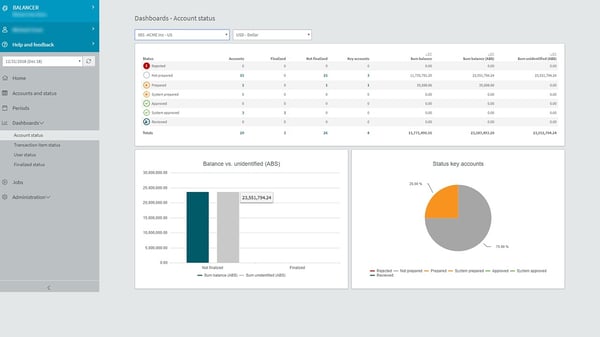
In cases involving larger reconciliations with high transaction volumes, some users note that loading times may require brief processing windows. Teams handling complex datasets often sequence reviews or segment reconciliations to maintain workflow continuity. For organizations prioritizing documentation consistency and visibility, this structured processing supports controlled and traceable close execution.
Adra provides standardized reporting that aligns with structured reconciliation workflows. For teams seeking highly customized layouts or presentation-specific formats, some users create complementary templates to tailor outputs to internal preferences. Teams that define consistent reporting structures upfront tend to maintain clarity and repeatability across close cycles.
Based on my evaluation, Adra by Trintech appears best suited for finance teams seeking reconciliation clarity, documentation centralization, and manageable automation. It focuses less on large-scale transformation and more on making month-end processes structured, visible, and easier to manage.
What I like about Adra by Trintech:
- It helps reduce manual comparison work by automatically matching transactions and surfacing exceptions for review. Teams can focus more on resolving discrepancies rather than preparing reconciliation files.
- The user-friendly interface and straightforward navigation are well-suited for accounting teams that want faster adoption and structure without a steep technical ramp-up.
What G2 users like about Adra by Trintech:
“I appreciate how effective Adra by Trintech is for working with balance at book close, ensuring that I feel confident about my reconciliation process. I love how smooth the setup was, which made my initial experience with the software stress-free. Furthermore, I find it very reassuring to receive updates when there are any changes to the accounts, which helps maintain the accuracy of my reconciliations. The ability to easily keep an overview of my accounts right from the homepage is another aspect I value highly, as it simplifies managing my tasks. Overall, the ease of working with Adra by Trintech stands out, reinforcing my decision to continue using it and making it a reliable choice for my accounting needs.”
– Adra by Trintech review, Dao H.
What I dislike about Adra by Trintech:
- For larger reconciliations with high transaction volumes, processing becomes more noticeable as datasets scale. The loading times may require brief processing windows. Handling complex datasets often requires sequence reviews or segment reconciliations to maintain workflow continuity.
- Adra provides standardized reporting, which supports consistency across close processes. For highly customized layouts or presentation-specific formats, users need to create complementary templates to tailor outputs to internal preferences.
What G2 users dislike about Adra by Trintech:
“At times, the interface can feel a bit slow, especially when loading larger reconciliations. Reporting options could also be more flexible, with more customizable formats.”
– Adra by Trintech review, Cem U.
5. LiveFlow: Best for real-time spreadsheet-connected reporting
LiveFlow is a financial reporting tool and a close support solution used by teams that operate heavily in spreadsheets. Based on G2 Data, it is used by 77% of small businesses. This financial close software automates reporting workflows without replacing existing accounting systems.
One of the most consistently highlighted strengths I observed in G2 reviews is LiveFlow’s real-time data synchronization with accounting systems like QuickBooks and Xero. Reviewers mention how financial data automatically updates inside Google Sheets, eliminating the need for manual exports and copy-paste processes. This continuous sync allows finance teams to maintain up-to-date reporting models while reducing reconciliation errors tied to static spreadsheets.
Reviewers emphasize the ability to build fully customized financial reports within Google Sheets while maintaining a live connection to underlying accounting data. Instead of working within rigid, pre-formatted templates, teams can structure dashboards, management reports, and key performance indicator (KPI) trackers according to their internal preferences.
Because LiveFlow operates within Google Sheets, multiple stakeholders can review and adjust financial reports simultaneously. Users note that this makes it easier to share live dashboards with leadership, external accountants, or clients without generating new exports for each update. The spreadsheet-native experience helps reduce friction between accounting and finance teams during reporting cycles.
I also observed that implementation simplicity is commonly mentioned. Users describe connecting their accounting systems quickly and beginning report automation without a lengthy configuration process. For teams transitioning from manual spreadsheet workflows, this lighter deployment model appears to support faster adoption compared to more configuration-heavy close platforms.
Support quality is another theme that appears consistently in G2 reviews. Users frequently describe the LiveFlow support team as responsive, knowledgeable, and proactive in resolving questions during setup and ongoing use. Onboarding guidance and timely troubleshooting contribute to smoother adoption, particularly for teams new to automated spreadsheet integrations. This level of support seems to reinforce confidence for accounting teams integrating real-time data sync into critical reporting workflows.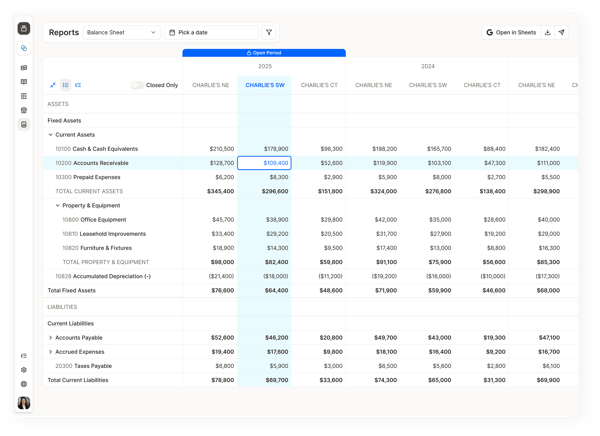
LiveFlow is designed around real-time and scheduled data refreshes within Google Sheets, enabling continuously updated reporting. For teams working with large spreadsheets or frequent refresh cycles, managing refresh timing and sheet controls can help maintain smooth performance. Some users also note that making structured refresh schedules and periodic file snapshots is helpful for maintaining clear reporting records.
For teams with highly advanced or niche reporting requirements, additional customization may require structured spreadsheet configurations outside the default dashboard framework. Organizations that design tailored Google Sheets models alongside LiveFlow’s synced data feeds often create advanced reporting views that align closely with internal performance metrics and analytical needs.
Based on my evaluation, LiveFlow provides reporting agility and real-time visibility, besides full close process automation. It supports organizations that want cleaner, automated financial reporting workflows without moving away from their existing accounting systems or spreadsheet-driven analysis.
What I like about LiveFlow:
- Due to real-time data synchronization, financial data automatically updates inside Google Sheets, eliminating the need for manual exports and copy-paste processes.
- The support team is responsive, knowledgeable, and proactive in resolving questions during setup and ongoing use.
What G2 users like about LiveFlow:
“The most impactful part of LiveFlow is the automated, real-time data sync. In the past, our financial reporting was always lagging. By the time we manually pulled reports from QuickBooks into Google Sheets, the data was already several days old. Especially when we’re waiting for a third-party team to reconcile our account.”
– LiveFlow review, Jessica E.
What I dislike about LiveFlow:
- Teams working with large spreadsheets or frequent refresh cycles may need structured refresh schedules and periodic file snapshots to maintain smooth performance and clear reporting records. This helps maintain performance stability and ensures accurate reporting over time.
- For highly advanced or niche reporting requirements, additional customization may require structured spreadsheet configurations outside the default dashboard framework. This allows teams to build more precise, tailored reporting setups.
What G2 users dislike about LiveFlow:
“While LiveFlow is an incredibly powerful tool, one area for improvement could be its integration with some third-party platforms outside of QuickBooks. Although the core features are top-notch, expanding compatibility with more accounting software or advanced data visualization tools could make it even more versatile for a wider range of users. However, this is a minor concern compared to the overall value LiveFlow brings.”
–