



As someone who has been part of the content ecosystem for a while, I know firsthand that finding the best SEO tools is harder than it should be.
SEO budgets and ROI are under more scrutiny than ever, and when I talk to teammates and SEO managers, the conversation almost always comes back to the same tension: price versus impact, and whether any single tool is actually worth it.
The honest answer in 2026 is that no single platform does everything well. Most teams end up switching between multiple tools just to piece together a complete picture: keyword insights, content performance, technical health, and backlinking. And with many platforms still catching up on how to measure performance in AI-driven search experiences, the confusion is only widening.
I put this guide together after evaluating a broad pool of G2 Data and user reviews, and combining that with my own SEO experience and conversations with my team. The goal was straightforward: to help content marketers, technical SEO teams, off-page specialists, and marketing managers cut through the noise and find the best SEO tool that actually fits how they work.
What follows is a detailed guide to help you find the seven best SEO tools to turn insights into action and make sense of how your content is performing in a landscape that keeps shifting. My main SEO tools include Semrush, Google Search Console, Birdeye, Conductor, Google Trends, Wincher, and last but not least, Ahrefs.
7 Best SEO tools for 2026: My top picks
- Semrush: Best for all-in-one SEO and competitor analysis
Keyword research, site audits, content optimization, and competitor insights in one platform. Helps manage end-to-end SEO workflows with strong content and performance tracking. (Paid plan starting from $139.95/mo) - Google Search Console: Best free SEO tool for performance tracking
First-party data from Google for tracking rankings, indexing, and search performance. (Completely free for users with quota restrictions) - Birdeye: Best for review management and local SEO visibility
Centralized review management, automation, and multi-platform presence tracking. Improves local search visibility by managing reviews and customer interactions. (Pricing available upon request) - Conductor: Best for enterprise SEO and content strategy
Deep insights, content optimization, and reporting tools designed for large teams. (Pricing available upon request) - Google Trends: Best for identifying trending topics and search demand
Real-time trend data to validate content ideas and understand search interest planning. (Completely free) - Ahrefs: Best for backlink analysis and competitor research
Industry-leading backlink data, keyword insights, and competitive analysis tools. Helps uncover link-building opportunities and analyze competitor strategies. (Plan starting from $129/mo) - Wincher: Best for simple and reliable rank tracking
Easy-to-use keyword tracking with accurate daily updates. Provides clear visibility into keyword performance without added complexity. (Paid plan starting from $49/mo)
*These SEO tools are top-rated in their categories, according to the G2 Spring 2026 Grid Report. I’ve highlighted the varied strengths of each tool and their starting price to make the comparison easier
The best SEO tools: G2 feature ratings
I’ve created a quick comparison table that shows how each of the seven best SEO software performs on core SEO capabilities, based on G2 feature ratings. This is how SEO tools rank for features such as link building, keyword research, SERP rank tracking, localization, and content insights.
| SEO Tool | Link building | Keyword research | SERP rank tracking | Localization | Content insights |
| Semrush | 84% | 93% | 90% | 85% | 87% |
| Google Search Console | 75% | 83% | 84% | 80% | 81% |
| Conductor | 76% | 92% | 91% | 82% | 89% |
| Google Trends | 75% | 90% | 77% | 85% | 86% |
| Ahrefs | 93% | 90% | 87% | 81% | 84% |
| Wincher | 81% | 88% | 89% | 83% | 84% |
Want more SEO benchmarks? Our roundup of SEO statistics for 2026 reveals that 65% of businesses are already seeing stronger SEO performance with AI, alongside data on rankings, traffic, lead generation, and search behavior.
7 best SEO tools I recommend
While the way people search in the age of AI is evolving, SEO fundamentals still take a large share of the cake as of 2026. Google continues to be the most used search engine, with nearly ~90% market share, and organic search still accounts for 53% of all website traffic.
From what I’ve seen and discussed across different SEO teams, one of the biggest gaps today is connecting all this data into a single, clear picture. You might know what’s ranking and what’s broken, but tying that back to actual content performance or business impact isn’t always straightforward.
The best SEO tools in 2026 help solve this problem by giving you features to accurately track traditional SERP performance, while also integrating new-age features for tracking AI visibility. This gives you a centralized view, allows you to make informed decisions, and stay future-ready as SEO expands into the era of AI-driven search and answer engines.
That’s where the right mix of tools makes a difference. This also shapes how these tools are implemented across organizations. With 72% of users coming from small businesses, 21% from mid-market, and just 7% from enterprises, most platforms are designed for quick onboarding and minimal setup. On average, SEO tools see around 66% user adoption with an estimated ROI payback period of 9 months, which reinforces how quickly teams expect to start seeing value after implementation.
Bottom line: the best SEO tools are worth it when they help you move from data to decisions faster and fix technical issues before they impact visibility. When that happens, SEO stops being reactive and becomes a consistent, scalable growth channel.
I’d also like to make one thing clear: when I define an SEO tool, I’m talking about visibility across traditional SEO, along with AEO features. These differ from AEO tools, which are separate tools used solely to provide visibility and optimization across AI-generated answers, conversational interfaces, and AI-curated search results.
How did I find and evaluate the best SEO tools?
I started with the latest G2’s Grid® Reports to build a shortlist of the best SEO tools based on G2 Score, user satisfaction, and overall market presence. That gave me a clear, data-backed baseline for which platforms are actually performing well across content teams, SEO specialists, and marketing organizations.
Next, I dug into G2 reviews for these products to understand how these tools perform in real workflows to avoid any personal bias. I looked for consistent feedback around keyword research accuracy, content optimization, technical SEO capabilities, reporting, and ease of use. I also paid close attention to how teams use these tools together, since no single platform covers every aspect of SEO effectively.
Beyond reviews, I layered in my own experience as a content marketer and conversations with SEO teams to understand the features and experiences reviewers mentioned. This was especially important when looking at newer gaps. The idea was to see how well these tools support AI-driven search visibility while ensuring their core traditional SEO features work well.
I’ve also included screenshots in this article from G2 vendor profiles and publicly available product documentation.
What makes the best SEO tools: My selection criteria
After spending years using SEO tools, digging into G2 Data, and layering in my own research, I kept seeing the same priorities come up across reviews and conversations with SEO teams.
- Keyword research depth and accuracy: I looked for tools that go beyond surface-level keyword research suggestions and provide reliable data on search volume, difficulty, and intent. The best SEO tools help uncover not just keywords, but real opportunities such as long-tail queries, content gaps, and emerging topics.
- Content optimization and workflow support: SEO today is tightly linked to content, so I prioritized tools that help with content planning, optimization, and performance tracking. Strong platforms guide what to create, how to structure it, and how to improve it over time, not just where it ranks.
- Technical SEO capabilities: I evaluated whether tools can identify and help fix issues like crawl errors, indexing problems, and site performance bottlenecks through technical audits. The best tools make technical SEO actionable, not just visible, so teams can quickly resolve issues that impact rankings.
- Competitor analysis and market insights: Understanding what competitors are doing is a core part of SEO. I looked for tools that provide clear insights into competitor keywords, backlinks, and content strategies, helping teams identify gaps and opportunities.
- Reporting and performance tracking: I focused on tools that make it easy to track rankings, traffic, and overall SEO performance. Strong platforms connect data across keywords, pages, and queries so teams can measure what’s working and share insights with stakeholders.
- Ease of use and scalability: SEO tools are used across different roles, so I considered how accessible they are for both beginners and advanced users. The best tools balance depth with usability and scale well across teams, projects, and websites.
- Support for AI-driven search (AEO readiness): As search evolves, I looked for signals of how well tools adapt to AI-driven discovery. While most platforms still focus on traditional SEO metrics, the best ones are beginning to bridge the gap between rankings and broader search visibility.
Not every tool excels in every category. But the best SEO tools consistently perform where it matters most for content marketers, SEO specialists, and marketing teams: actionable insights, reliable data, and workflows that help turn strategy into results.
The list below contains genuine user reviews from the SEO Tools category. To be included in this category, a solution must:
- Support keyword research and search performance tracking
- Provide insights into website visibility and rankings
- Help identify and resolve technical SEO issues
*This data was pulled from G2 in 2026. Some reviews may have been edited for clarity.
Note: This list reviews the best tools, both paid and free. If you’re looking for free tools, check out our detailed list of the best free SEO tools we have tested.
1. Semrush: Best for all-in-one SEO and competitor analysis
G2 rating: 4.4/5
Having used Semrush, I can confidently say this is the right tool if you’re looking for a serious, all-in-one SEO software that fits into your workflow. At its core, I would describe Semrush as a brand visibility platform that helps marketers to command their online presence.
Instead of jumping between different platforms for keyword research, competitor analysis, audits, and content optimization, Semrush pulls most of these into one place. From what I’ve seen, it’s often the default for SEO software teams when they want a single system to manage everything end-to-end, especially as workflows become more layered.
What stood out to me first was the breadth of features. You’re not just getting keyword data. You get access to competitor insights, domain analytics, backlink tracking, and content optimization tools, all layered into a single environment. That range makes it easier to move across different parts of SEO without constantly switching tools.
Keyword research is another area where Semrush consistently holds up. The platform provides detailed insights into search volume, difficulty, and related queries, which makes it easier to plan and prioritize content. This is strongly corroborated by its keyword research (93%) rating on G2 Data, which reflects how reliable users find this part of the tool.
That same consistency carries into technical SEO. Features like site audits and issue tracking are built into the workflow, helping teams identify and fix problems without relying on separate tools. You can see this in its ratings for SEO audit score (92%) and its technical SEO score (90%), which reinforce its strength on the technical side.
Competitor analysis is where Semrush starts to stand out even more. Teams rely on it to understand what’s working for others in their space, whether that’s identifying keyword gaps, tracking rankings, or uncovering backlink opportunities. Its competitor analysis (91%) rating aligns closely with how frequently this capability comes up in reviews.
On the reporting and tracking side, it also holds up well. It offers features such as SERP rank tracking (90% approval) and data visualization (88% approval), which gives teams a fairly clear view of performance without needing additional reporting tools. That balance between depth and usability is something many teams seem to appreciate when sharing insights across stakeholders.
More broadly, Semrush also performs strongly on overall usability and satisfaction. It 90% users mention it meets requirements, with users highlighting how well the platform supports day-to-day SEO workflows. Combined with the ease of use score (88% approval), this reinforces its position as a tool that balances depth with accessibility.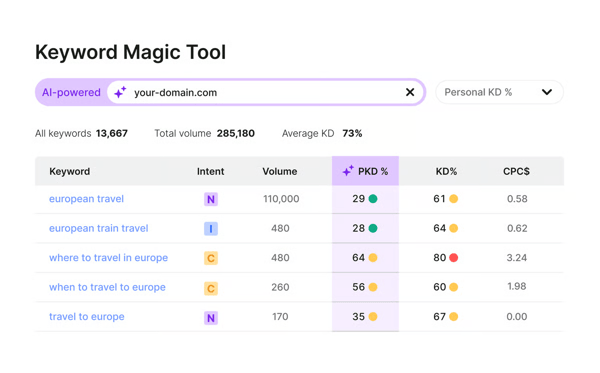
At the same time, the reviews reflect a natural trade-off that comes with feature-rich SEO platforms. Because Semrush brings so many capabilities into one place, some users mention that it can take a bit of time to fully get comfortable with the platform, especially when exploring more advanced features. That said, most feedback suggests the core workflows are relatively intuitive, and teams tend to get more value as they spend time with the tool.
Also, while reviewers recognize the value of having a comprehensive SEO platform in one place, some note that costs can feel higher as usage expands or additional features are unlocked. Many users point out that consolidating multiple SEO tools into a single platform can actually warrant that investment over time.
In conclusion, I would say that Semrush definitely comes across as one of the best SEO tools for teams that want a single platform to handle multiple parts of the SEO process. If you’re managing content, tracking competitors, and trying to build a scalable SEO workflow without stitching together multiple tools, Semrush is a strong contender based on what users consistently describe.
What I like about Semrush:
- Semrush brings together keyword research, competitor analysis, site audits, and content optimization into a single platform, making it easier to manage end-to-end SEO workflows.
- The platform provides strong keyword data and competitor insights, which help guide content strategy and uncover new growth opportunities.
What G2 users like about Semrush:
“What I like most about Semrush is honestly the amount of data it gives you. The keyword tools like Keyword Magic and Keyword Overview are really helpful when you are trying to find question-type searches, long tail stuff, or just gaps in content you can target. I also use it a lot for competitor research. It makes it pretty easy to see what other sites are doing and how they structure their content to show up in search results. Looking at things like featured snippets, PAA questions, and search intent changes has been really useful for planning content. Overall, it just saves a lot of time compared to trying to piece all this together from different tools.”
– Semrush review, Nariman H.
What I dislike about Semrush:
- G2 users appreciate how much functionality Semrush offers, but teams that are newer to SEO or only need a subset of features may find the platform feature-rich at first, especially when navigating its more advanced tools.
- While the platform delivers strong value for teams that use multiple features, smaller businesses or individual users may find the cost higher compared to more focused tools.
What G2 users dislike about Semrush:
“It’s just a lot on the platform that I don’t use. And, also, the pricing is very expensive, so I’m not able as a small agency to use all the capabilities because I can’t afford it. I wish it were more affordable. There are some new AI tools out there that are coming up, and they’re more affordable. And I’ve been complementing with additional subscriptions.”
– Semrush review, Lucy K.
2. Google Search Console: Best free SEO tool for performance tracking
G2 rating: 4.7/5
Google Search Console (GSC) is a completely free Google web service that enables website owners to monitor, maintain, and troubleshoot their site’s presence in Google Search results. I’ve personally use GSC to track and analyze my web pages, and I’d say this is a tool you simply can’t do without if you’re serious about understanding how your content performs on Google.
Unlike most SEO tools that rely on modeled or third-party data, GSC pulls everything directly from Google. That’s probably the biggest reason I keep coming back to it. When I want to know what queries are driving clicks, how pages are performing, or whether something has dropped off, this is usually the first place I check.
Something I find myself extensively relying on GSC for is performance tracking, especially for measuring impressions, CTRs, and average positions for specific queries and pages. The G2 reviews also back this claim up, as I see many users relying on it to validate whether their SEO efforts are actually working. SERP rank tracking has an 84% satisfaction rate, and keyword research is rated at 83% on G2, which reflects how dependable users find its performance data.
That same strength carries into technical SEO. I find it to be an essential tool for monitoring indexing, identifying crawl issues, and understanding site health, as do many reviewers. It’s one of the few tools that gives you direct visibility into how Google is interacting with your site, which is reflected in its technical SEO (88%) and SEO auditing (86%) scores.
Ease of use is another area where GSC stands out. I find the interface is relatively simple, and most core insights are easy to access without much setup. G2 Data aligns with this, as it gets an ease of use score of 92%. This helps explain why it’s widely adopted across different types of teams.
Another thing that comes through clearly is how accessible it is. Since it’s completely free, teams of all sizes, ranging from startups to enterprise organizations, use it as a foundational SEO tool. It also integrates well with other Google products like Analytics and Looker Studio, making it easier to build reports and dashboards. That broader usability is reflected in its meeting requirements (93%) scores, which reinforces how well it fits into everyday SEO workflows.
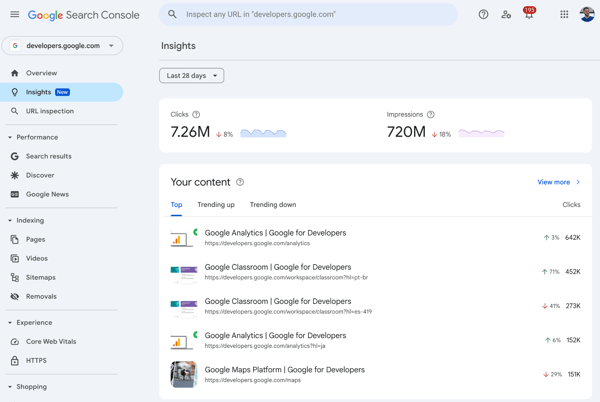
From what I’ve seen in G2 reviews, users generally view Google Search Console as a strong foundation for SEO insights, especially when it comes to performance and technical visibility. At the same time, some reviewers mention that it tends to offer a higher view compared to paid SEO tools, particularly for deeper keyword analysis or competitive insights. For many teams, this simply means pairing it with another tool to build a more complete picture.
Data freshness also comes up occasionally in feedback. A few users note that updates aren’t always fully real-time, which can make it slightly harder to validate very recent changes or short-term performance shifts. That said, for most ongoing SEO tracking and trend analysis, the data is still considered reliable and useful.
Overall, Google Search Console reads like one of the best SEO tools to build your foundation on. If you want reliable, first-party data directly from Google to track performance and monitor site health, it’s indispensable, but most teams will still pair it with other tools to get a more complete view of their SEO strategy.
What I like about Google Search Console:
- Google Search Console provides direct, first-party data from Google, making it a highly reliable source for tracking search performance.
- It offers strong performance tracking and technical insights, including indexing status, search queries, and crawl issues, which help teams monitor site health effectively.
What G2 users like about Google Search Console:
“I really like Google Search Console’s ability to compare keyword performance on a daily, weekly, or monthly basis and provide crawl statistics. Crawl statistics allow us to see if there are any issues on the website, helping us improve SEO. I find the keyword statistics valuable, as they let us know which keywords to invest more in and where we are performing well or weakly, which is useful for client reporting and when creating content for SEO. The setup was very easy, and it integrates well with other tools like Google Trends, enriching our strategic planning by allowing simultaneous trend data comparison for the keywords we’re working with.”
– Google Search Console review, Suayip Can O.
What I dislike about Google Search Console:
- Google Search Console offers more limited keyword data and lacks competitor insights compared to more comprehensive, paid SEO tools, which may lead teams to supplement it with additional platforms.
- The data is not always fully real-time, and reporting or export capabilities can feel somewhat restricted, though it remains reliable for ongoing performance tracking.
What G2 users dislike about Google Search Console:
“Google Search Console could improve by offering more granular keyword data, longer historical reports, faster data updates, and clearer explanations for ranking or indexing drops, especially for large or fast-changing sites.”
– Google Search Console review, Nabin P.
Overwhelmed with the vastness of SEO features? Read about how to use the 10 most important SEO features to make the most out of your best SEO software.
3. Birdeye: Best for review management and local SEO visibility
G2 rating: 4.7/5
My first thought about Birdeye is that it is a platform that differs in its approach to SEO. The approach is less about keywords and rankings, and more about visibility through reputation, customer engagement, and local SEO expertise. As a tool, it is packaged as an agentic marketing tool and is mostly reliable for its local SEO visibility.
Instead of focusing solely on traditional SEO workflows, Birdeye brings together reviews, listings, and customer interactions across platforms such as Google and Facebook. From what I’ve seen in the reviews, it’s often used by businesses that want to improve how they appear in local search without juggling multiple tools for feedback, messaging, and listings.
What stood out to me first is how central review management is to the platform. Teams rely on Birdeye to collect, monitor, and respond to reviews across multiple channels, all from a single dashboard. That centralized approach makes it easier to stay on top of customer feedback, which directly impacts local SEO visibility.
That strength is supported by how users rate the overall experience. Birdeye scores highly on usability, with ease of use rated 94% and ease of setup rated 94% in G2, which reflects how quickly teams can get started and manage day-to-day tasks without much friction.
Another theme that comes through clearly is how well it handles multi-platform presence. Users highlight the ability to manage listings and interactions across different channels in one place, which is especially useful for businesses with multiple locations. The platform also performs strongly in overall satisfaction, with quality of support at 95% and ease of doing business at 96%, reinforcing its reliability from a customer experience standpoint.
Automation is another area where Birdeye adds value. Features like automated review requests through email and SMS help teams increase review volume without adding manual effort. While it’s not positioned as a traditional SEO software, this kind of automation plays a key role in improving visibility in local search results over time.
Reviews also expand on Birdeye’s AI-powered features as a standout strength. From AI-generated review responses to social media content creation, reviewers frequently mention how these tools reduce the time spent on repetitive communication tasks. Users highlight how the AI cycles through response templates to keep replies varied and professional, while still allowing for manual edits when a more personal touch is needed. This kind of AI-backed content generation appears to make a meaningful difference in keeping engagement consistent without adding to the team’s workload.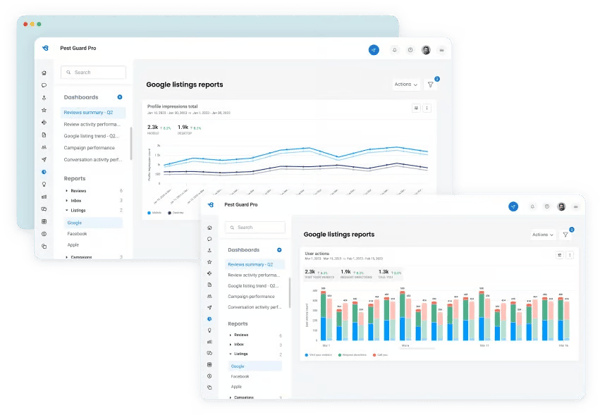
On the flip side, there are a few areas where some teams seek more flexibility. While Birdeye offers a wide range of features, some G2 users note that certain workflows could be less structured, more flexible, particularly for teams with highly specific or customized requirements. For most use cases, though, the platform’s built-in approach seems to work well without requiring much configuration.
Also, based on G2 reviews, some users note occasional platform glitches, including dashboard inconsistencies, review syncing delays, and conversations disappearing mid-thread. These tend to surface during higher-volume periods or when managing multiple locations simultaneously. That said, many reviewers also point out that these issues are intermittent rather than persistent, and Birdeye’s support team is frequently praised for resolving technical problems quickly when they do arise.
At the end of the day, Birdeye is a powerful AI-powered SEO tool that is suitable for businesses focused on reputation management and local visibility. If your goal is to manage reviews, improve customer engagement, and strengthen your presence across multiple platforms, it’s a strong fit based on what users consistently describe.
What I like about Birdeye:
- Birdeye centralizes review management across platforms like Google and Facebook, making it easier for teams to monitor and respond to customer feedback from a single place.
- It automates review requests through email and SMS, helping teams increase review volume while reducing manual effort.
What G2 users like about Birdeye:
“Birdeye brings reputation management, customer communication, and marketing into one central place, which directly supports Whywait’s “trusted, reliable, local” positioning on the Gold Coast. Automated review requests sent after jobs help steadily increase Google and Facebook reviews without adding extra admin, strengthening local SEO, and building “social proof” for a service business like plumbing. It has been a straightforward implementation, with support from Birdeye as needed.”
– Birdeye review, Gary M.
What I dislike about Birdeye:
- Birdeye offers a structured approach to workflows, which works well for most use cases, but teams with more specific or advanced requirements may find customization options somewhat limited.
- Based on G2 reviews, some users report occasional platform glitches such as dashboard inconsistencies and review syncing delays, though many note these are intermittent, and the support team is quick to resolve them when they arise.
What G2 users dislike about Birdeye:
“Sometimes it glitches, but the support team is fast.”
– Birdeye review, Marie S.
4. Conductor: Best for enterprise SEO and content strategy
G2 rating: 4.5/5
Conductor is ideal if you’re an enterprise or mid-sized organization seeking a content-led SEO platform. It feels less like a typical SEO tool and more like a platform built to help teams turn search data into content decisions at scale. Based on G2 Data, the customer base confirms this, with 37% adoption among enterprises and 32% among mid-market businesses.
Instead of focusing only on rankings or audits, it leans into how SEO connects with content strategy, planning, and performance. From what I’ve seen in the reviews, it’s often used by larger marketing teams that need a clearer way to align SEO insights with what they create, publish, and report on across the business.
What stood out to me first was how frequently users talk about the depth of data and insights. Conductor is often valued for providing a more complete view of search performance, especially for large sites with complex content ecosystems. That’s reflected in its keyword research (92%) and SERP rank tracking (91%) scores, which show how consistently it performs across core SEO analysis.
That same strength carries into content optimization. Many users highlight how the platform helps identify what content to improve and where new opportunities exist, rather than just showing what’s already ranking. It gets an 89% for content insights, which reinforces this, making it easier for teams to connect SEO data directly to content planning.
Another theme that comes through clearly is reporting. Users often mention the ability to build detailed dashboards and share insights with stakeholders, which is especially important for enterprise teams. This is supported by its scores for SEO auditing (90%) and SEO change tracking (90%), which help teams monitor performance and communicate impact over time.
Customer support is another area where Conductor consistently stands out. Several reviewers mention responsive support teams and dedicated account management, which seem to play a big role in helping teams get value out of the platform. Users unsurprisingly rated its quality of support at 95%, reinforcing how strongly it performs on service and onboarding.