


My days were 36 hours when I was a part of a sales team.
Some people misconstrue the work of a sales team as limited to calling and selling. But it is much more than that. I remember spending my days frantically calling, emailing, and texting clients, but at the end of the day, no conversation bore any fruit.
Other than maintaining quarterly sales targets, we were also responsible for client acquisition, pipeline visibility, revenue growth, and deal closures. But I remember most of my time being eaten up in manual CRM workflows. Had I known about sales engagement software back then, I wouldn’t have pulled my hair or blamed the marketing team every now and then for sourcing low-quality leads.
A sales engagement software automates multi-channel lead distribution, offers personalized coaching, and integrates with CRM to analyze lead histories, lead progress, and sales conversations. It also tracks sales performance, ensures consistency, and converts with a higher potential.
Carrying a bag of prior experience, I went to the market and evaluated 10+ sales engagement software to assess their role in lead generation to convert better.
10 best sales engagement software for 2025: My top picks
- Salesforce sales cloud for email marketing and case management (Pricing available on request)
- HubSpot Sales Hub for marketing ROI analytics and campaign management. (US$45/mo)
- Zoominfo Sales is used for data segmentation, filtering, and marketing automation. (Pricing available on request).
- Apollo.io is used for lead validation, lead analysis, and lead enrichment. (Pricing available on request).
- ActiveCampaign for sending outbound emails and data quality management. ($15/mo)
- Instantly for the breadth of partner applications and managing email lists. ($30/mo)
- SalesLoft for email platform integration, email scheduling and notifications. (Pricing available on request)
- Clari is responsible for live pipeline management and account-based analytics. (Pricing available on request)
- FlashIntel for callback scheduling, progressive dialing, and preview dialing. (Pricing available on request)
- Bigin by Zoho CRM for contract and account management and call center features ($4.60/mo)
According to G2 Grid Reports, these sales engagement software are top-rated in their category. I’ve also included their monthly pricing to make comparisons easier for you.
10 best sales engagement tools: my take
When I set out to to evaluate sales engagement tools, I first made a list of major sales-related challenges and growth areas. As I recalled my own experience, the picture got clearer. The day-to-day struggle comprised of calling prospects, manually updating records and personalizing content for each prospect from the start.
My personal reason for evaluating sales engagement software was to support sales and marketing teams in the process of creating sales journeys. That’s when I came across some tools which played a major part in automating sales activities to improve conversions.
If you are looking for a sales engagement software and don’t know where to start from, consider this list to further fine-tune your requirements.
How did I find and evaluate these best sales engagement software?
I spent weeks trying and testing various sales engagement software and evaluating its key features, such as multi-channel sourcing, personalized reporting and analytics, performance tracking, AI coaching, and lead profiling.
In addition to analyzing the top features, I factored in other important parameters in the experimentation, like pricing, pros and cons, user reviews, benefits, and drawbacks. I also used AI to narrow down key headliners and differentiators of each product to collate an unbiased software analysis.
In cases where I couldn’t test the tool due to limited access, I consulted a professional with hands-on experience and validated their insights using verified g2 reviews. The screenshots featured in this article may be a mix of those captured during testing and ones obtained from the vendor’s G2 page.
I also paid close attention to user sentiments, emotions, and market trends for the sales engagement software mentioned below. I identified the trends
to portray a complete picture of the sentiments and reviews that exist in the market. This list properly evaluates details like market presence, cost-effectiveness, budget satisfaction, and real market sentiments shared by the users.
My prior experience with the sales team proved monumental in the entire lifecycle of software evaluation. I tried to analyze the sales engagement software on crucial sales targets. The ultimate goal here was to evaluate how each tool matches up to the end goal of sales revenue, high-quality lead generation, and repeat consumer rate.
My two cents on what makes a sales engagement software worth it
The ideal sales engagement software is a catalyst to the CRM tool that optimizes outbound sales, manages lead journeys and ensures consistency in overall sales connections.
By collating the experience of my prior sales job and shortlisting key differentiators of the tools mentioned below, I was able to sum up my experience:
- Multi-channel outreach: Just like how I sent emails or reminders to my clients with CRM, I prioritized the multi-channel outreach feature in the sales engagement tools in my list. Automating communication with your prospects via several content engagement and multimedia channels is crucial to creating a sense of recall for the customer. Engaging and tracking responses, whether inbound or outbound, sets the tone and foundation of future sales conversations.
- Automation and workflow sequences: I prioritized tools that offered built-in sync with CRM software to store new follow-ups, due sales action, customer nudges, or lead stage management with automation. I ensured that sales engagement software fetches these details to set robust automation workflows for every customer in the pipeline.
- CRM integration and data sync: In keeping with the last point, I personally checked the smooth transfer of lead management data into sales engagement software to pull up lead profiles in real time, mark status, and monitor real-time marketing operations from the same window. This feature is crucial so sales teams don’t waste time on manual data entries.
- Advanced analytics and reporting: I made it a point to select tools that offer a drop-down view of conversion metrics to analyze sales teams’ performance. The tools below offer advanced analytics and reporting to maintain performance metrics and get insightful details of every sales pipeline.
- Performance tracking: Another evaluation factor for me was the real-time performance tracking of sales development representatives. Performance tracking metrics give you an update on the current intensity and quality of performance. This means that if any sales associate is underperforming, the software will point that out and make room for further process improvement.
- Personalization at scale: In contrast to manual email integrations of CRM software, I chose tools that offer personalized email templates, AI-assisted message recommendations, and customization options to improve the relevance of my outreach messages and make personal connections with the prospect.
- Compliance and data security: Since sales data is sensitive, the software must have built-in compliance features (GDPR, CCPA, etc.), data encryption, and permission control to ensure security and compliance with state government regulations.
Based on the above factors, I initially narrowed down a dataset of 40+ sales engagement platforms. 10 tools surpassed all these conditions and bagged top spots in the G2 grid report.
The list below contains genuine user reviews from sales engagement software. To be included in this category, a solution must:
- Be a sales-facing product meant for daily use by sales representatives.
- Integrate sales communication channels (email, calls, social, etc, within 1 cohesive platform)
- Manage standardized sales content such as email templates, call scripts, presentations, social posts, and other marketing materials.
- Automate multichannel communication sequences and workflows.
- Provide analytics or insights into sales performance.
*This data was pulled from G2 in 2025. Some reviews may have been edited for clarity.
1. Salesforce Sales Cloud
The best thing about Salesforce Sales Cloud is that it offers a centralized platform for monitoring all sales activities and operations and providing real-time insights.
It is one of those tools that can completely transform how a business operates, but only if you harness its full power. I was able to streamline my sales processes, manage customer interactions, and get analytical reports to improve the strategies for the future.
What I absolutely loved about Salesforce Sales Cloud is the ability to centralize everything. Every lead, every customer interaction, and every deal in progress is in one place.
I built automation workflows for lead nurturing and eliminated manual data entries or email creation workflows. Features like Einstein AI-driven analytics helped me prioritize leads and forecast sales with surprising accuracy. I also had access to the custom dashboard that allowed me to visualize performance metrics and easily plan team tasks.
I also appreciated how flexible it is—whether I needed to customize fields, automate follow-ups, or integrate third-party apps from the AppExchange, I was able to do everything.
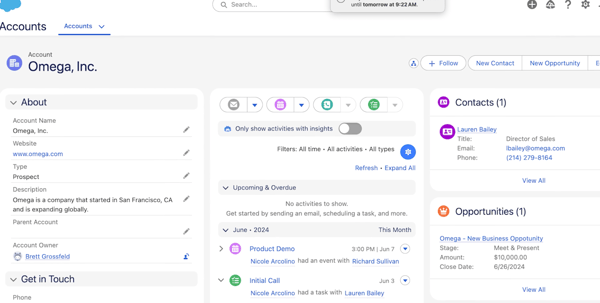
What I didn’t appreciate about Salesforce Sales Cloud is the steep learning curve that it comes with. Setting up Salesforce Sales Cloud and managing the configuration process is difficult. The configuration is overwhelming, especially if you are managing complex sales pipelines or multiple teams.
Some G2 users also shared that they had to spend significant time (and money) on training and admin support just to get the system running in the way they wanted. Also, while its capabilities are impressive, the user interface sometimes feels clunky.
I also learned that Salesforce Sales Cloud isn’t cheap. Pricing varies based on tiers: Essential, Professional, Enterprise, and Unlimited. Each plan offers a different level of customization, automation, and support.
You’ll want Enterprise or Unlimited for advanced AI-powered insights and deeper automation. While the platform is incredibly powerful, some advanced features like CPQ (Configure, Price, and Quote) will come at additional costs.
Overall, Salesforce Sales Cloud is a comprehensive sales and marketing suite that provides effective sales automation and pipeline management features to help you reach your revenue.
What I like about Salesforce Sales Cloud:
- I love creating sales cases and work orders. It helps me attend to consumer queries and resolve them faster.
- It offers ease of work as it seamlessly integrates with other compatible applications and helps you create dashboards for your needs.
What do G2 Users like about Salesforce Sales Cloud:
“Salesforce Sales Cloud is a powerful, all-in-one CRM that helps businesses streamline sales processes, improve productivity, and drive revenue growth. One of its standout features is its AI-powered automation, which makes lead management, forecasting, and pipeline tracking incredibly efficient.
Another major advantage of the platform is its customizability. Businesses can tailor workflows, reports, and dashboards to fit their unique needs. The platform’s integration capabilities with other tools like Slack, Outlook, and third-party apps make collaboration seamless.
– Salesforce Sales Cloud Review, Assay Poulose P.
What I dislike about Salesforce Sales Cloud:
- I found the UI a bit tricky to navigate, and the learning curve was a bit complex. But once you learn it, it is a smooth sail.
- I found that sometimes, the customer service team is not as responsive as you want them to be, and the tool also has a few data storage limitations.
What do G2 users dislike about Salesforce Sales Cloud:
“One challenge I’ve faced is user adoption. While Salesforce Sales Cloud is intuitive, the sheer number of features can be overwhelming for new users. However, Salesforce’s in-app guidance and training resources, such as Trailhead, have made onboarding easier. As an admin, I’ve spent considerable time customizing layouts, automating tasks, and creating user-friendly interfaces to improve adoption rates across teams.”
– Salesforce Sales Cloud Review, Shireen S.
Train your sales team adeptly by forming a brand new sales script and encouraging them to face clients head-on with improved communication skills.
2. HubSpot Sales Hub
I have spent a good deal of time evaluating HubSpot Sales Hub, and I love how it centralizes inbound and outbound sales actions, pipeline visibility, and lead progress onto one platform.
The first thing that stands out is how seamlessly it integrates with partner applications. It offers email automation, lead tracking, and CRM insights for you to stay aware of what is happening at the tail end of your sales pipeline.
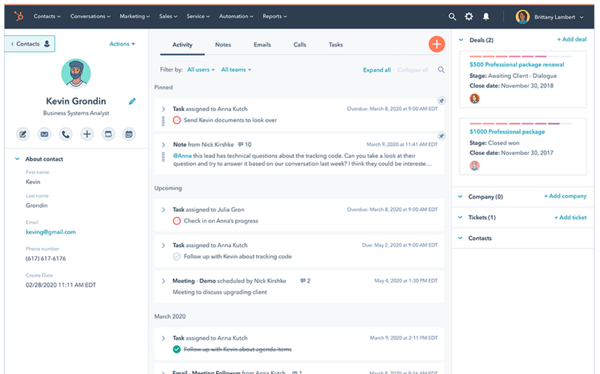
The email tracking and automation features make it effortless to monitor conversations with prospects. I get a real-time notification when someone opens a mail, which helps me time my follow-ups correctly.
I was particularly impressed with the deal tracking dashboard, which provided a clear view of where my leads are in the funnel.
The CRM itself is incredibly user-friendly, which is a relief because I have had a fair share of struggles with clunky sales software in the past. I was happy with the automated data logging that stores every email, call, and interaction in the system without any manual intervention.
HubSpot’s ability to help with email blasts, automated follow-ups, and integration with tools like Apollo makes it a great asset for outbound sales teams.
However, as much as I like the tool, it does have some limitations. The pricing model is a little tricky, and I feel I was lured in with the free version only to realize that I needed the premium version.
Features like automated reminders, advanced reporting, and deeper workflow automation are locked behind high-tier plans (such as professional or enterprise applications). For smaller teams or startups, the cost adds up fast.
The lead generation tools can also use some work. HubSpot makes it a little difficult to differentiate between a lead and a deal, which can get a little confusing.
Also, if you are using HubSpot’s invoicing system, you need to take some tutorials. Some G2 users shared that the platform doesn’t let you create credit notes from existing invoices. Also, some basic features, like automated reminders, aren’t included in the starter plan. Apart from that, HubSpot also has a slightly longer onboarding curve that might take some time.
Overall, HubSpot Sales Hub is a powerful sales collaboration tool that can create transparency in deal funnels, metrics, and lead-generation tasks for you and your teams.
What I like about HubSpot Sales Hub:
- I love how HubSpot offers integrated features to connect back with the clients or even remind our teams internally.
- I liked the CRM layout as it was very clean and intuitive, with tons of videos to help you navigate through the user interface.
What do G2 Users like about HubSpot Sales Hub:
“What I really appreciate about HubSpot is its easy use, especially the kanban-style layout for managing deals. It makes it really simple to visualize where everything stands, and I love how it keeps my emails automatically recorded. Plus, it’s quite affordable compared to other tools, which is a big plus, especially considering the range of features I get access to. Most of my lead generation tools can be integrated with HubSpot. It can be easily implemented with other tools.”
– HubSpot Sales Hub Review, Roselle P.
What I dislike about HubSpot Sales Hub:
- I didn’t like that some advanced features, like custom reporting or deeper automation workflow, are only available for high-tiered plans.
- I wish there were more customization options for account owners, but it seems pretty preset.
What do G2 users dislike about HubSpot Sales Hub:
“One area where HubSpot Sales Hub could improve is its user-friendliness when creating dashboards. While the platform offers powerful reporting and analytics tools, the dashboard customization process can be a bit cumbersome and less intuitive than it could be.”
– HubSpot Sales Hub, Maddalena B.
Learn how to tackle sales objections during the sales lifecycle to build trust and improve the possibility of sales deals.
3. ZoomInfo Sales
ZoomInfo Sales provides premium features like lead management, call tracking, personalized reports, and performance tracking to optimize your sales and marketing workflows.
If you are in sales or marketing, you know the struggle of finding contacts and ensuring that their information is up to date. That’s where ZoomInfo came in.
It provided insight into the lead database and eased the process of information retrieval. The biggest perk was the depth of contact and company information it provides. Whether I am looking for direct mail, phone numbers, or organizational structures, it’s all there in one place.
One of my favorite features of ZoomInfo is how easy it is to search for leads. The platform has powerful filtering options, letting me narrow down prospects by job title, company size, industry, and even specific technologies in their business. It saves me hours of manual research and lays out the data in an easy and intuitive way.
I also love it’s integration with Salesforce CRM. When it works smoothly, the data transfers are done seamlessly. I can pull data in my CRM without any hassle.
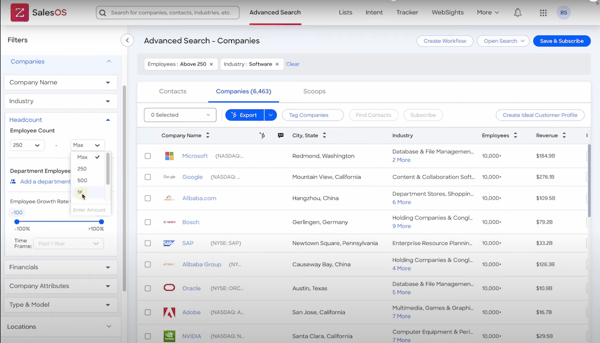
However, Zoominfo Sales can improve in a few areas. Sometimes, data doesn’t sync properly, which can delay the work, especially when I am trying to update lead records quickly.
While Zoominfo Sales does a solid job of providing up-to-date details, it is not perfect. I have encountered instances where phone numbers were outdated or emails bounced back. This isn’t the only flaw, but it sure means that I need to double-check critical contact details before reaching out.
Another thing that needs mentioning is the pricing. Its premium plans offer features like advanced automation, enriched prospecting data, and deeper integrations that can benefit your sales pipeline. But, the cost involved is high.
ZoomInfo can also improve its filtering features. While it’s powerful, there are times when I wish there were granular filters to filter out prospects that work in a specific business or technology. And if you ever need customer support, do not expect instant help. It’s decent, but getting personal assistance does take some patience.
Overall, ZoomInfo is a robust and powerful sales engagement system that optimizes your nurturing workflows via multiple channels and helps you monitor the efficiency of sales processes.
What I like about ZoomInfo Sales:
- I love how ZoomInfo has significantly expanded its prospect pool and made finding the right people and companies much easier.
- It’s nice how I can get the contact information (name, email, designation) via the Chrome extension to pull the lead details directly and strategize further.
What do G2 Users like about ZoomInfo Sales:
“As an outsourced SDR/Lead Generation business, having great data is fundamental to us delivering successful campaigns for our clients. ZoomInfo gives us direct access to the stakeholders that are able to influence the procurement of our client’s services, saving us valuable time and stopping us from getting blocked by gatekeepers. It also integrates seamlessly with our CRM, saving wasted time on administration.”
– ZoomInfo Sales Review, Eddy R.
What I dislike about ZoomInfo Sales:
- One thing that worried me is that the lead information isn’t always accurate and there was a discrepancy in the company information.
- I observed that sometimes, ZoomInfo provides outdated data, and that leads to bounced emails or unanswered calls.
What do G2 users dislike about ZoomInfo Sales:
“Some records are incorrect or not completely current. This is somewhat expected and not an issue for me to this point. Some of the AI features are repetitive and predictable. Having said that, there are always opportunities to revise and make changes. AI is a great starting point when it comes to email, outreach, and planning.”
– ZoomInfo Sales Review, John F.
Not able to track prospect signals to provide accurate data to sales teams? See how buyer intent activates the right sales enablement signals to easily secure new accounts.
4. Apollo.io
Apollo.io provides multi-channel sales prospecting and enables you to personalize your lead engagement processes based on recent communication. It tracks inbound emails, helps create outbound emails, and offers personalized text generation to improve engagement.
If you are in B2B sales, lead generation, or recruitment, Apollo is a unified platform that offers all these features under one roof.
To start with, I want to highlight the reporting and analytics features. Apollo just doesn’t give you basic engagement stats; it provides deep insights into email performance, outreach effectiveness, and conversion metrics. It offers granular campaign data to improve future outreach efforts as well.
One of the standout features for me is the automation. The workflow automation lets me set up entire outreach sequences and follow-ups and even trigger actions based on engagement. I can literally “set and forget” my campaigns, and the tool ensures that the leads don’t go cold.
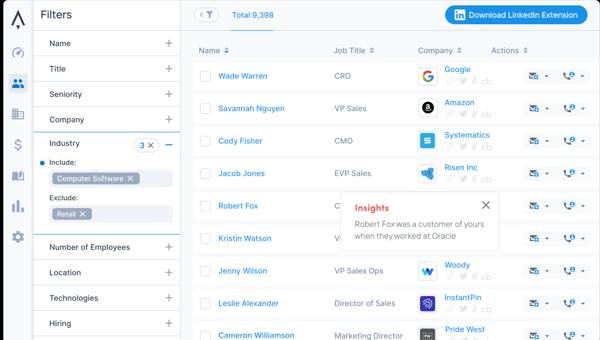
It also offers powerful filters that enable you to narrow down prospects based on industry, company size, job title, or even intent-based data. It comes with LinkedIn integration, so finding and reaching out to the right client is pretty efficient.
Apollo.io also excels in email outreaches. It doesn’t just provide verified emails; it also helps personalize and schedule outreach campaigns. The built-in sequencing tool means that I don’t have to rely on multiple tools for cold emails. And the best part? It tracks everything. I can see when someone opens an email or clicks a link.
While Apollo.io puts you out there and bolsters your outreach, there are also a few downsides. While it offers all that a sales team needs, the pricing is a little tricky. The credit system for email lookups and LinkedIn extensions means that you have to be strategic about the credits. I wish there were more flexible pricing options for mobile number access – it feels a bit steep for independent users.
Another thing that G2 users mentioned was the lack of lead text messaging abilities. With so many sales teams incorporating SMS into outreach strategy, it feels like Apollo.io should have capitalized here as well. And if you are on a lower-tier plan, some restrictions, like the 25-emails-per-day limit, can be frustrating.
Overall, if you are looking for a viable outreach and email marketing solution, then you should choose Apollo.io as it has the best in-house features for you.
What I like about Apollo.io:
- I loved the built-in granular analytics for email outreaches; the reports were accurate and to the point.
- I also liked how Apollo.io helps identify ideal consumer profile (ICP) using various filters like Revenue, Job titles, competitors, etc.
What do G2 Users like about Apollo.io:
“Within only two months already have driven new business. It slotted into my workflow very easily and was an immediately impactful addition. All of the information is very searchable and actionable. I have used this daily, and team members are also eager to use it for their workflows. My company appreciates that it implements well with salesforce and other programs, as we look to deploy at scale across the organization it will make this process easier.”
– Apollo.io Review, Joey L.
What I dislike about Apollo.io:
- I noticed that sometimes, even “verified emails” bounce or are invalid, which indicates that the email information requires some work.
- I found that Apollo.io can be inconsistent in providing data accuracy, particularly with job information and titles, affecting campaign quality.
What do G2 users dislike about Apollo.io:
“It doesn’t handle all use cases for existing contacts/customers – some of the contact collection automation is limited, such as pulling associated contacts to upcoming opportunities that we’d like to use to automate communicating upcoming renewals.”
– Apollo.io Review, Lachlan C.
5. ActiveCampaign
ActiveCampaign is a sales engagement platform that builds personalized email outreach and drip campaigns and improves conversion metrics, all from a unified platform.
It offers a distinct level of control and customization for email marketing, customer segmentation, and CRM automation, which is something I haven’t seen on many platforms.
One thing I absolutely love is how flexible the automation builder is. Whether I am setting a simple welcome sequence or a complex multi-setup workflow, it automates follow-ups and notifications based on past actions.
The automation flowchart makes it easy to visualize where each contact is in the funnel. With integrations into tools like ClickFunnels, Kajabi, and EverWebinar, it becomes a powerhouse for managing customer journeys.
ActiveCampaign also does a solid job of giving me data regarding open rates, click-through rates, and automation performance. The fact that I can preview emails within the automation workflow prevents me from juggling between multiple platforms.
While most people know ActiveCampaign as an email marketing tool, the built-in CRM is surprisingly powerful. It allows for detailed contact tracking, deal pipelines, and automated lead scoring, making managing sales funnels seamless.
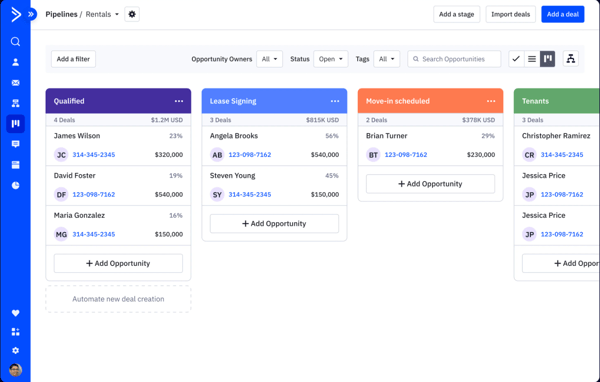
However, each tool has its drawbacks, and ActiveCampaign can improve in some ways. The interface, while powerful, can feel a bit clunky, especially for beginners. A ton of functionality is packed into the platform, which can sometimes feel a little overwhelming.
If you are just starting out with ActiveCampaign, expect a learning curve on how to use it properly. Also, customer support can be hit or miss.
Some G2 users feel that ActiveCampaign can work on the branding on forms and emails in the Lite version. It’s a bit restricting if you try to keep everything clean and professional with the lite version. While importing contacts is mostly smooth, I have run into issues where blank fields overwrite existing data, which requires manual editing.
That said, ActiveCampaign is an end-to-end automation and campaign management platform that improves sales engagement and lead management workflows and integrates sales and marketing operations.
What I like about ActiveCampaign:
- I loved the customer support team at ActiveCampaign. They are incredibly fast and prioritize your queries.
- I also appreciated the easy and intuitive email formats that generate cold emails without disrupting the automation workflow.
What do G2 Users like about ActiveCampaign:
“ActiveCampaign is an incredible platform that is very easy to use. It has multiple capabilities for automated journeys and one-off eDMs. I also love that we can save our Outlook emails with supporters on AC so the whole team knows what’s happening.
There is also amazing customer support that we can use whenever we need it (not that we need it often). I use ActiveCampaign every single day at work and will continue to do so!”
– ActiveCampaign Review, Cassie F.
What I dislike about ActiveCampaign:
- I had some difficulty handling multiple automation because I was confused, and I couldn’t pay attention to the effect on the customer.
- The reports feature is a bit difficult to understand until you really learn the platform or attend a tutorial.