


I never thought I’d need to send a fax in 2025.
I mean, who still faxes, right? But then I remembered my sister’s college days. Back in her first year, she had to fax a permission slip just to step outside the campus for a day. A fax! In the era of instant messaging and emails, her college insisted on a process straight out of the ‘90s.
That memory hit me hard when I recently needed to send a fax myself (believe me, there are enough government offices and businesses that require faxes). I definitely have no fax machine, no landline, and absolutely no desire to step into a shady print shop. And so, I went down the rabbit hole of free online fax services.
That’s when I realized the internet is full of “free” online faxing options that either limit you to one page, sneak in watermarks, or trick you into a hidden paywall. But after testing multiple services (and almost giving up), I finally found the best ones that actually work, with no scams, no surprises, and most importantly, no fax machine required.
If you’re in the same boat, I’ve got you covered. Here are the best free online fax services that allow you to send faxes online without the headache.
7 best free online fax service in 2025: My top picks
- CocoFax: Best for occasional free faxing
Offers a simple online fax solution with limited free use, making it ideal for users who only need to fax occasionally. (free for up to 10 pages; 14-day free trial of paid plans) - Documo: Best for HIPAA-compliant secure faxing
Provides a reliable and secure faxing platform designed for industries like healthcare that require HIPAA compliance. (14-day free trial) - Dropbox Fax (HelloFax): Best free fax service with e-signature integration
Let’s users send faxes and sign documents digitally, combining faxing with e-signature functionality. (free for up to 5 pages; 30-day free trial of paid plans) - eFax Online Fax Service: Best for businesses needing secure and reliable faxing
Well-established provider offering user-friendly online faxing tailored to professional needs. (7-day free trial of Plus plan) - iFax: Best for mobile users faxing on the go
A mobile-friendly platform that enables users to send and receive faxes anytime, anywhere. (7-day free trial) - RingEx: Best all-in-one communication platform with faxing
Combines faxing with messaging, calling, and collaboration tools, making it suitable for unified communications. (14-day free trial) - Upland InterFAX: Best for businesses requiring a dependable online faxing option
Enterprise-ready solution designed for organizations that need secure, scalable online faxing. (30-day free trial)
These online fax services are listed alphabetically and come with free trials, free forever options, or freemium models.
7 best free online fax services I recommend
If there’s one thing I learned while searching for an online fax service, it’s that convenience is everything. The best online fax services should let me send (and, if possible, receive) faxes without the hassle of outdated hardware, confusing software, or unnecessary fees. And this isn’t a niche need — the global fax services market is projected to reach $4.47 billion by 2030 (5.15% CAGR).
For me, the ideal service is one that is fast, reliable, and easy to use. I shouldn’t have to jump through hoops to send a simple document. A clean, user-friendly interface and the ability to upload files from my phone, email, or cloud storage make all the difference.
Security is another big factor. Since faxes often contain sensitive information, I look for services that offer encryption and secure transmission, because the last thing I need is my document floating around in cyberspace.
Of course, I know free comes with trade-offs. Most free fax services have daily limits or don’t allow incoming faxes. But as long as they’re reliable, secure, and don’t hold my document hostage behind a paywall, they’re worth considering.
How did I find and evaluate the best free online fax services?
I wanted to make sure I was recommending services that actually work, so I took a structured approach to my research. I created a shortlist of services and dug deeper, exploring each platform’s website to verify the details of its free plan.
I signed up, sent faxes, and noted how easy (or frustrating) the process was wherever I could. I checked whether the service required an account, the number of pages I could send for free, and whether I received a confirmation that my fax had gone through. I also paid close attention to security.
I also used AI to analyze G2 user reviews and understand common pain points, what people loved and hated, and whether these tools lived up to the hype.
In cases where I couldn’t personally test a tool due to limited access, I consulted a professional with hands-on experience and validated their insights using verified G2 reviews. The screenshots featured in this article may include those captured during testing and those obtained from the vendor’s G2 page.
What makes the best free online fax services?
I evaluated each platform based on several key criteria to distinguish the truly useful online fax services from the ones that are more trouble than they’re worth.
- Reliability and delivery speed: Not all online fax services guarantee instant delivery. Some free options queue faxes for hours, while unreliable services might fail to send them all together. I looked for fax platforms that provide fast transmission times and delivery confirmation receipts because if I’m faxing something important, I need to know it actually arrived.
- Security and compliance: Faxing often involves sensitive documents, from legal contracts to financial statements. I prioritized services that offer end-to-end encryption, secure data transmission, and compliance with industry regulations like HIPAA and GDPR. Some free services lack adequate security measures, making them vulnerable to risks associated with confidential information.
- Page limits and sending restrictions: A fax service is only useful if it actually lets me send what I need. Free services often cap the number of pages I can send per day, while paid plans vary in their limits. The best fax services offer a reasonable number of pages per fax without excessive restrictions, whether for free users or premium subscribers.
- File format support and integrations: A great fax service should accept multiple file formats, including PDF, DOCX, JPEG, and PNG, since different industries work with different types of documents. Bonus points for platforms that integrate with cloud storage (Google Drive, Dropbox, OneDrive) and email-to-fax features, making it easier to fax directly from my workflow.
- Ease of use and mobile accessibility: I’m looking for a simple fax solution that is easy to use on both desktop and mobile devices. Many businesses and remote workers rely on their phones, so I tested whether services offered mobile apps or mobile-friendly websites for on-the-go faxing. Not all free online fax services support mobile apps, but if they did, I would give them brownie points.
- Watermarks and branding: Many free fax services add watermarks or branding to documents, which can make an official contract or application look unprofessional. While I expect some trade-offs with free services, the best ones either avoid this entirely or make it unobtrusive. Paid services, on the other hand, should have completely clean faxes.
- Receiving faxes and dedicated fax numbers: While this is not a must-have in my list of checkboxes, a dedicated fax number is a great brownie point, especially for businesses. I then checked whether the services provided local, toll-free, or international numbers and whether they allowed multiple users to manage incoming faxes efficiently.
By evaluating services against these criteria, I was able to identify the ones that actually deliver a secure and hassle-free experience, whether you’re looking for a quick, free faxing solution or a robust business fax service.
I’ll be honest and admit that not all check every criterion in my list. But they have strengths that make them worth considering, depending on your needs. Now, let’s take a look at the best options
The free online fax service list below contains real user reviews from the best online fax service category page. It’s important to note that in the context of this list, vendors offering a free trial are also considered free. To be included in this category, a solution must:
- Allow users to send and receive a fax directly from the platform, an email account, or a mobile application
- Give users the ability to edit and sign documents within the tool
- Provide the ability to integrate with an existing fax number
*This data was pulled from G2 in 2025. Some reviews may have been edited for clarity.
1. CocoFax: Best for occasional free faxing
One of the first things I liked about CocoFax was how easy it was to get started. Signing up literally took me only a few minutes, and I was quickly assigned a fax number. The dashboard is intuitive, making it easy to navigate between the inbox, outbox, and sent faxes.
I also appreciated that CocoFax integrates with Google Drive, Dropbox, OneDrive, and email-to-fax, which is incredibly convenient when dealing with cloud-stored documents.
The process of sending faxes was straightforward. I uploaded a document, entered the recipient’s fax number, and hit send. Within minutes, my fax was delivered, and I received a confirmation. Cross-platform sending is another highlight. According to G2 Data, 94% of users praised CocoFax for allowing faxes to be sent seamlessly from the platform, a mobile app, or even an email account.

CocoFax performs well security-wise. It utilizes encryption to safeguard documents in transit, which is crucial when transmitting sensitive information. This added layer of security is a definite advantage for industries such as healthcare and legal services.
However, I noticed that CocoFax’s free plan comes with a few limitations. While it does let you send faxes without paying upfront, there’s a catch, you’re limited in the number of pages you can send. I could send 10 pages for free and then get credits at $0.03 per page, with referrals earning some additional free pages. To receive a fax, though, an upgrade to the paid plan is required. That said, the free plan still serves as a great way to test the platform before committing.
If you only need to send occasional faxes, CocoFax remains a convenient choice. It’s ideal for light users or those who fax infrequently. For businesses or professionals who need more consistent faxing capabilities, upgrading to a paid plan offers a more cost-effective and scalable solution.
Would I recommend it? Absolutely. CocoFax provides a reliable and easy-to-use platform for sending one-off faxes to an IRS agent, a healthcare office, or another regulatory body. It’s also a solid option for small businesses, remote professionals, and startups that occasionally need to send or manage faxes securely.
What I like about CocoFax:
- I didn’t have to waste time figuring things out. The dashboard is clean, and sending a fax feels just like sending an email. I could upload my document, type in the recipient’s number, and hit send. That’s it.
- I’ve used some online fax services that take forever to process, but CocoFax sent mine within minutes.
What G2 users like about CocoFax:
“Fax sent in less than 5 mins and always received to other businesses.”
– CocoFax Review, Muhammad D.
What I dislike about CocoFax:
- I noticed that CocoFax’s free plan comes with limits on the number of pages I can send. While it’s convenient to test the platform for free, multiple G2 reviews echo this constraint, making it less suitable for heavier faxing needs.
- Receiving faxes requires an upgrade to a paid plan, which initially caught me off guard. Several G2 reviewers mentioned the same, showing that light users might find the free plan somewhat restrictive despite its usefulness for sending occasional faxes.
What G2 users dislike about CocoFax:
“Aside from requiring a subscription to receive faxes or to reserve a permanent fax number, I have no complaints about CocoFax. I only need it in order to send some forms that I will be receiving via mail when they are filled out.”
– CocoFax Review, verified G2 user.
2. Documo: Best for HIPAA-compliant secure faxing
Documo’s mFax immediately felt different from most online fax services I’ve tried. The moment I logged in, it was clear that this platform was built with business users in mind. It’s not just a quick-fix faxing tool but as a fully-featured, secure, and scalable solution.
A major selling point of Documo’s mFAx is security. Documo is HIPAA-compliant, making it a great fit for healthcare providers, legal professionals, and businesses that need to send and receive secure and sensitive documents.

Documo offers a 14-day free trial with 100 pages, which I think is more than enough for occasional fax needs and to get a real sense of how it works. Instead of locking basic features behind a paywall, Documo actually lets you experience the platform before committing, which I really appreciated. However, please note that to must sign up using your work email address.
One feature I particularly appreciated about Documo was its built-in file converter, which made handling documents significantly easier. Instead of scrambling to find the right file format, I could simply drag and drop files, convert them to PDF or TIFF, and send them directly from the platform. This was especially useful when working with scanned images or different file types that weren’t originally formatted for faxing.

Cloud storage integrations with Dropbox, Box, and Google Drive made the process even smoother. I could pull documents directly from my storage without having to download and re-upload them. Other bells and whistles, like adding an e-signature, are available, but they come at an extra cost.
Now, there aren’t any major dealbreakers if you’re just using Documo for occasional faxing needs. The platform runs smoothly and, for most users, performs exactly as promised. However, for those relying on faxing regularly for business or critical operations, there are a few aspects worth keeping in mind.
I saw that the user interface (UI), while modern and easy to navigate, can feel slightly confusing in certain areas. Some G2 users mentioned that configuring advanced options isn’t as intuitive as it could be, and a few also noted occasional slow sending times or brief downtimes. Personally, I didn’t face these issues, but it’s worth considering if you’re exploring paid plans.
That said, Documo’s mFax remains a reliable and secure option for businesses and professionals who frequently send and receive faxes. It’s particularly strong for industries like healthcare, where compliance and data protection are essential, making it a dependable choice for day-to-day fax operations.
What I like about Documo:
- The free trial is actually useful. A 14-day trial with 100 pages included is great, in my view. I didn’t feel rushed to make a decision, and I could fully test the platform.
- The built-in file converter is a nice touch. I didn’t have to worry about whether my document was in the right format. It saved me time and made faxing way less of a hassle.
What G2 users like about Documo:
“mFax is easy to set up and works seamlessly right from the start. The user-friendly interface makes sending and receiving faxes hassle-free, which is a huge plus. It provides a reliable and straightforward solution for handling fax communications efficiently.”
– Documo Review, Mohammed S.
What I disliked about Documo:
- I found that Documo’s user interface, while modern, can feel slightly confusing in some areas. Several G2 reviewers pointed out that configuring advanced options isn’t always intuitive, so this is something I’d keep in mind if you plan to use it frequently.
- Occasionally, sending times can be slow, and brief downtimes might occur. I personally didn’t run into this often, but multiple G2 users flagged it as a potential drawback for those relying on the platform for regular business faxing.
What G2 users dislike about Documo:
“Sometimes it takes longer to send faxes.”
– Documo Review, Mariela S.
3. Dropbox Fax (HelloFax): Best free fax service with e-signature integration
Now I am pretty sure we always thought of Dropbox as just a cloud storage service, but what I didn’t know was that it also lets you send faxes with Dropbox Fax (formerly HelloFax). After testing it out, I’d say it is one of the best free online fax services for your one-off faxing needs.
The interface itself is clean and modern, and uploading files is as simple as dragging and dropping. I could easily access files from Dropbox (obviously), Google Drive, OneDrive, Box, and Evernote.

But the biggest advantage for me? Built-in e-signatures. Unlike most online fax services, where I have to sign a document separately and then upload it, Dropbox Fax allows me to sign documents directly within the platform before sending them. According to G2 Data, 96% of users appreciate this function in the tool. This eliminates the extra steps of printing, signing, and scanning, making it perfect for handling contracts, approvals, or any paperwork that requires a signature. Additionally, this feature is available even on the free plan, which isn’t something I often see.
That said, I noticed that Dropbox Fax’s free plan feels a bit limited. You only get five free pages in total, and after that, you’ll need to upgrade to send more faxes. On the plus side, Dropbox offers a referral and sharing program to earn extra free pages, something more generous than what CocoFax provides. Still, five pages felt a bit low to me, and like many other online fax services, receiving faxes isn’t part of the free plan unless you upgrade. That said, it’s still a great way to test the platform before making a commitment.
Another thing I observed is that there’s no dedicated mobile app. While the web interface works well on mobile browsers, the lack of an app can make faxing on the go less convenient. To send a fax via email from a smartphone, a paid plan is required. Even so, the web experience remains polished and functional, and adding a mobile app in the future would make it even smoother for remote professionals.
So, would I recommend it? Absolutely, Dropbox Fax is a simple, digital-first solution that works well for occasional faxing. If you only need to send faxes every now and then and value built-in signing and easy access from anywhere, it’s a smart, user-friendly choice.
What I like about Dropbox Fax (HelloFax):
- I love that I can sign documents directly within the platform before faxing. There is no need to print, sign, or rescan. It’s all digital, and even better, it’s available on the free plan. That’s a huge plus for handling contracts or approvals quickly.
- Being able to fax documents straight from my cloud storage feels incredibly convenient. It also works with Google Drive, OneDrive, and Box, so I don’t have to waste time downloading and re-uploading files.
What G2 users like about Dropbox Fax (HelloFax):
“Easy way to send faxes without the paper and expensive machines.”
– Dropbox Fax (HelloFax) Review, Christopher W.
What I dislike about Dropbox Fax (HelloFax):
- I noticed that Dropbox Fax’s free plan feels quite limited, offering only five free pages per month. Multiple G2 reviewers also mention this constraint, and while referrals can add extra pages, I found it a bit restrictive if you need to send more frequently.
- Another drawback I observed is the lack of a dedicated mobile app. Several G2 users pointed out that faxing on the go isn’t as seamless, and I agree; it works via mobile browsers, but a dedicated app would make the experience much smoother for remote or frequent users.
What G2 users dislike about Dropbox Fax (HelloFax):
“The mobile application is not available. I hope they will release the HelloFax mobile application. So, instead of sending phone-scanned files to the computer, I can directly fax them via mobile.”
– Dropbox Fax (HelloFax) Review, Stella N.
4. eFax Online Fax Service: Best for businesses needing secure and reliable faxing
eFax appears to be a user-friendly solution with robust compliance features. It offers a 7-day free trial of its Plus plan for individuals. However, due to technical difficulties, I didn’t have the chance to try eFax myself, so I relied on over 100 G2 user reviews to get a sense of how well it performs.
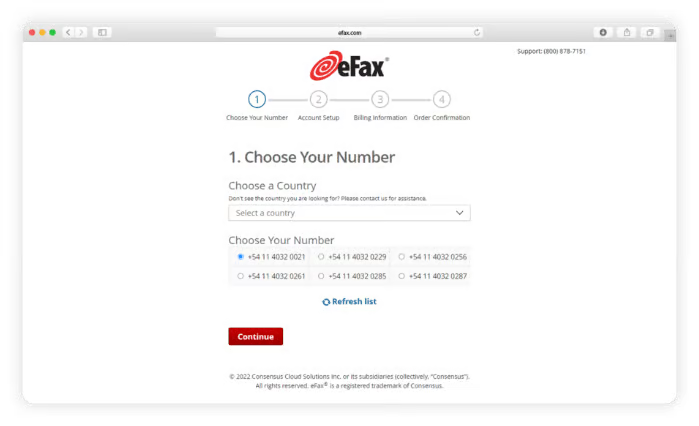
One of the things that stood out from user reviews based on my research is how easy it is to send faxes. Several users mentioned that eFax makes the process simple and convenient. Some users also appreciated its HIPAA compliance, making it a solid choice for healthcare professionals handling sensitive documents. However, please note that HIPAA compliance is included with premium plans.
Another plus is the ability to store faxes digitally, so you don’t have to deal with piles of paper files. That’s definitely a useful feature if you send or receive faxes regularly.
But here’s where things get a little tricky. eFax generally performs reliably, though I noticed that some G2 users mentioned instances where faxes failed to send despite receiving confirmation notifications. In most cases, these issues were resolved quickly after contacting customer support, but for time-sensitive documents, that delay can be inconvenient. Since the platform doesn’t automatically resend failed faxes, you may need to re-enter the details manually, but once sent, delivery is typically smooth.
I also observed that the eFax portal isn’t as user-friendly for everyone. While many users appreciated its email integration and straightforward document uploads, a few found the navigation slightly confusing or preferred the older interface over the latest updates. It’s not a major concern, but something worth noting for those who value a highly intuitive dashboard.
These points aside, eFax remains a convenient and secure option for small businesses and professionals, especially those who require HIPAA-compliant faxing. Its reliability and compliance features make it a trusted choice in industries where data protection is critical.
What I like about eFax Online Fax Services:
- It’s easy to send faxes from anywhere. I saw many G2 users mention how simple and convenient eFax is, especially compared to traditional faxing. The ability to store faxes digitally also means no piles of paper cluttering up the desk.
- Based on my research, it integrates well with email. Many users liked that they could send and receive faxes directly through email.
What G2 users like about eFax Online Fax Services:
“Setting up is so easy. You just make an account, and a fax number is assigned to you. The interface is user-friendly, and everything is laid out for you. You upload the documents you want to send, fill in information about your recipient, and voila, your fax is sent. I also appreciate the variety of subscription plans offered and the ability to cancel at any time.”
– eFax Online Fax Services Review, Kyra M.
What I dislike about eFax Online Fax Services:
- I have noticed that occasionally, faxes sent via eFax fail to send, even after receiving confirmation. Several G2 reviewers mentioned this too, and while customer support usually resolves it quickly, I found it a bit inconvenient for time-sensitive documents.
- I also observed that the eFax portal isn’t always the most user-friendly. Some G2 users, and I agree, found the navigation slightly confusing or preferred the older interface, which could be a minor hurdle for those who value an intuitive dashboard.
What G2 users dislike about eFax Online Fax Services:
“Sending a fax is a bit of an arduous process, and after a recent update, my faxes were not being sent despite receiving notifications that they were. We did not realize this for a few weeks, but after an hour of working with customer service, the problem was resolved. Really wish we had been made aware of the known issue via email or phone call so we could have fixed the problem before weeks of missed sent and received faxes.”
– eFax Online Fax Services Review, Christy B.
5. iFax: Best for mobile users faxing on the go
When I first looked into iFax, I wasn’t sure what to expect. The service offers a 7-day free trial, but there’s a catch. You need to enter your credit card details upfront. That always makes me pause a bit. I prefer free trials that let me test things out before committing to a payment method. But since G2 reviews were mostly positive, I figured it was worth checking out.
From the moment I got in, one thing was clear: iFax is built for simplicity. The interface is modern and incredibly easy to navigate. I didn’t have to dig through menus or second-guess how to send a fax.
It was as simple as entering a recipient, attaching my document, and clicking send. I can see why so many users appreciate the ease of use, especially for people who don’t send faxes often. Its contact management feature is also well-liked. According to G2 Data, 85% users praised the ability to store and manage their address book directly within the platform.

Plus, the mobile apps were a standout for me. Unlike some services that only work in a browser, iFax has dedicated apps for iOS and Android, making it convenient to send faxes from anywhere.
It easily integrates with cloud storage platforms. What surprised me was its HubSpot integration, which could be useful for small businesses. But there are some drawbacks.
One thing that stood out to me was that some advanced features come at an extra cost. For instance, receiving faxes and HIPAA compliance are only available on higher-tier plans, which should ideally be included in all paid options. That said, these premium tiers do unlock more robust functionality for businesses with stricter compliance or communication needs.
I also noticed that iFax’s pricing structure makes the most sense for businesses or professionals who frequently handle faxing. For someone who only needs to send an occasional fax, it might feel like you’re paying for more than you actually use. Still, the platform’s scalability ensures that teams with higher faxing volumes receive solid value for they investment.
Overall, iFax remains a strong, professional solution for those who fax regularly and want a well-integrated, reliable platform. Its secure setup, ease of use, and modern interface make it a dependable choice for both individuals and growing businesses.
What I like about iFax:
- It’s easy to use across devices. Whether I’m on my phone, tablet, or desktop, iFax works smoothly.
- The cloud integration makes faxing convenient. I appreciated being able to easily access documents from Google Drive, Dropbox, and OneDrive. It even has HubSpot integration.
What G2 users like about iFax:
“It was really easy to use! I was a bit concerned because I’ve never actually faxed anything! I just typed in the Name and number, attached my document, and that was that!”
– iFax Review, Niki R.
What I dislike about iFax:
- I noticed that some advanced features on iFax come at an extra cost. Several G2 reviewers pointed out that receiving faxes and HIPAA compliance are only on higher-tier plans, and I found this a bit limiting for standard users who might expect these features included.
- Another point I observed is that iFax’s pricing feels more suited for frequent users. Like some G2 users, I felt that for occasional faxing, you might end up paying for more than you actually use, even though the platform scales well for heavier volumes.
What G2 users dislike about iFax:
“There are some features that you have to pay extra for that should really be commonplace.”
– iFax Review, Erin N.
6. RingEx: Best all-in-one communication platform with faxing
Researching RingEx as an online fax service, I quickly realized it’s more than just faxing. RingCentral is a comprehensive communication suite that combines calling, voicemail, messaging, and faxing into a single platform. For businesses that need an all-in-one solution, this makes a lot of sense.

Now, RingCentral offers a 14-day free trial that requires credit card information to sign up. From what I saw, setting it up is easy. What stood out to me was how flexible and accessible faxing is with RingEx. I could send, receive, and manage faxes across smartphones, tablets, and computers, which meant I wasn’t tied to a single device.
If I needed to fax the same document to multiple people, the “Fax Broadcasting” feature allowed me to send it to up to 50 recipients at once, which would be a big time-saver for businesses that fax regularly. Another major advantage was the ability to